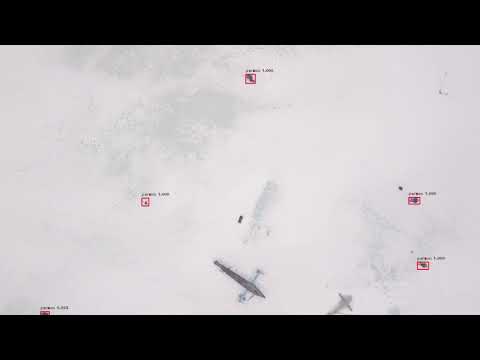
Lacmus is a cross-platform application that helps to find people who are lost in the forest using computer vision and neural networks.

Overview

lacmus

logo

The program for searching through photos from the air of lost people in the forest using Retina Net neural nwtwork.

The project is being developed by a non-profit organization Liza Alert.

Demonstration

01

Picture 1

02

Picture 2

video

Video 1

See more examples.

Training data

You can download Lacmus Drone Dataset (LaDD) from mail.ru cloud

You also can download Lacmus version of Stenford Drone Dataset (SDD) from mail.ru cloud

Usage

Read more about training steps and atraining data at train documentation to learn how to train the model.

Pretrained models

The models are avalable here.

Partners

ODS DTL JB GitBook Liza alert Novaya Gazeta Teplica

Comments
  • Пользовательская документация - работа с данными

    Пользовательская документация - работа с данными

    • Добавить в вики инструкцию по тому как добавлять данные в проект и как отправлять их на сервер.

    • Добавить инструкцию с тем как снимть данные для операторов БПЛА с перечнем поз.

    enhancement documentation 
    opened by gosha20777 5
  • Dataset format + cropping

    Dataset format + cropping

    1. Класcы для работы с датасетом LADD ("подмножество" формата Pascal VOC).
    • чтение датасета (список изображений, чтение аннотаций к изображению)
    • формирование датасета (добавление изображений, формирование файла аннотаций, формирование файлов ImageSets)
    1. Скрипт для формирования нового датасета путем нарезки изображений из имеющегося датасета. Новый датасет сохраняется в формате Pascal VOC и готов для обучения. Изображение нарезается прямоугольниками "по сетке".
    • настраиваются размеры итоговых изображений, размеры "нахлеста" изображений друг на друга
    • в датасет добавляется равное количество изображений с людьми и без людей (сбалансированный датасет)
    • выполняется параллельная обработка изображений для ускорения работы
    opened by nvsit 4
  • docker image(GPU) failed to built

    docker image(GPU) failed to built

    Hi! i've tried to build GPU-version of docker image on my ubuntu 16.04(nvidia 418.67, Cuda 10.1 and got this error in the end.

    sudo docker build --file Dockerfile.gpu -t rescuer_la . Sending build context to Docker daemon 14.56MB Step 1/24 : FROM tensorflow/tensorflow:1.12.0-gpu-py3 ---> 413b9533f92a Step 2/24 : ENV DEBIAN_FRONTEND noninteractive ---> Using cache ---> 8a52f51116f2 Step 3/24 : RUN apt-get update -qq && apt-get install --no-install-recommends -y build-essential g++ git wget apt-transport-https curl cython libopenblas-base python3-numpy python3-scipy python3-h5py python3-yaml python3-pydot && apt-get clean && rm -rf /var/lib/apt/lists/* ---> Using cache ---> a545cb38439e Step 4/24 : RUN pip3 --no-cache-dir install -U numpy==1.13.3 ---> Using cache ---> 98d345ea0a28 Step 5/24 : ARG KERAS_VERSION=2.2.4 ---> Using cache ---> 7b09457df232 Step 6/24 : ENV KERAS_BACKEND=tensorflow ---> Using cache ---> 85a448c8d80b Step 7/24 : RUN pip3 --no-cache-dir install --no-dependencies git+https://github.com/fchollet/keras.git@${KERAS_VERSION} ---> Using cache ---> 1c91dbe3620b Step 8/24 : RUN python3 -c "import tensorflow; print(tensorflow.version)" && dpkg-query -l > /dpkg-query-l.txt && pip3 freeze > /pip3-freeze.txt ---> Running in 08e7f4469a36 Traceback (most recent call last): File "/usr/local/lib/python3.5/dist-packages/tensorflow/python/pywrap_tensorflow.py", line 58, in from tensorflow.python.pywrap_tensorflow_internal import * File "/usr/local/lib/python3.5/dist-packages/tensorflow/python/pywrap_tensorflow_internal.py", line 28, in _pywrap_tensorflow_internal = swig_import_helper() File "/usr/local/lib/python3.5/dist-packages/tensorflow/python/pywrap_tensorflow_internal.py", line 24, in swig_import_helper _mod = imp.load_module('_pywrap_tensorflow_internal', fp, pathname, description) File "/usr/lib/python3.5/imp.py", line 242, in load_module return load_dynamic(name, filename, file) File "/usr/lib/python3.5/imp.py", line 342, in load_dynamic return _load(spec) ImportError: libcuda.so.1: cannot open shared object file: No such file or directory

    During handling of the above exception, another exception occurred:

    Traceback (most recent call last): File "", line 1, in File "/usr/local/lib/python3.5/dist-packages/tensorflow/init.py", line 24, in from tensorflow.python import pywrap_tensorflow # pylint: disable=unused-import File "/usr/local/lib/python3.5/dist-packages/tensorflow/python/init.py", line 49, in from tensorflow.python import pywrap_tensorflow File "/usr/local/lib/python3.5/dist-packages/tensorflow/python/pywrap_tensorflow.py", line 74, in raise ImportError(msg) ImportError: Traceback (most recent call last): File "/usr/local/lib/python3.5/dist-packages/tensorflow/python/pywrap_tensorflow.py", line 58, in from tensorflow.python.pywrap_tensorflow_internal import * File "/usr/local/lib/python3.5/dist-packages/tensorflow/python/pywrap_tensorflow_internal.py", line 28, in _pywrap_tensorflow_internal = swig_import_helper() File "/usr/local/lib/python3.5/dist-packages/tensorflow/python/pywrap_tensorflow_internal.py", line 24, in swig_import_helper _mod = imp.load_module('_pywrap_tensorflow_internal', fp, pathname, description) File "/usr/lib/python3.5/imp.py", line 242, in load_module return load_dynamic(name, filename, file) File "/usr/lib/python3.5/imp.py", line 342, in load_dynamic return _load(spec) ImportError: libcuda.so.1: cannot open shared object file: No such file or directory

    Failed to load the native TensorFlow runtime.

    See https://www.tensorflow.org/install/errors

    for some common reasons and solutions. Include the entire stack trace above this error message when asking for help. The command '/bin/sh -c python3 -c "import tensorflow; print(tensorflow.version)" && dpkg-query -l > /dpkg-query-l.txt && pip3 freeze > /pip3-freeze.txt' returned a non-zero code: 1

    opened by aprentis 3
  • CUDNN_STATUS_INTERNAL_ERROR

    CUDNN_STATUS_INTERNAL_ERROR

    CUDNN_STATUS_INTERNAL_ERROR while loading the model

    2021-04-05 20:44:46.086918: E tensorflow/stream_executor/cuda/cuda_dnn.cc:328] Could not create cudnn handle: CUDNN_STATUS_INTERNAL_ERROR
    2021-04-05 20:44:46.087682: E tensorflow/stream_executor/cuda/cuda_dnn.cc:328] Could not create cudnn handle: CUDNN_STATUS_INTERNAL_ERROR
    [2021-04-05 20:44:46,090] ERROR in app: Exception on /image [POST]
    Traceback (most recent call last):
      File "/usr/local/lib/python3.6/dist-packages/flask/app.py", line 2447, in wsgi_app
        response = self.full_dispatch_request()
      File "/usr/local/lib/python3.6/dist-packages/flask/app.py", line 1952, in full_dispatch_request
        rv = self.handle_user_exception(e)
      File "/usr/local/lib/python3.6/dist-packages/flask/app.py", line 1821, in handle_user_exception
        reraise(exc_type, exc_value, tb)
      File "/usr/local/lib/python3.6/dist-packages/flask/_compat.py", line 39, in reraise
        raise value
      File "/usr/local/lib/python3.6/dist-packages/flask/app.py", line 1950, in full_dispatch_request
        rv = self.dispatch_request()
      File "/usr/local/lib/python3.6/dist-packages/flask/app.py", line 1936, in dispatch_request
        return self.view_functions[rule.endpoint](**req.view_args)
      File "inference.py", line 132, in predict_image
        caption = run_detection_image(request.json['data'])
      File "inference.py", line 49, in run_detection_image
        boxes, scores, labels = model.predict_on_batch(np.expand_dims(image, axis=0))
      File "/usr/local/lib/python3.6/dist-packages/tensorflow/python/keras/engine/training.py", line 1788, in predict_on_batch
        outputs = predict_function(iterator)
      File "/usr/local/lib/python3.6/dist-packages/tensorflow/python/eager/def_function.py", line 780, in call
        result = self._call(*args, **kwds)
      File "/usr/local/lib/python3.6/dist-packages/tensorflow/python/eager/def_function.py", line 814, in _call
        results = self._stateful_fn(*args, **kwds)
      File "/usr/local/lib/python3.6/dist-packages/tensorflow/python/eager/function.py", line 2829, in call
        return graph_function._filtered_call(args, kwargs)  # pylint: disable=protected-access
      File "/usr/local/lib/python3.6/dist-packages/tensorflow/python/eager/function.py", line 1848, in _filtered_call
        cancellation_manager=cancellation_manager)
      File "/usr/local/lib/python3.6/dist-packages/tensorflow/python/eager/function.py", line 1924, in _call_flat
        ctx, args, cancellation_manager=cancellation_manager))
      File "/usr/local/lib/python3.6/dist-packages/tensorflow/python/eager/function.py", line 550, in call
        ctx=ctx)
      File "/usr/local/lib/python3.6/dist-packages/tensorflow/python/eager/execute.py", line 60, in quick_execute
        inputs, attrs, num_outputs)
    tensorflow.python.framework.errors_impl.UnknownError: 2 root error(s) found.
      (0) Unknown:  Failed to get convolution algorithm. This is probably because cuDNN failed to initialize, so try looking to see if a warning log message was printed above.
         [[node retinanet-bbox/conv1/Conv2D (defined at inference.py:49) ]]
         [[retinanet-bbox/filtered_detections/map/while/body/_1/retinanet-bbox/filtered_detections/map/while/strided_slice_2/_32]]
      (1) Unknown:  Failed to get convolution algorithm. This is probably because cuDNN failed to initialize, so try looking to see if a warning log message was printed above.
         [[node retinanet-bbox/conv1/Conv2D (defined at inference.py:49) ]]
    0 successful operations.
    0 derived errors ignored. [Op:__inference_predict_function_7071]
    
    Function call stack:
    predict_function -> predict_function
    
    Mon Apr  5 23:06:13 2021       
    +-----------------------------------------------------------------------------+
    | NVIDIA-SMI 450.102.04   Driver Version: 450.102.04   CUDA Version: 11.0     |
    |-------------------------------+----------------------+----------------------+
    | GPU  Name        Persistence-M| Bus-Id        Disp.A | Volatile Uncorr. ECC |
    | Fan  Temp  Perf  Pwr:Usage/Cap|         Memory-Usage | GPU-Util  Compute M. |
    |                               |                      |               MIG M. |
    |===============================+======================+======================|
    |   0  GeForce MX230       Off  | 00000000:01:00.0 Off |                  N/A |
    | N/A   64C    P3    N/A /  N/A |    218MiB /  2002MiB |     22%      Default |
    |                               |                      |                  N/A |
    +-------------------------------+----------------------+----------------------+
                                                                                   
    +-----------------------------------------------------------------------------+
    | Processes:                                                                  |
    |  GPU   GI   CI        PID   Type   Process name                  GPU Memory |
    |        ID   ID                                                   Usage      |
    |=============================================================================|
    |    0   N/A  N/A       956      G   /usr/lib/xorg/Xorg                 95MiB |
    |    0   N/A  N/A      1301      G   /usr/bin/gnome-shell              121MiB |
    +-----------------------------------------------------------------------------+
    

    docker version: Docker version 19.03.8, build afacb8b7f0

    opened by gosha20777 2
  • Bug: Could not find registration proxy for IID: {ADD8BA80-002B-8F0F-00C04FD062}

    Bug: Could not find registration proxy for IID: {ADD8BA80-002B-8F0F-00C04FD062}

    Describe the bug Version - 0.3.2 os - Win10

    при попытке загрузить директорию с файлами через USB выдает ошибку Сообщение программы:

    Error Интерфейс не зарегистрирован
    Не удалось найти регистрацию прокси-сервера для IID: {ADD8BA80-002B-8F0F-00C04FD062}
    
    bug 
    opened by Denaizer 2
  • Bug: Program crash with exit code 134

    Bug: Program crash with exit code 134

    Describe the bug Program crashes with 134 status code when material.avalonia theme is installed.

    To Reproduce Steps to reproduce the behavior:

    1. Go to 'file - open directory'
    2. Click on 'predict all' button
    3. Open another directory with images (file - open directory)
    4. Exuted with code 134

    Desktop (please complete the following information):

    • OS: Ubuntu 19.04
    • CPU: Intel Core i7-6500U
    • GPU: GeForce GTX 950M

    Additional context It seems to me that this is due to incorrect visualization errors at material.avalonia theme.

    bug 
    opened by gosha20777 2
  • docker image(CPU) failed to start.

    docker image(CPU) failed to start.

    Hi, i`ve successfully built CPU image, but it failed to start with this error.

    sudo docker run --rm -v /tmp/.X11-unix:/tmp/.X11-unix -e DISPLAY=unix$DISPLAY --workdir=$(pwd) --volume="/home/$USER:/home/$USER" --volume="/etc/group:/etc/group:ro" --volume="/etc/passwd:/etc/passwd:ro" --volume="/etc/shadow:/etc/shadow:ro" --volume="/etc/sudoers.d:/etc/sudoers.d:ro" rescuer_la No protocol specified No protocol specified

    Unhandled Exception: System.Exception: XOpenDisplay failed at Avalonia.X11.AvaloniaX11Platform.Initialize(X11PlatformOptions options) at Avalonia.Controls.AppBuilderBase1.Setup() at Avalonia.Controls.AppBuilderBase1.Start[TMainWindow](Func`1 dataContextProvider) at RescuerLaApp.Program.Main(String[] args) in /app/install/RescuerLaApp/Program.cs:line 14

    opened by aprentis 2
  • Thread safe issue with visual_effect_generator

    Thread safe issue with visual_effect_generator

    Bug description The visual_effect_generator, as all python generators, is not thread-safe. That can cause an exception when using several worker threads, especially within single process.

    How to reproduce Enter the lacmus directory and run train.py with --workers > 1 but without --multiprocessing:

    keras_retinanet/bin/train.py --backbone mobilenet_v3_small --no-snapshots --batch-size 8 --max-queue-size=10 --workers=8 --epoch 1 --steps 200 pascal ../../../data/ful

    Actual result On one or another training step the process stops with an exception "ValueError: generator already executing"

    Callstack: Traceback (most recent call last): File "keras_retinanet/bin/train.py", line 546, in main() File "keras_retinanet/bin/train.py", line 541, in main initial_epoch=args.initial_epoch File "/home/jupyter-kseniia/.local/lib/python3.7/site-packages/keras/legacy/interfaces.py", line 91, in wrapper return func(*args, **kwargs) File "/home/jupyter-kseniia/.local/lib/python3.7/site-packages/keras/engine/training.py", line 1732, in fit_generator initial_epoch=initial_epoch) File "/home/jupyter-kseniia/.local/lib/python3.7/site-packages/keras/engine/training_generator.py", line 185, in fit_generator generator_output = next(output_generator) File "/home/jupyter-kseniia/.local/lib/python3.7/site-packages/keras/utils/data_utils.py", line 625, in get six.reraise(*sys.exc_info()) File "/home/jupyter-kseniia/.conda/envs/lacmus-k/lib/python3.7/site-packages/six.py", line 703, in reraise raise value File "/home/jupyter-kseniia/.local/lib/python3.7/site-packages/keras/utils/data_utils.py", line 610, in get inputs = future.get(timeout=30) File "/home/jupyter-kseniia/.conda/envs/lacmus-k/lib/python3.7/multiprocessing/pool.py", line 657, in get raise self._value File "/home/jupyter-kseniia/.conda/envs/lacmus-k/lib/python3.7/multiprocessing/pool.py", line 121, in worker result = (True, func(*args, **kwds)) File "/home/jupyter-kseniia/.local/lib/python3.7/site-packages/keras/utils/data_utils.py", line 406, in get_index return _SHARED_SEQUENCES[uid][i] File "keras_retinanet/bin/../../keras_retinanet/preprocessing/generator.py", line 375, in getitem inputs, targets = self.compute_input_output(group) File "keras_retinanet/bin/../../keras_retinanet/preprocessing/generator.py", line 347, in compute_input_output image_group, annotations_group = self.random_visual_effect_group(image_group, annotations_group) File "keras_retinanet/bin/../../keras_retinanet/preprocessing/generator.py", line 212, in random_visual_effect_group image_group[index], annotations_group[index] File "keras_retinanet/bin/../../keras_retinanet/preprocessing/generator.py", line 195, in random_visual_effect_group_entry visual_effect = next(self.visual_effect_generator) ValueError: generator already executing terminate called without an active exception terminate called recursively Aborted (core dumped)

    bug 
    opened by prickly-u 1
  • Fix readme logo and organization logo

    Fix readme logo and organization logo

    • Удалить лого Лиза Алерт из ридми.
    • Добавить лого lacmus
    • Выкинуть лого Лиза Алерт из организации lacmus foundation и заменить его на lacmus
    • добавить секцию partners в readme
    • добавить лого DTL, Сбер.Клауд, Liza Alert в партнёры.
    bug documentation 
    opened by gosha20777 1
  • Bug: System.NullReferenceException throws while loading file

    Bug: System.NullReferenceException throws while loading file

    Version - 0.3.2 OS - Linux/Windows

    На последнем и предпоследнем релизе есть плавающий глюк, систематику еще не выявил. При попытке загрузить с жесткого диска файлы программа падает с таким сообщением:

     Unhandled Exception: System.NullReferenceException: Object reference not set to an instance of an object.
       at RescuerLaApp.Models.Frame.<>c__DisplayClass38_0.<Load>b__0(Object o)
       in /home/user/files/projects/lacmus/RescuerLaApp/Models/Frame.cs:line 77
       at System.Threading.ExecutionContext.RunInternal(ExecutionContext executionContext, ContextCallback callback, Object state)
    --- End of stack trace from previous location where exception was thrown ---
       at System.Threading.ThreadPoolWorkQueue.Dispatch()
    

    От количества файлов это не зависит, битых файлов нет.

    bug 
    opened by Denaizer 1
  • Feat: add fucnction to reset image back to 100% size

    Feat: add fucnction to reset image back to 100% size

    Пилоты очень просили доп. опцию - центрирования и возврата обработанной фотографии к 100%, т.к. при работе на трекпаде фото может "улетать" за пределы галактики.

    enhancement 
    opened by Denaizer 1
  • Detections are of shape `(1, 200700, 6)` but decode_openvino_detections uses the wrong number of dims

    Detections are of shape `(1, 200700, 6)` but decode_openvino_detections uses the wrong number of dims

    https://github.com/lacmus-foundation/lacmus/blob/f1dd0da5fb1c04d12ad25e7f67b5dd2a98f595d4/cli_inference_openvino.py#L57

    As seen here this is assuming 4 dims when output has 3.

    opened by suvojit-0x55aa 1
  • Add Cutmix

    Add Cutmix

    Add cutmix generator for beter results. The cutmix generator can be useful for training models and achieving better results. This will help take existing models to a higher level of quality.

    Resources that may be useful:

    • https://arxiv.org/abs/1905.04899 - the original article
    • https://github.com/clovaai/CutMix-PyTorch - a pytorch implementation
    • https://github.com/DevBruce/CutMixImageDataGenerator_For_Keras - keras implenentation (not compartable with retinanet)
    enhancement 
    opened by gosha20777 0
Releases(2.5.0)
  • 2.5.0(Aug 18, 2021)

  • 0.3.2(Nov 13, 2019)

    Change log

    • update to latest avaloniaUI-0.9-preview6
    • fix critical bug with windows #48
    • fix multiple bugs with osx
    • fix multiple bugs Linux
    • better performance
    • windows fully supported
    • osx Catalina fully supported
    • add show and hide bounding box function
    • add favorites images
    • convert GPS tags to correct format (Google, Yandex comparable)
    • add material disign

    Ussage

    system requirements CPU support for Windows/Linux/CentOS/MacOS X GPU support ONLY for linux, only nvidia graphic support

    OS: Windows 10 / Lunux / MacOS X (x64 only!). CPU: 2x+ Core CPU (with AVX, SSE SSE2 SSE3 SSE4 SSE4.1) Intel Core i3/i5/i7/xeon Sandy Bridge / AMD Buldozer and higher (Note: intel celeron does not support!) GPU (Optional): GTX, 4Gb vRAM, CUDA 9.1+ comparable (including CUDA 10 and higher), no CUDA driver required, e.g. GTX 950m and higher RAM: 4096 mb RAM and higher Storage: 5gb free disk space (10gb free disk space for GPU version)

    1. Installation

    CPU

    • install docker and docker service (and add user to docker group for linux)
    • unzip archive with your runtime

    GPU

    • install docker and docker service (and add user to docker group for linux)
    • install nvidia-docker and run it
    • unzip archive with your runtime use runtime with -gpu suffix
    1. Usage

    Linux\CentOS\OSX

    cd /directory/with/app/
    ./ReacuerLaApp
    

    Windows

    go to directory with app
    run ReacuerLaApp.exe
    

    Supported Runtimes (x64 only!)

    • win10 - windows 10 pro (x64 only!)
    • ubuntu16; ubuntu18 - linux ubuntu 16.04 and 18.04 (x64 only!)
    • linux - most computer linux distributions (x64 only!), such as CentOS, Debian, Fedora, Arch, Gentoo and their derivatives
    • osx - macOS 10.12 Sierra or higher (x64 only!)
    Source code(tar.gz)
    Source code(zip)
    linux-gpu.zip(35.33 MB)
    linux.zip(35.33 MB)
    osx.zip(33.38 MB)
    ubuntu16-gpu.zip(35.33 MB)
    ubuntu16.zip(35.33 MB)
    ubuntu18-gpu.zip(35.33 MB)
    ubuntu18.zip(35.33 MB)
    win10.zip(37.02 MB)
  • 0.3.2-preview(Nov 8, 2019)

    Change log

    • update to latest avaloniaUI-0.9-preview6
    • fix criticlal bug with windows #48
    • fix multiple bugs with osx
    • fix multiple bugs linux
    • better performance
    • windows fully supported
    • osx catalina fully supported

    Ussage

    system requirements CPU support for Windows/Linux/CentOS/MacOS X GPU support ONLY for linux, only nvidia graphic support

    OS: Windows 10 / Lunux / MacOS X (x64 only!). CPU: 2x+ Core CPU (with AVX, SSE SSE2 SSE3 SSE4 SSE4.1) Intel Core i3/i5/i7/xeon Sandy Bridge / AMD Buldozer and higher (Note: intel celeron does not support!) GPU (Optional): GTX, 4Gb vRAM, CUDA 9.1+ comparable (including CUDA 10 and higher), no CUDA driver required, e.g. GTX 950m and higher RAM: 4096 mb RAM and higher Storage: 5gb free disk space (10gb free disk space for GPU version)

    1. Installation

    CPU

    • install docker and docker service (and add user to docker group for linux)
    • unzip archive with your runtime

    GPU

    • install docker and docker service (and add user to docker group for linux)
    • install nvidia-docker and run it
    • unzip archive with your runtime use runtime with -gpu suffix
    1. Usage

    Linux\CentOS\OSX

    cd /directory/with/app/
    ./ReacuerLaApp
    

    Windows

    go to directory with app
    run ReacuerLaApp.exe
    

    Supported Runtimes (x64 only!)

    • win10 - windows 10 pro (x64 only!)
    • ubuntu16; ubuntu18 - linux ubuntu 16.04 and 18.04 (x64 only!)
    • linux - most computer linux distributions (x64 only!), such as CentOS, Debian, Fedora, Arch, Gentoo and their derivatives
    • osx - macOS 10.12 Sierra or higher (x64 only!)
    Source code(tar.gz)
    Source code(zip)
    linux-gpu.zip(35.00 MB)
    linux.zip(35.00 MB)
    osx.zip(33.04 MB)
    ubuntu16-gpu.zip(35.00 MB)
    ubuntu16.zip(35.00 MB)
    ubuntu18-gpu.zip(35.00 MB)
    ubuntu18.zip(35.00 MB)
    win10.zip(36.69 MB)
  • 0.3.1(Oct 26, 2019)

    Change log

    • fix bugs with model updating
    • add auth function and crypt keys

    Ussage

    system requirements CPU support for Windows/Linux (recommend)/CentOS/MacOS X GPU support ONLY for linux, only nvidia graphic support

    OS: Windows 10 / Lunux / MacOS X (x64 only!). CPU: 2x+ Core CPU (with AVX, SSE SSE2 SSE3 SSE4 SSE4.1) Intel Core i3/i5/i7/xeon Sandy Bridge / AMD Buldozer and higher (Note: intel celeron does not support!) GPU (Optional): GTX, 4Gb vRAM, CUDA 9.1+ comparable (including CUDA 10 and higher), no CUDA driver required, e.g. GTX 950m and higher RAM: 4096 mb RAM and higher Storage: 5gb free disk space (10gb free disk space for GPU version)

    Attention: Windows version have a critical bug with CPU cash. It happens cause Windows works with glx incorrect. We are working on ti. See #48 for more details.

    1. Installation

    CPU

    • install docker and docker service (and add user to docker group for linux)
    • unzip archive with your runtime

    GPU

    • install docker and docker service (and add user to docker group for linux)
    • install nvidia-docker and run it
    • unzip archive with your runtime use runtime with -gpu suffix
    1. Usage

    Linux\CentOS\OSX

    cd /directory/with/app/
    ./ReacuerLaApp
    

    Windows

    go to directory with app
    run ReacuerLaApp.exe
    

    Supported Runtimes (x64 only!)

    • win10 - windows 10 pro (x64 only!)
    • ubuntu16; ubuntu18 - linux ubuntu 16.04 and 18.04 (x64 only!)
    • linux - most computer linux distributions (x64 only!), such as CentOS, Debian, Fedora, Arch, Gentoo and their derivatives
    • osx - macOS 10.12 Sierra or higher (x64 only!)
    Source code(tar.gz)
    Source code(zip)
    linux-gpu.zip(35.00 MB)
    linux.zip(35.00 MB)
    osx.zip(33.04 MB)
    ubuntu16-gpu.zip(35.00 MB)
    ubuntu16.zip(35.00 MB)
    ubuntu18-gpu.zip(35.00 MB)
    ubuntu18.zip(35.00 MB)
    win10.zip(36.69 MB)
  • 0.3.0(Sep 26, 2019)

    Change log

    • fix bugs with model updating
    • add message boxes
    • add geo-tags support
    • add help and about function
    • add ability to save images with objects in specific folder

    Ussage

    system requirements CPU support for Windows/Linux (recommend)/CentOS/MacOS X GPU support ONLY for linux, only nvidia graphic support

    OS: Windows 10 / Lunux / MacOS X (x64 only!). CPU: 2x+ Core CPU (with AVX, SSE SSE2 SSE3 SSE4 SSE4.1) Intel Core i3/i5/i7/xeon Sandy Bridge / AMD Buldozer and higher (Note: intel celeron does not support!) GPU (Optional): GTX, 4Gb vRAM, CUDA 9.1+ comparable (including CUDA 10 and higher), no CUDA driver required, e.g. GTX 950m and higher RAM: 4096 mb RAM and higher Storage: 5gb free disk space (10gb free disk space for GPU version)

    Attention: Windows version have a critical bug with CPU cash. It happens cause Windows works with glx incorrect. We are working on ti. See #48 for more details.

    1. Installation

    CPU

    • install docker and docker service (and add user to docker group for linux)
    • unzip archive with your runtime

    GPU

    • install docker and docker service (and add user to docker group for linux)
    • install nvidia-docker and run it
    • unzip archive with your runtime use runtime with -gpu suffix
    1. Usage

    Linux\CentOS\OSX

    cd /directory/with/app/
    ./ReacuerLaApp
    

    Windows

    go to directory with app
    run ReacuerLaApp.exe
    

    Supported Runtimes (x64 only!)

    • win10 - windows 10 pro (x64 only!)
    • ubuntu16; ubuntu18 - linux ubuntu 16.04 and 18.04 (x64 only!)
    • linux - most computer linux distributions (x64 only!), such as CentOS, Debian, Fedora, Arch, Gentoo and their derivatives
    • osx - macOS 10.12 Sierra or higher (x64 only!)
    Source code(tar.gz)
    Source code(zip)
    linux-gpu.zip(34.96 MB)
    linux.zip(34.96 MB)
    osx.zip(33.00 MB)
    ubuntu16-gpu.zip(34.96 MB)
    ubuntu16.zip(34.96 MB)
    ubuntu18-gpu.zip(34.96 MB)
    ubuntu18.zip(34.96 MB)
    win10.zip(36.65 MB)
  • 0.2.9(Sep 26, 2019)

    Change log

    • fix bugs with model updating
    • add message boxes
    • add geo-tags support
    • add help and about function
    • add ability to save images with objects in specific folder

    Ussage

    system requirements

    CPU support for Windows/Linux (recommend)/CentOS/MacOS X GPU support ONLY for linux, only nvidia graphic support

    OS: Windows 10 / Lunux / MacOS X (x64 only!). CPU: 2x+ Core CPU (with AVX, SSE SSE2 SSE3 SSE4 SSE4.1) Intel Core i3/i5/i7/xeon Sandy Bridge / AMD Buldozer and higher (Note: intel celeron does not support!) GPU (Optional): GTX, 4Gb vRAM, CUDA 9.1+ comparable (including CUDA 10 and higher), no CUDA driver required, e.g. GTX 950m and higher RAM: 4096 mb RAM and higher Storage: 5gb free disk space (10gb free disk space for GPU version)

    Attention: Windows version have a critical bug with CPU cashe. It heppens couse Windows works with glx incorrect. We are working on ti.

    1. Instalation

    CPU

    • install docker and docker service (and add user to docker group for linux)
    • unzip archive with your runtime

    GPU

    • install docker and docker service (and add user to docker group for linux)
    • install nvidia-docker and run it
    • unzip archive with your runtime use runtime with -gpu suffix
    1. Ussage

    Linux\CentOS\OSX

    cd /directory/with/app/
    ./ReacuerLaApp
    

    Windows

    go to directory with app
    run ReacuerLaApp.exe
    

    Supported Runtimes (x64 only!)

    • win10 - windows 10 pro (x64 only!)
    • ubuntu16; ubuntu18 - linux ubuntu 16.04 and 18.04 (x64 only!)
    • linux - most computer linux distributions (x64 only!), such as CentOS, Debian, Fedora, Arch, Gentoo and their derivatives
    • osx - macOS 10.12 Sierra or higher (x64 only!)
    Source code(tar.gz)
    Source code(zip)
    linux-gpu.zip(34.96 MB)
    linux.zip(34.96 MB)
    osx.zip(33.00 MB)
    ubuntu16-gpu.zip(34.96 MB)
    ubuntu16.zip(34.96 MB)
    ubuntu18-gpu.zip(34.96 MB)
    ubuntu18.zip(34.96 MB)
    win10.zip(36.65 MB)
  • 0.2.8(Sep 5, 2019)

    Change log

    • fix bugs with docker
    • fix render timer bug at avalonia 0.8.x
    • update avalonia ui 0.8.0 => 0.8.2
    • speed up image loading on linux
    • smaller docker images size
    • add gpu support
    • add api versioning support

    Ussage

    system requirements CPU support for Windows/Linux (recommend)/CentOS/MacOS X GPU support ONLY for linux, only nvidia graphic support

    OS: Windows 10 / Lunux / MacOS X (x64 only!). CPU: 2x+ Core CPU (with AVX, SSE SSE2 SSE3 SSE4 SSE4.1) Intel Core i3/i5/i7/xeon Sandy Bridge / AMD Buldozer and higher (Note: intel celeron does not support!) GPU (Optional): GTX, 4Gb vRAM, CUDA 9.1+ comparable (including CUDA 10 and higher), no CUDA driver required, e.g. GTX 950m and higher RAM: 4096 mb RAM and higher Storage: 5gb free disk space (10gb free disk space for GPU version)

    Attention: Windows version have a critical bug with CPU cashe. It heppens couse Windows works with glx incorrect. We are working on ti.

    1. Instalation

    CPU

    • install docker and docker service (and add user to docker group for linux)
    • unzip archive with your runtime

    GPU

    • install docker and docker service (and add user to docker group for linux)
    • install nvidia-docker and run it
    • unzip archive with your runtime use runtime with -gpu suffix
    1. Ussage

    Linux\CentOS\OSX

    cd /directory/with/app/
    ./ReacuerLaApp
    

    Windows

    go to directory with app
    run ReacuerLaApp.exe
    

    Supported Runtimes (x64 only!)

    • win10 - windows 10 pro (x64 only!)
    • ubuntu16; ubuntu18 - linux ubuntu 16.04 and 18.04 (x64 only!)
    • linux - most computer linux distributions (x64 only!), such as CentOS, Debian, Fedora, Arch, Gentoo and their derivatives
    • osx - macOS 10.12 Sierra or higher (x64 only!)
    Source code(tar.gz)
    Source code(zip)
    linux-gpu.zip(34.50 MB)
    linux.zip(34.50 MB)
    osx.zip(32.53 MB)
    ubuntu16-gpu.zip(34.62 MB)
    ubuntu16.zip(34.50 MB)
    ubuntu18-gpu.zip(34.62 MB)
    ubuntu18.zip(34.50 MB)
    win10.zip(36.50 MB)
  • 0.2.7(Aug 23, 2019)

    Change log

    • fix bugs with docker tags
    • smaller archive sizes

    Ussage

    system requirements CPU support for Windows/Linux (recommend)/CentOS/MacOS X GPU support ONLY for linux, only nvidia graphic support

    OS: Windows 10 / Lunux / MacOS X (x64 only!). CPU: 2x+ Core CPU (with AVX, SSE SSE2 SSE3 SSE4 SSE4.1) Intel Core i3/i5/i7/xeon Sandy Bridge / AMD Buldozer and higher (Note: intel celeron does not support!) GPU (Optional): GTX, 4Gb vRAM, CUDA 9.1+ comparable (including CUDA 10 and higher), no CUDA driver required, e.g. GTX 950m and higher RAM: 4096 mb RAM and higher Storage: 5gb free disk space (10gb free disk space for GPU version)

    UPD: Windows version have a critical bug with CPU cashe. It heppens couse Windows works with glx incorrect. We are working on ti.

    1. Instalation

    CPU

    • install docker and docker service
    • unzip archive with your runtime

    GPU (experemental support in this release)

    • install docker and docker service
    • install nvidia-docker and run it
    • unzip archive with your runtime
    1. Ussage

    Linux\CentOS\OSX

    cd /directory/with/app/
    ./ReacuerLaApp
    

    Windows

    go to directory with app
    run ReacuerLaApp.exe
    

    Supported Runtimes (x64 only!)

    • win10 - windows 10 pro (x64 only!)
    • ubuntu16; ubuntu18 - linux ubuntu 16.04 and 18.04 (x64 only!)
    • linux - most computer linux distributions (x64 only!), such as CentOS, Debian, Fedora, Arch, Gentoo and their derivatives
    • osx - macOS 10.12 Sierra or higher (x64 only!)
    Source code(tar.gz)
    Source code(zip)
    linux.zip(34.49 MB)
    osx.zip(32.53 MB)
    ununtu16.zip(34.50 MB)
    ununtu18.zip(34.50 MB)
    win10.zip(34.59 MB)
  • 0.2.6(Aug 14, 2019)

    Change log

    • client app works without docker
    • add docker manager
    • add neoro-model auto updator
    • better models
    • update dataset

    Ussage

    CPU support for Windows/Linux (recommend)/CentOS/MacOS X GPU support ONLY for linux, only nvidia graphic support

    1. Instalation

    CPU

    • install docker and docker service
    • unzip archive with your runtime

    GPU (experemental support in this release)

    • install docker and docker service
    • install nvidia-docker and run it
    • unzip archive with your runtime
    1. Ussage

    Linux\CentOS\OSX

    cd /directory/with/app/
    ./ReacuerLaApp
    

    Windows

    go to directory with app
    run ReacuerLaApp.exe
    

    Supported Runtimes

    • win10 - windows 10 x64 pro
    • ubuntu16; ubuntu18 - linux ubuntu 16.04 and 18.04
    • linux - most computer linux distributions (x64 only!), such as CentOS, Debian, Fedora, Arch, Gentoo and their derivatives
    • osx - macOS 10.12 Sierra x64 or higher
    Source code(tar.gz)
    Source code(zip)
    linux.zip(34.61 MB)
    osx.zip(34.35 MB)
    ununtu16.zip(34.61 MB)
    ununtu18.zip(34.61 MB)
    win10.zip(34.68 MB)
  • 0.2.5(Jun 28, 2019)

    Change log

    • Update zoom feature - add more useful navigation. (press up down left right arrows on keyboard to move image)
    • Fix some critical bugs

    Ussage

    Use dockerfile to launch it.

    CPU support for Windows/Linux (recommend)/MacOS X GPU support ONLY for linux, only nvidia graphic support

    1. Instalation

    CPU

    docker build -t rescuer_la .
    

    GPU

    docker build --file Dockerfile.gpu -t rescuer_la_gpu .
    
    1. Ussage

    In some distributive (e.g. Debian / Ubuntu) you should run this command before (see issue #8)

    sudo xhost +
    

    CPU

    docker run --rm \
    -v /tmp/.X11-unix:/tmp/.X11-unix \
    -e DISPLAY=unix$DISPLAY \
    --workdir=$(pwd) \
    --volume="/home/$USER:/home/$USER" \
    --volume="/etc/group:/etc/group:ro" \
    --volume="/etc/passwd:/etc/passwd:ro" \
    --volume="/etc/shadow:/etc/shadow:ro" \
    --volume="/etc/sudoers.d:/etc/sudoers.d:ro" \
    rescuer_la
    

    GPU

    docker run --rm \
    --runtime=nvidia \
    -v /tmp/.X11-unix:/tmp/.X11-unix \
    -e DISPLAY=unix$DISPLAY \
    --workdir=$(pwd) \
    --volume="/home/$USER:/home/$USER" \
    --volume="/etc/group:/etc/group:ro" \
    --volume="/etc/passwd:/etc/passwd:ro" \
    --volume="/etc/shadow:/etc/shadow:ro" \
    --volume="/etc/sudoers.d:/etc/sudoers.d:ro" \
    rescuer_la_gpu
    Source code(tar.gz)
    Source code(zip)
  • 0.2.4(Jun 27, 2019)

    Change log

    • Add zoom feature
    • Fix bugs
    • Speedup image zooming

    Ussage

    Use dockerfile to launch it.

    CPU support for Windows/Linux (recommend)/MacOS X GPU support ONLY for linux, only nvidia graphic support

    1. Instalation

    CPU

    docker build -t rescuer_la .
    

    GPU

    docker build --file Dockerfile.gpu -t rescuer_la_gpu .
    
    1. Ussage

    In some distributive (e.g. Debian / Ubuntu) you should run this command before (see issue #8)

    sudo xhost +
    

    CPU

    docker run --rm \
    -v /tmp/.X11-unix:/tmp/.X11-unix \
    -e DISPLAY=unix$DISPLAY \
    --workdir=$(pwd) \
    --volume="/home/$USER:/home/$USER" \
    --volume="/etc/group:/etc/group:ro" \
    --volume="/etc/passwd:/etc/passwd:ro" \
    --volume="/etc/shadow:/etc/shadow:ro" \
    --volume="/etc/sudoers.d:/etc/sudoers.d:ro" \
    rescuer_la
    

    GPU

    docker run --rm \
    --runtime=nvidia \
    -v /tmp/.X11-unix:/tmp/.X11-unix \
    -e DISPLAY=unix$DISPLAY \
    --workdir=$(pwd) \
    --volume="/home/$USER:/home/$USER" \
    --volume="/etc/group:/etc/group:ro" \
    --volume="/etc/passwd:/etc/passwd:ro" \
    --volume="/etc/shadow:/etc/shadow:ro" \
    --volume="/etc/sudoers.d:/etc/sudoers.d:ro" \
    rescuer_la_gpu
    Source code(tar.gz)
    Source code(zip)
  • 0.2.3(Jun 26, 2019)

    Change log

    • Add save annotation function
    • Add console applications to work with datasets
    • Update LADD dataset
    • Fix bugs

    Liza Alert Drone Ddataset v2

    You can download Liza Alert Drone Dataset

    Ussage

    Use dockerfile to launch it.

    CPU support for Windows/Linux (recommend)/MacOS X GPU support ONLY for linux, only nvidia graphic support

    1. Instalation

    CPU

    docker build -t rescuer_la .
    

    GPU

    docker build --file Dockerfile.gpu -t rescuer_la_gpu .
    
    1. Ussage

    In some distributive (e.g. Debian / Ubuntu) you should run this command before (see issue #8)

    sudo xhost +
    

    CPU

    docker run --rm \
    -v /tmp/.X11-unix:/tmp/.X11-unix \
    -e DISPLAY=unix$DISPLAY \
    --workdir=$(pwd) \
    --volume="/home/$USER:/home/$USER" \
    --volume="/etc/group:/etc/group:ro" \
    --volume="/etc/passwd:/etc/passwd:ro" \
    --volume="/etc/shadow:/etc/shadow:ro" \
    --volume="/etc/sudoers.d:/etc/sudoers.d:ro" \
    rescuer_la
    

    GPU

    docker run --rm \
    --runtime=nvidia \
    -v /tmp/.X11-unix:/tmp/.X11-unix \
    -e DISPLAY=unix$DISPLAY \
    --workdir=$(pwd) \
    --volume="/home/$USER:/home/$USER" \
    --volume="/etc/group:/etc/group:ro" \
    --volume="/etc/passwd:/etc/passwd:ro" \
    --volume="/etc/shadow:/etc/shadow:ro" \
    --volume="/etc/sudoers.d:/etc/sudoers.d:ro" \
    rescuer_la_gpu
    Source code(tar.gz)
    Source code(zip)
  • 0.2.2(Jun 19, 2019)

    Change log

    • Update model inference
    • Fix bugs
    • Speedup image loading
    • Speedup image proсessing
    • Go to the newest version avalonUI
    • Reduce resource consumption
    • Add automatic build (by @ortho)
    • Code refactoring (by @worldbeater)

    Ussage

    Use dockerfile to launch it.

    CPU support for Windows/Linux (recommend)/MacOS X GPU support ONLY for linux, only nvidia graphic support

    1. Instalation

    CPU

    docker build -t rescuer_la .
    

    GPU

    docker build --file Dockerfile.gpu -t rescuer_la_gpu .
    
    1. Ussage

    In some distributive (e.g. Debian / Ubuntu) you should run this command before (see issue #8)

    sudo xhost +
    

    CPU

    docker run --rm \
    -v /tmp/.X11-unix:/tmp/.X11-unix \
    -e DISPLAY=unix$DISPLAY \
    --workdir=$(pwd) \
    --volume="/home/$USER:/home/$USER" \
    --volume="/etc/group:/etc/group:ro" \
    --volume="/etc/passwd:/etc/passwd:ro" \
    --volume="/etc/shadow:/etc/shadow:ro" \
    --volume="/etc/sudoers.d:/etc/sudoers.d:ro" \
    rescuer_la
    

    GPU

    docker run --rm \
    --runtime=nvidia \
    -v /tmp/.X11-unix:/tmp/.X11-unix \
    -e DISPLAY=unix$DISPLAY \
    --workdir=$(pwd) \
    --volume="/home/$USER:/home/$USER" \
    --volume="/etc/group:/etc/group:ro" \
    --volume="/etc/passwd:/etc/passwd:ro" \
    --volume="/etc/shadow:/etc/shadow:ro" \
    --volume="/etc/sudoers.d:/etc/sudoers.d:ro" \
    rescuer_la_gpu
    Source code(tar.gz)
    Source code(zip)
  • 0.2.1(Jun 3, 2019)

    • Fix the Issue #7

    Use dockerfile to launch it.

    CPU support for Windows/Linux (recommend)/MacOS X GPU support ONLY for linux, only nvidia graphic support

    Ussage

    1. Instalation

    CPU

    docker build -t rescuer_la .
    

    GPU

    docker build --file Dockerfile.gpu -t rescuer_la .
    
    1. Ussage

    In some distributive (e.g. Debian / Ubuntu) you should run this command before (see issue #8)

    sudo xhost +
    

    CPU

    docker run --rm \
    -v /tmp/.X11-unix:/tmp/.X11-unix \
    -e DISPLAY=unix$DISPLAY \
    --workdir=$(pwd) \
    --volume="/home/$USER:/home/$USER" \
    --volume="/etc/group:/etc/group:ro" \
    --volume="/etc/passwd:/etc/passwd:ro" \
    --volume="/etc/shadow:/etc/shadow:ro" \
    --volume="/etc/sudoers.d:/etc/sudoers.d:ro" \
    rescuer_la
    

    GPU

    docker run --rm \
    --runtime=nvidia
    -v /tmp/.X11-unix:/tmp/.X11-unix \
    -e DISPLAY=unix$DISPLAY \
    --workdir=$(pwd) \
    --volume="/home/$USER:/home/$USER" \
    --volume="/etc/group:/etc/group:ro" \
    --volume="/etc/passwd:/etc/passwd:ro" \
    --volume="/etc/shadow:/etc/shadow:ro" \
    --volume="/etc/sudoers.d:/etc/sudoers.d:ro" \
    rescuer_la
    
    Source code(tar.gz)
    Source code(zip)
  • 0.2.0(May 17, 2019)

    Create cross platform gui application

    Use dockerfile to launch it.

    CPU support for Windows/Linux (recommend)/MacOS X GPU support ONLY for linux, only nvidia graphic support

    Ussage

    1. Instalation

    CPU

    docker build -t rescuer_la .
    

    GPU

    docker build --file Dockerfile.gpu -t rescuer_la .
    
    1. Ussage

    CPU

    docker run --rm \
    -v /tmp/.X11-unix:/tmp/.X11-unix \
    -e DISPLAY=unix$DISPLAY \
    --workdir=$(pwd) \
    --volume="/home/$USER:/home/$USER" \
    --volume="/etc/group:/etc/group:ro" \
    --volume="/etc/passwd:/etc/passwd:ro" \
    --volume="/etc/shadow:/etc/shadow:ro" \
    --volume="/etc/sudoers.d:/etc/sudoers.d:ro" \
    rescuer_la
    

    GPU

    docker run --rm \
    --runtime=nvidia
    -v /tmp/.X11-unix:/tmp/.X11-unix \
    -e DISPLAY=unix$DISPLAY \
    --workdir=$(pwd) \
    --volume="/home/$USER:/home/$USER" \
    --volume="/etc/group:/etc/group:ro" \
    --volume="/etc/passwd:/etc/passwd:ro" \
    --volume="/etc/shadow:/etc/shadow:ro" \
    --volume="/etc/sudoers.d:/etc/sudoers.d:ro" \
    rescuer_la
    
    Source code(tar.gz)
    Source code(zip)
    screen.png(279.21 KB)
Owner
Lacmus Foundation
open-source fondation engaged in the search for missing people and developments in the field of computer vision and deep learning
Lacmus Foundation
Deep Structured Instance Graph for Distilling Object Detectors (ICCV 2021)

DSIG Deep Structured Instance Graph for Distilling Object Detectors Authors: Yixin Chen, Pengguang Chen, Shu Liu, Liwei Wang, Jiaya Jia. [pdf] [slide]

DV Lab 31 Nov 17, 2022
BankNote-Net: Open dataset and encoder model for assistive currency recognition

BankNote-Net: Open Dataset for Assistive Currency Recognition Millions of people around the world have low or no vision. Assistive software applicatio

Microsoft 13 Oct 28, 2022
unet-family: Ultimate version

unet-family: Ultimate version 基于之前my-unet代码,我整理出来了这一份终极版本unet-family,方便其他人阅读。 相比于之前的my-unet代码,代码分类更加规范,有条理 对于clone下来的代码不需要修改各种复杂繁琐的路径问题,直接就可以运行。 并且代码有

2 Sep 19, 2022
Deal or No Deal? End-to-End Learning for Negotiation Dialogues

Introduction This is a PyTorch implementation of the following research papers: (1) Hierarchical Text Generation and Planning for Strategic Dialogue (

Facebook Research 1.4k Dec 29, 2022
Deep Learning and Reinforcement Learning Library for Scientists and Engineers 🔥

TensorLayer is a novel TensorFlow-based deep learning and reinforcement learning library designed for researchers and engineers. It provides an extens

TensorLayer Community 7.1k Dec 27, 2022
An example to implement a new backbone with OpenMMLab framework.

Backbone example on OpenMMLab framework English | 简体中文 Introduction This is an template repo about how to use OpenMMLab framework to develop a new bac

Ma Zerun 22 Dec 29, 2022
Hitters Linear Regression - Hitters Linear Regression With Python

Hitters_Linear_Regression Kullanacağımız veri seti Carnegie Mellon Üniversitesi'

AyseBuyukcelik 2 Jan 26, 2022
WRENCH: Weak supeRvision bENCHmark

🔧 What is it? Wrench is a benchmark platform containing diverse weak supervision tasks. It also provides a common and easy framework for development

Jieyu Zhang 176 Dec 28, 2022
Official repository of "DeepMIH: Deep Invertible Network for Multiple Image Hiding", TPAMI 2022.

DeepMIH: Deep Invertible Network for Multiple Image Hiding (TPAMI 2022) This repo is the official code for DeepMIH: Deep Invertible Network for Multip

Junpeng Jing 67 Nov 22, 2022
Callable PyTrees and filtered JIT/grad transformations => neural networks in JAX.

Equinox Callable PyTrees and filtered JIT/grad transformations = neural networks in JAX Equinox brings more power to your model building in JAX. Repr

Patrick Kidger 909 Dec 30, 2022
Code for Transformers Solve Limited Receptive Field for Monocular Depth Prediction

Official PyTorch code for Transformers Solve Limited Receptive Field for Monocular Depth Prediction. Guanglei Yang, Hao Tang, Mingli Ding, Nicu Sebe,

stanley 152 Dec 16, 2022
Self-Supervised Monocular DepthEstimation with Internal Feature Fusion(arXiv), BMVC2021

DIFFNet This repo is for Self-Supervised Monocular Depth Estimation with Internal Feature Fusion(arXiv), BMVC2021 A new backbone for self-supervised d

Hang 94 Dec 25, 2022
🐦 Quickly annotate data from the comfort of your Jupyter notebook

🐦 pigeon - Quickly annotate data on Jupyter Pigeon is a simple widget that lets you quickly annotate a dataset of unlabeled examples from the comfort

Anastasis Germanidis 647 Jan 05, 2023
Deep learning with dynamic computation graphs in TensorFlow

TensorFlow Fold TensorFlow Fold is a library for creating TensorFlow models that consume structured data, where the structure of the computation graph

1.8k Dec 28, 2022
TensorFlow CNN for fast style transfer

Fast Style Transfer in TensorFlow Add styles from famous paintings to any photo in a fraction of a second! It takes 100ms on a 2015 Titan X to style t

1 Dec 14, 2021
Rotated Box Is Back : Accurate Box Proposal Network for Scene Text Detection

Rotated Box Is Back : Accurate Box Proposal Network for Scene Text Detection This material is supplementray code for paper accepted in ICDAR 2021 We h

NCSOFT 30 Dec 21, 2022
Code for "LoRA: Low-Rank Adaptation of Large Language Models"

LoRA: Low-Rank Adaptation of Large Language Models This repo contains the implementation of LoRA in GPT-2 and steps to replicate the results in our re

Microsoft 394 Jan 08, 2023
NeoPlay is the project dedicated to ESport events.

NeoPlay is the project dedicated to ESport events. On this platform users can participate in tournaments with prize pools as well as create their own tournaments.

3 Dec 18, 2021
git《USD-Seg:Learning Universal Shape Dictionary for Realtime Instance Segmentation》(2020) GitHub: [fig2]

USD-Seg This project is an implement of paper USD-Seg:Learning Universal Shape Dictionary for Realtime Instance Segmentation, based on FCOS detector f

Ruolin Ye 80 Nov 28, 2022