UNITER: UNiversal Image-TExt Representation Learning
This is the official repository of UNITER (ECCV 2020). This repository currently supports finetuning UNITER on NLVR2, VQA, VCR, SNLI-VE, Image-Text Retrieval for COCO and Flickr30k, and Referring Expression Comprehensions (RefCOCO, RefCOCO+, and RefCOCO-g). Both UNITER-base and UNITER-large pre-trained checkpoints are released. UNITER-base pre-training with in-domain data is also available.
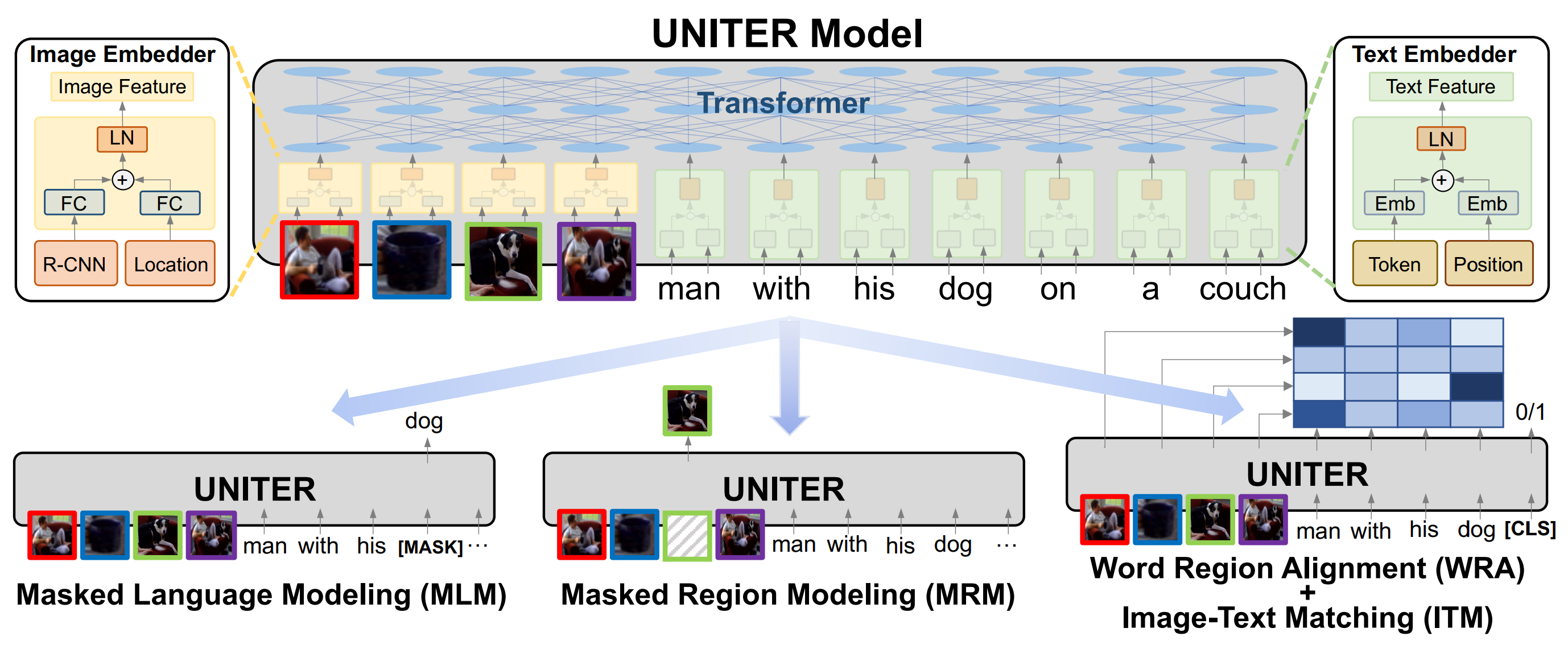
Some code in this repo are copied/modified from opensource implementations made available by PyTorch, HuggingFace, OpenNMT, and Nvidia. The image features are extracted using BUTD.
Requirements
We provide Docker image for easier reproduction. Please install the following:
- nvidia driver (418+),
- Docker (19.03+),
- nvidia-container-toolkit.
Our scripts require the user to have the docker group membership so that docker commands can be run without sudo. We only support Linux with NVIDIA GPUs. We test on Ubuntu 18.04 and V100 cards. We use mixed-precision training hence GPUs with Tensor Cores are recommended.
Quick Start
NOTE: Please run bash scripts/download_pretrained.sh $PATH_TO_STORAGE to get our latest pretrained checkpoints. This will download both the base and large models.
We use NLVR2 as an end-to-end example for using this code base.
-
Download processed data and pretrained models with the following command.
bash scripts/download_nlvr2.sh $PATH_TO_STORAGEAfter downloading you should see the following folder structure:
├── ann │ ├── dev.json │ └── test1.json ├── finetune │ ├── nlvr-base │ └── nlvr-base.tar ├── img_db │ ├── nlvr2_dev │ ├── nlvr2_dev.tar │ ├── nlvr2_test │ ├── nlvr2_test.tar │ ├── nlvr2_train │ └── nlvr2_train.tar ├── pretrained │ └── uniter-base.pt └── txt_db ├── nlvr2_dev.db ├── nlvr2_dev.db.tar ├── nlvr2_test1.db ├── nlvr2_test1.db.tar ├── nlvr2_train.db └── nlvr2_train.db.tar -
Launch the Docker container for running the experiments.
# docker image should be automatically pulled
source launch_container.sh $PATH_TO_STORAGE/txt_db $PATH_TO_STORAGE/img_db \
    $PATH_TO_STORAGE/finetune $PATH_TO_STORAGE/pretrained
The launch script respects $CUDA_VISIBLE_DEVICES environment variable. Note that the source code is mounted into the container under
/srcinstead of built into the image so that user modification will be reflected without re-building the image. (Data folders are mounted into the container separately for flexibility on folder structures.) -
Run finetuning for the NLVR2 task.
# inside the container
python train_nlvr2.py --config config/train-nlvr2-base-1gpu.json

# for more customization
horovodrun -np $N_GPU python train_nlvr2.py --config $YOUR_CONFIG_JSON
-
Run inference for the NLVR2 task and then evaluate.
# inference
python inf_nlvr2.py --txt_db /txt/nlvr2_test1.db/ --img_db /img/nlvr2_test/ \
    --train_dir /storage/nlvr-base/ --ckpt 6500 --output_dir . --fp16

# evaluation
# run this command outside docker (tested with python 3.6)
# or copy the annotation json into mounted folder
python scripts/eval_nlvr2.py ./results.csv $PATH_TO_STORAGE/ann/test1.json
The above command runs inference on the model we trained. Feel free to replace
--train_dirand--ckptwith your own model trained in step 3. Currently we only support single GPU inference. -
Customization
# training options python train_nlvr2.py --help- command-line argument overwrites JSON config files
- JSON config overwrites
argparsedefault value. - use horovodrun to run multi-GPU training
--gradient_accumulation_stepsemulates multi-gpu training
-
Misc.
# text annotation preprocessing
bash scripts/create_txtdb.sh $PATH_TO_STORAGE/txt_db $PATH_TO_STORAGE/ann

# image feature extraction (Tested on Titan-Xp; may not run on latest GPUs)
bash scripts/extract_imgfeat.sh $PATH_TO_IMG_FOLDER $PATH_TO_IMG_NPY

# image preprocessing
bash scripts/create_imgdb.sh $PATH_TO_IMG_NPY $PATH_TO_STORAGE/img_db
In case you would like to reproduce the whole preprocessing pipeline.
Downstream Tasks Finetuning
VQA
NOTE: train and inference should be ran inside the docker container
- download data
bash scripts/download_vqa.sh $PATH_TO_STORAGE - train
horovodrun -np 4 python train_vqa.py --config config/train-vqa-base-4gpu.json \ --output_dir $VQA_EXP - inference
The result file will be written at
python inf_vqa.py --txt_db /txt/vqa_test.db --img_db /img/coco_test2015 \ --output_dir $VQA_EXP --checkpoint 6000 --pin_mem --fp16$VQA_EXP/results_test/results_6000_all.json, which can be submitted to the evaluation server
VCR
NOTE: train and inference should be ran inside the docker container
- download data
bash scripts/download_vcr.sh $PATH_TO_STORAGE - train
horovodrun -np 4 python train_vcr.py --config config/train-vcr-base-4gpu.json \ --output_dir $VCR_EXP - inference
The result file will be written at
horovodrun -np 4 python inf_vcr.py --txt_db /txt/vcr_test.db \ --img_db "/img/vcr_gt_test/;/img/vcr_test/" \ --split test --output_dir $VCR_EXP --checkpoint 8000 \ --pin_mem --fp16$VCR_EXP/results_test/results_8000_all.csv, which can be submitted to VCR leaderboard for evluation.
VCR 2nd Stage Pre-training
NOTE: pretrain should be ran inside the docker container
- download VCR data if you haven't
bash scripts/download_vcr.sh $PATH_TO_STORAGE - 2nd stage pre-train
horovodrun -np 4 python pretrain_vcr.py --config config/pretrain-vcr-base-4gpu.json \
    --output_dir $PRETRAIN_VCR_EXP
Visual Entailment (SNLI-VE)
NOTE: train should be ran inside the docker container
- download data
bash scripts/download_ve.sh $PATH_TO_STORAGE - train
horovodrun -np 2 python train_ve.py --config config/train-ve-base-2gpu.json \
    --output_dir $VE_EXP
Image-Text Retrieval
download data
bash scripts/download_itm.sh $PATH_TO_STORAGE
NOTE: Image-Text Retrieval is computationally heavy, especially on COCO.
Zero-shot Image-Text Retrieval (Flickr30k)
# every image-text pair has to be ranked; please use as many GPUs as possible
horovodrun -np $NGPU python inf_itm.py \
    --txt_db /txt/itm_flickr30k_test.db --img_db /img/flickr30k \
    --checkpoint /pretrain/uniter-base.pt --model_config /src/config/uniter-base.json \
    --output_dir $ZS_ITM_RESULT --fp16 --pin_mem
Image-Text Retrieval (Flickr30k)
- normal finetune
horovodrun -np 8 python train_itm.py --config config/train-itm-flickr-base-8gpu.json - finetune with hard negatives
horovodrun -np 16 python train_itm_hard_negatives.py \
    --config config/train-itm-flickr-base-16gpu-hn.jgon
Image-Text Retrieval (COCO)
- finetune with hard negatives
horovodrun -np 16 python train_itm_hard_negatives.py \
    --config config/train-itm-coco-base-16gpu-hn.json
Referring Expressions
- download data
bash scripts/download_re.sh $PATH_TO_STORAGE - train
python train_re.py --config config/train-refcoco-base-1gpu.json \ --output_dir $RE_EXP - inference and evaluation
The result files will be written under
source scripts/eval_refcoco.sh $RE_EXP$RE_EXP/results_test/
Similarly, change corresponding configs/scripts for running RefCOCO+/RefCOCOg.
Pre-tranining
download
bash scripts/download_indomain.sh $PATH_TO_STORAGE
pre-train
horovodrun -np 8 python pretrain.py --config config/pretrain-indomain-base-8gpu.json \
    --output_dir $PRETRAIN_EXP
Unfortunately, we cannot host CC/SBU features due to their large size. Users will need to process them on their own. We will provide a smaller sample for easier reference to the expected format soon.
Citation
If you find this code useful for your research, please consider citing:
@inproceedings{chen2020uniter,
  title={Uniter: Universal image-text representation learning},
  author={Chen, Yen-Chun and Li, Linjie and Yu, Licheng and Kholy, Ahmed El and Ahmed, Faisal and Gan, Zhe and Cheng, Yu and Liu, Jingjing},
  booktitle={ECCV},
  year={2020}
}
License
MIT

 1.1k Jan 02, 2023
 231 Jan 08, 2023
 66 Jul 25, 2022
 94 Oct 26, 2022
 2.8k Jan 01, 2023
 9.1k Jan 02, 2023
 289 Jan 06, 2023
 8.5k Jan 03, 2023
 1.2k Dec 23, 2022
 124 Jan 03, 2023
 15 Oct 24, 2022
 844 Jan 07, 2023
 233 Sep 09, 2022
 10 May 26, 2022
 1 Dec 22, 2021
 3 Jan 14, 2022
 1 Sep 14, 2022
 1 Dec 21, 2021
 55 Nov 28, 2022
 21 Dec 17, 2022