Easy way to add GoogleMaps to Flask applications. maintainer: @getcake

Overview

Flask Google Maps Generic badge

Flask Estension PyPI version fury.io PyPI download month PyPI license PyPI format PyPI status CI-Github Code style: black

Easy to use Google Maps in your Flask application

requires

Contribute

To contribute with the project, clone it, create a virtualenv and install all of you need to dev, see below:

git clone https://github.com/flask-extensions/Flask-GoogleMaps.git
cd Flask-GoogleMaps
poetry use env 3.8  # just to create virtualenv at the first time
poetry shell # activate virtualenv
poetry install  # to install all for dev
pre-commit install # to install pre-commit hooks

Installation

To use in your project just use your dependency manager to install it, with pip is like this:

pip install flask-googlemaps

How it works

Flask-GoogleMaps includes some global functions and template filters in your Jinja environment, also it allows you to use the Map in views if needed.

registering

in your app

from flask import Flask
from flask_googlemaps import GoogleMaps

app = Flask(__name__)

# you can set key as config
app.config['GOOGLEMAPS_KEY'] = "8JZ7i18MjFuM35dJHq70n3Hx4"

# Initialize the extension
GoogleMaps(app)

# you can also pass the key here if you prefer
GoogleMaps(app, key="8JZ7i18MjFuM35dJHq70n3Hx4")

In template

{{googlemap("my_awesome_map", lat=0.23234234, lng=-0.234234234, markers=[(0.12,
-0.45345), ...])}}

That's it! now you have some template filters and functions to use, more details in examples and screenshot below.

Usage

  • You can create the map in the view and then send to the template context
  • you can use the template functions and filters directly

1. View

from flask import Flask, render_template
from flask_googlemaps import GoogleMaps
from flask_googlemaps import Map

app = Flask(__name__, template_folder=".")
GoogleMaps(app)

@app.route("/")
def mapview():
    # creating a map in the view
    mymap = Map(
        identifier="view-side",
        lat=37.4419,
        lng=-122.1419,
        markers=[(37.4419, -122.1419)]
    )
    sndmap = Map(
        identifier="sndmap",
        lat=37.4419,
        lng=-122.1419,
        markers=[
          {
             'icon': 'http://maps.google.com/mapfiles/ms/icons/green-dot.png',
             'lat': 37.4419,
             'lng': -122.1419,
             'infobox': "<b>Hello World</b>"
          },
          {
             'icon': 'http://maps.google.com/mapfiles/ms/icons/blue-dot.png',
             'lat': 37.4300,
             'lng': -122.1400,
             'infobox': "<b>Hello World from other place</b>"
          }
        ]
    )
    return render_template('example.html', mymap=mymap, sndmap=sndmap)

if __name__ == "__main__":
    app.run(debug=True)
Map() Parameters
  • lat: The latitude coordinate for centering the map.
  • lng: The longitude coordinate for centering the map.
  • zoom: The zoom level. Defaults to 13.
  • maptype: The map type - ROADMAP, SATELLITE, HYBRID, TERRAIN. Defaults to ROADMAP.
  • markers: Markers array of tuples having (lat, lng, infobox, icon, label). Defaults to None.
  • or markers: a list of dicts containing lat, lng, infobox, icon, label.
  • or markers: Markers dictionary with icon urls as keys and markers array as values.
  • varname: The instance variable name.
  • style: A string containing CSS styles. Defaults to "height:300px;width:300px;margin:0;".
  • identifier: The CSS ID selector name.
  • cls: The CSS Class selector name. Defaults to "map".
  • language: The map language. Defaults to "en".
  • region: The map region. Defaults to "US".

Also controls True or False:

  • zoom_control
  • maptype_control
  • scale_control
  • scale_control
  • streetview_control
  • rotate_control
  • fullscreen_control
  • scroll_wheel
  • collapsible (map collapses by click on varname_collapse button)
  • mapdisplay (show a collapsible map by default or not)
  • center_on_user_location (using HTML5 Geolocation)

2. Template

<!DOCTYPE html>
<html>
  <head>
    {{"decoupled-map"|googlemap_js(37.4419, -122.1419, markers=[(37.4419,
    -122.1419)])}} {{mymap.js}} {{sndmap.js}}
  </head>
  <body>
    <h1>Flask Google Maps Example</h1>

    <h2>Template function centered, no marker</h2>
    {{googlemap("simple-map", 37.4419, -122.1419)}}

    <h2>Template filter decoupled with single marker</h2>
    {{"decoupled-map"|googlemap_html(37.4419, -122.1419)}}

    <h2>Template function with multiple markers</h2>
    {% with map=googlemap_obj("another-map", 37.4419, -122.1419,
    markers=[(37.4419, -122.1419), (37.4300, -122.1400)]) %} {{map.html}}
    {{map.js}} {% endwith %}

    <h2>First map generated in view</h2>
    {{mymap.html}}

    <h2>Second map generated in view</h2>
    <h3>Example for different icons in multiple markers with infoboxes</h3>
    {{sndmap.html}}
  </body>
</html>

Infobox

Here's an example snippet of code:

    Map(
        identifier="catsmap",
        lat=37.4419,
        lng=-122.1419,
        markers=[
            {
                'icon': 'http://maps.google.com/mapfiles/ms/icons/green-dot.png',
                'lat':  37.4419,
                'lng':  -122.1419,
                'infobox': "<img src='cat1.jpg' />"
            },
            {
                'icon': 'http://maps.google.com/mapfiles/ms/icons/blue-dot.png',
                'lat': 37.4300,
                'lng': -122.1400,
                'infobox': "<img src='cat2.jpg' />"
            },
            {
                'icon': 'http://maps.google.com/mapfiles/ms/icons/yellow-dot.png',
                'lat': 37.4500,
                'lng': -122.1350,
                'infobox': "<img src='cat3.jpg' />"
            }
        ]
    )

Which results in something like the following map: screen shot 2015-07-29 at 2 41 52 pm

Label

Here's an example snippet of code:

Map(
        identifier="labelsmap",
        lat=37.4419,
        lng=-122.1419,
        markers=[
            {
                'lat': 37.4500,
                'lng': -122.1350,
                'label': "X"
            },
            {
                'lat':  37.4419,
                'lng':  -122.1419,
                'label': "Y"
            },
            {
                'lat': 37.4300,
                'lng': -122.1400,
                'label': "Z"
            }
        ]
    )

Which results in something like the following map:
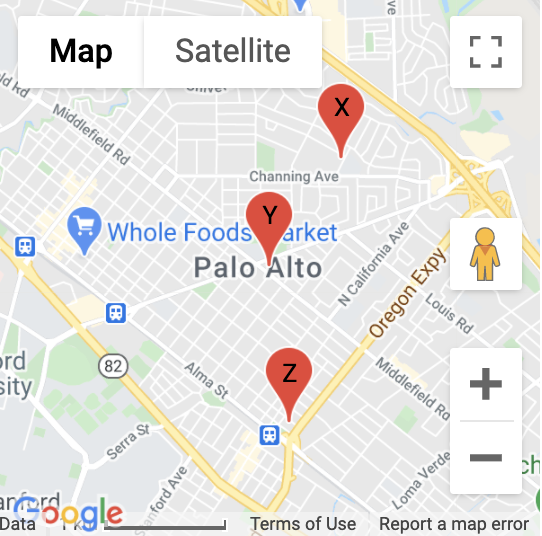
Map showing markers with labels

Fit all markers within bounds

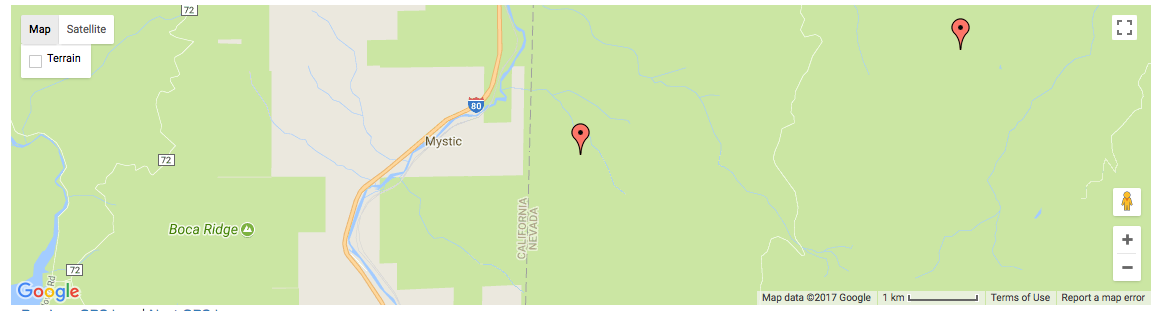
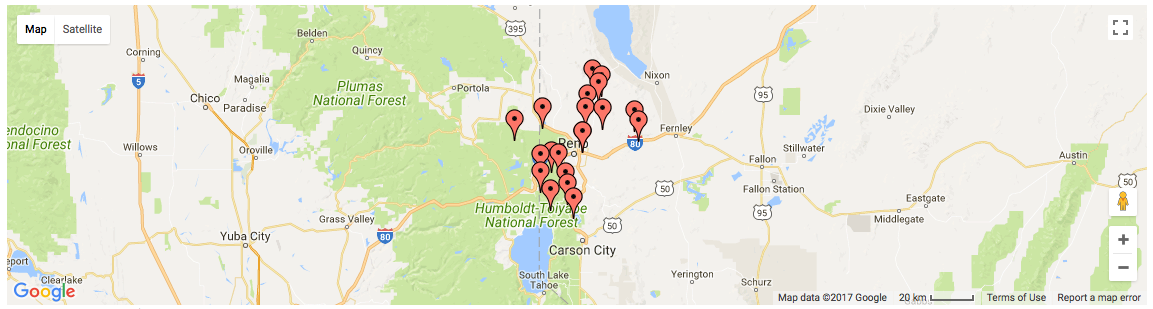
Allow users to easily fit all markers within view on page load

Without bounds

@app.route('/map-unbounded/')
def map_unbounded():
"""Create map with markers out of bounds."""
    locations = []    # long list of coordinates
    map = Map(
        lat=locations[0].latitude,
        lng=locations[0].longitude,
        markers=[(loc.latitude, loc.longitude) for loc in locations]
    )
    return render_template('map.html', map=map)
image

With bounds

@app.route('/map-bounded/')
def map_bounded():
"""Create map with all markers within bounds."""
    locations = []    # long list of coordinates
    map = Map(
        lat=locations[0].latitude,
        lng=locations[0].longitude,
        markers=[(loc.latitude, loc.longitude) for loc in locations],
        fit_markers_to_bounds = True
    )
    return render_template('map.html', map=map)
image

Geocoding and Reverse Geocoding

from flask_googlemaps import get_address, get_coordinates
API_KEY = 'YOUR API KEY'

#Reverse Geocoding: getting detailed address from coordinates of a location
print(get_address(API_KEY,22.4761596,88.4149326))
#output: {'zip': '700150', 'country': 'India', 'state': 'West Bengal', 'city': 'Kolkata', 'locality': 'Kolkata', 'road': 'Techno City', 'formatted_address': 'Sirin Rd, Mauza Ranabhutia, Techno City, Kolkata, West Bengal 700150, India'}


#Geocoding: getting coordinates from address text
print(get_coordinates(API_KEY,'Netaji Subhash Engineering College Kolkata'))
#output: {'lat': 22.4761596, 'lng': 88.4149326}

Run the example app

$ git clone https://github.com/flask-extensions/Flask-GoogleMaps
$ cd Flask-GoogleMaps/

If you have Poetry

$ poetry install

without poetry

$ pip install --upgrade pip
$ pip install -e .
$ pip install -r requirements.txt

Run it.

$ FLASK_GOOGLEMAPS_KEY="YourKeyHERE" FLASK_APP=examples/example.py flask run
running on localhost:5000 .....

Access: http://localhost:5000/ and http://localhost:5000/fullmap

Contribute with the Google Maps API

Please see this page developers.google.com/maps/documentation/javascript/tutorial and contribute!

Comments
  • Add toggle for map.fitBounds() - closes issue #55

    Add toggle for map.fitBounds() - closes issue #55

    Allow users to easily fit all markers within view on page load

    Without bounds

    @app.route('/map-unbounded/')
    def map_unbounded():
    """Create map with markers out of bounds."""
        locations = []    # long list of coordinates
        map = Map(
            lat=locations[0].latitude,
            lng=locations[0].longitude,
            markers=[(loc.latitude, loc.longitude) for loc in locations]
        )
        return render_template('map.html', map=map)
    

    image

    With bounds

    @app.route('/map-bounded/')
    def map_bounded():
    """Create map with all markers within bounds."""
        locations = []    # long list of coordinates
        map = Map(
            lat=locations[0].latitude,
            lng=locations[0].longitude,
            markers=[(loc.latitude, loc.longitude) for loc in locations],
            fit_markers_to_bounds = True
        )
        return render_template('map.html', map=map)
    

    image

    opened by mattdaviscodes 9
  • Infobox for multple icons

    Infobox for multple icons

    When you have multiple icons, you can't set different infoboxes for each icon.

    In the initialize_ function in gmapsj.html, the getInfoCallback({{gmap.varname}}, "{{gmap.infobox[loop.index0]|safe}}")) is inside the markers[icon] loop:

          {% for icon in gmap.markers %}
                {% for marker in gmap.markers[icon] %}
                    var marker_{{loop.index0}} = new google.maps.Marker({
                        position: new google.maps.LatLng({{marker.0}}, {{marker.1}}),
                        map: {{gmap.varname}},
                        icon: "{{ icon }}"
                    });
                    {% if gmap.infobox != None %}
                            {% if gmap.typeflag %}
                                google.maps.event.addListener(marker_{{loop.index0}}, 'click',
                                getInfoCallback({{gmap.varname}}, "{{gmap.infobox[loop.index0]|safe}}"));
                            {% else %}
                                google.maps.event.addListener(marker_{{loop.index0}}, 'click',
                                getInfoCallback({{gmap.varname}}, "{{gmap.infobox|safe}}"));
                            {% endif %}
                    {% endif %}
                {% endfor %}
            {% endfor %}
    

    In the case where you have one marker per icon and a infobox list, you always get the first value of the list for every marker.

    It's not clear to me what's the best way to add multiple infoboxes for multiple icons without breaking the multiple infoboxes for multiple markers with one icon. Maybe a flag multipleiconflag and a call to getInfoCallback outside the marker loop?

    opened by rodrigorahal 9
  • Google Map doesn't show up in example

    Google Map doesn't show up in example

    Hello, thanks for the work !

    However, I can't even display the Google Maps in the example code. I already have a key for these Google Maps API so I added GoogleMaps(app, key = mykey) image

    Here is a screen of what I get one I run the python file:

    unnamed

    Thank you if you can help me figuring out where is the problem

    bug 
    opened by luskah 8
  • [bug] No data validation for lat and lng attributes

    [bug] No data validation for lat and lng attributes

    Describe the bug If the value of lat is beyond -90 and +90 and lng is beyond -180 and +180 then the map will actually not display anything as the values will be invalid.

    As an intelligent program, the program must raise an error message to notify the invalid input or should not accept such a value.

    To Reproduce Put invalid lat and lng values while initializing a Map object. e.g. lat=91, lng=11,

    image

    bug 
    opened by bhuveshsharma09 8
  • Ploting data from mysql DB.

    Ploting data from mysql DB.

    Hello how can i inject data from mysql to maps, i use this code but its not working:

    users = User.query.all()
    fullmap = Map(
               identifier="fullmap",
               varname="fullmap",
               style=(
                   "height:100%;"
                   "width:100%;"
                   "top:0;"
                   "left:0;"
                   "position:absolute;"
                   "z-index:10;"               
               ),
                
               lat=37.4419,
               lng=-122.1419,           
                
               markers=[
                   {           
                       'icon': 'static/img/icons/home1.png',
                       'title': 'Adresse Home',
                       'lat': user.latitude,
                       'lng': user.longitude,
                       'infobox': (
                           "Hello I am <b style='color:#ffcc00;'>YELLOW</b>!"
                           "<h3>"user.first_name"</h3>"
                           "<img src='user.image'>"
                           "<br>Images allowed!"
                       )
                   }for user in users:],
    

    Can you help me please. Thank you

    opened by ai-abdellah 8
  • Unicode error on new version

    Unicode error on new version

    I made a upgrade to the new version and i'm getting a JS error now:

    `var raw_markers = [{'lat': u'-19.9520738', 'lng': u'-43.9490132', 'icon': '//maps.google.com/mapfiles/ms/icons/red-dot.png'}];``

    You can see that it is including u in front of lat lng.

    I checked in the source and it seems to be correct gmap.markers|tojson|safe , but when using pip install flask-googlemaps --upgrade it is not installing the same version that we have here.

    Is something needed to update on pip? Maybe need to change the version? (from 0.2.2 to 0.2.3) ?

    opened by mariohmol 8
  • Erro de compatibilidade

    Erro de compatibilidade

    Opa, @rochacbruno quando tentei instalar a extensão foi retornado para mim um erro de compatibilidade com o SQLAlchemy. O erro foi o seguinte:

    Collecting flask-googlemaps
      Using cached Flask_GoogleMaps-0.2.5-py2.py3-none-any.whl
    Requirement already satisfied: flask in ./venv/lib/python3.5/site-packages (from flask-googlemaps) (0.12.2)
    Requirement already satisfied: itsdangerous>=0.21 in ./venv/lib/python3.5/site-packages (from flask->flask-googlemaps) (0.24)
    Requirement already satisfied: Jinja2>=2.4 in ./venv/lib/python3.5/site-packages (from flask->flask-googlemaps) (2.10)
    Requirement already satisfied: Werkzeug>=0.7 in ./venv/lib/python3.5/site-packages (from flask->flask-googlemaps) (0.14.1)
    Requirement already satisfied: click>=2.0 in ./venv/lib/python3.5/site-packages (from flask->flask-googlemaps) (6.7)
    Requirement already satisfied: MarkupSafe>=0.23 in ./venv/lib/python3.5/site-packages (from Jinja2>=2.4->flask->flask-googlemaps) (1.0)
    flask-sqlalchemy 2.3.2 has requirement Flask>=0.10, but you'll have flask GoogleMaps which is incompatible.
    Installing collected packages: flask-googlemaps
    Successfully installed flask-googlemaps
    

    Diz que foi instalado com sucesso, mas na verdade não instala.

    opened by math77 5
  • Question: large dataset loading.

    Question: large dataset loading.

    Hey! I am using Flask-googleMaps for a NASA Space Apps Challenge and its been working great so far, thanks for making it! I have hit one issue I was hoping to pick your mind about and see if you have a solution.

    I am tring to render over 20k +/- circles on the map to show wildfires detected by satellite. I believe I implemented FGM properly but it takes forever to load. I think this is because of the very large dataset I am loading.

    Do you have any ideas for ways that I can either stream the circles in over time or something else that will work to load them?

    question 
    opened by osteth 5
  • Create a marker click listener for the map

    Create a marker click listener for the map

    I changed init.py and gmapjs.html in order to add functionality for a click listener to the marker. I fixed up the code as well to include the missing comma in file gmapjs.html in line 35 causing users to not see the map loaded up. I also added a property called {{gmap.varname}}_clickedMarker to the map in order to see the lat and lng of the last clicked marker.

    opened by gferioli0418 4
  • Mixed content error http vs https

    Mixed content error http vs https

    Hi,

    I have a problem when I load my site with https protocol, and the script (gmaps) loads over http.

    The message is the following: was loaded over HTTPS, but requested an insecure script 'http://maps.googleapis.com/maps/api/js?sensor=false'. This request has been blocked; the content must be served over HTTPS.

    Thx,

    opened by joanbales 4
  • Bad setup.py in 0.2.5

    Bad setup.py in 0.2.5

    0.2.4 is fine, regression occurs at 0.2.5

    Repro is easy:

    pip install -v flask-googlemaps
    

    Tidbit you're interested in is

    Installing collected packages: Werkzeug, MarkupSafe, Jinja2, click, itsdangerous, flask, flask-googlemaps
    
      Compiling /private/var/folders/2h/0dr8jftd1916yq_lp40__wzh0000gn/T/pip-build-avapA_/Jinja2/jinja2/asyncfilters.py ...
        File "/private/var/folders/2h/0dr8jftd1916yq_lp40__wzh0000gn/T/pip-build-avapA_/Jinja2/jinja2/asyncfilters.py", line 7
          async def auto_to_seq(value):
                  ^
      SyntaxError: invalid syntax
    
      Compiling /private/var/folders/2h/0dr8jftd1916yq_lp40__wzh0000gn/T/pip-build-avapA_/Jinja2/jinja2/asyncsupport.py ...
        File "/private/var/folders/2h/0dr8jftd1916yq_lp40__wzh0000gn/T/pip-build-avapA_/Jinja2/jinja2/asyncsupport.py", line 22
          async def concat_async(async_gen):
                  ^
      SyntaxError: invalid syntax
    

    Impact to user is when you do pip freeze it won't show Flask-GoogleMaps==0.2.5

    The error is coming from Jinja but pip install Flask still causes Flask to show up in pip freeze, so something is wrong with the setup.py

    opened by wontonst 3
  • [bug] All the described ways of showing a map in this repo don't work

    [bug] All the described ways of showing a map in this repo don't work

    Describe the bug A clear and concise description of what the bug is.

    All the described ways of showing a map in this repo don't work.

    To Reproduce Steps to reproduce the behavior:

    1. Having the following folder structure
    # /path/
    # ...../folder/...
    ├── README.md
    ├── __pycache__
    │   └── app.cpython-310.pyc
    ├── app.py
    ├── static
    └── templates
        └── example.html
    
    1. Having the following config files:
    Config files

    /path/.env

    Your .env content here
    

    and

    /path/settings.toml

    [default]
    
    1. Having the following app code:
      from flask import Flask, render_template
      from flask_googlemaps import GoogleMaps, Map
      
      app = Flask(__name__, template_folder=".")
      GoogleMaps(app)
      
      
      @app.route("/")
      def mapview():
          # creating a map in the view
          mymap = Map(
              identifier="view-side",
              lat=37.4419,
              lng=-122.1419,
              markers=[(37.4419, -122.1419)],
          )
          sndmap = Map(
              identifier="sndmap",
              lat=37.4419,
              lng=-122.1419,
              markers=[
                  {
                      'icon': 'http://maps.google.com/mapfiles/ms/icons/green-dot.png',
                      'lat': 37.4419,
                      'lng': -122.1419,
                      'infobox': "<b>Hello World</b>",
                  },
                  {
                      'icon': 'http://maps.google.com/mapfiles/ms/icons/blue-dot.png',
                      'lat': 37.4300,
                      'lng': -122.1400,
                      'infobox': "<b>Hello World from other place</b>",
                  },
              ],
          )
          return render_template('/templates/example.html', mymap=mymap, sndmap=sndmap)
      
      
      if __name__ == "__main__":
          app.run(debug=True)
    
    
    1. Executing under the following environment

    flask run, pycharm run, ...

    Expected behavior A clear and concise description of what you expected to happen.

    Debug output

     * Running on http://127.0.0.1:5000/ (Press CTRL+C to quit)
     * Restarting with watchdog (fsevents)
     * Debugger is active!
     * Debugger PIN: 119-826-731
    127.0.0.1 - - [02/May/2022 23:59:41] "GET / HTTP/1.1" 200 -
    127.0.0.1 - - [02/May/2022 23:59:43] "GET / HTTP/1.1" 200 
    

    Environment (please complete the following information):

    • OS: macOS Monterey 12.3.1

    Additional context

    example.html:

    <!DOCTYPE html>
    <html lang="en">
    <head>
        <meta charset="UTF-8">
        <title>Title</title>
    </head>
    <body>
    {{googlemap("sndmap", lat=0.23234234, lng=-0.234234234, markers=[(0.12, -0.45345)])}}
    </body>
    </html>
    

    s

    bug duplicate 
    opened by ghost 2
  • Prevent cluster at zoom level

    Prevent cluster at zoom level

    I have a map populated very densely with markers. Zoomed all the way in it is still clustering. Is it possible to prevent clustering at a zoom level or lower?

    question 
    opened by d0ngl3md 0
  • Release the latest version of the library to pypi

    Release the latest version of the library to pypi

    Hello, as the title says the latest version of the library is not on pypi and cannot be installed with pip. The latest version on there has a bug in gmapjs.html (on line 41 a comma is missing). I would be really thankful if you release it on pypi as I am trying to deploy an app with this library on heroku. Thanks!

    question 
    opened by veselin-angelov 3
  • [bug]Maps not loading to page

    [bug]Maps not loading to page

    I can't get the example maps to load to the page 'example.html'. When I go to my API metrics page on the Google Cloud Platform the number of calls to my API is not changing.

    I have tested my API key with a standard JS request and it is increasing and therefore the key is working.

    I have the following code on my app.py and my 'example.html' is exactly as is given in the repo front page.

    Any ideas? Feedback is greatly appreciated.

    from flask import Flask, render_template
    from flask_googlemaps import GoogleMaps
    from flask_googlemaps import Map
    
    app = Flask(__name__)
    app.config['GOOGLEMAPS_KEY'] = "my_API_key"
    GoogleMaps(app, key="my_API_key")
    
    @app.route("/")
    def mapview():
        # creating a map in the view
        mymap = Map(
            identifier="view-side",
            lat=37.4419,
            lng=-122.1419,
            markers=[(37.4419, -122.1419)]
        )
        sndmap = Map(
            identifier="sndmap",
            lat=37.4419,
            lng=-122.1419,
            markers=[
              {
                 'icon': 'http://maps.google.com/mapfiles/ms/icons/green-dot.png',
                 'lat': 37.4419,
                 'lng': -122.1419,
                 'infobox': "<b>Hello World</b>"
              },
              {
                 'icon': 'http://maps.google.com/mapfiles/ms/icons/blue-dot.png',
                 'lat': 37.4300,
                 'lng': -122.1400,
                 'infobox': "<b>Hello World from other place</b>"
              }
            ]
        )
        return render_template('example.html', mymap=mymap, sndmap=sndmap)
    
    if __name__ == "__main__":
        app.run(debug=True)
    
    bug 
    opened by phukeo 10
  • (index):49 Uncaught SyntaxError: Unexpected identifier

    (index):49 Uncaught SyntaxError: Unexpected identifier

    When run the examples i get the following error: (index):49 Uncaught SyntaxError: Unexpected identifier, in the last line of following code:

    gmap = new google.maps.Map(
            document.getElementById('gmap'), {
                center: new google.maps.LatLng(37.4419, -122.1419),
                zoom: 13,
                mapTypeId: google.maps.MapTypeId.ROADMAP,
                zoomControl: true,
                mapTypeControl: true,
                scaleControl: true,
                streetViewControl: true,
                rotateControl: true,
                scrollwheel: true,
                fullscreenControl: true
                styles: "height:500px;width:800px;margin:0;"
            });
    

    Looks like he needs the comma at the end of the next line of code. " fullscreenControl: true".

    Thanks a lot. DTapia.

    bug 
    opened by DTHerrera 6
  • Add a marker label

    Add a marker label

    Hello, I cannot figure out how to add a label on my marker as here Is this possible?

    I tried adding an icon property but with no results

    icon = {
            'path': 'M 0,0 C -2,-20 -10,-22 -10,-30 A 10,10 0 1,1 10,-30 C 10,-22 2,-20 0,0 z M -2,-30 a 2,2 0 1,1 4,0 2,2 0 1,1 -4,0',
            'title': 'Mytitle,
            'fillColor': '#000',
            'strokeColor': '#000',
            'strokeWeight': 1,
            'scale': 1,
            'label': 'Mylabel',
            'labelOrigin': {'x': 10, 'y': 10}
    }
    

    ANy help would be much appreciated. Thank you for this great extension :)

    question 
    opened by harisbal 0
Releases(4.1.1.2)
Owner
Flask Extensions
A curated list (and repos) of Flask-Extensions
Flask Extensions
Official implementation of the ICLR 2021 paper

You Only Need Adversarial Supervision for Semantic Image Synthesis Official PyTorch implementation of the ICLR 2021 paper "You Only Need Adversarial S

Bosch Research 272 Dec 28, 2022
To model the probability of a soccer coach leave his/her team during Campeonato Brasileiro for 10 chosen teams and considering years 2018, 2019 and 2020.

To model the probability of a soccer coach leave his/her team during Campeonato Brasileiro for 10 chosen teams and considering years 2018, 2019 and 2020.

Larissa Sayuri Futino Castro dos Santos 1 Jan 20, 2022
ATOMIC 2020: On Symbolic and Neural Commonsense Knowledge Graphs

(Comet-) ATOMIC 2020: On Symbolic and Neural Commonsense Knowledge Graphs Paper Jena D. Hwang, Chandra Bhagavatula, Ronan Le Bras, Jeff Da, Keisuke Sa

AI2 152 Dec 27, 2022
《Train in Germany, Test in The USA: Making 3D Object Detectors Generalize》(CVPR 2020)

Train in Germany, Test in The USA: Making 3D Object Detectors Generalize This paper has been accpeted by Conference on Computer Vision and Pattern Rec

Xiangyu Chen 101 Jan 02, 2023
This repo is official PyTorch implementation of MobileHumanPose: Toward real-time 3D human pose estimation in mobile devices(CVPRW 2021).

Github Code of "MobileHumanPose: Toward real-time 3D human pose estimation in mobile devices" Introduction This repo is official PyTorch implementatio

Choi Sang Bum 203 Jan 05, 2023
Plaything for Autistic Children (demo for PaddlePaddle/Wechaty/Mixlab project)

星星的孩子 - 一款为孤独症孩子设计的聊天机器人游戏 孤独症儿童是目前常常被忽视的一类群体。他们有着类似性格内向的特征,实际却受着广泛性发育障碍的折磨。 项目背景 这类儿童在与人交往时存在着沟通障碍,其特点表现在: 社交交流差,互动障碍明显 认知能力有限,被动认知 兴趣狭窄,重复刻板,缺乏变化和想象

Tianyi Pan 35 Nov 24, 2022
Scikit-event-correlation - Event Correlation and Forecasting over High Dimensional Streaming Sensor Data algorithms

scikit-event-correlation Event Correlation and Changing Detection Algorithm Theo

Intellia ICT 5 Oct 30, 2022
A Text Attention Network for Spatial Deformation Robust Scene Text Image Super-resolution (CVPR2022)

A Text Attention Network for Spatial Deformation Robust Scene Text Image Super-resolution (CVPR2022) https://arxiv.org/abs/2203.09388 Jianqi Ma, Zheto

MA Jianqi, shiki 104 Jan 05, 2023
Duke Machine Learning Winter School: Computer Vision 2022

mlwscv2002 Welcome to the Duke Machine Learning Winter School: Computer Vision 2022! The MLWS-CV includes 3 hands-on training sessions on implementing

Duke + Data Science (+DS) 9 May 25, 2022
As-ViT: Auto-scaling Vision Transformers without Training

As-ViT: Auto-scaling Vision Transformers without Training [PDF] Wuyang Chen, Wei Huang, Xianzhi Du, Xiaodan Song, Zhangyang Wang, Denny Zhou In ICLR 2

VITA 68 Sep 05, 2022
🥈78th place in Riiid Solution🥈

Riiid Answer Correctness Prediction Introduction This repository is the code that placed 78th in Riiid Answer Correctness Prediction competition. Requ

ds wook 14 Apr 26, 2022
3D-Transformer: Molecular Representation with Transformer in 3D Space

3D-Transformer: Molecular Representation with Transformer in 3D Space

55 Dec 19, 2022
Constructing interpretable quadratic accuracy predictors to serve as an objective function for an IQCQP problem that represents NAS under latency constraints and solve it with efficient algorithms.

IQNAS: Interpretable Integer Quadratic programming Neural Architecture Search Realistic use of neural networks often requires adhering to multiple con

0 Oct 24, 2021
External Attention Network

Beyond Self-attention: External Attention using Two Linear Layers for Visual Tasks paper : https://arxiv.org/abs/2105.02358 EAMLP will come soon Jitto

MenghaoGuo 357 Dec 11, 2022
Beyond a Gaussian Denoiser: Residual Learning of Deep CNN for Image Denoising

Beyond a Gaussian Denoiser: Residual Learning of Deep CNN for Image Denoising

Kai Zhang 1.2k Dec 29, 2022
Distilled coarse part of LoFTR adapted for compatibility with TensorRT and embedded divices

Coarse LoFTR TRT Google Colab demo notebook This project provides a deep learning model for the Local Feature Matching for two images that can be used

Kirill 46 Dec 24, 2022
An Artificial Intelligence trying to drive a car by itself on a user created map

An Artificial Intelligence trying to drive a car by itself on a user created map

Akhil Sahukaru 17 Jan 13, 2022
Toward Spatially Unbiased Generative Models (ICCV 2021)

Toward Spatially Unbiased Generative Models Implementation of Toward Spatially Unbiased Generative Models (ICCV 2021) Overview Recent image generation

Jooyoung Choi 88 Dec 01, 2022
This is a Python Module For Encryption, Hashing And Other stuff

EnroCrypt This is a Python Module For Encryption, Hashing And Other Basic Stuff You Need, With Secure Encryption And Strong Salted Hashing You Can Do

5 Sep 15, 2022
BridgeGAN - Tensorflow implementation of Bridging the Gap between Label- and Reference-based Synthesis in Multi-attribute Image-to-Image Translation.

Bridging the Gap between Label- and Reference based Synthesis(ICCV 2021) Tensorflow implementation of Bridging the Gap between Label- and Reference-ba

huangqiusheng 8 Jul 13, 2022