




termplotlib is a Python library for all your terminal plotting needs.

Overview

termplotlib

PyPi Version PyPI pyversions GitHub stars PyPi downloads

gh-actions codecov LGTM Code style: black

termplotlib is a Python library for all your terminal plotting needs. It aims to work like matplotlib.

Line plots

For line plots, termplotlib relies on gnuplot. With that installed, the code

import termplotlib as tpl
import numpy as np

x = np.linspace(0, 2 * np.pi, 10)
y = np.sin(x)

fig = tpl.figure()
fig.plot(x, y, label="data", width=50, height=15)
fig.show()

produces

    1 +---------------------------------------+
  0.8 |    **     **                          |
  0.6 |   *         **           data ******* |
  0.4 | **                                    |
  0.2 |*              **                      |
    0 |                 **                    |
      |                                   *   |
 -0.2 |                   **            **    |
 -0.4 |                     **         *      |
 -0.6 |                              **       |
 -0.8 |                       **** **         |
   -1 +---------------------------------------+
      0     1    2     3     4     5    6     7

Horizontal histograms

import termplotlib as tpl
import numpy as np

rng = np.random.default_rng(123)
sample = rng.standard_normal(size=1000)
counts, bin_edges = np.histogram(sample)

fig = tpl.figure()
fig.hist(counts, bin_edges, orientation="horizontal", force_ascii=False)
fig.show()

produces
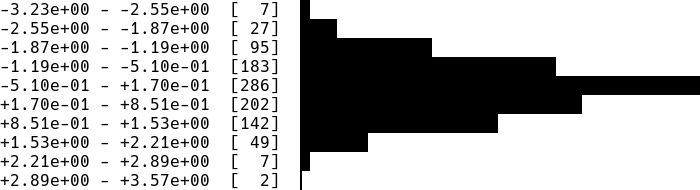
hist1

Horizontal bar charts are covered as well. This

import termplotlib as tpl

fig = tpl.figure()
fig.barh([3, 10, 5, 2], ["Cats", "Dogs", "Cows", "Geese"], force_ascii=True)
fig.show()

produces

Cats   [ 3]  ************
Dogs   [10]  ****************************************
Cows   [ 5]  ********************
Geese  [ 2]  ********

Vertical histograms

import termplotlib as tpl
import numpy as np

rng = np.random.default_rng(123)
sample = rng.standard_normal(size=1000)
counts, bin_edges = np.histogram(sample, bins=40)
fig = tpl.figure()
fig.hist(counts, bin_edges, grid=[15, 25], force_ascii=False)
fig.show()

produces

hist2

Tables

Support for tables has moved over to termtables.

Installation

termplotlib is available from the Python Package Index, so simply do

pip install termplotlib

to install.

Testing

To run the termplotlib unit tests, check out this repository and type

pytest

Similar projects

Comments
  •  width = max([len(line) for c in self._content for line in c]) No content in figure

    width = max([len(line) for c in self._content for line in c]) No content in figure

    import termplotlib as tpl
    import numpy
    
    x = numpy.linspace(0, 2 * numpy.pi, 10)
    y = numpy.sin(x)
    
    fig = tpl.figure()
    fig.plot(x, y, label="data", width=50, height=15)
    fig.show()
    

    after run this piece of code ,there are error ,

    if self._width is None:
    ---> 33             width = max([len(line) for c in self._content for line in c])
         34             width += padding_lr
         35         else:
    

    did you come up with this problem?

    opened by hudengjunai 10
  • Figure.table fails if stdout does not have an `encoding` attribute

    Figure.table fails if stdout does not have an `encoding` attribute

    I ran into this issue when using asciiplotlib in a celery worker where celery replaces sys.stdout with a proxy object called LoggingProxy which does not have an encoding attribute. This seems to be valid as far as the python documentation goes so probably asciiplotlib should check if the attribute exists? The specific line that causes problem

    asciiplotlib/table.py in _get_border_chars at line 31

            border_chars = None
        elif isinstance(border_style, list):
            assert len(border) == 11
            border_chars = border
        else:
            if sys.stdout.encoding in ["UTF-8", "UTF8"] and not force_ascii: # Here
                border_chars = {
                    "thin": ["─", "│", "┌", "┐", "└", "┘", "├", "┤", "┬", "┴", "┼"],
                    "rounded": ["─", "│", "╭", "╮", "╰", "╯", "├", "┤", "┬", "┴", "┼"],
                    "thick": ["━", "┃", "┏", "┓", "┗", "┛", "┣", "┫", "┳", "┻", "╋"],
                    "double": ["═", "║", "╔", "╗", "╚", "╝", "╠", "╣", "╦", "╩", "╬"],
    
    opened by alexjg 7
  • Add float formatting in `barh.py`

    Add float formatting in `barh.py`

    This adds a formatting similar to what is already implemented for the integers when using float in barh :

    Before :

    Water  [3.05]  *************
    Milk   [10.1]  ****************************************
    Juice  [5.00756]  ********************
    

    After:

    Water  [ 3.05000]  *************
    Milk   [10.10000]  ****************************************
    Juice  [ 5.00756]  ********************
    

    Each float value now uses the same width producing a better alignment of the bars.

    Test script:

    import termplotlib as tpl
    data = ([3.05, 10.1, 5.00756], ['Water', 'Milk', 'Juice'])
    fig = tpl.figure()
    fig.barh(*data, force_ascii=True)
    fig.show()
    
    opened by ghost 5
  • Displays meaningless numbers when NaNs are present

    Displays meaningless numbers when NaNs are present

    NaNs seem to mess up asciiplotlib The following:

    import asciiplotlib as apl
    from numpy import arange
    
    fig = apl.figure()
    fig.plot([100,101,102,103,104], [0,1,float("nan"), float("nan"),4])
    fig.show()
    

    Produces:

      120 +-----------+----------+-----------+----------+----------+-----------+
          |                                                                    |
          |                                                                    |
      100 +*******                                                             +
          |  **** ****                                                         |
          |      ***  ****                                                     |
       80 +         ****  ****                                                 +
          |             ****  ****                                             |
          |                 ***   ****                                         |
       60 +                    ****   ***                                      +
          |                        ***   ****                                  |
          |                           ****   ****                              |
          |                               ***    ****                          |
       40 +                                  ****    ****                      +
          |                                      ***     ****                  |
          |                                         ****     ****              |
       20 +                                             ****     ****          +
          |                                                 ***      *         |
          |                                                    ****   *        |
        0 +-----------+----------+-----------+----------+----------**----------+
          0           20         40          60         80        100         120
    

    Interestingly, the x values affect the behavior, too. Using [0,1,2,3,4] for x instead produces a much more innocent-looking plot. Very strange.

    opened by tgbrooks 5
  • FileNotFoundError: [WinError 2] The system cannot find the file specified

    FileNotFoundError: [WinError 2] The system cannot find the file specified

    When trying to run the first example in the readme,

    import asciiplotlib as apl
    import numpy
    
    x = numpy.linspace(0, 2 * numpy.pi, 10)
    y = numpy.sin(x)
    
    fig = apl.figure()
    fig.plot(x, y, label="data", width=50, height=15)
    fig.show()
    

    I get the following error;

    Traceback (most recent call last):
      File "cliplot.py", line 26, in <module>
        fig.plot(x, y, label="data", width=50, height=15)
      File "C:\Users\uqasnosw\AppData\Local\Continuum\Miniconda3\envs\python36\lib\site-packages\asciiplotlib\figure.py", line 63, in plot
        self._content.append(plot(*args, **kwargs))
      File "C:\Users\uqasnosw\AppData\Local\Continuum\Miniconda3\envs\python36\lib\site-packages\asciiplotlib\plot.py", line 24, in plot
        stderr=subprocess.PIPE,
      File "C:\Users\uqasnosw\AppData\Local\Continuum\Miniconda3\envs\python36\lib\subprocess.py", line 709, in __init__
        restore_signals, start_new_session)
      File "C:\Users\uqasnosw\AppData\Local\Continuum\Miniconda3\envs\python36\lib\subprocess.py", line 997, in _execute_child
        startupinfo)
    FileNotFoundError: [WinError 2] The system cannot find the file specified
    

    I'm using Python 3.6 on Windows 10 64-bit.

    opened by aaronsnoswell 5
  • [Question] GPL License

    [Question] GPL License

    Forgive the mundane question but does the GPLv3 allow me to use termplotlib as a dependency in my BSD open-source project? Or does this require re-licensing my project under GPL? This is a fantastic project 👍 good job.

    opened by danieljfarrell 4
  • FileNotFoundError: [WinError 2] The system cannot find the file specified

    FileNotFoundError: [WinError 2] The system cannot find the file specified

    Dear nschloe, your lib sounds nice! I got a different error in that code.. Any idea?

    Traceback (most recent call last):
      File ".\app.py", line 51, in <module>
        fig.plot(x, y)
      File "mypath\env\lib\site-packages\termplotlib\figure.py", line 64, in plot
        self._content.append(plot(*args, **kwargs))
      File "mypath\env\lib\site-packages\termplotlib\plot.py", line 22, in plot
        stderr=subprocess.PIPE,
      File "mypath\appdata\local\programs\python\python37\Lib\subprocess.py", line 800, in __init__
        restore_signals, start_new_session)
      File "mypath\appdata\local\programs\python\python37\Lib\subprocess.py", line 1207, in _execute_child
        startupinfo)
    FileNotFoundError: [WinError 2] The system cannot find the file specified
    
    opened by mscampos92 4
  • Handle strings in horizontal histogram bins

    Handle strings in horizontal histogram bins

    Hello, thank you for making this.

    Long story:

    In my use case I had a Pandas dataframe (DF) containing 1 panda series. This series had been created by resample a two series DF with dates and occurrences

    The resampling is like an histogram binning: it add all occurrences by frequency. e.g (series with dates as index):

    12:00 -> 17
    12:30 -> 21
    13:00 -> 11
    

    (^this is greatly simplified)

    TL;DR

    I want to have something like this:

    2020-04-11 23:00:00  [  28]  ▎
    2020-04-11 23:30:00  [  29]  ▎
    2020-04-12 00:00:00  [1299]  █████████████▌
    2020-04-12 00:30:00  [2637]  ███████████████████████████▍
    2020-04-12 01:00:00  [ 996]  ██████████▍
    2020-04-12 01:30:00  [ 404]  ████▎
    2020-04-12 02:00:00  [ 557]  █████▊
    

    or something like that And maybe be able to format dates

    What I changed

    In my code I needed to change this line https://github.com/nschloe/termplotlib/blob/9827634d1a7049ca430506532bb048241788ad38/termplotlib/hist.py#L48

    to this:

        if show_bin_edges:
            if type(bin_edges[0]) != int:
                labels = [str(d) for d in bin_edges]
            else:
                labels = [
                    "{:+.2e} - {:+.2e}".format(bin_edges[k], bin_edges[k + 1])
                    for k in range(len(bin_edges) - 1)
                ]
    

    (I find it more readable to have just one side of the interval btw)

    Advantage:

    I could provide termplotlib.figure.hist() these equal length "lists":

    counts = DF.series # ≡ list of occurences (or int list)
    bin_edges = DF.series.index # ≡ list of dates
    

    Feature request

    Handle any types of bins dates (e.g. python datetimes; numpy datetimes64, ...) and their formats ?

    As this might be too painful I think the str() could do most of it.

    Thank you for reading Regards

    opened by thenger 4
  • Unittests failing

    Unittests failing

    Does this inly work with Python 3? :(

    ==================================== ERRORS ====================================
    _____________________ ERROR collecting test/test_figure.py _____________________
    ImportError while importing test module '/home/bla/Downloads/asciiplotlib/test/test_figure.py'.
    Hint: make sure your test modules/packages have valid Python names.
    Traceback:
    test/test_figure.py:3: in <module>
        import asciiplotlib as apl
    /usr/local/lib/python2.7/dist-packages/asciiplotlib/__init__.py:14: in <module>
        from .figure import Figure, figure
    /usr/local/lib/python2.7/dist-packages/asciiplotlib/figure.py:5: in <module>
        from .table import table
    /usr/local/lib/python2.7/dist-packages/asciiplotlib/table.py:3: in <module>
        from collections.abc import Sequence
    E   ImportError: No module named abc
    
    opened by benlarsendk 4
  • IndexError: list index out of range error in vertical hist

    IndexError: list index out of range error in vertical hist

    Amazing lib thanx alot @nschloe !

    I am facing the following error (I am also pasting the arrays i am using for histogram and bins that might help you i guess):

    Traceback (most recent call last):
      File "paura_lite.py", line 30, in <module>
        fig.hist(X2, freqs2, grid=[25, 25], force_ascii=False)
      File "/usr/local/lib/python3.6/site-packages/termplotlib/figure.py", line 56, in hist
        self._content.append(hist(*args, **kwargs))
      File "/usr/local/lib/python3.6/site-packages/termplotlib/hist.py", line 22, in hist
        force_ascii=force_ascii,
      File "/usr/local/lib/python3.6/site-packages/termplotlib/hist.py", line 123, in hist_vertical
        if row[pos] == 8 and (pos + 1 == len(row) or row[pos + 1] > 0):
    IndexError: list index out of range
    

    X2 and freqs2 are respectively (plotting the same arrays with either plot or horizontal histogram works just fine fyi

    [124.41883839  35.41717879  31.53559882  28.65272995  21.51772978
      18.91799348  17.13384018  16.4547271   15.12907567  12.27610031
      12.89634676  10.55464499  10.1385237    9.76782805   8.12663877
       7.21406045   5.71375229   4.28627088   3.3031431    2.84735662]
    [   0.  200.  400.  600.  800. 1000. 1200. 1400. 1600. 1800. 2000. 2200.
     2400. 2600. 2800. 3000. 3200. 3400. 3600. 3800. 4000.]
    
    
    opened by tyiannak 3
  • widht and height arguments of plot non working?

    widht and height arguments of plot non working?

    Hello, I just discovered this lib, this is very useful for servers without graphical interface! thanks a lot for the work.

    I just can't make the widht and height arguments of plot function work :

    (python 3.7.3)

    >>> prof
    array([-2.        , -2.        , -1.77777778, -1.77777778, -1.55555556,
           -1.55555556, -1.33333333, -1.33333333, -1.11111111, -1.11111111,
           -0.88888889, -0.88888889, -0.66666667, -0.66666667, -0.44444444,
           -0.44444444, -0.22222222, -0.22222222, -0.        , -0.        ,
            0.        ,  0.        ,  0.22222222,  0.22222222,  0.44444444,
            0.44444444,  0.66666667,  0.66666667,  0.88888889,  0.88888889,
            1.11111111,  1.11111111,  1.33333333,  1.33333333,  1.55555556,
            1.55555556,  1.77777778,  1.77777778,  2.        ,  2.        ])
    >>> fig = tplt.figure()
    >>> fig.plot(range(len(prof)), prof, width=len(prof), height=20)
    >>> fig.show()
    
        2 +--------+-------+--------+--------+-------+--------+-------+----***-+
          |                                                            ****    |
      1.5 +                                                         ***        +
          |                                                     ****           |
          |                                                  ***               |
        1 +                                               ***                  +
          |                                           ****                     |
      0.5 +                                        ***                         +
          |                                    ****                            |
        0 +                              ******                                +
          |                             *                                      |
          |                          ***                                       |
     -0.5 +                      ****                                          +
          |                   ***                                              |
       -1 +                ***                                                 +
          |            ****                                                    |
          |         ***                                                        |
     -1.5 +     ****                                                           +
          |  ***                                                               |
       -2 ***------+-------+--------+--------+-------+--------+-------+--------+
          0        5       10       15       20      25       30      35       40
    

    It seems that the plot uses the defaut values for widht and height of the figure. Maybe I did something wrong?

    opened by TitouanGendron 3
  • Add headers for user readability

    Add headers for user readability

    The horizontal view is useful if we're aware of the context (category, count) but it's missing the context of headers for application users.

    Right now, I imagine the user has to get that working

    Instead of just this,

    Cats   [ 3]  ************
    Dogs   [10]  ****************************************
    Cows   [ 5]  ********************
    Geese  [ 2]  ********
    

    add a header:

    Animals  Count
    Cats     [ 3]   ************
    Dogs     [10]   ****************************************
    Cows     [ 5]   ********************
    Geese    [ 2]   ********
    
    opened by deeTEEcee 0
Releases(v0.3.9)
Owner
Nico Schlömer
Mathematics, numerical analysis, scientific computing, Python. Always interested in new problems.
Nico Schlömer
A Python library for plotting hockey rinks with Matplotlib.

Hockey Rink A Python library for plotting hockey rinks with Matplotlib. Installation pip install hockey_rink Current Rinks The following shows the cus

24 Jan 02, 2023
Realtime Web Apps and Dashboards for Python and R

H2O Wave Realtime Web Apps and Dashboards for Python and R New! R Language API Build and control Wave dashboards using R! New! Easily integrate AI/ML

H2O.ai 3.4k Jan 06, 2023
A curated list of awesome Dash (plotly) resources

Awesome Dash A curated list of awesome Dash (plotly) resources Dash is a productive Python framework for building web applications. Written on top of

Luke Singham 1.7k Jan 07, 2023
Visualization Data Drug in thailand during 2014 to 2020

Visualization Data Drug in thailand during 2014 to 2020 Data sorce from ข้อมูลเปิดภาครัฐ สำนักงาน ป.ป.ส Inttroducing program Using tkinter module for

Narongkorn 1 Jan 05, 2022
Extract and visualize information from Gurobi log files

GRBlogtools Extract information from Gurobi log files and generate pandas DataFrames or Excel worksheets for further processing. Also includes a wrapp

Gurobi Optimization 56 Nov 17, 2022
Peloton Stats to Google Sheets with Data Visualization through Seaborn and Plotly

Peloton Stats to Google Sheets with Data Visualization through Seaborn and Plotly Problem: 2 peloton users were looking for a way to track their metri

9 Jul 22, 2022
Fast scatter density plots for Matplotlib

About Plotting millions of points can be slow. Real slow... 😴 So why not use density maps? ⚡ The mpl-scatter-density mini-package provides functional

Thomas Robitaille 473 Dec 12, 2022
Learn Data Science with focus on adding value with the most efficient tech stack.

DataScienceWithPython Get started with Data Science with Python An engaging journey to become a Data Scientist with Python TL;DR Download all Jupyter

Learn Python with Rune 110 Dec 22, 2022
Data aggregated from the reports found at the MCPS COVID Dashboard into a set of visualizations.

Montgomery County Public Schools COVID-19 Visualizer Contents About this project Data Support this project About this project Data All data we use can

James 3 Jan 19, 2022
A visualization tool made in Pygame for various pathfinding algorithms.

Pathfinding-Visualizer 🚀 A visualization tool made in Pygame for various pathfinding algorithms. Pathfinding is closely related to the shortest path

Aysha sana 7 Jul 09, 2022
cqMore is a CadQuery plugin based on CadQuery 2.1.

cqMore (under construction) cqMore is a CadQuery plugin based on CadQuery 2.1. Installation Please use conda to install CadQuery and its dependencies

Justin Lin 36 Dec 21, 2022
Cryptocurrency Centralized Exchange Visualization

This is a simple one that uses Grafina to visualize cryptocurrency from the Bitkub exchange. This service will make a request to the Bitkub API from your wallet and save the response to Postgresql. G

Popboon Mahachanawong 1 Nov 24, 2021
Color scales in Python for humans

colorlover Color scales for humans IPython notebook: https://plot.ly/ipython-notebooks/color-scales/ import colorlover as cl from IPython.display impo

Plotly 146 Sep 25, 2022
Create artistic visualisations with your exercise data (Python version)

strava_py Create artistic visualisations with your exercise data (Python version). This is a port of the R strava package to Python. Examples Facets A

Marcus Volz 53 Dec 28, 2022
Plot and save the ground truth and predicted results of human 3.6 M and CMU mocap dataset.

Visualization-of-Human3.6M-Dataset Plot and save the ground truth and predicted results of human 3.6 M and CMU mocap dataset. human-motion-prediction

Gaurav Kumar Yadav 5 Nov 18, 2022
Visualizing weather changes across the world using third party APIs and Python.

WEATHER FORECASTING ACROSS THE WORLD Overview Python scripts were created to visualize the weather for over 500 cities across the world at varying di

G Johnson 0 Jun 12, 2021
A blender import/export system for Defold

defold-blender-export A Blender export system for the Defold game engine. Setup Notes There are no exhaustive documents for this tool yet. Its just no

David Lannan 27 Dec 30, 2022
RockNext is an Open Source extending ERPNext built on top of Frappe bringing enterprise ready utilization.

RockNext is an Open Source extending ERPNext built on top of Frappe bringing enterprise ready utilization.

Matheus Breguêz 13 Oct 12, 2022
Sprint planner considering JIRA issues and google calendar meetings schedule.

Sprint planner Sprint planner is a Python script for planning your Jira tasks based on your calendar availability. Installation Use the package manage

Apptension 2 Dec 05, 2021
eoplatform is a Python package that aims to simplify Remote Sensing Earth Observation by providing actionable information on a wide swath of RS platforms and provide a simple API for downloading and visualizing RS imagery

An Earth Observation Platform Earth Observation made easy. Report Bug | Request Feature About eoplatform is a Python package that aims to simplify Rem

Matthew Tralka 4 Aug 11, 2022