Python+Numpy+OpenGL: fast, scalable and beautiful scientific visualization

Overview

https://raw.githubusercontent.com/rougier/glumpy/master/doc/_static/glumpy-teaser.png

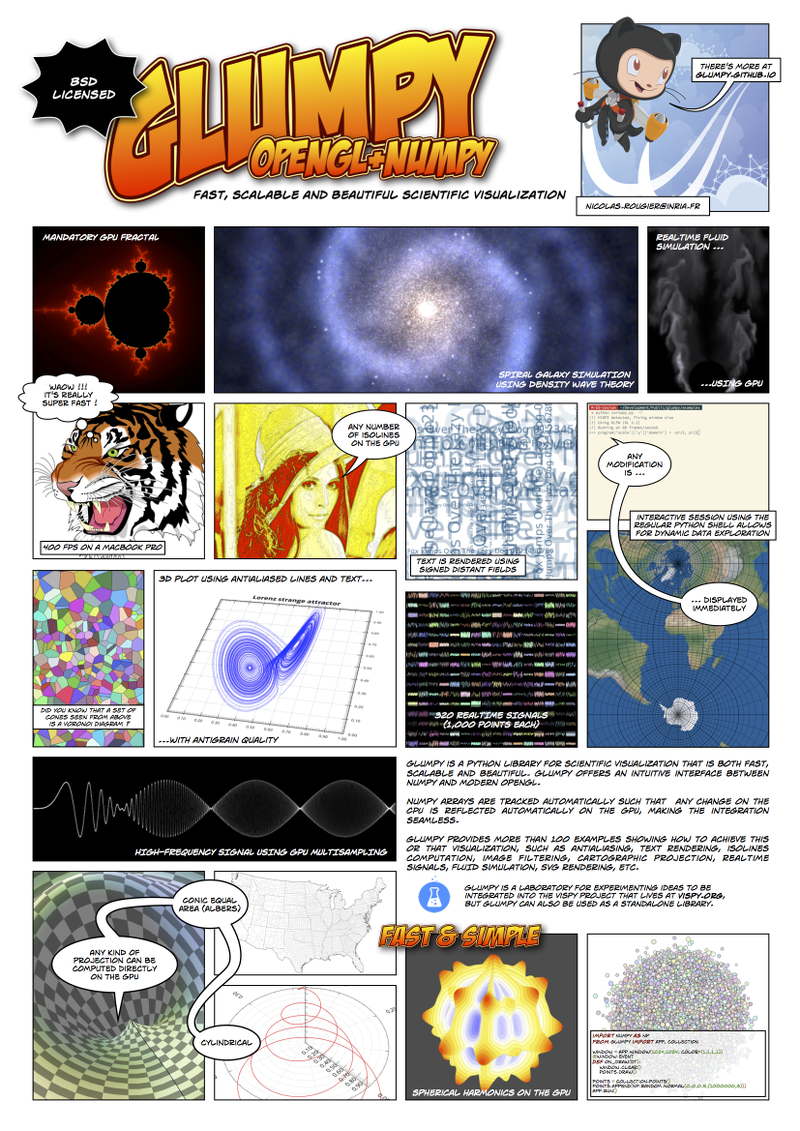
Glumpy is a python library for scientific visualization that is both fast, scalable and beautiful. Glumpy offers a natural interface between numpy and modern OpenGL.

Source repository https://github.com/glumpy/glumpy
Issue tracker https://github.com/glumpy/glumpy/issues
Website http://glumpy.github.io
Gallery http://glumpy.github.io/gallery.html
Documentation http://glumpy.readthedocs.org/en/latest/
Chatroom https://gitter.im/glumpy/chatroom
Mailing list https://groups.google.com/forum/#!forum/glumpy-users

Installation

git clone https://github.com/glumpy/glumpy.git
cd glumpy
python setup.py install
cd examples
./app-simple.py

Dependencies

Python

System

Embedded

glumpy makes use of a number of great external tools that are directly embedded within the repository. Here is a list:

  • moviepy by Zulko
  • pypng by David Jones
  • inputhook management from IPython
  • six utilities for writing code that runs on Python 2 and 3 by Benjamin Peterson

Example usage

from glumpy import app

window = app.Window(512,512)

@window.event
def on_draw(dt):
    window.clear()

app.run()

More...

https://raw.githubusercontent.com/rougier/glumpy/master/doc/_static/poster.png

Comments
  • Problems getting app-simple.py to run

    Problems getting app-simple.py to run

    I started by having a similar problem to https://github.com/glumpy/glumpy/issues/25. I installed glfw using git clone https://github.com/glfw/glfw.git and it installed into my home directory. When I tried ~/glumpy/examples$./app-simple.py from the terminal I received

    bash: ./app-simple.py: Permission denied

    When I used python app-simple.py from the terminal I received the following

    Traceback (most recent call last): File "app-simple.py", line 7, in window = app.Window() File "/home/rodoginfinite/anaconda2/lib/python2.7/site-packages/glumpy-1.0.6-py2.7-linux-x86_64.egg/glumpy/app/init.py", line 150, in new backend = use(name) File "/home/rodoginfinite/anaconda2/lib/python2.7/site-packages/glumpy-1.0.6-py2.7-linux-x86_64.egg/glumpy/app/init.py", line 116, in use importlib.import_module(name) File "/home/rodoginfinite/anaconda2/lib/python2.7/importlib/init.py", line 37, in import_module import(name) File "/home/rodoginfinite/anaconda2/lib/python2.7/site-packages/glumpy-1.0.6-py2.7-linux-x86_64.egg/glumpy/app/window/backends/backend_glfw.py", line 82, in from glumpy.ext import glfw File "/home/rodoginfinite/anaconda2/lib/python2.7/site-packages/glumpy-1.0.6-py2.7-linux-x86_64.egg/glumpy/ext/glfw.py", line 60, in raise OSError('GLFW library not found') OSError: GLFW library not found

    and when I ran from PyCharm I received the following

    Traceback (most recent call last): File "/home/rodoginfinite/glumpy/examples/app-simple.py", line 5, in from glumpy import app ImportError: No module named glumpy

    I modified /home/rodoginfinite/anaconda2/lib/python2.7/site-packages/glumpy-1.0.6-py2.7-linux-x86_64.egg/glumpy/app/init.py line 34 to __backend__ = 'glfw' and changed line 49 to def use(backend, api='GL', major=3, minor=2, profile='core'): and ran python app-simple.py in the terminal and received

    Traceback (most recent call last): File "app-simple.py", line 7, in window = app.Window() File "/home/rodoginfinite/anaconda2/lib/python2.7/site-packages/glumpy-1.0.6-py2.7-linux-x86_64.egg/glumpy/app/init.py", line 184, in new window = backend.Window(_args, *_kwargs) AttributeError: 'str' object has no attribute 'Window'

    I'm probably making noob errors, but I've been trying to solve it for a while now. Any help would be appreciated. Also, I have PyQt and Qt 5 and was wondering what would be necessary to get that working as an alternative. Would it be something like __backend__= 'PyQt' and def use(backend, api = 'Qt' , major = int , minor = int, profile = 'core') with the ints replaced by version numbers?

    opened by RodogInfinite 30
  • ImportError: cannot import name app

    ImportError: cannot import name app

    I have tried installing glumpy both via pip and through the pymor ubuntu ppa repository but get the same results, even after reinstalling and reconfiguring multiple related packages. All dependencies are installed per the installation instructions.

    import numpy as np from glumpy import app, gl, gloo Traceback (most recent call last): File "", line 1, in ImportError: cannot import name app

    Oddly, if I just do the following, I get an empty window.

    import glumpy glumpy.Window() <glumpy.window.backend_glut.Window object at 0x18884d0>

    Here's another example

    import glumpy img = glumpy.graphics.Image("data/lena.png", anchor_x = 'center', anchor_y = 'center') Traceback (most recent call last): File "", line 1, in AttributeError: 'module' object has no attribute 'Image'

    I'm utterly confused, I've spent 3 hours on this and can find nothing relevant. I'm using python 2.7.

    opened by grokkerino 30
  • OpenGL / GLUT problem

    OpenGL / GLUT problem

    python examples/app-backend.py
    [w] Cannot set error on copy on GPU copy
    Traceback (most recent call last):
      File "examples/app-backend.py", line 7, in <module>
        from glumpy import app
      File "/home/untereiner/lib/python2.7/site-packages/glumpy/__init__.py", line 8, in <module>
        from . app import run
      File "/home/untereiner/lib/python2.7/site-packages/glumpy/app/__init__.py", line 17, in <module>
        from glumpy.ext.inputhook import inputhook_manager, stdin_ready
      File "/home/untereiner/lib/python2.7/site-packages/glumpy/ext/__init__.py", line 6, in <module>
        from . import glfw
      File "/home/untereiner/lib/python2.7/site-packages/glumpy/ext/glfw.py", line 60, in <module>
        raise OSError('GLFW library not found')
    OSError: GLFW library not found
    

    How can I use a glut backend for linux ? The backend osxfreeglut doesn't seem to work

    PyOpenGL==3.1.0 PyOpenGL-accelerate==3.1.0 glumpy==latest git version numpy==1.8.2

    opened by untereiner 27
  • invalid operation in attempts to upgrade to core profile 330

    invalid operation in attempts to upgrade to core profile 330

    This is what happened after fixes I described in https://github.com/glumpy/glumpy/issues/79

    My test code is based on https://github.com/glumpy/glumpy/blob/master/examples/app-two-programs.py

    import numpy as np
    from glumpy import gl, app, gloo
    
    
    app.use("sdl2", api='GL', major=3, minor=3,profile='core')
    config = app.configuration.Configuration()
    
    config.major_version = 3
    config.minor_version = 3
    config.profile = "core"
    window = app.Window(config=config, width=500, height=300)
    
    vertex = """#version 330
    in vec2 a_position;
    void main() {
        gl_Position = vec4(a_position, 0.0, 1.0);
        gl_PointSize = 30.0;
    }
    """
    
    fragment1 = """#version 330
    out vec4 FragColor;
    void main() {
        FragColor = vec4(0.0, 0.0, 1.0, 1.0);
    }
    """


    fragment2 = """
    void main() {
        gl_FragColor = vec4(1.0, 0.0, 0.0, 1.0);
    }
    """
    
    
    program1 = gloo.Program(vertex, fragment1)  # blue on the right
    program1['a_position'] = np.zeros((1,2),dtype=np.float32) + 0.5
    program2 = gloo.Program(vertex, fragment2)  # red on the left
    program2['a_position'] = np.zeros((1,2),dtype=np.float32) - 0.5
    
    
    @window.event
    def on_draw(dt):
        window.clear()
        program1.draw(gl.GL_POINTS)
        program2.draw(gl.GL_POINTS)
    
    app.run()
    

    The output and reported error is:

    i] Using SDL2 (GL 4.1)
    [i] Running at 60 frames/second
    Traceback (most recent call last):
      File "test_glumpy.py", line 54, in <module>
        app.run()
      File "/Users/uuplusu/.virtualenvs/mpy27/lib/python2.7/site-packages/glumpy/app/__init__.py", line 302, in run
        clock = __init__(clock=clock, framerate=framerate, backend=__backend__)
      File "/Users/uuplusu/.virtualenvs/mpy27/lib/python2.7/site-packages/glumpy/app/__init__.py", line 262, in __init__
        window.dispatch_event('on_resize', window._width, window._height)
      File "/Users/uuplusu/.virtualenvs/mpy27/lib/python2.7/site-packages/glumpy/app/window/event.py", line 394, in dispatch_event
        if getattr(self, event_type)(*args):
      File "/Users/uuplusu/.virtualenvs/mpy27/lib/python2.7/site-packages/glumpy/app/window/window.py", line 219, in on_resize
        self.dispatch_event('on_draw', 0.0)
      File "/Users/uuplusu/.virtualenvs/mpy27/lib/python2.7/site-packages/glumpy/app/window/event.py", line 384, in dispatch_event
        if handler(*args):
      File "test_glumpy.py", line 51, in on_draw
        program1.draw(gl.GL_POINTS)
      File "/Users/uuplusu/.virtualenvs/mpy27/lib/python2.7/site-packages/glumpy/gloo/program.py", line 592, in draw
        self.activate()
      File "/Users/uuplusu/.virtualenvs/mpy27/lib/python2.7/site-packages/glumpy/gloo/globject.py", line 89, in activate
        self._activate()
      File "/Users/uuplusu/.virtualenvs/mpy27/lib/python2.7/site-packages/glumpy/gloo/program.py", line 385, in _activate
        attribute.activate()
      File "/Users/uuplusu/.virtualenvs/mpy27/lib/python2.7/site-packages/glumpy/gloo/globject.py", line 89, in activate
        self._activate()
      File "/Users/uuplusu/.virtualenvs/mpy27/lib/python2.7/site-packages/glumpy/gloo/variable.py", line 380, in _activate
        gl.glEnableVertexAttribArray(self.handle)
      File "/usr/local/Cellar/python/2.7.13/Frameworks/Python.framework/Versions/2.7/lib/python2.7/site-packages/OpenGL/platform/baseplatform.py", line 402, in __call__
        return self( *args, **named )
      File "/usr/local/Cellar/python/2.7.13/Frameworks/Python.framework/Versions/2.7/lib/python2.7/site-packages/OpenGL/error.py", line 232, in glCheckError
        baseOperation = baseOperation,
    OpenGL.error.GLError: GLError(
    	err = 1282,
    	description = 'invalid operation',
    	baseOperation = glEnableVertexAttribArray,
    	cArguments = (0,)
    )
    
    opened by autosquid 18
  • snippet-grids example does not work

    snippet-grids example does not work

    Intel GPU:

    [i] Using GLFW (GL 3.0)
    [i] Running at 60 frames/second
    error: fragment shader varying v_index_4 not written by vertex shader
    .error: fragment shader varying v_x_4 not written by vertex shader
    .
    Traceback (most recent call last):
      File "examples/snippet-grids.py", line 106, in <module>
        app.run()
      File "/data/git/glumpy/glumpy/app/__init__.py", line 301, in run
        clock = __init__(clock=clock, framerate=framerate, backend=__backend__)
      File "/data/git/glumpy/glumpy/app/__init__.py", line 261, in __init__
        window.dispatch_event('on_resize', window._width, window._height)
      File "/data/git/glumpy/glumpy/app/window/event.py", line 375, in dispatch_event
        if getattr(self, event_type)(*args):
      File "/data/git/glumpy/glumpy/app/window/window.py", line 193, in on_resize
        self.dispatch_event('on_draw', 0.0)
      File "/data/git/glumpy/glumpy/app/window/event.py", line 365, in dispatch_event
        if handler(*args):
      File "examples/snippet-grids.py", line 82, in on_draw
        program.draw(gl.GL_LINE_STRIP)
      File "/data/git/glumpy/glumpy/gloo/program.py", line 499, in draw
        self.activate()
      File "/data/git/glumpy/glumpy/gloo/globject.py", line 87, in activate
        self._create()
      File "/data/git/glumpy/glumpy/gloo/program.py", line 155, in _create
        raise ValueError('Linking error')
    ValueError: Linking error
    

    NVIDIA GPU: image

    and scrolling =>

    Traceback (most recent call last):
      File "_ctypes/callbacks.c", line 314, in 'calling callback function'
      File "/data/git/glumpy/glumpy/app/window/backends/backend_glfw.py", line 288, in on_scroll
        self.dispatch_event('on_mouse_scroll', x, y, xoffset, yoffset)
      File "/data/git/glumpy/glumpy/app/window/event.py", line 365, in dispatch_event
        if handler(*args):
      File "examples/snippet-grids.py", line 90, in on_mouse_scroll
        program['xscale'] *= np.exp(2.5*dx)
      File "/data/git/glumpy/glumpy/gloo/program.py", line 333, in __getitem__
        raise IndexError("Unknown item (no corresponding hook, uniform or attribute)")
    IndexError: Unknown item (no corresponding hook, uniform or attribute)
    
    opened by rossant 18
  • Failed to run examples scripts

    Failed to run examples scripts

    Failed to run examples scripts on my mac book air 2013 (mac os x Yosemite, Intel HD 5000). I installed python with anaconda package. I also installed optional libraries like freetype, moviepy, pypng etc Here what I get after running app-simple.py:

    Traceback (most recent call last): File "app-simple.py", line 7, in from glumpy import app File "/Users/timbad/anaconda/lib/python2.7/site-packages/glumpy-1.0.3-py2.7-macosx-10.5-x86_64.egg/glumpy/init.py", line 21, in from . graphics import collections File "/Users/timbad/anaconda/lib/python2.7/site-packages/glumpy-1.0.3-py2.7-macosx-10.5-x86_64.egg/glumpy/graphics/collections/init.py", line 10, in from . glyph_collection import GlyphCollection File "/Users/timbad/anaconda/lib/python2.7/site-packages/glumpy-1.0.3-py2.7-macosx-10.5-x86_64.egg/glumpy/graphics/collections/glyph_collection.py", line 6, in from . agg_glyph_collection import AggGlyphCollection File "/Users/timbad/anaconda/lib/python2.7/site-packages/glumpy-1.0.3-py2.7-macosx-10.5-x86_64.egg/glumpy/graphics/collections/agg_glyph_collection.py", line 9, in from glumpy.graphics.text import FontManager File "/Users/timbad/anaconda/lib/python2.7/site-packages/glumpy-1.0.3-py2.7-macosx-10.5-x86_64.egg/glumpy/graphics/text/init.py", line 6, in from . font_manager import FontManager File "/Users/timbad/anaconda/lib/python2.7/site-packages/glumpy-1.0.3-py2.7-macosx-10.5-x86_64.egg/glumpy/graphics/text/font_manager.py", line 12, in from . sdf_font import SDFFont File "/Users/timbad/anaconda/lib/python2.7/site-packages/glumpy-1.0.3-py2.7-macosx-10.5-x86_64.egg/glumpy/graphics/text/sdf_font.py", line 9, in from glumpy.ext.sdf import compute_sdf ImportError: cannot import name compute_sdf

    opened by timbad 17
  • cannot import figure

    cannot import figure

    glumpy is used as part of toast optical tomography library which provides python bindings. I ran a sample tutorial script and given below is the traceback.


    Traceback (most recent call last): File "", line 1, in File "/usr/lib/python2.7/dist-packages/spyderlib/widgets/externalshell/sitecustomize.py", line 493, in runfile execfile(filename, namespace) File "/home/imaging/toast/script/python/tutorials/recon1.py", line 82, in from toast import mesh File "/home/imaging/toastpp/linux64/lib/python2.7/site-packages/toast/mesh.py", line 3, in import tglumpy File "/home/imaging/toastpp/linux64/lib/python2.7/site-packages/toast/tglumpy.py", line 5, in from glumpy import figure, Trackball ImportError: cannot import name figure


    I get the same error when I type from glumpy import figure at the python prompt.

    Given below is the script tglumpy.py. I can email this separately if you wish

    import os import numpy as np import OpenGL.GL as gl import glumpy as gp from glumpy import figure, Trackball from numpy import matrix from scipy import sparse from scipy.sparse import linalg from numpy.random import rand from types import * import mesh

    import pdb

    class Mesh3D(object): def init(self,hmesh,nim,cm): nlist,elist,perm = mesh.SurfData (hmesh) bb = mesh.MeshBB(hmesh) bbmin = bb[:,0] bbmax = bb[:,1] bbcnt = (bbmin+bbmax)/2 scale = 2/np.max(bbmax-bbmin) nlen = nlist.shape[0] self.elen = elist.shape[0] self.indices = np.zeros((self.elen,3), dtype=np.int32) self.vertices = np.zeros((self.elen_3,3), dtype=np.float32) self.normals = np.zeros((self.elen_3,3), dtype=np.float32) for xi in range(self.elen): d1 = nlist[elist[xi,1],:]-nlist[elist[xi,0],:] d2 = nlist[elist[xi,2],:]-nlist[elist[xi,0],:] nml = np.cross(d1,d2) nml = nml/np.linalg.norm(nml) for yi in range(3): ns = elist[xi,yi] nt = xi_3+yi self.indices[xi,yi] = nt for zi in range(3): self.vertices[nt,zi] = (nlist[ns,zi]-bbcnt[zi])_scale self.normals[nt,zi] = nml[zi] if nim == None: self.values = None else: self.values = np.zeros((self.elen_3,3), dtype=np.float32) nmin = np.min(nim) nmax = np.max(nim) if nmin == nmax: nmin = nmin-0.5 nmax = nmax+0.5 for xi in range(self.elen): for yi in range(3): ns = elist[xi,yi] nt = xi_3+yi v = (nim[perm[ns]]-nmin)/(nmax-nmin) col = cm.get_color(v) self.values[nt,:] = col._get_rgb() def draw(self): gl.glEnableClientState(gl.GL_VERTEX_ARRAY) gl.glEnableClientState(gl.GL_NORMAL_ARRAY) gl.glVertexPointerf(self.vertices) gl.glNormalPointerf(self.normals) if self.values != None: gl.glEnableClientState(gl.GL_COLOR_ARRAY) gl.glColorPointer(3, gl.GL_FLOAT, 0, self.values) gl.glDrawElements(gl.GL_TRIANGLES, self.elen_3, gl.GL_UNSIGNED_INT, self.indices) gl.glDisableClientState(gl.GL_VERTEX_ARRAY) gl.glDisableClientState(gl.GL_NORMAL_ARRAY) gl.glDisableClientState(gl.GL_COLOR_ARRAY) def drawwire(self): gl.glEnableClientState(gl.GL_VERTEX_ARRAY) gl.glVertexPointerf(self.vertices) gl.glDrawElements(gl.GL_TRIANGLES, self.elen_3, gl.GL_UNSIGNED_INT, self.indices) gl.glDisableClientState(gl.GL_VERTEX_ARRAY)

    class Mesh2D(object): def init(self,hmesh,nim,cm): nlist,elist,eltp = mesh.Data (hmesh) bb = mesh.BB(hmesh) bbmin = bb[:,0] bbmax = bb[:,1] bbcnt = (bbmin+bbmax)/2 scale = 1.5/np.max(bbmax-bbmin) nlen = nlist.shape[0] elen = elist.shape[0] vertices = np.zeros((elen_3),dtype=[('position','f4',3)]) #for i in range(elen): # for j in range(3): # vertices[i_3+j] = nlist[elist[i,j] # TODO!!!

        self.elen = elist.shape[0]
        self.indices = np.zeros((self.elen,3), dtype=np.int32)
        self.vertices = np.zeros((nlen,3), dtype=np.float32)
        self.values = np.zeros((nlen,3), dtype=np.float32)
        if nim == None:
            nim = np.zeros((mesh.NodeCount(hmesh),1), dtype=np.float32)
        nmin = np.min(nim)
        nmax = np.max(nim)
        if nmin == nmax:
            nmin = nmin-0.5
            nmax = nmax+0.5
        for xi in range(nlen):
            for zi in range(2):
                self.vertices[xi,zi] = (nlist[xi,zi]-bbcnt[zi])*scale
            self.vertices[xi,2] = 1
            v = (nim[xi]-nmin)/(nmax-nmin)
            col = cm.get_color(v)
            self.values[xi,:] = col._get_rgb()
        for xi in range(self.elen):
            for yi in range(3):
                ns = elist[xi,yi]
                self.indices[xi,yi] = ns
    def draw(self):
        gl.glEnableClientState(gl.GL_VERTEX_ARRAY)
        gl.glEnableClientState(gl.GL_COLOR_ARRAY)
        gl.glVertexPointerf(self.vertices)
        gl.glColorPointer(3, gl.GL_FLOAT, 0, self.values)
        gl.glDrawElements(gl.GL_TRIANGLES, self.elen*3, gl.GL_UNSIGNED_INT, self.indices)
        gl.glDisableClientState(gl.GL_VERTEX_ARRAY)
        gl.glDisableClientState(gl.GL_COLOR_ARRAY)
    def drawwire(self):
        gl.glEnableClientState(gl.GL_VERTEX_ARRAY)
        gl.glVertexPointerf(self.vertices)
        gl.glDrawElements(gl.GL_TRIANGLES, self.elen*3, gl.GL_UNSIGNED_INT, self.indices)
        gl.glDisableClientState(gl.GL_VERTEX_ARRAY)
    

    if name == 'main':

    def ShowMesh3D(hmesh,nim,col,cmap,lighting,mode):

    cm = gp.colormap.Grey
    if cmap=='Hot':
        cm = gp.colormap.Hot
    elif cmap=='Fire':
        cm = gp.colormap.Fire
    elif cmap=='Ice':
        cm = gp.colormap.Ice
    elif cmap=='IceAndFire':
        cm = gp.colormap.IceAndFire
    
    wire = True
    fill = True
    if mode=='Wire':
        fill = False
    elif mode=='Fill':
        wire = False
    
    mesh = []
    if type(hmesh) is list:
        for i in range(len(hmesh)):
            mesh.append(Mesh3D(hmesh[i],nim,cm))
    else:
        mesh.append(Mesh3D(hmesh,nim,cm))
    
    window = gp.Window(800,800)
    trackball = gp.Trackball(0,0,2)
    
    @window.event
    def on_draw():
        gl.glClearColor(0,0,0,1)
        window.clear()
        trackball.push()
        if lighting==True:
            gl.glEnable (gl.GL_LIGHTING)
        gl.glEnable(gl.GL_DEPTH_TEST)
        gl.glEnable(gl.GL_BLEND)
        gl.glBlendFunc (gl.GL_SRC_ALPHA, gl.GL_ONE_MINUS_SRC_ALPHA)
        #I.shader.bind(I.texture,I._lut)
        for i in range(len(mesh)):
            if type(col) is list:
                c = col[i]
            else:
                c = col
            gl.glColor4f(c[0],c[1],c[2],c[3])
            if fill==True:
                mesh[i].draw()
            if wire==True:
                gl.glPolygonMode (gl.GL_FRONT, gl.GL_LINE)
                gl.glEnable(gl.GL_POLYGON_OFFSET_LINE)
                gl.glPolygonOffset (-1,0)
                mesh[i].drawwire()
                gl.glPolygonMode (gl.GL_FRONT, gl.GL_FILL)
                gl.glDisable(gl.GL_POLYGON_OFFSET_LINE)
    
        #I.shader.unbind()
        trackball.pop()
    
    @window.event
    def on_init():
        gl.glEnable (gl.GL_LIGHT0)
        gl.glLightfv (gl.GL_LIGHT0, gl.GL_DIFFUSE, (1.0, 0.7, 0.5, 1))
        gl.glLightfv (gl.GL_LIGHT0, gl.GL_AMBIENT, (0.2, 0.2, 0.2, 1))
        gl.glLightfv (gl.GL_LIGHT0, gl.GL_SPECULAR,(1.0, 1.0, 1.0, 1))
        #gl.glLightfv (gl.GL_LIGHT0, gl.GL_POSITION,(-1.0, 2.0, -1.0, 0.0))
        gl.glLightfv (gl.GL_LIGHT0, gl.GL_POSITION,(-0.5, -0.2, -1, 0))
        gl.glEnable (gl.GL_BLEND)
        #gl.glColorMaterial(gl.GL_FRONT_AND_BACK, gl.GL_AMBIENT_AND_DIFFUSE)
        gl.glColorMaterial(gl.GL_FRONT_AND_BACK, gl.GL_DIFFUSE)
        gl.glMaterialfv(gl.GL_FRONT, gl.GL_SHININESS, 50.0);
        gl.glEnable (gl.GL_COLOR_MATERIAL)
        gl.glBlendFunc (gl.GL_SRC_ALPHA, gl.GL_ONE_MINUS_SRC_ALPHA)
        gl.glPolygonMode (gl.GL_FRONT, gl.GL_FILL)
        gl.glFrontFace (gl.GL_CW)
        gl.glEnable (gl.GL_CULL_FACE)
        gl.glShadeModel (gl.GL_SMOOTH)
    
    @window.event
    def on_mouse_drag(x, y, dx, dy, button):
        trackball.drag_to(x,y,dx,dy)
        window.draw()
    
    @window.event
    def on_mouse_scroll(x, y, dx, dy):
        trackball.zoom_to(x,y,dx,dy)
        window.draw()
    
    window.mainloop()

    

    def ShowMesh2D(hmesh,nim,cmap,mode):

    cm = gp.colormap.Grey
    if cmap=='Hot':
        cm = gp.colormap.Hot
    elif cmap=='Fire':
        cm = gp.colormap.Fire
    elif cmap=='Ice':
        cm = gp.colormap.Ice
    elif cmap=='IceAndFire':
        cm = gp.colormap.IceAndFire
    
    wire = True
    fill = True
    if mode=='Wire':
        fill = False
    elif mode=='Fill':
        wire = False
    
    mesh = Mesh2D(hmesh,nim,cm)
    
    fig = figure(size=(800,800))
    trackball = Trackball(0,0,2)
    fig.push (mesh)
    fig.show()
    

    @window.event

    def on_draw():

    gl.glClearColor(0,0,0,1)

    window.clear()

    trackball.push()

    gl.glDisable(gl.GL_DEPTH_TEST)

    gl.glEnable(gl.GL_BLEND)

    gl.glBlendFunc (gl.GL_SRC_ALPHA, gl.GL_ONE_MINUS_SRC_ALPHA)

    #I.shader.bind(I.texture,I._lut)

    mesh.draw()

    if wire==True:

    gl.glPolygonMode (gl.GL_FRONT, gl.GL_LINE)

    gl.glColor4f(0,1,0,1)

    mesh.drawwire()

    gl.glPolygonMode (gl.GL_FRONT, gl.GL_FILL)

    #I.shader.unbind()

    trackball.pop()

    @window.event

    def on_init():

    gl.glEnable (gl.GL_BLEND)

    gl.glColorMaterial(gl.GL_FRONT_AND_BACK, gl.GL_AMBIENT_AND_DIFFUSE)

    gl.glEnable (gl.GL_COLOR_MATERIAL)

    gl.glBlendFunc (gl.GL_SRC_ALPHA, gl.GL_ONE_MINUS_SRC_ALPHA)

    gl.glPolygonMode (gl.GL_FRONT, gl.GL_FILL)

    gl.glFrontFace (gl.GL_CCW)

    gl.glEnable (gl.GL_CULL_FACE)

    gl.glShadeModel (gl.GL_SMOOTH)

    #@window.event

    #def on_mouse_drag(x, y, dx, dy, button):

    # trackball.drag_to(x,y,dx,dy)

    # window.draw()

    @window.event

    def on_mouse_scroll(x, y, dx, dy):

    trackball.zoom_to(x,y,dx,dy)

    window.draw()

    window.mainloop()
    opened by gankrish 17
  • raise RuntimeError('Freetype library not found') RuntimeError: Freetype library not found

    raise RuntimeError('Freetype library not found') RuntimeError: Freetype library not found

    Hi everyone, please fix this error. I just imported glumpy and I receive this error. I am not able to work with this. RuntimeError: Freetype library not found. Please Help

    Also the step by step instruction for installation given by you on https://glumpy.readthedocs.io/en/latest/ is not helping. Another doubt, I don't understand what is python3 folder? Where am I supposed to copy those dlls? And the statement either of the dlls, I am implying for win64 since my system is on win64. What exactly are you guys targetting?

    My current version is 1.1.0 and it is not upgrading ('''pip install --upgrade glumpy''') <-- This is not working.

    I am a newbie in this field, Don't know much. Please help.

    opened by Utkarsh22Ahuja 14
  • Unable to install glumpy on Ubuntu 14.04 : GLFW Library not found

    Unable to install glumpy on Ubuntu 14.04 : GLFW Library not found

    Here's the traceback when I executed the commands for installation.

    ./app-simple.py 
    Traceback (most recent call last):
      File "./app-simple.py", line 7, in <module>
    from glumpy import app
      File "/usr/local/lib/python2.7/dist-packages/glumpy-1.0.3-py2.7-linux-    x86_64.egg/glumpy/__init__.py", line 8, in <module>
        from . import app
      File "/usr/local/lib/python2.7/dist-packages/glumpy-1.0.3-py2.7-linux-x86_64.egg/glumpy/app/__init__.py", line 17, in <module>
        from glumpy.ext.inputhook import inputhook_manager, stdin_ready
      File "/usr/local/lib/python2.7/dist-packages/glumpy-1.0.3-py2.7-linux-x86_64.egg/glumpy/ext/__init__.py", line 6, in <module>
        from . import glfw
      File "/usr/local/lib/python2.7/dist-packages/glumpy-1.0.3-py2.7-linux-x86_64.egg/glumpy/ext/glfw.py", line 60, in <module>
        raise OSError('GLFW library not found')
    OSError: GLFW library not found
    

    I have already compiled and executed 'make' and 'make install' for GLFW 3.1. Cannot understand why this is not working.

    opened by aman-ks 11
  • Incorrect text placement with `font-agg.py` and `font-sdf.py`

    Incorrect text placement with `font-agg.py` and `font-sdf.py`

    When I run the font-agg.py and font-sdf.py examples, all the text is printed on the very bottom of the window, instead of being spread out (see attached screenshots). font-atlas.py works fine.

    I'm using glumpy 1.0.6 cloned from the GitHub repository.

    Output from inxi -b:

    System:    Host: desktop Kernel: 3.19.0-32-generic x86_64 (64 bit)
               Desktop: Cinnamon 2.8.6  Distro: Linux Mint 17.3 Rosa
    Machine:   Mobo: MSI model: Z170-A PRO (MS-7971) v: 1.0
               Bios: American Megatrends v: 1.50 date: 09/02/2015
    CPU:       Quad core Intel Core i5-6400 (-MCP-) speed/max: 800/2701 MHz
    Graphics:  Card: Intel Device 1912
               Display Server: X.Org 1.17.1 drivers: intel (unloaded: fbdev,vesa)
               Resolution: [email protected]
               GLX Renderer: Mesa DRI Intel Skylake DT GT2
               GLX Version: 3.0 Mesa 10.5.9
    Network:   Card: Realtek RTL8111/8168/8411 PCI Express Gigabit Ethernet Controller
               driver: r8169
    Drives:    HDD Total Size: 500.1GB (5.7% used)
    Info:      Processes: 184 Uptime: 3 min Memory: 667.3/15967.3MB
               Client: Shell (bash) inxi: 2.2.28
    

    Let me know if there's anything I can do to help track down the issue.

    image

    image

    opened by jdugge 10
  • Integration with pyimgui or nanogui -> Confirmed for pyimgui

    Integration with pyimgui or nanogui -> Confirmed for pyimgui

    Would a pure python integration between glumpy and pyimgui or nanogui, using pyopengl and glfw, be possible?

    If not, what features should be added to glumpy to make it happen?

    opened by mlviz 9
  • PathCollection doesn't document cap and join styles

    PathCollection doesn't document cap and join styles

    I have an issue (attachment shows a reduced demonstration) where the miters of joined line segments in a PathCollection extend unreasonably far when the angle between them grows acute (use the trackball to rotate the figure in the demo to see the behaviour).

    Changing the miter_limit parameter appears to have no effect.

    I suspect that the cap and join parameters are necessary to confine the extension of the lines, but I've not found any documentation on what values they take. I haven't yet had time to decipher the complex shader code to figure it out.

    I'd be happy to contribute a PR to elucidate this, but first I need to understand it myself! miters.zip

    opened by kennykb 5
  • RuntimeError: Freetype library not found

    RuntimeError: Freetype library not found

    Hi, I am trying to learn OpenGL in python by using glumpy and when try to run the folllowing code on MacOS:

    from glumpy import app, gloo, gl
    
    
    vertex = """
      uniform float scale;
      attribute vec2 position;
      attribute vec4 color;
      varying vec4 v_color;
      void main()
      {
        gl_Position = vec4(scale*position, 0.0, 1.0);
        v_color = color;
      } """
    
    fragment = """
      varying vec4 v_color;
      void main()
      {
          gl_FragColor = v_color;
      } """
      
    quad = gloo.Program(vertex, fragment, count=4)
    
    quad['color'] = [ (1,0,0,1), (0,1,0,1), (0,0,1,1), (1,1,0,1) ]
    quad['position'] = [ (-1,-1),   (-1,+1),   (+1,-1),   (+1,+1)   ]
    quad['scale'] = 1.0
    
    window = app.Window()
    @window.event
    def on_draw(dt):
        window.clear()
        quad.draw(gl.GL_TRIANGLE_STRIP)
    app.run()
    

    it keeps giving me raise RuntimeError('Freetype library not found') RuntimeError: Freetype library not found I know that this error is a duplicate of https://github.com/glumpy/glumpy/issues/249 but it doesn't solve my problem because I can't find a freetype.dll for MacOS

    opened by Hammad-hab 5
  • Inconsistent translation between GLFW and glumpy keycodes

    Inconsistent translation between GLFW and glumpy keycodes

    I'm trying to use keyboard inputs but I think the API is a bit unintuitive here. If I use the GLFW backend, the some keycodes returned by on_key_press are glfw keycodes but I would expect them to be the usual glumpy keycodes.

    Minimal example:

    import glfw
    import glumpy
    from glumpy import app
    
    app.use("glfw")
    window = app.Window(600, 600)
    
    @window.event
    def on_key_press(symbol, modifier):
        if symbol == glumpy.key.A:
            print("Glumpy A")
    
        if symbol == glfw.KEY_A:
            print("GLFW A")
    
        if symbol == glumpy.key.F1:
            print("Glumpy F1")
    
        if symbol == glfw.KEY_F1:
            print("GLFW F1")
    
    app.run()
    

    If you run this code and press the A key I would expect the output to be "Glumpy A" but it is "GLFW A" instead. More confusingly, when you press the F1 key the keycode seems to be correctly translated to glumpy and the output is "Glumpy F1". This seems inconsistent to me.

    I could extend the key map in backend_glfw.py and make a PR, but I first wanted to know if this is intended behaviour

    opened by hesom 1
  • Apple Silicon?

    Apple Silicon?

    I'm attempting to run a glumpy script I developed in x86 on a new M1 Pro MacBook with python compiled for arm64e. It seems the triangle dependency is going to prevent me from doing this. Any workarounds/suggestions?

    Python 3.8.13 | packaged by conda-forge | (default, Mar 25 2022, 06:05:16) 
    [Clang 12.0.1 ] on darwin
    Type "help", "copyright", "credits" or "license" for more information.
    >>> import glumpy
    Traceback (most recent call last):
      File "<stdin>", line 1, in <module>
      File "/Users/patrickbryant/miniforge3/envs/py38/lib/python3.8/site-packages/glumpy/__init__.py", line 8, in <module>
        from . import api
      File "/Users/patrickbryant/miniforge3/envs/py38/lib/python3.8/site-packages/glumpy/api/__init__.py", line 5, in <module>
        from . import matplotlib
      File "/Users/patrickbryant/miniforge3/envs/py38/lib/python3.8/site-packages/glumpy/api/matplotlib/__init__.py", line 5, in <module>
        from . figure import Figure
      File "/Users/patrickbryant/miniforge3/envs/py38/lib/python3.8/site-packages/glumpy/api/matplotlib/figure.py", line 6, in <module>
        from . axes import Axes
      File "/Users/patrickbryant/miniforge3/envs/py38/lib/python3.8/site-packages/glumpy/api/matplotlib/axes.py", line 7, in <module>
        from glumpy.graphics.collections import PointCollection
      File "/Users/patrickbryant/miniforge3/envs/py38/lib/python3.8/site-packages/glumpy/graphics/collections/__init__.py", line 11, in <module>
        from . polygon_collection import PolygonCollection
      File "/Users/patrickbryant/miniforge3/envs/py38/lib/python3.8/site-packages/glumpy/graphics/collections/polygon_collection.py", line 6, in <module>
        from .raw_polygon_collection import RawPolygonCollection
      File "/Users/patrickbryant/miniforge3/envs/py38/lib/python3.8/site-packages/glumpy/graphics/collections/raw_polygon_collection.py", line 6, in <module>
        import triangle
      File "/Users/patrickbryant/miniforge3/envs/py38/lib/python3.8/site-packages/triangle/__init__.py", line 13, in <module>
        from .tri import (
      File "/Users/patrickbryant/miniforge3/envs/py38/lib/python3.8/site-packages/triangle/tri.py", line 1, in <module>
        from .core import triang
    ImportError: dlopen(/Users/patrickbryant/miniforge3/envs/py38/lib/python3.8/site-packages/triangle/core.cpython-38-darwin.so, 0x0002): tried: '/core.cpython-38-darwin.so' (no such file), '/Applications/Xcode.app/Contents/Developer/Platforms/MacOSX.platform/Developer/SDKs/MacOSX10.14.sdk/usr/lib//core.cpython-38-darwin.so' (no such file), '/Users/patrickbryant/miniforge3/envs/py38/lib/python3.8/site-packages/triangle/core.cpython-38-darwin.so' (mach-o file, but is an incompatible architecture (have 'x86_64', need 'arm64e'))
    
    opened by patrickbryant 9
  • app-qt5.py example opens two windows

    app-qt5.py example opens two windows

    Screenshot from 2021-08-20 13-44-19

    I'm testing the PyQt5 example https://github.com/glumpy/glumpy/blob/master/examples/app-qt5.py, and it shows this puzzling behavior. It opens two windows. Clicking the button in one of them changes the color of the other - it looks like the glumpy canvas that should be embedded in the Qt window ended up in a window of its own, see screenshot.

    I have Arch Linux, PyQt5 5.15.4, glumpy 1.2.0.

    Side note, the version string in https://github.com/glumpy/glumpy/blob/master/glumpy/init.py is still __version__ = "1.0.6"

    opened by fjansson 6
Releases(1.2.0)
Owner
Glumpy
Fast, scalable & beautiful scientific visualisation
Glumpy
ScisorWiz: Differential Isoform Visualizer for Long-Read RNA Sequencing Data

ScisorWiz: Vizualizer for Differential Isoform Expression README ScisorWiz is a linux-based R-package for visualizing differential isoform expression

Alexander Stein 6 Oct 04, 2022
Tweets your monthly GitHub Contributions as Wordle grid

Tweets your monthly GitHub Contributions as Wordle grid

Venu Vardhan Reddy Tekula 5 Feb 16, 2022
Python Data Structures for Humans™.

Schematics Python Data Structures for Humans™. About Project documentation: https://schematics.readthedocs.io/en/latest/ Schematics is a Python librar

Schematics 2.5k Dec 28, 2022
Rick and Morty Data Visualization with python

Rick and Morty Data Visualization For this project I looked at data for the TV show Rick and Morty Number of Episodes at a Certain Location Here is th

7 Aug 29, 2022
demir.ai Dataset Operations

demir.ai Dataset Operations With this application, you can have the empty values (nan/null) deleted or filled before giving your dataset to machine le

Ahmet Furkan DEMIR 8 Nov 01, 2022
Seismic Waveform Inversion Toolbox-1.0

Seismic Waveform Inversion Toolbox (SWIT-1.0)

Haipeng Li 98 Dec 29, 2022
Eulera Dashboard is an easy and intuitive way to get a quick feel of what’s happening on the world’s market.

an easy and intuitive way to get a quick feel of what’s happening on the world’s market ! Eulera dashboard is a tool allows you to monitor historical

Salah Eddine LABIAD 4 Nov 25, 2022
Some examples with MatPlotLib library in Python

MatPlotLib Example Some examples with MatPlotLib library in Python Point: Run files only in project's directory About me Full name: Matin Ardestani Ag

Matin Ardestani 4 Mar 29, 2022
Generate graphs with NetworkX, natively visualize with D3.js and pywebview

webview_d3 This is some PoC code to render graphs created with NetworkX natively using D3.js and pywebview. The main benifit of this approac

byt3bl33d3r 68 Aug 18, 2022
visualize_ML is a python package made to visualize some of the steps involved while dealing with a Machine Learning problem

visualize_ML visualize_ML is a python package made to visualize some of the steps involved while dealing with a Machine Learning problem. It is build

Ayush Singh 164 Dec 12, 2022
Fast data visualization and GUI tools for scientific / engineering applications

PyQtGraph A pure-Python graphics library for PyQt5/PyQt6/PySide2/PySide6 Copyright 2020 Luke Campagnola, University of North Carolina at Chapel Hill h

pyqtgraph 3.1k Jan 08, 2023
erdantic is a simple tool for drawing entity relationship diagrams (ERDs) for Python data model classes

erdantic is a simple tool for drawing entity relationship diagrams (ERDs) for Python data model classes. Diagrams are rendered using the venerable Graphviz library.

DrivenData 129 Jan 04, 2023
DrawBot lets you draw images taken from the internet on Skribbl.io, Gartic Phone and Paint

DrawBot You don't speak french? No worries, english translation is over here. C'est quoi ? DrawBot est un logiciel codé par V2F qui va prendre possess

V2F 205 Jan 01, 2023
Investment and risk technologies maintained by Fortitudo Technologies.

Fortitudo Technologies Open Source This package allows you to freely explore open-source implementations of some of our fundamental technologies under

Fortitudo Technologies 11 Dec 14, 2022
A little logger for machine learning research

Blinker Blinker provides a fast dispatching system that allows any number of interested parties to subscribe to events, or "signals". Signal receivers

Reinforcement Learning Working Group 27 Dec 03, 2022
🎨 Python3 binding for `@AntV/G2Plot` Plotting Library .

PyG2Plot 🎨 Python3 binding for @AntV/G2Plot which an interactive and responsive charting library. Based on the grammar of graphics, you can easily ma

hustcc 990 Jan 05, 2023
Visualise top-rated GitHub repositories in a barchart by keyword

This python script was written for simple purpose -- to visualise top-rated GitHub repositories in a barchart by keyword. Script generates html-page with barchart and information about repository own

Cur1iosity 2 Feb 07, 2022
Create Badges with stats of Scratch User, Project and Studio. Use those badges in Github readmes, etc.

Scratch-Stats-Badge Create customized Badges with stats of Scratch User, Studio or Project. Use those badges in Github readmes, etc. Examples Document

Siddhesh Chavan 5 Aug 28, 2022
Pebble is a stat's visualization tool, this will provide a skeleton to develop a monitoring tool.

Pebble is a stat's visualization tool, this will provide a skeleton to develop a monitoring tool.

Aravind Kumar G 2 Nov 17, 2021
A minimal Python package that produces slice plots through h5m DAGMC geometry files

A minimal Python package that produces slice plots through h5m DAGMC geometry files Installation pip install dagmc_geometry_slice_plotter Python API U

Fusion Energy 4 Dec 02, 2022