Apache Liminal
Apache Liminal is an end-to-end platform for data engineers & scientists, allowing them to build, train and deploy machine learning models in a robust and agile way.
The platform provides the abstractions and declarative capabilities for data extraction & feature engineering followed by model training and serving. Liminal's goal is to operationalize the machine learning process, allowing data scientists to quickly transition from a successful experiment to an automated pipeline of model training, validation, deployment and inference in production, freeing them from engineering and non-functional tasks, and allowing them to focus on machine learning code and artifacts.
Basics
Using simple YAML configuration, create your own schedule data pipelines (a sequence of tasks to perform), application servers, and more.
Getting Started
A simple getting stated guide for Liminal can be found here
Apache Liminal Documentation
Full documentation of Apache Liminal can be found here
High Level Architecture
High level architecture documentation can be found here
Example YAML config file
---
name: MyLiminalStack
owner: Bosco Albert Baracus
volumes:
  - volume: myvol1
    local:
      path: /Users/me/myvol1
pipelines:
  - pipeline: my_pipeline
    start_date: 1970-01-01
    timeout_minutes: 45
    schedule: 0 * 1 * *
    metrics:
      namespace: TestNamespace
      backends: [ 'cloudwatch' ]
    tasks:
      - task: my_python_task
        type: python
        description: static input task
        image: my_python_task_img
        source: write_inputs
        env_vars:
          NUM_FILES: 10
          NUM_SPLITS: 3
        mounts:
          - mount: mymount
            volume: myvol1
            path: /mnt/vol1
        cmd: python -u write_inputs.py
      - task: my_parallelized_python_task
        type: python
        description: parallelized python task
        image: my_parallelized_python_task_img
        source: write_outputs
        env_vars:
          FOO: BAR
        executors: 3
        mounts:
          - mount: mymount
            volume: myvol1
            path: /mnt/vol1
        cmd: python -u write_inputs.py
services:
  - service:
    name: my_python_server
    type: python_server
    description: my python server
    image: my_server_image
    source: myserver
    endpoints:
      - endpoint: /myendpoint1
        module: my_server
        function: myendpoint1func
Installation
- Install this repository (HEAD)
pip install git+https://github.com/apache/incubator-liminal.git
- Optional: set LIMINAL_HOME to path of your choice (if not set, will default to ~/liminal_home)
echo 'export LIMINAL_HOME=' >> ~/.bash_profile && source ~/.bash_profile
Authoring pipelines
This involves at minimum creating a single file called liminal.yml as in the example above.
If your pipeline requires custom python code to implement tasks, they should be organized like this
If your pipeline introduces imports of external packages which are not already a part of the liminal framework (i.e. you had to pip install them yourself), you need to also provide a requirements.txt in the root of your project.
Testing the pipeline locally
When your pipeline code is ready, you can test it by running it locally on your machine.
- Ensure you have The Docker engine running locally, and enable a local Kubernetes cluster:
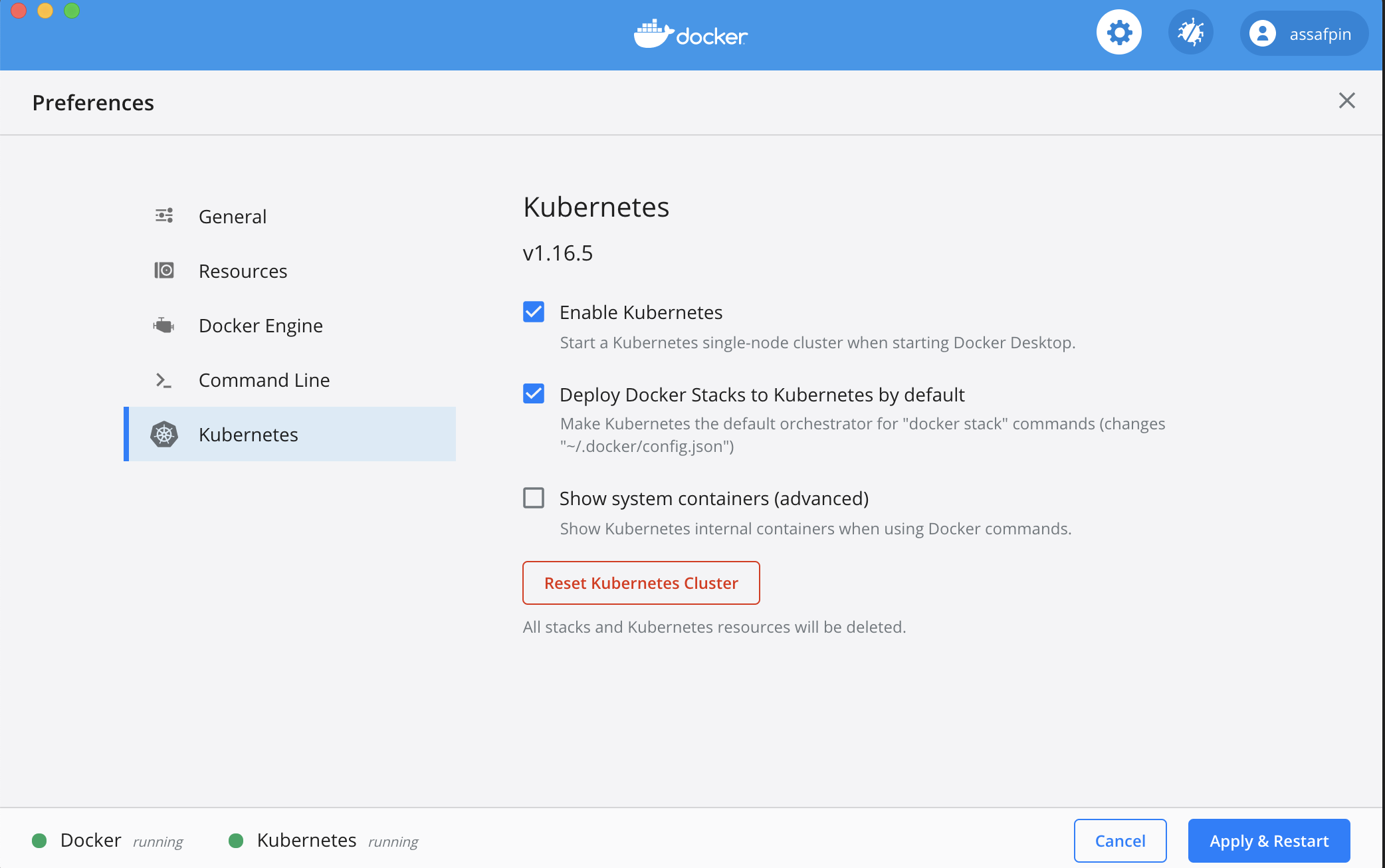
And allocate it at least 3 CPUs (under "Resources" in the Docker preference UI).
If you want to execute your pipeline on a remote kubernetes cluster, make sure the cluster is configured using :
kubectl config set-context <your remote kubernetes cluster>
- Build the docker images used by your pipeline.
In the example pipeline above, you can see that tasks and services have an "image" field - such as "my_static_input_task_image". This means that the task is executed inside a docker container, and the docker container is created from a docker image where various code and libraries are installed.
You can take a look at what the build process looks like, e.g. here
In order for the images to be available for your pipeline, you'll need to build them locally:
cd </path/to/your/liminal/code>
liminal build
You'll see that a number of outputs indicating various docker images built.
- Create a kubernetes local volume
In case your Yaml includes working with volumes please first run the following command:
cd </path/to/your/liminal/code>
liminal create
- Deploy the pipeline:
cd </path/to/your/liminal/code>
liminal deploy
Note: after upgrading liminal, it's recommended to issue the command
liminal deploy --clean
This will rebuild the airlfow docker containers from scratch with a fresh version of liminal, ensuring consistency.
- Start the server
liminal start
- Stop the server
liminal stop
- Display the server logs
liminal logs --follow/--tail

Number of lines to show from the end of the log:
liminal logs --tail=10

Follow log output:
liminal logs --follow
-
Navigate to http://localhost:8080/admin
-
You should see your
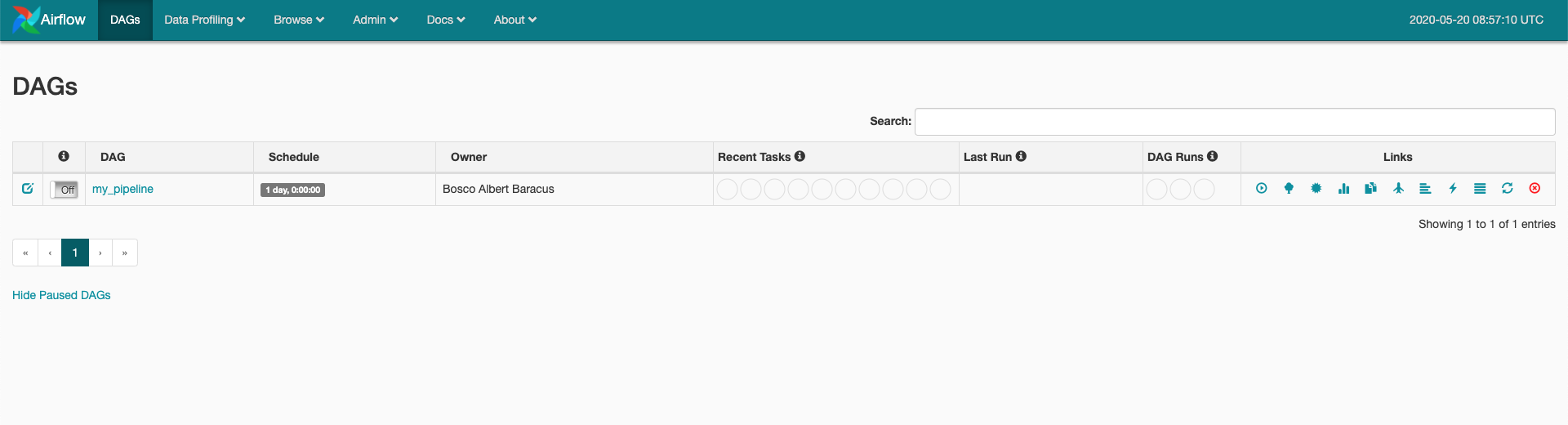 The pipeline is scheduled to run according to the
 json schedule: 0 * 1 * *field in the .yml file you provided. -
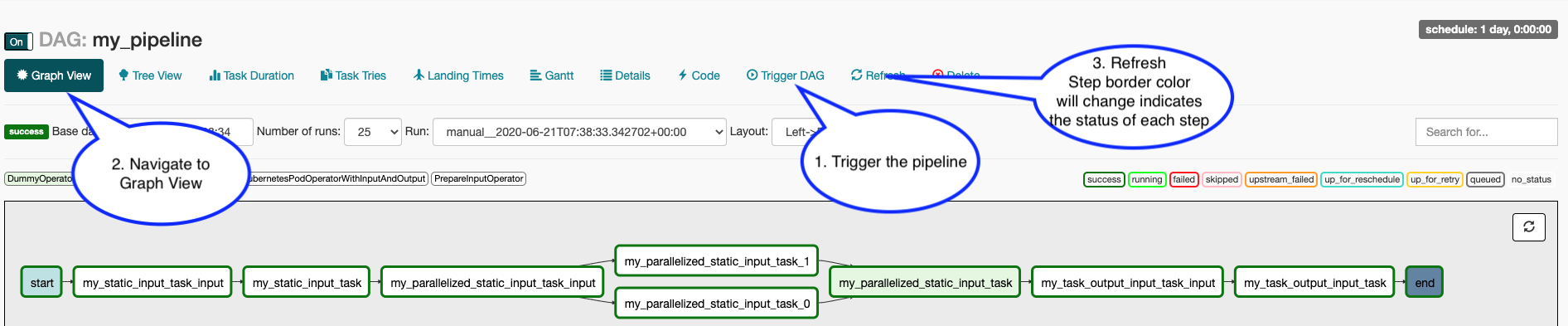
To manually activate your pipeline: Click your pipeline and then click "trigger DAG" Click "Graph view" You should see the steps in your pipeline getting executed in "real time" by clicking "Refresh" periodically.
Contributing
More information on contributing can be found here
Running Tests (for contributors)
When doing local development and running Liminal unit-tests, make sure to set LIMINAL_STAND_ALONE_MODE=True

 24 Dec 09, 2022
 1 Oct 28, 2021
 156 Dec 14, 2022
 1 Nov 05, 2021
 3.1k Jan 07, 2023
 1 Dec 06, 2022
 1.4k Jan 01, 2023
 7 Dec 18, 2021
 1 Apr 26, 2022
 1.4k Dec 28, 2022
 9.6k Jan 01, 2023
 2 Jul 19, 2022
 875 Dec 27, 2022
 1.3k Dec 28, 2022
 2.4k Jan 02, 2023
 1 Nov 03, 2021
 90 Oct 28, 2022
 14 Dec 15, 2022
 1.1k Dec 28, 2022
 148 Dec 07, 2022