Ipylivebash - Run shell script in Jupyter with live output

Overview

ipylivebash

ipylivebash is a library to run shell script in Jupyter with live output.

Example

%%livebash --save log.txt --save-timestamp

find .

Run find . and show the output in the Jupyter notebook and also save to log-${current_timestamp}.txt

%%livebash --ask-confirm --notify
set -e
deploy_script

Before running the deploy_script show a panel to ask for confirmation. Once it is finished, show a notification.

Features

  1. Run shell script in Jupyter with live output
  2. The output in the notebook cell is not saved in the notebook by default
  3. Support to save the output to a file. If the file already exists, it will pick another name automatically.
  4. Support to show a confirmation UI before executing the script
  5. Support to send a notification when the script finishes.

Usage

usage: livebash [-h] [--save OUTPUT_FILE] [--save-timestamp]
                [--line-limit LINE_LIMIT] [--height HEIGHT] [--ask-confirm]
                [--notify] [--keep-cell-output]

optional arguments:
  -h, --help
  --save OUTPUT_FILE    Save output to a file
  --save-timestamp      Add timestamp to the output file name
  --line-limit LINE_LIMIT
                        Restrict the no. of lines to be shown
  --height HEIGHT       Set the height of the output cell
  --ask-confirm         Ask for confirmation before execution
  --notify              Send a notification when the script finished
  --keep-cell-output    Keep the cell output

Options

--save OUTPUT_FILE

Save the output to a file.

If the file name already exists, it will add a suffix to avoid overriding the original file.

--save-timestamp

Add timestamp to the output file name.

--line-limit LINE_LIMIT

If the no. of line output exceed the limit, it may be truncated. It will show the last 5 lines only.

--height HEIGHT

Set the height of the output cell

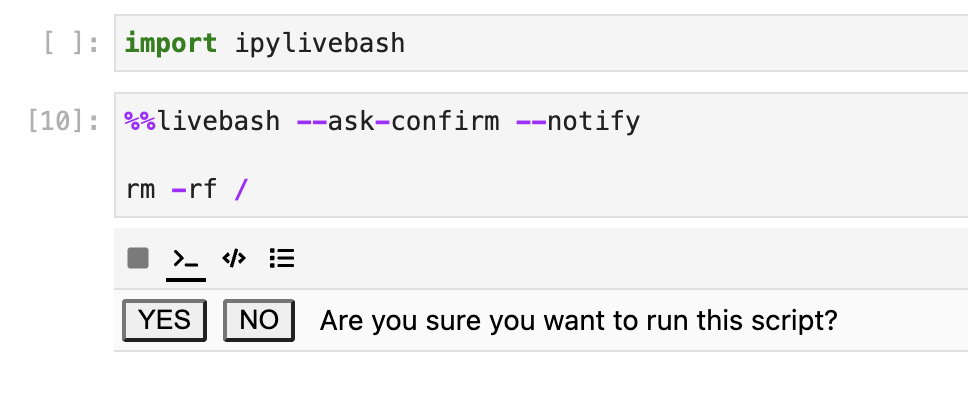
--ask-confirm

Ask for confirmation before execution

ask_confirm.png (392×80)

--notify

Send a notification when the script finished

--keep-cell-output

Keep the cell output such that it could be saved together with the notebook. It can't be used with other options like --line-limit.

Installation

You can install using pip:

pip install ipylivebash

If you are using Jupyter Notebook 5.2 or earlier, you may also need to enable the nbextension:

jupyter nbextension enable --py [--sys-prefix|--user|--system] ipylivebash

Development Installation

Create a dev environment:

conda create -n ipylivebash-dev -c conda-forge nodejs yarn python jupyterlab
conda activate ipylivebash-dev

Install the python. This will also build the TS package.

pip install -e ".[test, examples]"

When developing your extensions, you need to manually enable your extensions with the notebook / lab frontend. For lab, this is done by the command:

jupyter labextension develop --overwrite .
yarn run build

For classic notebook, you need to run:

jupyter nbextension install --sys-prefix --symlink --overwrite --py ipylivebash
jupyter nbextension enable --sys-prefix --py ipylivebash

Note that the --symlink flag doesn't work on Windows, so you will here have to run the install command every time that you rebuild your extension. For certain installations you might also need another flag instead of --sys-prefix, but we won't cover the meaning of those flags here.

How to see your changes

Typescript:

If you use JupyterLab to develop then you can watch the source directory and run JupyterLab at the same time in different terminals to watch for changes in the extension's source and automatically rebuild the widget.

# Watch the source directory in one terminal, automatically rebuilding when needed
yarn run watch
# Run JupyterLab in another terminal
jupyter lab

After a change wait for the build to finish and then refresh your browser and the changes should take effect.

Python:

If you make a change to the python code then you will need to restart the notebook kernel to have it take effect.

You might also like...
Output Analyzer for you terminal commands

Output analyzer (OZER) You can specify a few words inside config.yaml file and specify the color you want to be used. installing: Install command usin

Python Processing Tool for Vasp Ipnut/Output

PivotPy A Python Processing Tool for Vasp Input/Output. A CLI is available in Powershell, see Vasp2Visual. stylea{text-decoration: none !important;c

Runs a command in P4wnP1 and displays the output on OLED screen (SH1106)

p4wnp1-oled-terminal Runs a command in P4wnP1 and displays the output on OLED screen (SH1106) Works on Raspberry Pi Zero 2 W Tested successfully on RP

Tablicate - Python library for easy table creation and output to terminal

Tablicate Tablicate - Python library for easy table creation and output to terminal Features Column-wise justification alignment (left, right, center)

Format click help output nicely with rich.

rich-click Format click help output nicely with Rich. Click is a "Python package for creating beautiful command line interfaces". Rich is a "Python li

xonsh is a Python-powered, cross-platform, Unix-gazing shell

xonsh is a Python-powered, cross-platform, Unix-gazing shell language and command prompt.

adds flavor of interactive filtering to the traditional pipe concept of UNIX shell

percol __ ____ ___ ______________ / / / __ \/ _ \/ ___/ ___/ __ \/ / / /_/ / __/ / / /__/ /_/ / / / .__

xonsh is a Python-powered, cross-platform, Unix-gazing shell language and command prompt.

xonsh xonsh is a Python-powered, cross-platform, Unix-gazing shell language and command prompt. The language is a superset of Python 3.6+ with additio

Fetch is use to get information about anything on the shell using Wikipedia.

Fetch Search wikipedia article on command line [Why This?] [Support the Project] [Installation] [Configuration] Why this? Fetch helps you to quickly l

Comments
  • Problem in kubectl outputs

    Problem in kubectl outputs

    HI,

    first of all: thanks for this extesion, it helps a lot.

    But there seems to be an issue if the output comes too fast or something. It might be the debouncing? The output is only printed after I terminate the line or a new pod is created.

    %%livebash
    kubectl get pods -w
    

    It works if I use the following code:

    import subprocess
    import shlex
    def run_command(command):
        process = subprocess.Popen(shlex.split(command), stdout=subprocess.PIPE)
        while True:
            output = process.stdout.readline()
            if output == '' and process.poll() is not None:
                break
            if output:
                print(output.strip().decode("utf-8") )
        rc = process.poll()
        return rc
    
    run_command("kubectl get pods -w")
    
    opened by smerschjohann 2
Releases(release/0.1.2)
Owner
Ben Lau
Full Stack Developer
Ben Lau
A begginer reverse shell tool python.

A begginer tools for hacking. The theme of this repository is to bring some ready-made open-source tools for anyone new to the world of hacking. This

Dio brando 2 Jan 05, 2022
pypinfo is a simple CLI to access PyPI download statistics via Google's BigQuery.

pypinfo: View PyPI download statistics with ease. pypinfo is a simple CLI to access PyPI download statistics via Google's BigQuery. Installation pypin

Ofek Lev 351 Dec 26, 2022
Gamma ion pump QPC ethernet Python library & CLI utility

Unofficial Gamma ion pump ethernet control CLI utility and library This is a mini Python 3 library and utility that exposes some of the functions of t

2 Jul 18, 2022
🌈 Lightweight Python package that makes it easy and fast to print terminal messages in colors. 🌈

🌈 Colorist for Python 🌈 Lightweight Python package that makes it easy and fast to print terminal messages in colors. Prerequisites Python 3.9 or hig

Jakob Bagterp 1 Feb 05, 2022
Command line interface to watch your childhood shows in hindi and english, designed with python

Sweet dreams: Most of your childhood shows Command line interface to watch your

Not Your Surya 3 Feb 13, 2022
CLI for SQLite Databases with auto-completion and syntax highlighting

litecli Docs A command-line client for SQLite databases that has auto-completion and syntax highlighting. Installation If you already know how to inst

dbcli 1.8k Dec 31, 2022
A CLI Application to detect plagiarism in Source Code Files.

Plag Description A CLI Application to detect plagiarism in Source Code Files. Features Compare source code files for plagiarism. Extract code features

default=dev 2 Nov 10, 2022
Personal and work vim 8 configuration with submodules

vimfiles Windows Vim 8 configuration files based on the recommendations of Ruslan Osipov, Keep Your vimrc file clean and The musings of bluz71. :help

1 Aug 27, 2022
Convert shellcode generated using pe_2_shellcode to cdb format.

pe2shc-to-cdb This tool will convert shellcode generated using pe_to_shellcode to cdb format. Cdb.exe is a LOLBIN which can help evade detection & app

mrd0x 75 Jan 05, 2023
Key-control - A tool for add keys to your Termux app

Key-Control Is a tool for add keys to your Termux app. Cara Penginstalan $ pkg u

Beereva.id 1 Feb 14, 2022
Command line tool to keep track of your favorite playlists on YouTube and many other places.

Command line tool to keep track of your favorite playlists on YouTube and many other places.

Wolfgang Popp 144 Jan 05, 2023
Task-manager-CLI with Priority Modification

Task-manager-CLI with Priority Modification The functions for the app have been written in task.py file. 1. Install Node.js This project requires Node

1 Jan 21, 2022
Universal Command Line Interface for Amazon Web Services

This package provides a unified command line interface to Amazon Web Services.

Amazon Web Services 13.3k Jan 07, 2023
cmsis-pack-manager is a python module, Rust crate and command line utility for managing current device information that is stored in many CMSIS PACKs

cmsis-pack-manager cmsis-pack-manager is a python module, Rust crate and command line utility for managing current device information that is stored i

pyocd 20 Dec 21, 2022
Management commands to help backup and restore your project database and media files

Django Database Backup This Django application provides management commands to help backup and restore your project database and media files with vari

687 Jan 04, 2023
Konsave lets use save your KDE Plasma customizatios and restore them very easily!

Konsave (Save Plasma Customization) A CLI program that will let you save and apply your KDE Plasma customizations with just one command! Als

439 Jan 02, 2023
A Python command-line utility for validating that the outputs of a given Declarative Form Azure Portal UI JSON template map to the input parameters of a given ARM Deployment Template JSON template

A Python command-line utility for validating that the outputs of a given Declarative Form Azure Portal UI JSON template map to the input parameters of a given ARM Deployment Template JSON template

Glenn Musa 1 Feb 03, 2022
🗃️ Fileio-cli wrapper for fileioapi.py with fire.py, inspiration DOS

🗃️ File.io File.io simply upload a file, share the link, and after it is downloaded, the file is completely deleted. An API wrapper for the file.io w

nkot56297 2 May 12, 2022
A simple CLI based any Download Tool, that find files and let you stream or download thorugh WebTorrent CLI or Aria or any command tool

Privateer A simple CLI based any Download Tool, that find files and let you stream or download thorugh WebTorrent CLI or Aria or any command tool How

Shreyash Chavan 2 Apr 04, 2022
A Neat Application To Manage Your To-Do Lists.

WTD - What To Do? A Neat Application To Manage Your To-Do Lists. One folder can only have one to-do file. Running wth without any subcommands executes

Adam Vajda 1 Oct 24, 2021