pypinfo: View PyPI download statistics with ease.




pypinfo is a simple CLI to access PyPI download statistics via Google's BigQuery.
Installation
pypinfo is distributed on PyPI as a universal wheel and is available on Linux/macOS and Windows and supports Python 3.6+.
This is relatively painless, I swear.
Create project
Sign up if you haven't already. The first TB of queried data each month is free. Each additional TB is $5.
Go to https://console.developers.google.com/cloud-resource-manager and click CREATE PROJECT if you don't already have one:

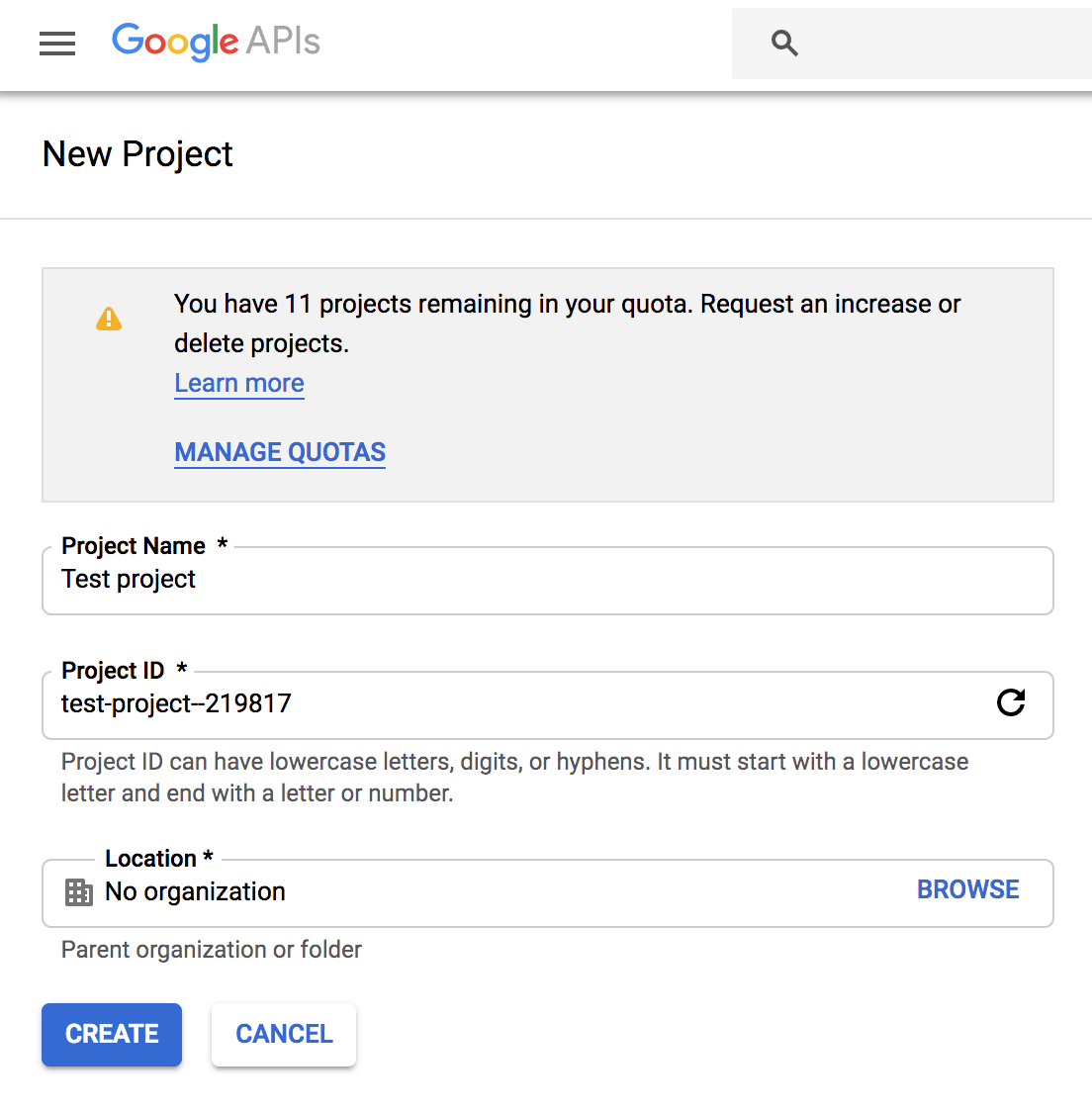
This takes you to https://console.developers.google.com/projectcreate. Fill out the form and click CREATE. Any name is fine, but I recommend you choose something to do with PyPI like pypinfo. This way you know what the project is designated for:
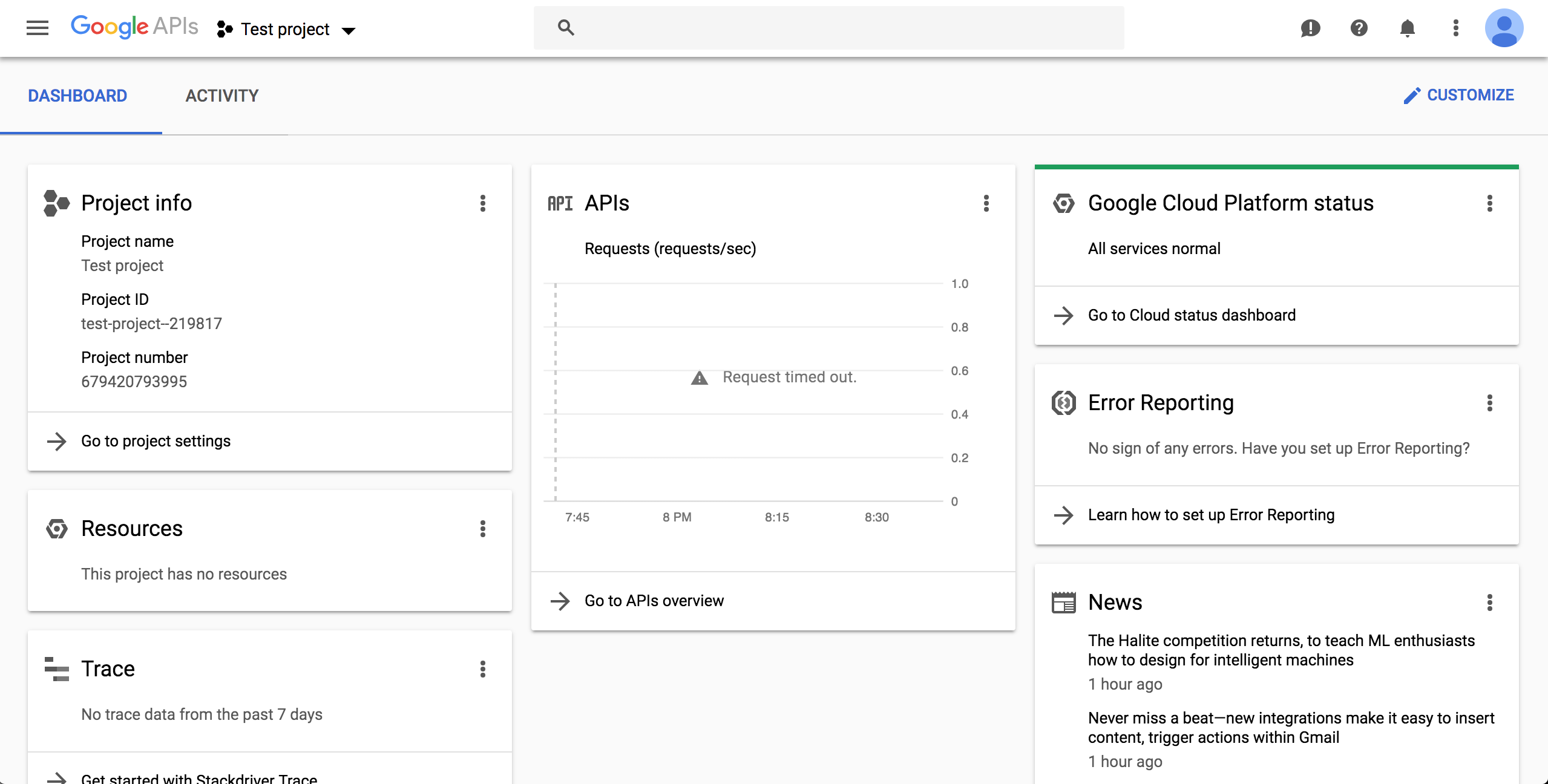
The next page should show your new project. If not, reload the page and select from the top menu:
Enable BigQuery API
Go to https://console.cloud.google.com/apis/api/bigquery-json.googleapis.com/overview and make sure the correct project is chosen using the drop-down on top. Click the ENABLE button:

After enabling, click CREATE CREDENTIALS:
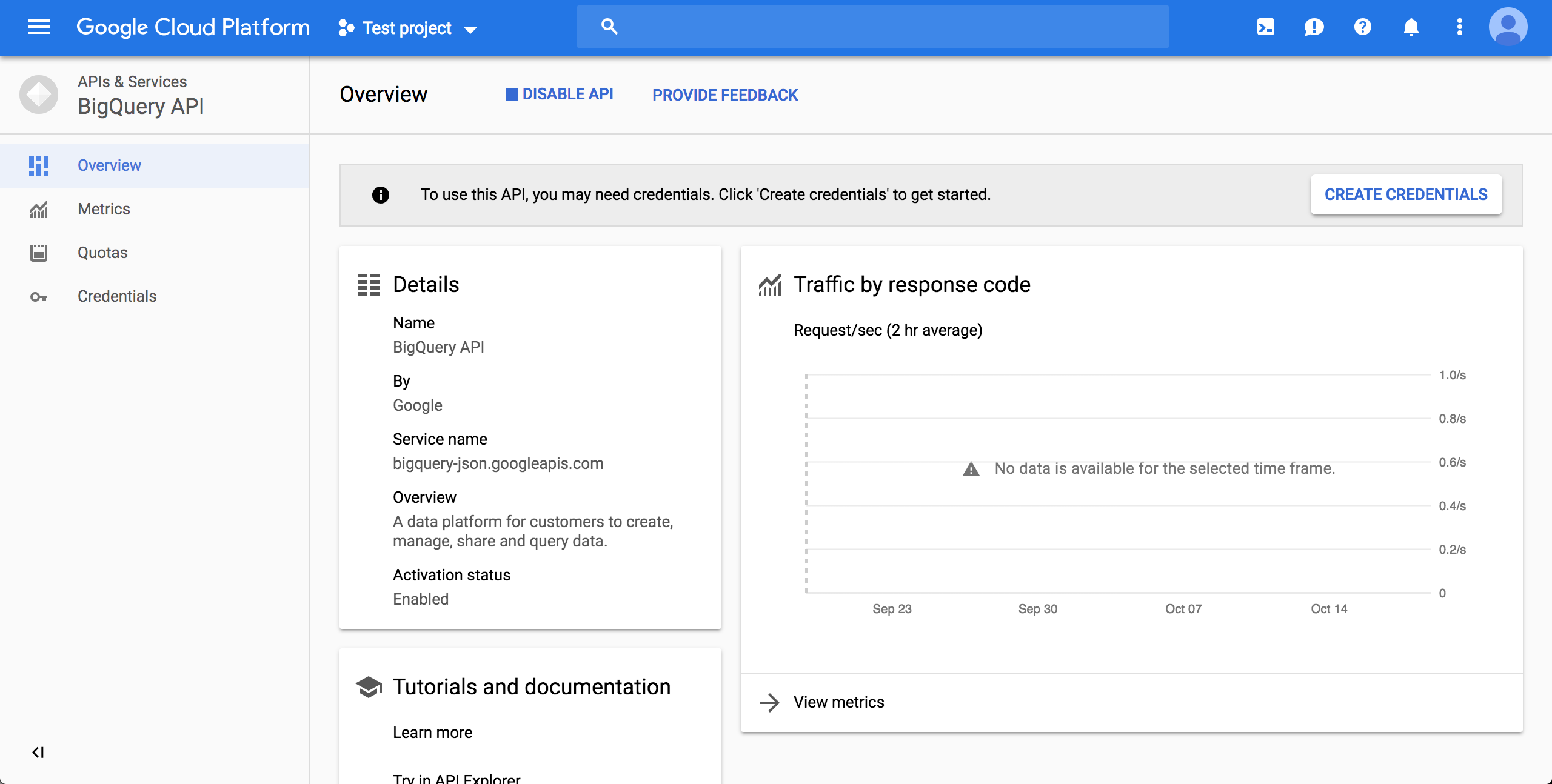
Choose the "BigQuery API" and "No, I'm not using them":

Fill in a name, and select role "BigQuery User" (if the "BigQuery" is not an option in the list, wait 15-20 minutes and try creating the credentials again), and select a JSON key:
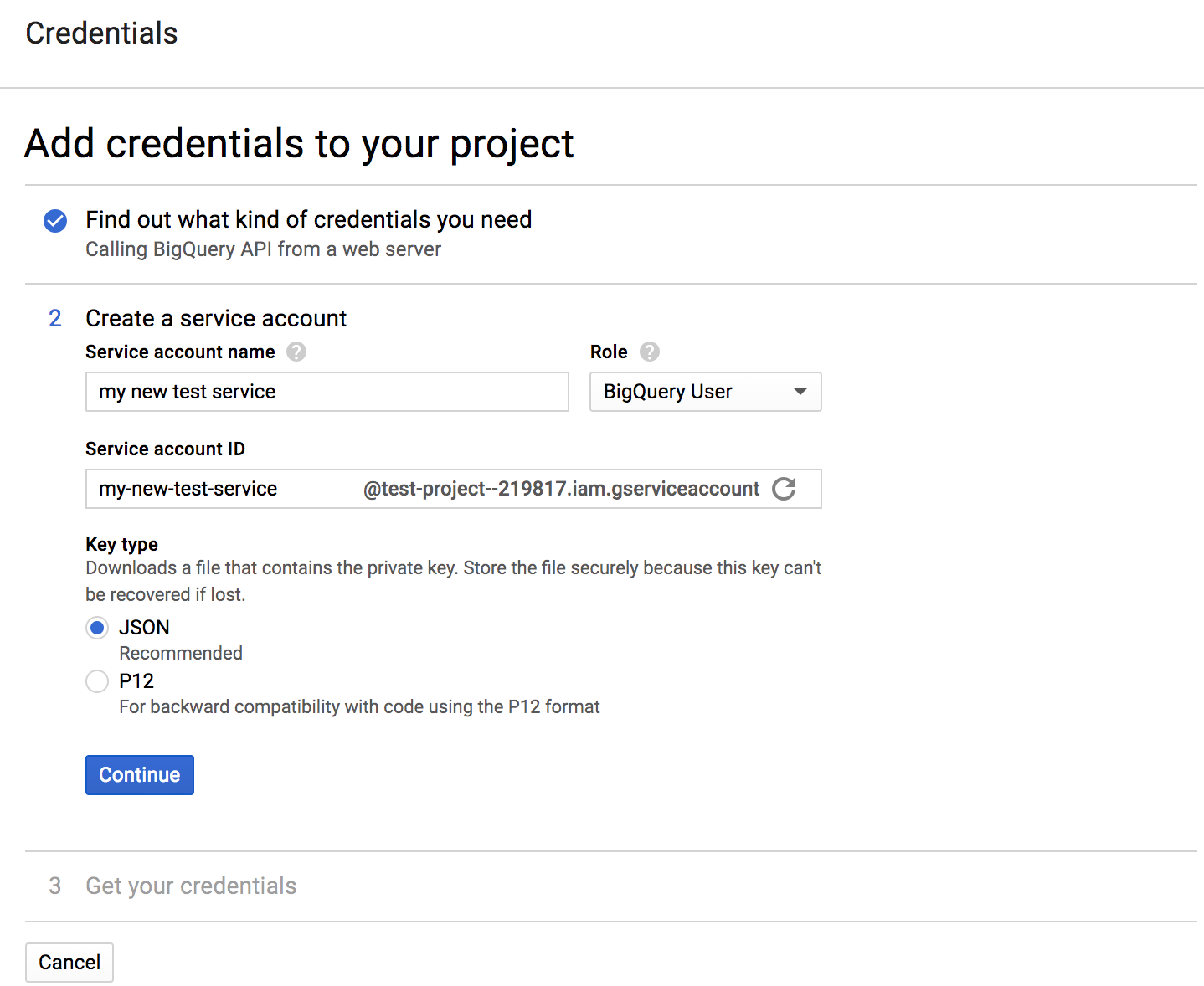
Click continue and the JSON will download to your computer. Note the download location. Move the file wherever you want:

pip install pypinfopypinfo --auth path/to/your_credentials.json, or set an environment variableGOOGLE_APPLICATION_CREDENTIALSthat points to the file.
Usage
$ pypinfo
Usage: pypinfo [OPTIONS] [PROJECT] [FIELDS]... COMMAND [ARGS]...

  Valid fields are:

  project | version | file | pyversion | percent3 | percent2 | impl | impl-version |

  openssl | date | month | year | country | installer | installer-version |

  setuptools-version | system | system-release | distro | distro-version | cpu |

  libc | libc-version

Options:
  -a, --auth TEXT         Path to Google credentials JSON file.
  --run / --test          --test simply prints the query.
  -j, --json              Print data as JSON, with keys `rows` and `query`.
  -i, --indent INTEGER    JSON indentation level.
  -t, --timeout INTEGER   Milliseconds. Default: 120000 (2 minutes)
  -l, --limit TEXT        Maximum number of query results. Default: 10
  -d, --days TEXT         Number of days in the past to include. Default: 30
  -sd, --start-date TEXT  Must be negative or YYYY-MM[-DD]. Default: -31
  -ed, --end-date TEXT    Must be negative or YYYY-MM[-DD]. Default: -1
  -m, --month TEXT        Shortcut for -sd & -ed for a single YYYY-MM month.
  -w, --where TEXT        WHERE conditional. Default: file.project = "project"
  -o, --order TEXT        Field to order by. Default: download_count
  --all                   Show downloads by all installers, not only pip.
  -pc, --percent          Print percentages.
  -md, --markdown         Output as Markdown.
  -v, --verbose           Print debug messages to stderr.
  --version               Show the version and exit.
  -h, --help              Show this message and exit.
pypinfo accepts 0 or more options, followed by exactly 1 project, followed by 0 or more fields. By default only the last 30 days are queried. Let's take a look at some examples!
Tip: If queries are resulting in NoneType errors, increase timeout.
Downloads for a project
$ pypinfo requests
Served from cache: False
Data processed: 2.83 GiB
Data billed: 2.83 GiB
Estimated cost: $0.02

| download_count |
| -------------- |
|    116,353,535 |
All downloads
$ pypinfo ""
Served from cache: False
Data processed: 116.15 GiB
Data billed: 116.15 GiB
Estimated cost: $0.57

| download_count |
| -------------- |
|  8,642,447,168 |
Downloads for a project by Python version
$ pypinfo django pyversion
Served from cache: False
Data processed: 967.33 MiB
Data billed: 968.00 MiB
Estimated cost: $0.01

| python_version | download_count |
| -------------- | -------------- |
| 3.8            |      1,735,967 |
| 3.6            |      1,654,871 |
| 3.7            |      1,326,423 |
| 2.7            |        876,621 |
| 3.9            |        524,570 |
| 3.5            |        258,609 |
| 3.4            |         12,769 |
| 3.10           |          3,050 |
| 3.3            |            225 |
| 2.6            |            158 |
| Total          |      6,393,263 |
All downloads by country code
$ pypinfo "" country
Served from cache: False
Data processed: 150.40 GiB
Data billed: 150.40 GiB
Estimated cost: $0.74

| country | download_count |
| ------- | -------------- |
| US      |  6,614,473,568 |
| IE      |    336,037,059 |
| IN      |    192,914,402 |
| DE      |    186,968,946 |
| NL      |    182,691,755 |
| None    |    141,753,357 |
| BE      |    111,234,463 |
| GB      |    109,539,219 |
| SG      |    106,375,274 |
| FR      |     86,036,896 |
| Total   |  8,068,024,939 |
Downloads for a project by system and distribution
$ pypinfo cryptography system distro
Served from cache: False
Data processed: 2.52 GiB
Data billed: 2.52 GiB
Estimated cost: $0.02

| system_name | distro_name                     | download_count |
| ----------- | ------------------------------- | -------------- |
| Linux       | Ubuntu                          |     19,524,538 |
| Linux       | Debian GNU/Linux                |     11,662,104 |
| Linux       | Alpine Linux                    |      3,105,553 |
| Linux       | Amazon Linux AMI                |      2,427,975 |
| Linux       | Amazon Linux                    |      2,374,869 |
| Linux       | CentOS Linux                    |      1,955,181 |
| Windows     | None                            |      1,522,069 |
| Linux       | CentOS                          |        568,370 |
| Darwin      | macOS                           |        489,859 |
| Linux       | Red Hat Enterprise Linux Server |        296,858 |
| Total       |                                 |     43,927,376 |
Most popular projects in the past year
$ pypinfo --days 365 "" project
Served from cache: False
Data processed: 1.69 TiB
Data billed: 1.69 TiB
Estimated cost: $8.45

| project         | download_count |
| --------------- | -------------- |
| urllib3         |  1,382,528,406 |
| six             |  1,172,798,441 |
| botocore        |  1,053,169,690 |
| requests        |    995,387,353 |
| setuptools      |    992,794,567 |
| certifi         |    948,518,394 |
| python-dateutil |    934,709,454 |
| idna            |    929,781,443 |
| s3transfer      |    877,565,186 |
| chardet         |    854,744,674 |
| Total           | 10,141,997,608 |
Downloads between two YYYY-MM-DD dates
$ pypinfo --start-date 2018-04-01 --end-date 2018-04-30 setuptools
Served from cache: False
Data processed: 571.37 MiB
Data billed: 572.00 MiB
Estimated cost: $0.01

| download_count |
| -------------- |
|      8,972,826 |
Downloads between two YYYY-MM dates
- A yyyy-mm
--start-datedefaults to the first day of the month - A yyyy-mm
--end-datedefaults to the last day of the month
$ pypinfo --start-date 2018-04 --end-date 2018-04 setuptools
Served from cache: False
Data processed: 571.37 MiB
Data billed: 572.00 MiB
Estimated cost: $0.01

| download_count |
| -------------- |
|      8,972,826 |
Downloads for a single YYYY-MM month
$ pypinfo --month 2018-04 setuptools
Served from cache: False
Data processed: 571.37 MiB
Data billed: 572.00 MiB
Estimated cost: $0.01

| download_count |
| -------------- |
|      8,972,826 |
Percentage of Python 3 downloads of the top 100 projects in the past year
Let's use --test to only see the query instead of sending it.
$ pypinfo --test --days 365 --limit 100 "" project percent3
SELECT
  file.project as project,
  ROUND(100 * SUM(CASE WHEN REGEXP_EXTRACT(details.python, r"^([^\.]+)") = "3" THEN 1 ELSE 0 END) / COUNT(*), 1) as percent_3,
  COUNT(*) as download_count,
FROM `bigquery-public-data.pypi.file_downloads`
WHERE timestamp BETWEEN TIMESTAMP_ADD(CURRENT_TIMESTAMP(), INTERVAL -366 DAY) AND TIMESTAMP_ADD(CURRENT_TIMESTAMP(), INTERVAL -1 DAY)
  AND details.installer.name = "pip"
GROUP BY
  project
ORDER BY
  download_count DESC
LIMIT 100
Credits
- Donald Stufft for maintaining PyPI all these years.
- Google for donating BigQuery capacity to PyPI.
- Paul Kehrer for his awesome blog post.
Changelog
Important changes are emphasized.
Unreleased
19.0.0
- Update dataset to the new Google-hosted location
18.0.1
- Fix usage of date ranges
18.0.0
- Use the clustered data table and standard SQL for lower query costs
17.0.0
- Add support for libc & libc-version fields
16.0.2
- Update TinyDB and Tinyrecord dependencies for compatibility
16.0.1
- Pin TinyDB<4, Tinyrecord does not yet support TinyDB v4
16.0.0
- Allow yyyy-mm[-dd]
--start-dateand--end-date:- A yyyy-mm
--start-datedefaults to the first day of the month - A yyyy-mm
--end-datedefaults to the last day of the month
- A yyyy-mm
- Add
--monthas a shortcut to--start-dateand--end-datefor a single yyyy-mm month - Add
--verboseoption to print credentials location - Update installation instructions
- Enforce
blackcode style
15.0.0
- Allow yyyy-mm-dd dates
- Add
--alloption, default to only showing downloads via pip - Add download total row
14.0.0
- Added new
filefield!
13.0.0
- Added
last_updateJSON key, which is a UTC timestamp.
12.0.0
- Breaking: JSON output is now a mapping with keys
rows, which is all the data that was previously outputted, andquery, which is relevant metadata. - Increased the resolution of percentages.
11.0.0
- Fixed JSON output.
10.0.0
- Fixed custom field ordering.
9.0.0
- Added new BigQuery usage stats.
- Lowered the default number of results to
10from20. - Updated examples.
- Fixed table formatting regression.
8.0.0
- Updated
google-cloud-bigquerydependency.
7.0.0
- Output table is now in Markdown format for easy copying to GitHub issues and PRs.
6.0.0
- Updated
google-cloud-bigquerydependency.
5.0.0
- Numeric output (non-json) is now prettier (thanks hugovk)
- You can now filter results for only pip installs with the
--pipflag (thanks hugovk)
4.0.0
--ordernow works with all fields (thanks Brian Skinn)- Updated installation docs (thanks Brian Skinn)
3.0.1
- Fix: project names are now normalized to adhere to PEP 503.
3.0.0
- Breaking:
--jsonoption is now just a flag and prints output as prettified JSON.
2.0.0
- Added
--jsonpath option.
1.0.0
- Initial release

 39 Oct 20, 2022
 5 Apr 12, 2022
 13 Jan 13, 2022
 27 Jan 01, 2023
 69 Oct 24, 2022
 1 Feb 03, 2022
 83 Dec 26, 2022
 1 Nov 17, 2021
 264 Dec 30, 2022
 70 Dec 23, 2022
 1 Nov 23, 2021
 2 Jan 31, 2022
 3 Mar 23, 2022
 45 Dec 11, 2022
 2 Apr 07, 2022
 11 Jan 04, 2022
 5 May 08, 2022
 29 Jan 17, 2022
 49 Nov 15, 2021
 8 Jan 09, 2023