
Latex code for making neural networks diagrams

Overview

PlotNeuralNet

DOI

Latex code for drawing neural networks for reports and presentation. Have a look into examples to see how they are made. Additionally, lets consolidate any improvements that you make and fix any bugs to help more people with this code.

Examples

Following are some network representations:
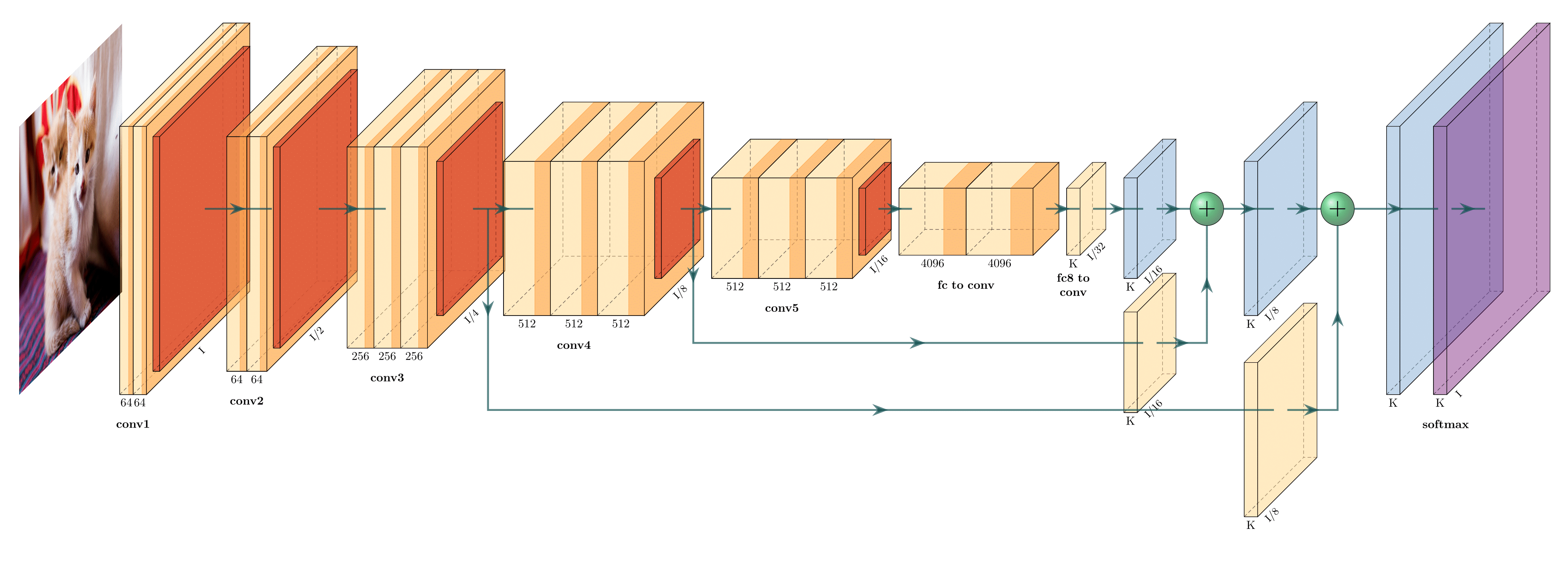
FCN-8 (view on Overleaf)
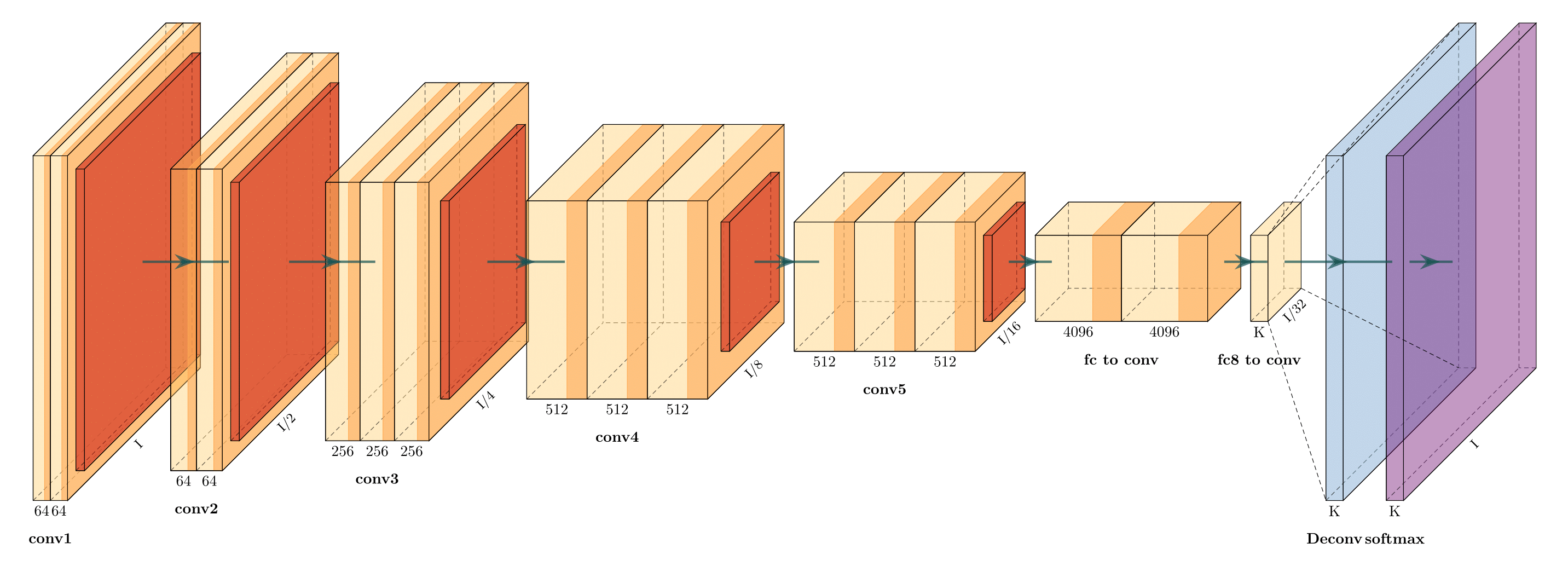
FCN-32 (view on Overleaf)

Holistically-Nested Edge Detection (view on Overleaf)

Getting Started

  1. Install the following packages on Ubuntu.

    • Ubuntu 16.04

      sudo apt-get install texlive-latex-extra
      
    • Ubuntu 18.04.2 Base on this website, please install the following packages.

      sudo apt-get install texlive-latex-base
      sudo apt-get install texlive-fonts-recommended
      sudo apt-get install texlive-fonts-extra
      sudo apt-get install texlive-latex-extra
      
    • Windows

    1. Download and install MikTeX.
    2. Download and install bash runner on Windows, recommends Git bash or Cygwin(https://www.cygwin.com/)
  2. Execute the example as followed.

    cd pyexamples/
    bash ../tikzmake.sh test_simple
    

TODO

  • Python interface
  • Add easy legend functionality
  • Add more layer shapes like TruncatedPyramid, 2DSheet etc
  • Add examples for RNN and likes.

Latex usage

See examples directory for usage.

Python usage

First, create a new directory and a new Python file:

$ mkdir my_project
$ cd my_project
vim my_arch.py

Add the following code to your new file:

import sys
sys.path.append('../')
from pycore.tikzeng import *

# defined your arch
arch = [
    to_head( '..' ),
    to_cor(),
    to_begin(),
    to_Conv("conv1", 512, 64, offset="(0,0,0)", to="(0,0,0)", height=64, depth=64, width=2 ),
    to_Pool("pool1", offset="(0,0,0)", to="(conv1-east)"),
    to_Conv("conv2", 128, 64, offset="(1,0,0)", to="(pool1-east)", height=32, depth=32, width=2 ),
    to_connection( "pool1", "conv2"),
    to_Pool("pool2", offset="(0,0,0)", to="(conv2-east)", height=28, depth=28, width=1),
    to_SoftMax("soft1", 10 ,"(3,0,0)", "(pool1-east)", caption="SOFT"  ),
    to_connection("pool2", "soft1"),
    to_end()
    ]

def main():
    namefile = str(sys.argv[0]).split('.')[0]
    to_generate(arch, namefile + '.tex' )

if __name__ == '__main__':
    main()

Now, run the program as follows:

bash ../tikzmake.sh my_arch
Comments
  • Error when running readme example: `I can't find file `tikzlibraryquotes.code.tex'`

    Error when running readme example: `I can't find file `tikzlibraryquotes.code.tex'`

    python my_arch.py works fine, producing the output included below. However, when I run pdflatex, I get error:

    ! I can't find file `tikzlibraryquotes.code.tex'.
    <argument> ...nput tikzlibrary\[email protected] .code.tex 
                                                      \catcode `\@ =\csname tikz...
    l.2 \usetikzlibrary{quotes,arrows.meta}
    

    I presume this is a simple fix requiring an install. Please may you help me diagnose what I need installed on my system for this to run? I am able to run tikz fine and create examples e.g. this one.

    LaTeX info

    $ pdflatex --version
    pdfTeX 3.1415926-2.5-1.40.14 (TeX Live 2013/Debian)
    kpathsea version 6.1.1
    Copyright 2013 Peter Breitenlohner (eTeX)/Han The Thanh (pdfTeX).
    There is NO warranty.  Redistribution of this software is
    covered by the terms of both the pdfTeX copyright and
    the Lesser GNU General Public License.
    For more information about these matters, see the file
    named COPYING and the pdfTeX source.
    Primary author of pdfTeX: Peter Breitenlohner (eTeX)/Han The Thanh (pdfTeX).
    Compiled with libpng 1.2.50; using libpng 1.2.50
    Compiled with zlib 1.2.8; using zlib 1.2.8
    Compiled with poppler version 0.24.5
    

    Python output:

    \documentclass[border=8pt, multi, tikz]{standalone} 
    \usepackage{import}
    \subimport{../layers/}{init}
    \usetikzlibrary{positioning}
    \usetikzlibrary{3d} %for including external image 
    
    
    \def\ConvColor{rgb:yellow,5;red,2.5;white,5}
    \def\ConvReluColor{rgb:yellow,5;red,5;white,5}
    \def\PoolColor{rgb:red,1;black,0.3}
    \def\UnpoolColor{rgb:blue,2;green,1;black,0.3}
    \def\FcColor{rgb:blue,5;red,2.5;white,5}
    \def\FcReluColor{rgb:blue,5;red,5;white,4}
    \def\SoftmaxColor{rgb:magenta,5;black,7}   
    
    
    \newcommand{\copymidarrow}{\tikz \draw[-Stealth,line width=0.8mm,draw={rgb:blue,4;red,1;green,1;black,3}] (-0.3,0) -- ++(0.3,0);}
    
    \begin{document}
    \begin{tikzpicture}
    \tikzstyle{connection}=[ultra thick,every node/.style={sloped,allow upside down},draw=\edgecolor,opacity=0.7]
    \tikzstyle{copyconnection}=[ultra thick,every node/.style={sloped,allow upside down},draw={rgb:blue,4;red,1;green,1;black,3},opacity=0.7]
    
    
    \pic[shift={(0,0,0)}] at (0,0,0) 
        {Box={
            name=conv1,
            caption= ,
            xlabel={{64, }},
            zlabel=512,
            fill=\ConvColor,
            height=64,
            width=2,
            depth=64
            }
        };
    
    
    \pic[shift={ (0,0,0) }] at (conv1-east) 
        {Box={
            name=pool1,
            caption= ,
            fill=\PoolColor,
            opacity=0.5,
            height=32,
            width=1,
            depth=32
            }
        };
    
    
    \pic[shift={(1,0,0)}] at (pool1-east) 
        {Box={
            name=conv2,
            caption= ,
            xlabel={{64, }},
            zlabel=128,
            fill=\ConvColor,
            height=32,
            width=2,
            depth=32
            }
        };
    
    
    \draw [connection]  (pool1-east)    -- node {\midarrow} (conv2-west);
    
    
    \pic[shift={ (0,0,0) }] at (conv2-east) 
        {Box={
            name=pool2,
            caption= ,
            fill=\PoolColor,
            opacity=0.5,
            height=28,
            width=1,
            depth=28
            }
        };
    
    
    \pic[shift={(3,0,0)}] at (pool1-east) 
        {Box={
            name=soft1,
            caption=SOFT,
            xlabel={{" ","dummy"}},
            zlabel=10,
            fill=\SoftmaxColor,
            opacity=0.8,
            height=3,
            width=1.5,
            depth=25
            }
        };
    
    
    \draw [connection]  (pool2-east)    -- node {\midarrow} (soft1-west);
    
    
    \end{tikzpicture}
    \end{document}
    
    opened by JamesOwers 8
  • Importing Standalone output to tex document

    Importing Standalone output to tex document

    Hey, Thanks for the tool, the graphics look awesome. I'm having some difficulty importing the outputted standalone tex file into a technical report of mine and was wondering if someone tried to do something similar and can help :) Thanks!

    opened by aklyussef 5
  • Fully Connected layer box

    Fully Connected layer box

    Below is the code that implements a fully connected layer box since I wasn't able to find it in the code. I used to_SoftMax function and modified it.

    The code should be put inside pycore/tikzeng.py file.

    def to_FullyConnected( name, s_filer=" ", n_filer=" ", offset="(0,0,0)", to="(0,0,0)", width=1.5, height=3, depth=25, opacity=0.8, caption=" " , zlabelposition='midway'):
        return r"""
    \pic[shift={"""+ offset +"""}] at """+ to +""" 
        {Box={
            name=""" + name +""",
            caption=""" +caption + """,
            xlabel={{ """+ '"'+str(n_filer) +'", "dummy"'+ """ }},
            zlabel="""+ str(s_filer) +""",
            zlabelposition="""+zlabelposition+""",
            fill=\FcColor,
            bandfill=\FcReluColor,
            opacity="""+ str(opacity) +""",
            height="""+ str(height) +""",
            width="""+ str(width) +""",
            depth="""+ str(depth) +"""
            }
        };
    """
    

    Cheers.

    opened by chrismaliszewski 5
  • to_input(...) doesn't have east, west... properties

    to_input(...) doesn't have east, west... properties

    I would like to connect the input image to conv blocks and other blocks, but it is not possible since to_input(...) doesn't have east, west, northeast, etc... properties. How to solve this? Maybe wrap to_input(...) in a box or something?

    opened by dougsouza 5
  • Unet to DenseNets

    Unet to DenseNets

    I am trying to modify Unet tex code to create DenseNets block. f838717a-6ad1-11e6-9391-f0906c80bc1d

    I am wondering how to modify the connection lines that then look like densenets style? Thank you for your time!

    opened by zuxfoucault 4
  • ModuleNotFoundError: No module named 'pycore.tikzeng'

    ModuleNotFoundError: No module named 'pycore.tikzeng'

    After running pip install pycore when I try to run in python: from pycore.tikzeng import * I got: ModuleNotFoundError: No module named 'pycore.tikzeng'

    Version: pycore==17.4.17

    opened by amirubin87 4
  • I want to know how to add legend

    I want to know how to add legend

    Hi, I wonder if there is a way of adding legend to the figure (identifying which color corresponds to which type of layer).

    A example default

    And how to eliminate cube number?

    opened by quinwu 4
  • Font size in the graph

    Font size in the graph

    Does anyone know how to change the font size in the graph? I tried to simply add to the documentclass

    \documentclass[border=15pt, multi, tikz]{standalone}

    but it doesn't work and returns some errors with positioning.

    opened by wufeim 3
  • unet error

    unet error

    pyexamples|master⚡ ⇒ bash ../tikzmake.sh unet

    File "unet.py", line 19 block_2ConvPool( name='b2', botton='pool_b1', top='pool_b2', s_filer=256, n_filer=128, offset="(1,0,0)", size=(32,32,3.5), opacity=0.5 ), ^ SyntaxError: invalid syntax This is pdfTeX, Version 3.14159265-2.6-1.40.19 (TeX Live 2018) (preloaded format=pdflatex) restricted \write18 enabled. entering extended mode ! I can't find file `unet.tex'. <> unet.tex

    (Press Enter to retry, or Control-D to exit) Please type another input file name: ^D ! Emergency stop. <*> unet.tex

    ! ==> Fatal error occurred, no output PDF file produced! Transcript written on texput.log. rm: *.aux: No such file or directory rm: *.vscodeLog: No such file or directory rm: *.tex: No such file or directory ../tikzmake.sh: line 10: xdg-open: command not found

    opened by wm901115nwpu 3
  • Labeling Blocks will create a solid line

    Labeling Blocks will create a solid line

    I tried to let the Box block's edges be invisible via fill=\fill, draw=\fill in Box.sty.

    Actually, It only let edges AH, AD, DE, CD, EF and HE invisible.

    Finally I found that \path (b) edge ["\bf\xlabel"', midway] (c); created a solid line in BC, so do AB and CF.

    I have no idea to fix this and I don't know why the solid lines emerged though no pic action acted in above code.

    Furthermore, I want customize the style of draw line, but nothing changes after I put thin into "box" style setting.

    opened by omegahh 3
  • What does the single quotation mark which follows double quotation marks mean?

    What does the single quotation mark which follows double quotation marks mean?

    Thanks for your amazing work! I am confused with the quotation mark like "\cubezlabel"'. What is the difference between "\cubezlabel".

    Looking forwarding your answer:)

    opened by omegahh 3
  • Made python interface installable via pip

    Made python interface installable via pip

    Hi, HarisIqbal88!

    My boss told me to use your package for my master thesis and I really like it, but it was bugging me, that it didn't have an installer. So I made it installable via pip. I had to rearrange your directories a little bit, but I hope you like it.

    I also added CITATION.cff, this will show how to cite your software directly in the repos sidebar.

    You might want to add your email or ORCID in pyproject.toml and check CITATION.cff for errors.

    I wish you a happy New Year!

    Kind regards, Jonas Eichhorn

    opened by AlreadyTakenJonas 1
  • Add a documentation

    Add a documentation

    Hello,

    Thank you for the good work.

    Please can you work toward doing a good documentation for this repo ? Some arguments are not clearly defined, and it's not clear what values we should use etc.. a proper documentation would be greatly appreciated !

    Cordially

    opened by NicolasNerr 0
  • Add arrow as legend (U-Net Model)

    Add arrow as legend (U-Net Model)

    How can I use an arrow as a legend of the plot? Please give me an example!

    Model architecture: U-Net (I want to plot "concatenate arrows" in U-Net as legend)

    image

    opened by mehrdad-dev 0
Releases(v1.0.0)
  • v1.0.0(Dec 25, 2018)

    This is the first release that is built on the idea to further extend the functionality with maximum backward compatibility. Layer names(e.g., Box,RightBandedBox) and their attributes(e.g., caption,xlabels) are generic. Moreover, the code is much better readable than the previous version. TO DO's:

    • Add easy legend functionality
    • Add more layer shapes like TruncatedPyramid, 2DSheet etc
    Source code(tar.gz)
    Source code(zip)
  • v0.1(Dec 25, 2018)

    This is the very first release in which layers were defined by specific names like Conv, ConvRelu,Deconv and a workable solution was created. This version is not suitable for extension because having a separate layer just because it is represented by a different colour is not clever. In future release, layers should be defined in generic terms like Box, RightBandedBox, Ball etc so that less code can make different layers with colour as a parameter. Additionally, attributes of each layer should also be changed to generic for example: from numFilters to xlabels

    Source code(tar.gz)
    Source code(zip)
Owner
Haris Iqbal
Computer Science Student at Saarland University
Haris Iqbal
Deep Learning GPU Training System

DIGITS DIGITS (the Deep Learning GPU Training System) is a webapp for training deep learning models. The currently supported frameworks are: Caffe, To

NVIDIA Corporation 4.1k Jan 03, 2023
Teaching end to end workflow of deep learning

Deep-Education This repository is now available for public use for teaching end to end workflow of deep learning. This implies that learners/researche

Data Lab at College of William and Mary 2 Sep 26, 2022
Red Team tool for exfiltrating files from a target's Google Drive that you have access to, via Google's API.

GD-Thief Red Team tool for exfiltrating files from a target's Google Drive that you(the attacker) has access to, via the Google Drive API. This includ

Antonio Piazza 39 Dec 27, 2022
Geometric Algebra package for JAX

JAXGA - JAX Geometric Algebra GitHub | Docs JAXGA is a Geometric Algebra package on top of JAX. It can handle high dimensional algebras by storing onl

Robin Kahlow 36 Dec 22, 2022
dataset for ECCV 2020 "Motion Capture from Internet Videos"

Motion Capture from Internet Videos Motion Capture from Internet Videos Junting Dong*, Qing Shuai*, Yuanqing Zhang, Xian Liu, Xiaowei Zhou, Hujun Bao

ZJU3DV 98 Dec 07, 2022
An addernet CUDA version

Training addernet accelerated by CUDA Usage cd adder_cuda python setup.py install cd .. python main.py Environment pytorch 1.10.0 CUDA 11.3 benchmark

LingXY 4 Jun 20, 2022
Implementation of association rules mining algorithms (Apriori|FPGrowth) using python.

Association Rules Mining Using Python Implementation of association rules mining algorithms (Apriori|FPGrowth) using python. As a part of hw1 code in

Pre 2 Nov 10, 2021
DiAne is a smart fuzzer for IoT devices

Diane Diane is a fuzzer for IoT devices. Diane works by identifying fuzzing triggers in the IoT companion apps to produce valid yet under-constrained

seclab 28 Jan 04, 2023
Experiments with the Robust Binary Interval Search (RBIS) algorithm, a Query-Based prediction algorithm for the Online Search problem.

OnlineSearchRBIS Online Search with Best-Price and Query-Based Predictions This is the implementation of the Robust Binary Interval Search (RBIS) algo

S. K. 1 Apr 16, 2022
Code for BMVC2021 paper "Boundary Guided Context Aggregation for Semantic Segmentation"

Boundary-Guided-Context-Aggregation Boundary Guided Context Aggregation for Semantic Segmentation Haoxiang Ma, Hongyu Yang, Di Huang In BMVC'2021 Pape

Haoxiang Ma 31 Jan 08, 2023
MAg: a simple learning-based patient-level aggregation method for detecting microsatellite instability from whole-slide images

MAg Paper Abstract File structure Dataset prepare Data description How to use MAg? Why not try the MAg_lib! Trained models Experiment and results Some

Calvin Pang 3 Apr 08, 2022
Multi-Glimpse Network With Python

Multi-Glimpse Network Our code requires Python ≥ 3.8 Installation For example, venv + pip: $ python3 -m venv env $ source env/bin/activate (env) $ pyt

9 May 10, 2022
Unified learning approach for egocentric hand gesture recognition and fingertip detection

Unified Gesture Recognition and Fingertip Detection A unified convolutional neural network (CNN) algorithm for both hand gesture recognition and finge

Mohammad 227 Dec 25, 2022
The second project in Python course on FCC

Assignment Write a function named add_time that takes in two required parameters and one optional parameter: a start time in the 12-hour clock format

Denise T 1 Dec 13, 2021
Adaptive Denoising Training (ADT) for Recommendation.

DenoisingRec Adaptive Denoising Training for Recommendation. This is the pytorch implementation of our paper at WSDM 2021: Denoising Implicit Feedback

Wenjie Wang 51 Dec 30, 2022
Tensorflow Implementation of SMU: SMOOTH ACTIVATION FUNCTION FOR DEEP NETWORKS USING SMOOTHING MAXIMUM TECHNIQUE

SMU A Tensorflow Implementation of SMU: SMOOTH ACTIVATION FUNCTION FOR DEEP NETWORKS USING SMOOTHING MAXIMUM TECHNIQUE arXiv https://arxiv.org/abs/211

Fuhang 5 Jan 18, 2022
Official code for Next Check-ins Prediction via History and Friendship on Location-Based Social Networks (MDM 2018)

MUC Next Check-ins Prediction via History and Friendship on Location-Based Social Networks (MDM 2018) Performance Details for Accuracy: | Dataset

Yijun Su 3 Oct 09, 2022
Implementation for Shape from Polarization for Complex Scenes in the Wild

sfp-wild Implementation for Shape from Polarization for Complex Scenes in the Wild project website | paper Code and dataset will be released soon. Int

Chenyang LEI 41 Dec 23, 2022
Code to reproduce the results in "Visually Grounded Reasoning across Languages and Cultures", EMNLP 2021.

marvl-code [WIP] This is the implementation of the approaches described in the paper: Fangyu Liu*, Emanuele Bugliarello*, Edoardo M. Ponti, Siva Reddy

25 Nov 15, 2022
DeLighT: Very Deep and Light-Weight Transformers

DeLighT: Very Deep and Light-weight Transformers This repository contains the source code of our work on building efficient sequence models: DeFINE (I

Sachin Mehta 440 Dec 18, 2022