Lightweight Markdown dialect for Python desktop apps

Overview

This project is part of the Pyrustic Open Ecosystem.

Usage | Installation

Litemark

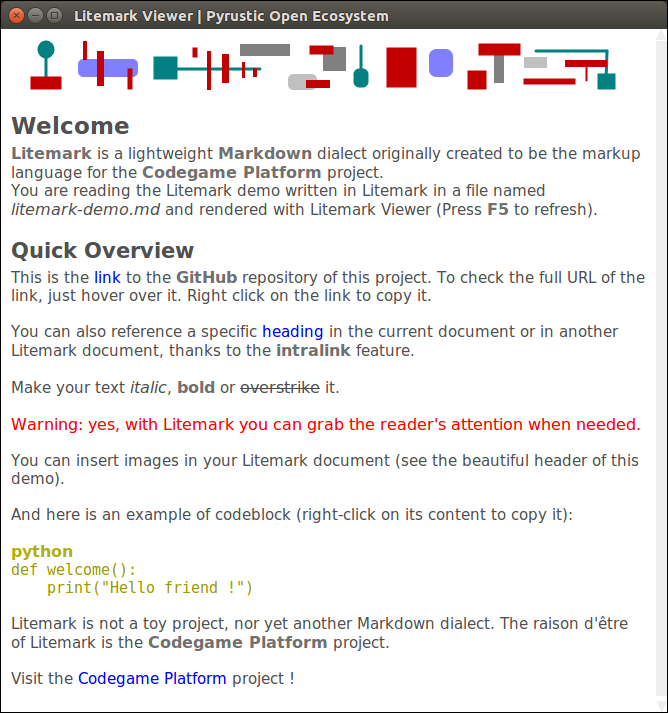
Litemark is a lightweight Markdown dialect originally created to be the markup language for the Codegame Platform project. When you run litemark from the command line interface without any arguments, the Litemark Viewer opens and displays the rendered demo.
Figure

Litemark demo rendered in the Litemark Viewer

Figure

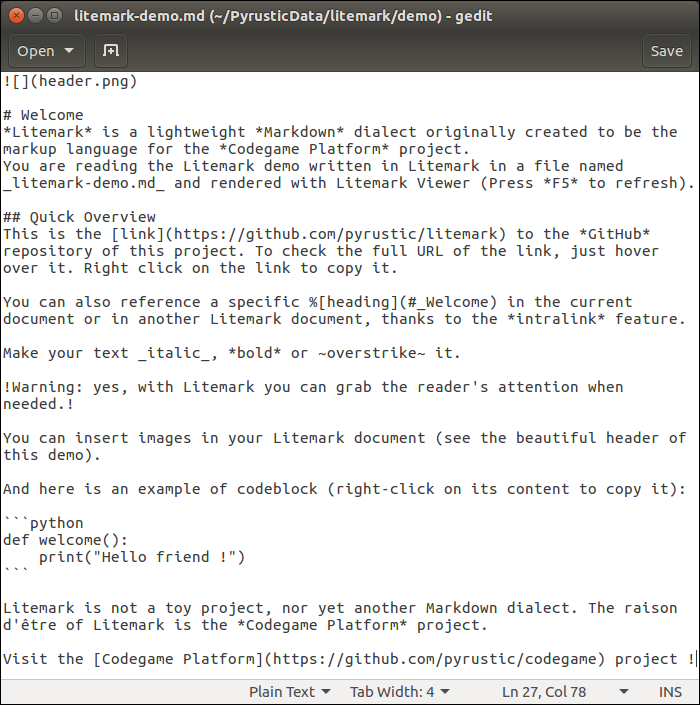
litemark-demo.md (plain text)

Usage

The name Litemark refers to both the markup language and the distribution package.

The distribution package comes with an API, a command line interface, and a graphical viewer.

API

It is easy to break an arbitrary plain text into a flat list of tokens:

import litemark


plain_text = """Hello *World* ! Visit the [repository](https://github.com/pyrustic/litemark) !"""

for token in litemark.scan(plain_text):
    # a token instance is a named tuple with 2 fields: name and data 
    print(token)

The output:

Token(name='STRING', data='Hello ')
Token(name='BOLD', data='World')
Token(name='STRING', data=' ')
Token(name='STRING', data='! ')
Token(name='STRING', data='Visit ')
Token(name='STRING', data='the ')
Token(name='LINK', data=('repository', 'https://github.com/pyrustic/litemark', ''))
Token(name='STRING', data=' ')
Token(name='STRING', data='!')
Token(name='STRING', data='')

The formal names of the tokens are defined in litemark.Element:

class Element:
    CODEBLOCK = "CODEBLOCK"
    HEADING = "HEADING"
    BOLD = "BOLD"
    ITALIC = "ITALIC"
    WARNING = "WARNING"
    OVERSTRIKE = "OVERSTRIKE"
    IMAGE = "IMAGE"
    INTRALINK = "INTRALINK"
    LINK = "LINK"

The token's data field represents a string for all elements except the following:

  • Element.CODEBLOCK: 2-tuple (str-title, str-content)
  • Element.HEADING: 2-tuple (int-level, str-content)
  • Element.IMAGE: 3-tuple (str-inline, str-path, str-alt)
  • Element.INTRALINK: 3-tuple (str-inline, str-path, str-alt)
  • Element.LINK: 3-tuple (str-inline, str-URL, str-alt)

Command line interface

To open litemark-demo.md in the graphical Viewer:

$ litemark

To open a specific litemark file in the graphical Viewer:

$ cd /path/to/root
$ litemark my-file.md

Note:

Litemark is created for use in a desktop application. Thus, the Litemark Scanner assumes that the images referenced in a litemark document are relative to the root directory. The root directory is simply the current working directory. For this reason, you must first do a cd (change directory) to the root before rendering a document.

Graphical Viewer

It is easy to embed a Litemark Viewer in your Python desktop app:

import litemark
import tkinter as tk

root_directory = "/home/alex/demo"
litemark_filename = "/home/alex/demo/document.md"

# your GUI
gui = tk.Tk()
gui.geometry("500x500+0+0")
# let's embed a Litemark Viewer in this GUI
# -- text widget
text_widget = tk.Text(gui)
text_widget.pack(expand=1, fill=tk.BOTH)
# -- the viewer instance
viewer = litemark.Viewer(widget=text_widget, root=root_directory)
viewer.open(litemark_filename)
viewer.readonly = True
# done !
gui.mainloop()

This is a work in progress. A reference documentation will be released soon.

Installation

Install for the first time

pip install litemark

Upgrade

pip install litemark --upgrade --upgrade-strategy eager

Related projects

  • Codegame Platform: create, distribute, and run codegames
  • shared: library to store, expose, read, and edit collections of data

This is a work in progress...

Owner
Pyrustic Open Ecosystem to develop and distribute Python apps
A minimal platform for Markdown-based blogs

madblog This project provides a minimal blogging platform based on Markdown files. Demos This project powers the following blogs: Platypush My persona

Fabio Manganiello 2 Aug 02, 2022
Extensions for Python Markdown

PyMdown Extensions Extensions for Python Markdown. Documentation Extension documentation is found here: https://facelessuser.github.io/pymdown-extensi

Isaac Muse 685 Jan 01, 2023
A Python implementation of John Gruber’s Markdown with Extension support.

Python-Markdown This is a Python implementation of John Gruber's Markdown. It is almost completely compliant with the reference implementation, though

Python-Markdown 3.1k Dec 30, 2022
A fast, extensible and spec-compliant Markdown parser in pure Python.

mistletoe mistletoe is a Markdown parser in pure Python, designed to be fast, spec-compliant and fully customizable. Apart from being the fastest Comm

Mi Yu 546 Jan 01, 2023
Notedown - Markdown <=> IPython Notebook

Python 2/3 and IPython 4 / Jupyter compatible! Convert IPython Notebooks to markdown (and back) notedown is a simple tool to create IPython notebooks

Aaron O'Leary 840 Jan 04, 2023
Markdown journal template.

Markdown Journal Template Description This project contains a script which creates a markdown journal template for the current year by creating a mark

Stephen McAleese 2 Mar 06, 2022
A automated python script that creates mark-down files to read for the aes keys and other useful information.

Archive A automated python script that creates mark-down files to read for the aes keys and other useful information. Table of Contents Benbot Automat

Tector 13 Dec 14, 2022
Remarkable Markdown Debian Package Fix

Remarkable debian package fix For some reason the Debian package for remarkable markdown editor has not been made to install properly on Ubuntu 20.04

Eric Seifert 37 Jan 02, 2023
Preview GitHub README.md files locally before committing them.

Grip -- GitHub Readme Instant Preview Render local readme files before sending off to GitHub. Grip is a command-line server application written in Pyt

Joe Esposito 5.9k Jan 08, 2023
Static site generator that supports Markdown and reST syntax. Powered by Python.

Pelican Pelican is a static site generator, written in Python. Write content in reStructuredText or Markdown using your editor of choice Includes a si

Pelican dev team 11.3k Jan 05, 2023
A Discord Bot for rendering Markdown

Markdown to PDF Bot A discord bot that accepts markdown files (or messages) and displays them as images. Prerequisite To install, you must have have :

1 Oct 21, 2021
A Python implementation of John Gruber’s Markdown with Extension support.

Python-Markdown This is a Python implementation of John Gruber's Markdown. It is almost completely compliant with the reference implementation, though

Python-Markdown 3.1k Dec 31, 2022
Application that converts markdown to html.

Markdown-Engine An application that converts markdown to html. Installation Using the package manager [pip] pip install -r requirements.txt Usage Run

adriano atambo 1 Jan 13, 2022
A markdown template manager for writing API docs in python.

DocsGen-py A markdown template manager for writing API docs in python. Contents Usage API Reference Usage You can install the latest commit of this re

Ethan Evans 1 May 10, 2022
a small simple library for generating documentation from docstrings

inkpot a small simple library for generating documentation from docstrings inkpot is available on pip. Please give it a star if you like it! To know m

Axel Gard 5 Oct 20, 2022
😸Awsome markdown readme for your profile or your portfolio

GitHub Profile Readme Description That's a simple and minimalist README.md for your profile Usage You can download or copy to your repository and make

0 Jul 24, 2022
Pure-python-server - A blogging platform written in pure python for developer to share their coding knowledge

Pure Python web server - PyProject A blogging platform written in pure python (n

Srikar Koushik Satya Viswanadha 10 Nov 07, 2022
Toci is a markdown tool to generate an outline from a given Jupyter notebook.

Toci is a markdown tool to generate an outline from a given Jupyter notebook. It traverses the markdown cells of a given ipynb file to form a toc for you.

Hakan Özler 7 Jan 22, 2022
Markdown parser, done right. 100% CommonMark support, extensions, syntax plugins & high speed. Now in Python!

markdown-it-py Markdown parser done right. Follows the CommonMark spec for baseline parsing Configurable syntax: you can add new rules and even replac

Executable Books 398 Dec 24, 2022
An interactive, terminal-based markdown presenter

lookatme lookatme is an interactive, extensible, terminal-based markdown presentation tool. TOC TOC Features Tour Navigating the Presentation CLI Opti

James Johnson 1.4k Jan 01, 2023