Nutrify - take a photo of food and learn about it

Overview

Nutrify - take a photo of food and learn about it

Work in progress.

To make this a thing, we're going to need lots of food images...

Start uploading your food images here: https://share.streamlit.io/mrdbourke/nutrify/main/food_image_collector.py

Streaming progress on Twitch/making videos about it on YouTube.

End goal: take a photo of food an learn about it (nutrition information, where it's from, recipes, etc).

Something like this (a data flywheel for food images):

Status: making a small application to collect large amounts of food images.

Comments
  • Capturing Image on mobile & page didn't refresh after upload

    Capturing Image on mobile & page didn't refresh after upload

    Hello Daniel, Shabir here first of all amazing work and I have been following this project from the start . The problem I faced was when I opened the link on my android device , and clicked on browse files I couldn't upload an image by capture , it took me to the screen to select photo from my mobile storage and also I noticed the page didn't refresh after I uploaded. I could see my image and other things as it is with the upload success message . Thanks again!

    opened by shabir15 7
  • Add a button for asking

    Add a button for asking "is this correct?"

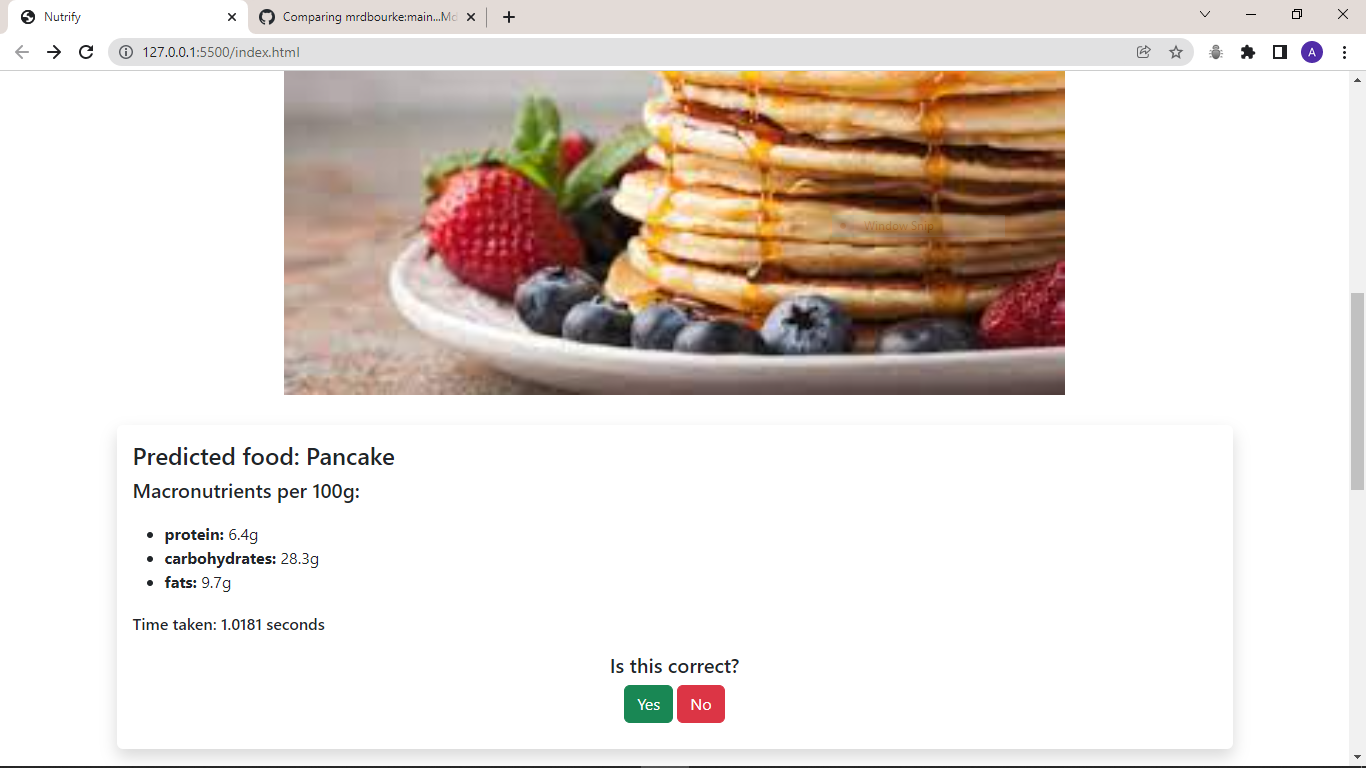
    Every time there's a prediction, there should be an easy to use button asking "is this correct?".

    The result of tapping this button will update a database prediction to say whether or not the prediction was right or wrong.

    This will help evaluate the model(s) in the wild.

    opened by mrdbourke 4
  • `pre-commit` breaking (not letting commits happen)

    `pre-commit` breaking (not letting commits happen)

    Tried installing pre-commit (https://pre-commit.com), it looks like it works for some files but breaks others when I try to commit them.

    Because the tests don't pass they never commit.

    For example:

    flake8...................................................................Failed
    - hook id: flake8
    - exit code: 1
    
    food_image_collector.py:15:80: E501 line too long (97 > 79 characters)
    food_image_collector.py:49:80: E501 line too long (80 > 79 characters)
    food_image_collector.py:54:80: E501 line too long (82 > 79 characters)
    food_image_collector.py:59:80: E501 line too long (123 > 79 characters)
    food_image_collector.py:66:80: E501 line too long (80 > 79 characters)
    food_image_collector.py:67:80: E501 line too long (81 > 79 characters)
    food_image_collector.py:123:80: E501 line too long (114 > 79 characters)
    food_image_collector.py:129:80: E501 line too long (106 > 79 characters)
    food_image_collector.py:134:80: E501 line too long (84 > 79 characters)
    food_image_collector.py:136:80: E501 line too long (102 > 79 characters)
    food_image_collector.py:137:80: E501 line too long (84 > 79 characters)
    food_image_collector.py:144:80: E501 line too long (91 > 79 characters)
    
    mypy.....................................................................Passed
    

    See the initial setup here: https://github.com/mrdbourke/nutrify/issues/1#issuecomment-916722957

    opened by mrdbourke 4
  • Can't upload image

    Can't upload image

    Uncaught SyntaxError: "0"-prefixed octal literals are deprecated; use the "0o" prefix instead

    This may be a known issue. This is console output when accessing the webpage.

    I think this results in the upload not working (unless I'm mistaken).

    The problem is in constants.js with egg tart having an id starting with 0.

    Hope this helps. Keep up the work.

    opened by shivan-s 3
  • Github actions

    Github actions

    I heard something about CI/CD.

    Github action is good for this.

    I have no idea how it works.

    So I'm keen to tag along with this.

    Edit: The idea is you commit your code and this will automatically update the production code. No downtime, all in one automated step.

    opened by shivan-s 3
  • Add function to set random seeds and minor styling changes

    Add function to set random seeds and minor styling changes

    Noticed the TODO in evaluate.py script and thought to make your work easier. Made a function to set random seeds for random and torch module. Also made some styling changes in the script to go hand-in-hand with conventions. For example,

    # import standard python libraries
    # import from 3rd party libraries (numpy, pandas, torch etc.)
    # import from source code (code that you have written, like `utils` etc.)
    

    Hope this branch gets merged and helps in the making of this project!

    opened by ishandandekar 2
  • Build a food/not food model into the app

    Build a food/not food model into the app

    There should be a food/not food model running with the app.

    This is so the app can detect whether food is present or not and then proceed with the classification of what food is present.

    opened by mrdbourke 2
  • A domain.

    A domain.

    Was looking up some domains. https://www.nutrify.com/ - this is taken and it's a registered name. So does this mean the whole projects needs a new name? I hope not...

    opened by shivan-s 2
  • pytest, linting, code formatting, pipenv

    pytest, linting, code formatting, pipenv

    Related PR: #4

    I understand that we want simplicity, but it is also a good idea to slowly include coding best practices...

    • incorporate pytest for automated testing
    • also have pre-commit hooks for linting, (mypy, flake8) and code formating black.
    • switch to pipenv for package management instead of a requirements.txt, we can manage production packages (e.g. streamlit) and the above dev pages separately.

    Some resources:

    • https://docs.pytest.org/en/6.2.x/
    • https://shivansivakumaran.com/coding/my-tubestats-app/#Hurdle_6_how_to_test_code
    • https://ljvmiranda921.github.io/notebook/2018/06/21/precommits-using-black-and-flake8/
    • https://pipenv.pypa.io/en/latest/
    opened by shivan-s 2
  • Add model training and evaluation scripts

    Add model training and evaluation scripts

    Starting to build out functionality for Nutrify's data flywheel.

    This PR adds train.py and evaluate.py as major scripts for training a FoodVision model as well as evaluating it.

    There's also a new directory called foodvision, this is where all of Nutrify's ML related files will go (for now) when it comes to training a computer vision model for identifying foods.

    Next will be to create a script to import the "100 most wrong predictions" into Label Studio to update and improve the labels before retraining another model.

    food-vision-data-flywheel-concept@2x

    opened by mrdbourke 1
  • 'Added-Styling'

    'Added-Styling'

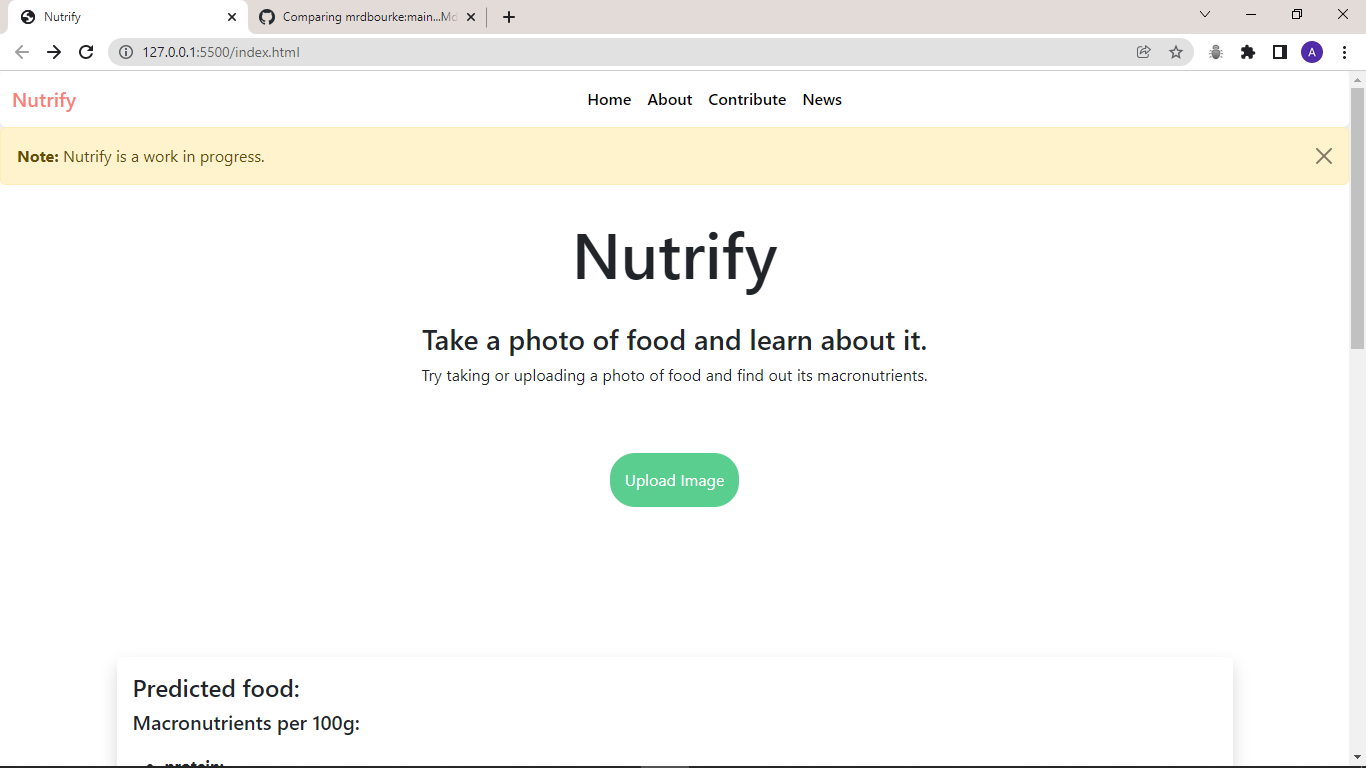
    Tried to make the website a little more better !. Added CSS and used Bootstrap to make the website looks more better.

    Screen Shots of the new looking Nutrify Website.

    image

    image

    opened by Md-Aquib 1
  • Create a script to import the

    Create a script to import the "100 most wrong predictions" and then export them as labelling task in Label Studio

    I've currently got a workflow for:

    evaluate.py stores the "X most wrong" predictions in a CSV/Weights & Biases Table/Artifact, so next will be to pull that information into a script such as fix_labels.py which:

    • inputs: a CSV file of "X most wrong" predictions (their labels, their images etc)
    • outputs: a Label Studio labelling task to fix/update the labels

    There could be a few options in the Label Studio interface to make the dataset better:

    1. confusing/clear - a label to state whether the image is confusing (e.g. multiple foods, lots going on, poor image) or clear (e.g. a single food with a good picture)
    2. whole_food/dish - a label to state whether the image has a single food or multiple foods in it (can use this later to differentiate between dishes and whole foods)
    3. prediction/updated class - a label which represents the updated information about the image

    food-vision-data-flywheel-concept@2x

    machine learning labelling 
    opened by mrdbourke 1
  • Create a function/script to create different models for different purposes (e.g. big, medium, small)

    Create a function/script to create different models for different purposes (e.g. big, medium, small)

    I'd like a script to create 3 different models (or more):

    1. Big - can be used for labelling/label improvements, this model will be the biggest and best but will be almost impossible to deploy properly, see here: https://huggingface.co/BAAI/EVA (this model requires a GPU with at least 24GB for batches of 16)
    2. Medium - can be used for experimenting, reviewing labels, etc
    3. Small - smallest and fastest model used for deploying (this model won't be as accurate as the others but will definitely be the fastest/capable of running on smaller devices/in the browser), see here: https://pytorch.org/vision/stable/models/generated/torchvision.models.quantization.shufflenet_v2_x2_0.html#shufflenet-v2-x2-0

    Ideas

    I could have a Python script called create_models.py which contains 3x functions (one for each model).

    Then in the train.py script, I can call the appropriate model for the job.

    Could use the "strategy" pattern in Python, see this video: https://youtu.be/WQ8bNdxREHU

    machine learning 
    opened by mrdbourke 0
  • Add a way to save to storage the images uploaded to Nutrify

    Add a way to save to storage the images uploaded to Nutrify

    Every image uploaded to Nutrify should be saved to storage (as long as the image is detected as being food).

    The image should be uploaded -> passed through food/not_food model -> saved to storage if the image if of food, then track:

    • Image UUID - use this to track information regarding different images across the database
    • Timestamp
    • Pred for image class
    opened by mrdbourke 3
  • Make the loading images function faster (this should appear on page load)

    Make the loading images function faster (this should appear on page load)

    Going to have to look into page loading times for this one.

    I'd like the upload image function to be available as soon as the page loads.

    Right now it's about a second or two behind the page itself.

    Not a huge deal but experience wise, it could be better.

    opened by mrdbourke 2
  • Database update: make it so a new food gets added via FDC ID -> information pulled into database

    Database update: make it so a new food gets added via FDC ID -> information pulled into database

    I'd like to be able to add an FDC ID to some section or a single file and that file gets watched.

    Every time a new FDC ID gets added to that file, information from the Food Data Central Database gets pulled in to be used Nutrify style.

    For example:

    • New FDC ID added to a list
    • List gets watched and update found -> triggers function
    • Function goes to FDC database and pulls information based on the ID
    • Nutrition information from that food ID is placed in the Nutrify database to be displayed on the web
    opened by mrdbourke 2
  • Model/class names not lined up + some classes are missing FDC data (

    Model/class names not lined up + some classes are missing FDC data ("Egg Tart", "Fries", "Hamimelon")

    Some classes are missing FDC data and will have to be fixed later on.

    Need a way to:

    • Know what classes a model has been trained on
    • Sync up model classes with food data (the data from the FDC)
    • Only publish models that have accompanying food data with them

    This will solve the problem of someone taking a photo of something an data not being displayed.

    Or...

    1. Create a model with X amount of classes
    2. Make dummy FDC data for the classes that don't have it yet
    3. Display information for which classes have data and which classes don't
    opened by mrdbourke 3
Releases(v0.1.3)
  • v0.1.3(Mar 14, 2022)

    Nutrify now displays macronutrient information for ~100 foods

    When you upload a photo to Nutrify, it now predicts what class of food is in the image and then displays information about that foods macronutrients.

    This happens via:

    image upload -> computer vision model -> returns class -> class index used to index on a database (hosted on Supabase) -> information from Supabase displayed on homepage

    This took a while to happen but I had to learn all about databases (Supabase uses pure PostgreSQL).

    The good thing is the app is still fast.

    A prediction + query to the database is done in ~0.2-0.5 seconds.

    That'll be the peak time I'd like to let it happen in, any longer and the experience won't be as fun.

    See the database code in the various JavaScript scripts (I'm new to JS so these are rough):

    • Constants for different food names/food data central IDs (fdc_id) live in constants.js
    • The database query and HTML update for macronutrients happen via get_data.js
    • The image upload and image classification happens via script.js
    • The connection to Supabase happens via supabaseClient.js - this uses an anon API key, that's apparently "safe to use in public", though I'm not sure what this means
    • Utility functions (all one of them) are located in utils.js

    Is this how JS projects get laid out?

    I have no idea.

    It seems to work though.

    Issues

    No nutrition information for some foods

    You might find that ~3/100 foods (like "egg tart") don't show nutrition information.

    This is because they don't exist (at least what I've found) in the Food-Central USDA Database (where the rest of the nutrition information comes from).

    Data loading is likely not optimal

    I'm a newbie to databases.

    The speed is how it is now because all of the database rows are loaded when you go to nutrify.app and then they are cached and queried when a prediction is made.

    This may not be best practice... but it works.

    Ideally, the database would be queried per image classification.

    However, I tried this and it takes 1-2 seconds per query (from where I live in Australia because the Supabase database is hosted in the US), this kind of time delay is not acceptable.

    Again, queries should happen within a maximum of 0.5 seconds.

    The model still does not predict whether there is a food present or not

    Future updates will include a food/not food model to see if there's food present in the image or not.

    Next

    • Add food/not food model + a message about "no food detected, please upload a photo of food"
    • Make app design nicer
    • Add a way to toggle different nutrients to view
    • Add a way to adjust the different amount of macronutrients per food (e.g. 100g -> 50g -> 250g)
    • Add logging? Logging for different predictions/images etc
    • Clean up the GitHub repo... seriously, what's going on here now? Perhaps it's time for an organization?
    Source code(tar.gz)
    Source code(zip)
  • v0.1.2(Jan 14, 2022)

    I've just created a new model based on EfficientNetB1-Lite (the TensorFlow JS version) that now powers Nutrify and published it to the Nutrify homepage.

    In short, Nutrify can now identify 100 total foods (previous was 78).

    The performance for each class varies quite a bit. But this will be upgraded in future models.

    Next

    Now we're up to 100 foods, the next step will be making the current model better (better data) and adding metadata to the website rather than just identifying the class of a food.

    In essence, the next few updates will focus on making the current system better rather than adding more foods.

    So the current list of foods will likely remain fixed for the next month or so.

    App updates (to come)

    • Add metadata (such as calories, protein, fat etc) for the first 100 foods (see list below) and make it display when a particular food is identified.
    • Add a model cascade for identifying food/not food (Nutrify should recognize a photo of food or not).
    • Display the top X (maybe 3?) predictions that can be clicked on and used.

    Modelling updates (to come)

    • Make training reproducible.
    • Make data traceable, e.g. what data is used where?
    • Have training and evaluation take place with results (e.g. acc, precision, recall per class)

    Updates

    The previous Nutrify model could identify the following 78 foods.

    Note: If there's more than one food in an image, Nutrify still only identifies one class, this will change with future models.

    # Previous 78 Foods Nutrify could classify
    ['Apple',
      'Artichoke',
      'BBQ sauce',
      'Bacon',
      'Bagel',
      'Banana',
      'Beef',
      'Beer',
      'Blueberries',
      'Bread',
      'Broccoli',
      'Butter',
      'Cabbage',
      'Candy',
      'Cantaloupe',
      'Carrot',
      'Cheese',
      'Chicken',
      'Chicken wings',
      'Cocktail',
      'Coconut',
      'Coffee',
      'Cookie',
      'Corn chips',
      'Cream',
      'Cucumber',
      'Doughnut',
      'Egg',
      'Fish',
      'Fries',
      'Grape',
      'Guacamole',
      'Hamburger',
      'Honey',
      'Ice cream',
      'Lemon',
      'Lime',
      'Lobster',
      'Mango',
      'Milk',
      'Muffin',
      'Mushroom',
      'Olive oil',
      'Olives',
      'Onion',
      'Orange',
      'Orange juice',
      'Pancake',
      'Pasta',
      'Pastry',
      'Pear',
      'Pepper',
      'Pineapple',
      'Pizza',
      'Pomegranate',
      'Popcorn',
      'Potato',
      'Prawns',
      'Pretzel',
      'Pumpkin',
      'Radish',
      'Rice',
      'Salad',
      'Salt',
      'Sandwich',
      'Sausages',
      'Soft drink',
      'Spinach',
      'Squid',
      'Strawberries',
      'Sushi',
      'Tea',
      'Tomato',
      'Tomato sauce',
      'Waffle',
      'Watermelon',
      'Wine',
      'Zucchini']
    

    Note: Squid and Chicken classes were removed from the above list (the Squid data was poor and Chicken as a class images are of actual chickens rather than chicken as a food).

    And now with the addition of 24 more foods:

    # 24 added foods to Nutrify
    ['Avocado',
      'Cherry',
      'Dumpling',
      'Egg tart',
      'Eggplant',
      'French fries',
      'Garlic',
      'Grapefruit',
      'Green beans',
      'Green onion',
      'Hamimelon',
      'Kiwi fruit',
      'Lettuce',
      'Meat ball',
      'Noodles',
      'Nuts',
      'Okra',
      'Papaya',
      'Peach',
      'Pie',
      'Plum',
      'Red cabbage',
      'Spring rolls',
      'Steak']
    

    This brings the total to 100 identifiable foods (1000 is the goal for the end of the 2022).

    # All current foods Nutrify can identify
    {0: 'Apple',
     1: 'Artichoke',
     2: 'Avocado',
     3: 'BBQ sauce',
     4: 'Bacon',
     5: 'Bagel',
     6: 'Banana',
     7: 'Beef',
     8: 'Beer',
     9: 'Blueberries',
     10: 'Bread',
     11: 'Broccoli',
     12: 'Butter',
     13: 'Cabbage',
     14: 'Candy',
     15: 'Cantaloupe',
     16: 'Carrot',
     17: 'Cheese',
     18: 'Cherry',
     19: 'Chicken wings',
     20: 'Cocktail',
     21: 'Coconut',
     22: 'Coffee',
     23: 'Cookie',
     24: 'Corn chips',
     25: 'Cream',
     26: 'Cucumber',
     27: 'Doughnut',
     28: 'Dumpling',
     29: 'Egg',
     30: 'Egg tart',
     31: 'Eggplant',
     32: 'Fish',
     33: 'French fries',
     34: 'Fries',
     35: 'Garlic',
     36: 'Grape',
     37: 'Grapefruit',
     38: 'Green beans',
     39: 'Green onion',
     40: 'Guacamole',
     41: 'Hamburger',
     42: 'Hamimelon',
     43: 'Honey',
     44: 'Ice cream',
     45: 'Kiwi fruit',
     46: 'Lemon',
     47: 'Lettuce',
     48: 'Lime',
     49: 'Lobster',
     50: 'Mango',
     51: 'Meat ball',
     52: 'Milk',
     53: 'Muffin',
     54: 'Mushroom',
     55: 'Noodles',
     56: 'Nuts',
     57: 'Okra',
     58: 'Olive oil',
     59: 'Olives',
     60: 'Onion',
     61: 'Orange',
     62: 'Orange juice',
     63: 'Pancake',
     64: 'Papaya',
     65: 'Pasta',
     66: 'Pastry',
     67: 'Peach',
     68: 'Pear',
     69: 'Pepper',
     70: 'Pie',
     71: 'Pineapple',
     72: 'Pizza',
     73: 'Plum',
     74: 'Pomegranate',
     75: 'Popcorn',
     76: 'Potato',
     77: 'Prawns',
     78: 'Pretzel',
     79: 'Pumpkin',
     80: 'Radish',
     81: 'Red cabbage',
     82: 'Rice',
     83: 'Salad',
     84: 'Salt',
     85: 'Sandwich',
     86: 'Sausages',
     87: 'Soft drink',
     88: 'Spinach',
     89: 'Spring rolls',
     90: 'Steak',
     91: 'Strawberries',
     92: 'Sushi',
     93: 'Tea',
     94: 'Tomato',
     95: 'Tomato sauce',
     96: 'Waffle',
     97: 'Watermelon',
     98: 'Wine',
     99: 'Zucchini'}
    

    More class-based results to come soon.

    Here's a visual update of the new classes (I've just noticed the duplicate of Fries and French Fries), this should be ironed out in the next update. 2022-01-14-nutrify-100-foods-update

    Source code(tar.gz)
    Source code(zip)
Owner
Daniel Bourke
Machine Learning Engineer live on YouTube.
Daniel Bourke
A suite of useful tools based on 3D interactivity in napari

napari-threedee A suite of useful tools based on 3D interactivity in napari This napari plugin was generated with Cookiecutter using @napari's cookiec

11 Dec 14, 2022
Bringing vtk.js into Dash and Python

Dash VTK Dash VTK lets you integrate the vtk.js visualization pipeline directly into your Dash app. It is powered by react-vtk-js. Docs Demo Explorer

Plotly 88 Nov 29, 2022
QR-Generator - An awesome QR Generator to create or customize your QR's

QR Generator An awesome QR Generator to create or customize your QR's! Table of

Tristán 1 Jan 28, 2022
impy is an all-in-one image analysis library, equipped with parallel processing, GPU support, GUI based tools and so on.

impy is All You Need in Image Analysis impy is an all-in-one image analysis library, equipped with parallel processing, GPU support, GUI based tools a

24 Dec 20, 2022
Cat avatars for adult independent users

Cat avatars for adult independent users Samples (Natasha, wake up!) Usage Check values from https://shantichat.github.io/avacats/index.json: { "sizes"

4 Nov 05, 2021
sK1 2.0 cross-platform vector graphics editor

sK1 2.0 sK1 2.0 is a cross-platform open source vector graphics editor similar to CorelDRAW, Adobe Illustrator, or Freehand. sK1 is oriented for prepr

sK1 Project 238 Dec 04, 2022
TRREASURE_IMAGE is python lib by which you can hide anything in a .jpg image with Command-Line Interface[cli] feature

TRREASURE_IMAGE TRREASURE_IMAGE is a python third-party library with Command-Line Interface[cli] feature. Table of Contents General Info Python librar

Fatin Shadab 3 Jun 07, 2022
Script For Importing Image sequences into scrap mechanic via blueprints

To use dowload and extract "video makes.zip" Python has to be installed https://www.python.org/ (may not work on version lower than 3.9) Has to be run

2 Oct 30, 2021
Py3D - A 3d rendering engine written entirely in python

Py3D is a 3d rendering engine written entirely in python. It is a simple and eas

1up Community 2 Nov 14, 2022
Fix datetime EXIF data in photos downloaded from Google Takeout

fix-google-takeout Warning Use at your own risk. Backup your photos. Overview Google takeout for photos

Mayank Mandava 20 Nov 05, 2022
starfish is a Python library for processing images of image-based spatial transcriptomics.

starfish: scalable pipelines for image-based transcriptomics starfish is a Python library for processing images of image-based spatial transcriptomics

199 Dec 08, 2022
Validate arbitrary image uploads from incoming data urls while preserving file integrity but removing EXIF and unwanted artifacts and RCE exploit potential

Validate arbitrary base64-encoded image uploads as incoming data urls while preserving image integrity but removing EXIF and unwanted artifacts and mitigating RCE-exploit potential.

A3R0 1 Jan 10, 2022
Simple Python image processing & automatization project for a simple web based game

What is this? Simple Python image processing & automatization project for a simple web based game Made using only Github Copilot (except the color and

SGeri 2 Aug 15, 2022
Bot by image recognition simulating (random) human clicks

bbbot22 bot por reconhecimento de imagem simulando cliques humanos (aleatórios) inb4: sim, esse é basicamente o mesmo bot de 2021 porque a Globo não t

Yuri 2 Apr 05, 2022
Automatic picture transmission(APT) protocol decoder for NOAA weather satellites

Automatic picture transmission(APT) decoder Automatic picture transmission protocol is used by NOAA satellites. They constantly send a frequency modul

Jayachandra Kasarla 25 Aug 05, 2022
Nutrify - take a photo of food and learn about it

Nutrify - take a photo of food and learn about it Work in progress. To make this a thing, we're going to need lots of food images... Start uploading y

Daniel Bourke 93 Dec 30, 2022
Alternate Python bindings for the Open Asset Import Library (ASSIMP)

Impasse A simple Python wrapper for assimp using cffi to access the library. Requires Python = 3.7. It's a fork of PyAssimp, Assimp's official Python

Salad Dais 3 Sep 26, 2022
OctoPrint is the snappy web interface for your 3D printer!

OctoPrint OctoPrint provides a snappy web interface for controlling consumer 3D printers. It is Free Software and released under the GNU Affero Genera

OctoPrint 7.1k Jan 03, 2023
Image-Viewer is a Windows image viewer based on Python 3.

Image-Viewer Hi! Image-Viewer is a Windows image viewer based on Python 3. Using You must download Image-Viewer.exe from the root of the repository. T

2 Apr 18, 2022
A tool for hiding data inside of images

Stegenography-tool a tool for hiding data inside of images Quick test: do python steg-encode.py test/message.txt test/covid19.png to generate the test

luke 2 Nov 02, 2021