PyChemia, Python Framework for Materials Discovery and Design

Overview

Build Status PyPI version Coverage Status Documentation Status HitCount

PyChemia, Python Framework for Materials Discovery and Design
PyChemia

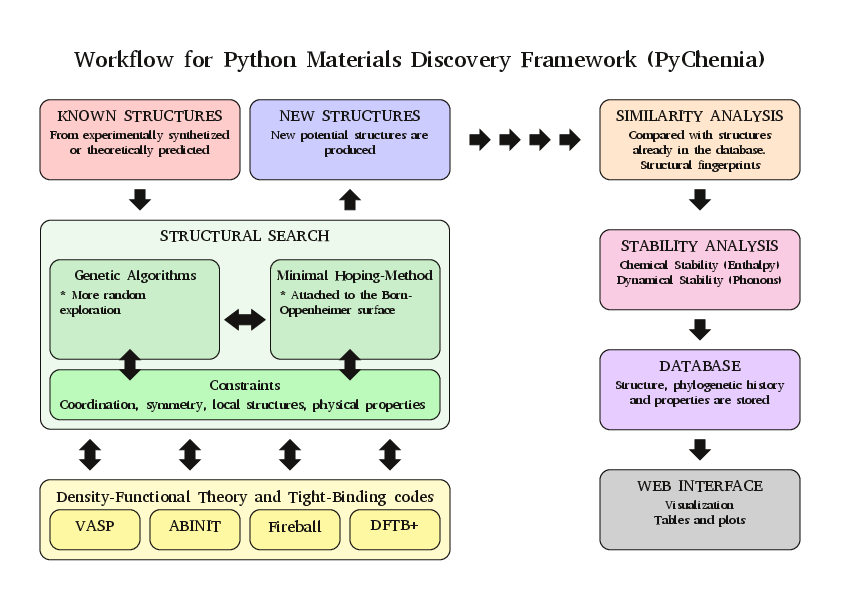
PyChemia is an open-source Python Library for materials structural search. The purpose of the initiative is to create a method agnostic framework for materials discovery and design using a variety of methods from Minima Hoping to Soft-computing based methods. PyChemia is also a library for data-mining, using several methods to discover interesting candidates among the materials already processed.

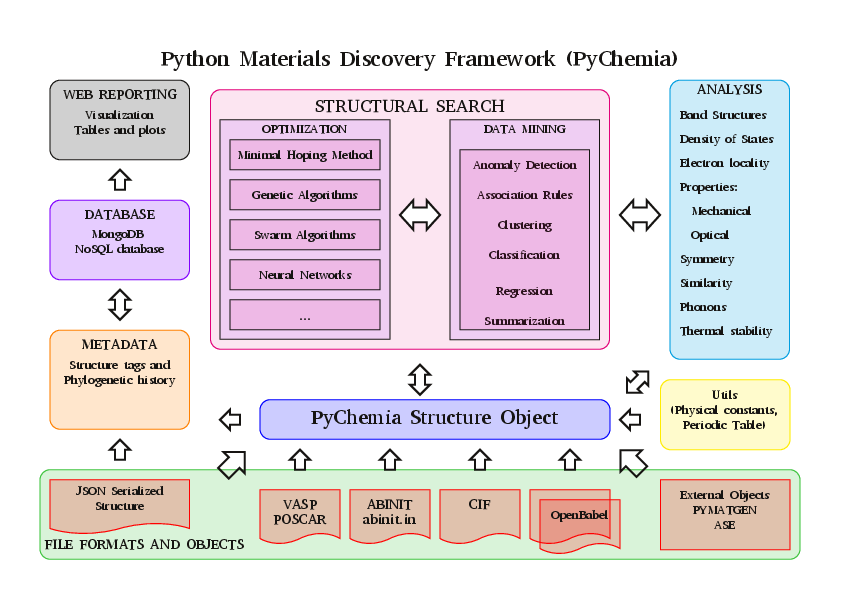
The core of the library is the Structure python class, it is able to describe periodic and non-periodic structures. As the focus of this library is structural search the class defines extensive capabilities to modify atomic structures.

The library includes capability to read and write in several ab-initio codes. At the level of DFT, PyChemia support VASP, ABINIT and Octopus. At Tight-binding level development is in process to support DFTB+ and Fireball. This allows the library to compute electronic-structure properties using state-of-the-art ab-initio software packages and extract properties from those calculations.

Installation

You can install pychemia in several ways. We are showing 3 ways of installing PyChemia inside a Virtual environment. A virtual environment is a good way of isolating software packages from the pacakges installed with the Operating System. The decision on which method to use depends if you want to use the most recent code or the package uploaded from time to time to PyPi. The last method is particularly suited for developers who want to change the code and get those changes operative without an explicit instalation.

Installing with pip from pypi.org on a virtual environment

This method installs PyChemia from the packages uploaded to PyPi every month. It will provides a version of PyChemia that is stable.

First, create and activate the virtual environment. We are using the name pychemia_ve, but that is arbitrary.

virtualenv pychemia_ve
source pychemia_ve/bin/activate

When the virtual environment is activated, your prompt changes to (pychemia_ve)...$. Now, install pychemia with pip

python3 -m pip install pychemia

Installing with pip from a cloned repo on a virtual environment

This method installs PyChemia from the Github repo. The method will install PyChemia from the most recent sources.

First, create and activate the virtual environment. We are using the name pychemia_ve, but that is arbitrary.

virtualenv pychemia_ve
source pychemia_ve/bin/activate

Second, clone the repository from GitHub

git clone https://github.com/MaterialsDiscovery/PyChemia.git

Finally, install from the repo folder

python3 -m pip install PyChemia

Using PyChemia from repo folder on a virtual environment

This method is mostly used for development. In this way PyChemia is not actually installed and changes to the code will take inmediate effect.

First, create and activate the virtual environment. We are using the name pychemia_ve, but that is arbitrary.

virtualenv pychemia_ve
source pychemia_ve/bin/activate

Clone the repository

git clone https://github.com/MaterialsDiscovery/PyChemia.git

Go to repo folder, install Cython with pip and execute setup.py to build the Cython modules.

cd PyChemia
python3 -m pip install Cython
python3 setup.py build_ext --inplace
python3 setup.py build

Finally, install the packages required for PyChemia to work

python3 -m pip install -r requirements.txt

Set the variable $PYTHONPATH to point to PyChemia folder, in the case of bash it will be:

export PYTHONPATH=`path`

On C shell (csh or tcsh)

setenv PYTHONPATH `path`

PyChemia requirements

PyChemia relies on a number of other python packages to operate. Some of them are mandatory and they must be installed. Other packages are optional and their absence will only constrain certain capabilities.

Mandatory

  1. Python >= 3.6 The library is tested on Travis for Python 3.6 up to 3.9 Support for Python 2.7 has been removed

    https://travis-ci.org/MaterialsDiscovery/PyChemia

  2. Numpy >= 1.19 Fundamental library for numerical intensive computation in Python. Numpy arrays are essential for efficient array manipulation.

  3. SciPy >= 1.5 Used mostly for Linear Algebra, FFT and spatial routines.

  4. Spglib >= 1.9 Used to determine symmetry groups for periodic structures

  5. Matplotlib >= 3.3 Used to plot band structures, densities of states and other 2D plots

  6. PyMongo >= 3.11 Used for structural search PyChemia relies strongly in MongoDB and its python driver. For the MongoDB server, any version beyond 3.11 should be fine. We have tested pychemia on MongoDB 4.0

  7. psutil >= 5.8 Cross-platform lib for process and system monitoring in Python

Optional

  1. nose >= 1.3.7 A python library for testing, simply go to the source directory and execute

    nosetests -v

  2. pytest Another utility for testing.

  3. Pandas Library for Data Analysis used by the datamining modules

  4. PyMC PyMC is a python module that implements Bayesian statistical models and fitting algorithms Important for the datamining capabilities of PyChemia

  5. Mayavi >= 4.1 Some basic visualization tools are incorporated using this library

  6. ScientificPython >2.6 This library is used for reading and writing NetCDF files

  7. pymatgen >= 2.9 pymatgen is an excellent library for materials analysis

  8. ASE Atomic Simulation Environment is another good library for ab-initio calculations. Quite impressive for the number of ab-initio packages supported

  9. qmpy The Python library behind the Open Quantum Materials Database. The OQMD is a database of DFT calculated structures. For the time being the database contains more than 300000 structures, with more than 90% of them with the electronic ground-state computed.

  10. coverage >= 4.0.1 Provides code coverage analysis

  11. python-coveralls To submit coverage information to coveralls.io

    https://coveralls.io/github/MaterialsDiscovery/PyChemia

Documentation

Instructions for installation, using and programming scripts with PyChemia can be found on two repositories for documentation:

Documentation is hosted on Read the Docs also available with Short URLs readthedocs and rtfd

Documentation is also hosted on Python Hosted

Sources

The main repository is on GitHub

Sources and wheel binaries are also distrubuted on PyPI or PyPI

Structure of the Library
PyChemia

PyChemia

Contributors

  1. Prof. Aldo H. Romero [West Virginia University] (Project Director)

  2. Guillermo Avendaño-Franco [West Virginia University] (Basic Infrastructure)

  3. Adam Payne [West Virginia University] (Bug fixes (Populations, Relaxators, and KPoints) )

  4. Irais Valencia Jaime [West Virginia University] (Simulation and testing)

  5. Sobhit Singh [West Virginia University] (Data-mining)

  6. Francisco Muñoz [Universidad de Chile] (PyPROCAR)

  7. Wilfredo Ibarra Hernandez [West Virginia University] (Interface with MAISE)

Comments
  • conda-forge package

    conda-forge package

    Hi,

    I recently create the pychemia conda forge package, now it is possible to install PyChemia via:

    conda install -c conda-forge pychemia
    

    I was wondering if one of the core developers is interested in joining me in maintaining the package.

    Best,

    Jan

    opened by jan-janssen 2
  • Installaltion problem

    Installaltion problem

    Dear Developers,

    I am trying to install pychemia by

    pip3 install pychemia --user

    But it fails with following errors. Any help is appreciated.

    ERROR: Complete output from command python setup.py egg_info: ERROR: Traceback (most recent call last): File "", line 1, in File "/tmp/pip-install-rd5hvw21/pychemia/setup.py", line 141, in data = write_version_py() File "/tmp/pip-install-rd5hvw21/pychemia/setup.py", line 89, in write_version_py release_data, FULLVERSION, GIT_REVISION = get_version_info() File "/tmp/pip-install-rd5hvw21/pychemia/setup.py", line 47, in get_version_info rf = open('setup.json') FileNotFoundError: [Errno 2] No such file or directory: 'setup.json' Using Cython: True ---------------------------------------- ERROR: Command "python setup.py egg_info" failed with error code 1 in /tmp/pip-install-rd5hvw21/pychemia/

    Thanks,

    Best \Alex

    opened by akentphonon 1
  • Removed pyximport from lennardjones since it only works if cython is installed.

    Removed pyximport from lennardjones since it only works if cython is installed.

    Dear Guillermo,

    Since setup.py already compiles the shared library required for lennardjones utilities for both cython and non-cython, this is unnecessary. It would be useful in the case that the shared library is not compiled and the import from the .pyx file needed to be imported directly without any compilation whatsoever.

    With the current setup.py, keeping the .pyx and .c in the distribution package will make sure it will work when both cython is present and not present.

    Best, Uthpala

    opened by uthpalaherath 0
  • Fixed lennardjones error that arises when installing with pip

    Fixed lennardjones error that arises when installing with pip

    Hello Guillermo,

    I added the lines: import pyximport pyximport.install()

    to init.py and lj.py in pychemia/code/lennardjones to fix an import error that occurs when installing PyChemia with pip.

    Best, Uthpala

    opened by uthpalaherath 0
  • Created VaspXML object as a CodeOutput object, fixed a bug in reading…

    Created VaspXML object as a CodeOutput object, fixed a bug in reading…

    … outcar, added writing to text and returning dict to DensityOfStates object

    1. Created VaspXML object as a CodeOutput object. a lot of features was added such as total,projcted and parametric density of states.
    2. fixed a bug in reading outcar energies
    3. added writing to text and returning dict to DensityOfStates object
    opened by petavazohi 0
  • Conserve repeating order of atoms in POSCAR -update

    Conserve repeating order of atoms in POSCAR -update

    This update allows the repeating order in atoms in POSCAR to be conserved.

    For example:

    Sr V O 1.0 3.8465199999999999 0.0000000000000000 0.0000000000000000 0.0000000000000000 3.8465199999999999 0.0000000000000000 0.0000000000000000 0.0000000000000000 3.8465199999999999 Sr V Sr O 1 1 1 3 Direct 0.0000000000000000 0.0000000000000000 0.0000000000000000 0.5000000000000000 0.5000000000000000 0.5000000000000000 0.5000000000000000 0.5000000000000000 0.0000000000000000 0.5000000000000000 0.0000000000000000 0.5000000000000000 0.5000000000000000 0.5000000000000000 0.0000000000000000 0.0000000000000000 0.5000000000000000 0.5000000000000000

    Here the order Sr, V, Sr, O will be conserved when using the structure to generate POTCARs and POSCARs for kgrid, encut convergence and relaxation with PyChemia. Otherwise, it reverts to Sr, V, O ignoring the order of the repetition.

    This is helpful for performing calculations for heterostructures where atoms in layers are ordered separately. The order of the POTCAR concatenation will follow this too.

    -Uthpala

    opened by uthpalaherath 0
  • Conserve repeating order of atoms in POSCAR

    Conserve repeating order of atoms in POSCAR

    This update allows the repeating order in atoms in POSCAR to be conserved.

    For example:

    Sr V O 1.0 3.8465199999999999 0.0000000000000000 0.0000000000000000 0.0000000000000000 3.8465199999999999 0.0000000000000000 0.0000000000000000 0.0000000000000000 3.8465199999999999 Sr V Sr O 1 1 1 3 Direct 0.0000000000000000 0.0000000000000000 0.0000000000000000 0.5000000000000000 0.5000000000000000 0.5000000000000000 0.5000000000000000 0.5000000000000000 0.0000000000000000 0.5000000000000000 0.0000000000000000 0.5000000000000000 0.5000000000000000 0.5000000000000000 0.0000000000000000 0.0000000000000000 0.5000000000000000 0.5000000000000000

    Here the order Sr, V, Sr, O will be conserved when using the structure to generate POTCARs and POSCARs for kgrid, encut convergence and relaxation with PyChemia. Otherwise, it reverts to Sr, V, O ignoring the order of the repetition.

    This is helpful for performing calculations for heterostructures where atoms in layers are ordered separately. The order of the POTCAR concatenation will follow this too.

    -Uthpala

    opened by uthpalaherath 0
  • free energy atom are changed to free energy per atom for convergence

    free energy atom are changed to free energy per atom for convergence

    changed the free energy in the convergence to free energy per atom. Also fixed the bug with kpoint converges best kpoint grid. previously it was taking the last calculated kgrid as the best kgrid.

    chaged La and Ac group to 'd' in pychemia/utils/periodic as they don't have f electrons. I hope I'm write

    opened by petavazohi 0
  • tutorial/example for

    tutorial/example for "predict next experiment"

    Be it composition- or structure-based, could you point to a place in the docs or provide an example that follows the general idea of:

    from pychemia import Discover()
    mdl = Discover()
    mdl.fit(X_train)
    next_experiment = mdl.suggest_next_experiment()
    

    I'm hoping to be able to compare PyChemia with mat_discover.

    opened by sgbaird 2
  • updated relax.py to keep EDIFF provided by user and only use 1E-04 if not provided

    updated relax.py to keep EDIFF provided by user and only use 1E-04 if not provided

    Hello Guillermo,

    In some of my structural relaxation I wanted to keep a lower EDIFF value so I added this in relax.py to use the EDIFF provided by the user in the INCAR. If not provided it will use the default value of EDIFF=1E-04.

    I simply changed:

         # How to change EDIFF
            if vj.input_variables["EDIFF"] > -0.01 * vj.input_variables["EDIFFG"]:
                vj.input_variables["EDIFF"] = round_small(
                    -0.01 * vj.input_variables["EDIFFG"]
                )
            else:
                    vj.input_variables["EDIFF"] = 1e-4
    

    to

            # How to change EDIFF
            if vj.input_variables["EDIFF"] > -0.01 * vj.input_variables["EDIFFG"]:
                vj.input_variables["EDIFF"] = round_small(
                    -0.01 * vj.input_variables["EDIFFG"]
                )
            else:
                if self.extra_vars["EDIFF"]:
                    vj.input_variables["EDIFF"] = self.extra_vars["EDIFF"]
                else:
                    vj.input_variables["EDIFF"] = 1e-4
    

    If you think it's something that is useful please merge it and add it to pip.

    Thank you,

    Best, Uthpala

    opened by uthpalaherath 7
  • new branch

    new branch

    Hi, I am haidi. I feel the code framework of pychemia is the best one among all CSP software i know. But more thing need to be done to make it user friendly and high effiency. I have add some code into it , would you please open a devel branch for developing ?

    opened by haidi-ustc 2
Owner
Materials Discovery Group
Materials Discovery
Materials Discovery Group
Python Library for learning (Structure and Parameter) and inference (Statistical and Causal) in Bayesian Networks.

pgmpy pgmpy is a python library for working with Probabilistic Graphical Models. Documentation and list of algorithms supported is at our official sit

pgmpy 2.2k Dec 25, 2022
Evidence enables analysts to deliver a polished business intelligence system using SQL and markdown.

Evidence enables analysts to deliver a polished business intelligence system using SQL and markdown

915 Dec 26, 2022
Exploratory data analysis

Exploratory data analysis An Exploratory data analysis APP TAPIWA CHAMBOKO 🚀 About Me I'm a full stack developer experienced in deploying artificial

tapiwa chamboko 1 Nov 07, 2021
A lightweight, hub-and-spoke dashboard for multi-account Data Science projects

A lightweight, hub-and-spoke dashboard for cross-account Data Science Projects Introduction Modern Data Science environments often involve many indepe

AWS Samples 3 Oct 30, 2021
Demonstrate a Dataflow pipeline that saves data from an API into BigQuery table

Overview dataflow-mvp provides a basic example pipeline that pulls data from an API and writes it to a BigQuery table using GCP's Dataflow (i.e., Apac

Chris Carbonell 1 Dec 03, 2021
A simple and efficient tool to parallelize Pandas operations on all available CPUs

Pandaral·lel Without parallelization With parallelization Installation $ pip install pandarallel [--upgrade] [--user] Requirements On Windows, Pandara

Manu NALEPA 2.8k Dec 31, 2022
Exploratory Data Analysis of the 2019 Indian General Elections using a dataset from Kaggle.

2019-indian-election-eda Exploratory Data Analysis of the 2019 Indian General Elections using a dataset from Kaggle. This project is a part of the Cou

Souradeep Banerjee 5 Oct 10, 2022
Demonstrate the breadth and depth of your data science skills by earning all of the Databricks Data Scientist credentials

Data Scientist Learning Plan Demonstrate the breadth and depth of your data science skills by earning all of the Databricks Data Scientist credentials

Trung-Duy Nguyen 27 Nov 01, 2022
Fancy data functions that will make your life as a data scientist easier.

WhiteBox Utilities Toolkit: Tools to make your life easier Fancy data functions that will make your life as a data scientist easier. Installing To ins

WhiteBox 3 Oct 03, 2022
Python for Data Analysis, 2nd Edition

Python for Data Analysis, 2nd Edition Materials and IPython notebooks for "Python for Data Analysis" by Wes McKinney, published by O'Reilly Media Buy

Wes McKinney 18.6k Jan 08, 2023
Convert tables stored as images to an usable .csv file

Convert an image of numbers to a .csv file This Python program aims to convert images of array numbers to corresponding .csv files. It uses OpenCV for

711 Dec 26, 2022
A tool to compare differences between dataframes and create a differences report in Excel

similarpanda A module to check for differences between pandas Dataframes, and generate a report in Excel format. This is helpful in a workplace settin

Andre Pretorius 9 Sep 15, 2022
Very useful and necessary functions that simplify working with data

Additional-function-for-pandas Very useful and necessary functions that simplify working with data random_fill_nan(module_name, nan) - Replaces all sp

Alexander Goldian 2 Dec 02, 2021
Tools for working with MARC data in Catalogue Bridge.

catbridge_tools Tools for working with MARC data in Catalogue Bridge. Borrows heavily from PyMarc

1 Nov 11, 2021
This repo contains a simple but effective tool made using python which can be used for quality control in statistical approach.

📈 Statistical Quality Control 📉 This repo contains a simple but effective tool made using python which can be used for quality control in statistica

SasiVatsal 8 Oct 18, 2022
pipeline for migrating lichess data into postgresql

How Long Does It Take Ordinary People To "Get Good" At Chess? TL;DR: According to 5.5 years of data from 2.3 million players and 450 million games, mo

Joseph Wong 182 Nov 11, 2022
PATC: Introduction to Big Data Analytics. Practical Data Analytics for Solving Real World Problems

PATC: Introduction to Big Data Analytics. Practical Data Analytics for Solving Real World Problems

1 Feb 07, 2022
A neural-based binary analysis tool

A neural-based binary analysis tool Introduction This directory contains the demo of a neural-based binary analysis tool. We test the framework using

Facebook Research 208 Dec 22, 2022
A meta plugin for processing timelapse data timepoint by timepoint in napari

napari-time-slicer A meta plugin for processing timelapse data timepoint by timepoint. It enables a list of napari plugins to process 2D+t or 3D+t dat

Robert Haase 2 Oct 13, 2022
A Pythonic introduction to methods for scaling your data science and machine learning work to larger datasets and larger models, using the tools and APIs you know and love from the PyData stack (such as numpy, pandas, and scikit-learn).

This tutorial's purpose is to introduce Pythonistas to methods for scaling their data science and machine learning work to larger datasets and larger models, using the tools and APIs they know and lo

Coiled 102 Nov 10, 2022