Blender-miHoYo-Shaders - Shaders for Blender attempting to replicate the shading of games developed by miHoYo

Overview

miHoYo Shaders for Blender 3.0 and above

Preview

Preview

preview.mp4
preview.mp4

Usage

  1. Download a release here.
  2. In a new project with your desired character mesh, append whatever materials the .blend file you downloaded will contain.
  3. Replace the original materials of the mesh with the materials from the .blend file you just appended.
  4. Use this script to import your textures.
  5. Constrain the empty object named Head Driver to the head bone of your character with a Child Of constraint.
  6. In the Global Material Properties panel, you may wonder what the Body Y and Hair Y values are supposed to be - those correspond to the ramp textures. Refer to this little infographic I made.
  7. I'll be making a video guide soon. If anyone wants to help out, that'd be appreciated.

Milestones

These shaders aren't meant to be 100% accurate - in fact they will most likely never be until someone blesses us with the decompiled shader code. Until then, what I only aim for is to replicate the in-game looks to the best of my ability.

Genshin Impact

  • Ramp texture implementation (done thanks to Manashiku)
  • Face shading
  • Metallic matcap function
  • Specular function (done with some inspiration from Aerthas' ArcSys shader)
  • Custom light/shadow settings for creative freedom
  • Stable release
  • Constant width rim lighting (until Blender implements real-time compositing/screen shaders, I don't see this feature happening anytime soon, for now have a simple NdotV rim light)
  • Constant width outlines (it's actually possible with Geometry Nodes, but it's far too non-intuitive for the average user to set up, waiting for Blender to implement actual vertex shaders)
  • Outline material

Honkai: Star Rail

  • Ramp texture implementation (done thanks to Manashiku)
  • Face shading
  • Specular function (done with some inspiration from Aerthas' ArcSys shader)
  • Custom light/shadow settings for creative freedom
  • Stable release
  • Constant width rim lighting (see above)
  • Constant width outlines (see above)
  • Outline material

Honkai Impact 3rd

  • Learn how to datamine assets from the game LOL someone please make a tool

Support

Rules

  • The GPL-3.0 License applies.
  • If you use this shader in your project (renders, animations), I'd appreciate being credited - you don't have to do it though.
  • If you use this shader as your main reference for your own shader, please give credit where its due.
  • Please don't redistribute the files, I'd appreciate it more if you linked this GitHub repo instead ^^

Special thanks

This wouldn't be possible if it weren't for ArcSys, Aerthas Veras, Manashiku, the folks over at 知乎专栏 and many more I simply can't cite who choose to share their knowledge and open-source their own shaders. For that, I'd like to give back to the community with what I've learned. A huge thanks to Zekium from Discord as well for contributing the script to automate the importing of textures. With that said, I hope you learn a thing or two. Enjoy!

You might also like...
A calculator developed in Python.

Calculadora Uma simples calculadora... ( + − × ÷ ) 💻 Situação do projeto: Projeto finalizado ✔️ 🛠 Tecnologias: Python Tkinter (GUI) ⚙️ Pré-requisito

x-tools is a collection of tools developed in Python

x-tools X-tools is a collection of tools developed in Python Commands\

Arcpy Tool developed for ArcMap 10.x that checks DVOF points against TDS data and creates an output feature class as well as a check database.

DVOF_check_tool Arcpy Tool developed for ArcMap 10.x that checks DVOF points against TDS data and creates an output feature class as well as a check d

addon for blender to import mocap data from tools like easymocap, frankmocap and Vibe

b3d_mocap_import addon for blender to import mocap data from tools like easymocap, frankmocap and Vibe ==================VIBE================== To use

 A small Blender addon for changing an object's local orientation while in edit mode
A small Blender addon for changing an object's local orientation while in edit mode

A small Blender addon for changing an object's local orientation while in edit mode.

Enhanced version of blender's bvh add-on with more settings supported. The bvh's rest pose should have the same handedness as the armature while could use a different up/forward definiton.

Enhanced bvh add-on (importer/exporter) for blender Enhanced bvh add-on (importer/exporter) for blender Enhanced bvh importer Enhanced bvh exporter Ho

A simple armature retargeting tool for Blender

Simple-Retarget-Tool-Blender A simple armature retargeting tool for Blender Update V2: Set Rest Pose to easily apply rest pose. Preset Import/Export.

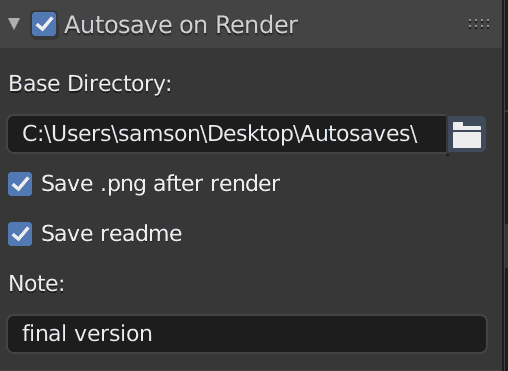
Add-In for Blender to automatically save files when rendering

Autosave - Render: Automatically save .blend, .png and readme.txt files when rendering with Blender Purpose This Blender Add-On provides an easy way t

Expose multicam options in the Blender VSE headers.

Multicam Expose multicam options in the Blender VSE headers. Install Download space_sequencer.py and swap it with the one that comes with the Blender

Comments
  • feat: Add Setup Wizard (Initial Release)

    feat: Add Setup Wizard (Initial Release)

    Initial Release/Beta Test for the Setup Wizard Tool

    • Added a Setup Wizard Tool (a handful of new setup scripts) to help streamline the import character process
    • Please read the README.md to get a quick understanding of the Setup Wizard Tool
    • I can explain the design and components (in more detail) for this tool to any reviewers

    Open to any and all feedback, suggestions, comments, etc.

    ~~(I realize there are print statements littered here and there...I can clean them up or we can keep them in case we need to troubleshoot issues down the line)~~ Debug print statements should be mostly cleaned up

    Design

    The idea behind the design of this tool is to make it easy to add new components (steps) without breaking other components (steps). We can do this by decoupling each component and making them call a common module (import_order.py) which acts as an invoker that invokes the next step in the process.

    The decoupling of the components also allows us to easily re-arrange steps in the workflow as needed (see config.json). It also makes each component have a single responsibility and reduces the chances that changes in one component will impact another component.

    Flow goes clockwise in diagram:

    1. genshin_setup_wizard
    2. import_order
    3. genshin_import_materials
    4. import_order
    5. genshin_import_charcter_model
    6. import_order

    . . . (and so on)

    (Crude Design Diagram of Setup Wizard Tool flow, a few new components have been added since this diagram was created) crude_design_diagram

    opened by michael-gh1 2
  • The third epic rewrite

    The third epic rewrite

    I think I've finally learned enough programming to tell you all that right now, the Blender shader is incredibly spaghetti and horribly thought out. This third full rewrite should hopefully improve how the shader is structured.

    Some major changes I'll be making:

    • Face shading and main (body/hair) shading will now be merged in one nodegroup. Having the two different shaders in two separate nodegroups is incredibly painful to maintain. I have no idea why I made this decision and hopefully I've learned enough not to make the same mistakes.
    • Taking off the ability to use environment lighting. Genshin's shader was never meant to take in environment lighting. The characters are meant to be lit with one directional light especially for the face shading. As to why I'm removing it, it's just really dumb in my view and adds unnecessary options for the user. Unfortunately, Blender doesn't let us call any form of a shadow pass in the fragment shader. Maybe I can do that with Goo Engine leading us to the next change....
    • We're switching over to Goo Engine. I hope any of you don't use Cycles. Goo Engine has a lot of NPR features that will be incredibly useful for many of us. I'm specifically migrating the shader to it for the depth-based rim lighting.
    • Adding other outputs for custom render passes/AOV passes. If you play around with compositing in Photoshop and similar software, then you're gonna love this change. I plan to rewrite the shader in such a way that it will be very intuitive to integrate with compositing. Some custom output sockets include the lit factor, the emission factor, and maybe more?

    That's pretty much it. I don't know when or if I'll even do this but I wanted to let those people actively using this shader know that huge changes are eventually coming and I hope this future update makes the shader easier for everyone to use. Honestly, I don't even know how this project got to 400 stars. I'm really thankful for the people using it and I'm very sorry that I've been neglecting this project. To be frank I have started hating visual scripting and nodes as a whole (lol), something about looking at them just discourages me and I don't know why. Blender, please add GLSL support owo

    enhancement to do 
    opened by festivize 0
Releases(genshin-v0.8)
Owner
Matsuri
A little festive.
Matsuri
An audnexus client, providing rich author and audiobook data to Plex via it's legacy plugin agent system.

Audnexus.bundle An audnex.us client, providing rich author and audiobook data to Plex via it's legacy plugin agent system. 📝 Table of Contents About

David Dembeck 248 Jan 02, 2023
This program can calculate the Aerial Distance between two cities.

Aerial_Distance_Calculator This program can calculate the Aerial Distance between two cities. This repository include both Jupyter notebook and Python

InvisiblePro 1 Apr 08, 2022
Chalice - A tool to facilitate Python based lambda deployment

Chalice is a tool to facilitate Python based lambda deployment. This repo contains the output of my basic exploration of this tool.

Csilla Bessenyei 1 Feb 03, 2022
Simplified web browser made in python for a college project

Python browser Simplified web browser made in python for a college project. Web browser has bookmarks, history, multiple tabs, toolbar. It was made on

AmirHossein Mohammadi 9 Jul 25, 2022
Artificial intelligence based on 5-dimensional quantum selection

Deep Thought An artificial intelligence based on 5-dimensional quantum selection. Algorithm The payload Make an random bit array (e.g. 1101...) Conver

Larry Holst 3 Dec 14, 2022
Test pour savoir si je suis capable de paratger une lib avec le monde entier !!

Data analysis Document here the project: MLproject Description: Project Description Data Source: Type of analysis: Please document the project the bet

Lucas_Penarrubia 0 Jan 18, 2022
A system for assigning and grading notebooks

nbgrader Linux: Windows: Forum: Coverage: Cite: A system for assigning and grading Jupyter notebooks. Documentation can be found on Read the Docs. Hig

Project Jupyter 1.2k Dec 26, 2022
Purge your likes and wall comments from VKontakte. Set yourself free from your digital footprint.

vk_liberator Regain liberty in the cruel social media world. This program assists you with purging your metadata from Russian social network VKontakte

20 Jun 11, 2021
frida-based ceserver. iOS analysis is possible with Cheat Engine.

frida-ceserver frida-based ceserver. iOS analysis is possible with Cheat Engine. Original by Dark Byte. Usage Install frida on iOS. python main.py Cyd

KenjiroIchise 89 Jan 08, 2023
Chemical Analysis Calculator, with full solution display.

Chemicology Chemical Analysis Calculator, to solve problems efficiently by displaying whole solution. Go to releases for downloading .exe, .dmg, Linux

Muhammad Moazzam 2 Aug 06, 2022
Audio2Face - a project that transforms audio to blendshape weights,and drives the digital human,xiaomei,in UE project

Audio2Face - a project that transforms audio to blendshape weights,and drives the digital human,xiaomei,in UE project

FACEGOOD 732 Jan 08, 2023
Chess bot can play automatically as white or black on lichess.com, chess.com and any website using drag and drop to move pieces

Chessbot "Why create another chessbot ?" The explanation is simple : I did not find a free bot I liked online : all the bots I saw on internet are par

Dhimas Bagus Prayoga 2 Nov 11, 2021
Python module to work with Magneto Database directly without using broken Magento 2 core

Python module to work with Magneto Database directly without using broken Magento 2 core

Egor Shitikov 13 Nov 10, 2022
Inspect the resources of your android projects and understand which ones are not being used and could potentially be removed.

Android Resources Checker What This program will inspect the resources of your app and help you understand which ones are not being used and could pot

Fábio Carballo 39 Feb 08, 2022
A Python utility belt containing simple tools, a stdlib like feel, and extra batteries. Hashing, Caching, Timing, Progress, and more made easy!

Ubelt is a small library of robust, tested, documented, and simple functions that extend the Python standard library. It has a flat API that all behav

Jon Crall 638 Dec 13, 2022
A python server markup language

PSML - Python server markup language How to install: python install.py

LMFS 6 May 18, 2022
Metal Gear Rising: Revengeance's DAT archive (un)packer

DOOMP Metal Gear Rising: Revengeance's DAT archive (un)packer

Christopher Holzmann Pérez 5 Sep 02, 2022
Ingest openldap data into bloodhound

Bloodhound for Linux Ingest a dumped OpenLDAP ldif into neo4j to be visualized in Bloodhound. Usage: ./ldif_to_neo4j.py ./sample.ldif | cypher-shell -

Guillaume Quéré 71 Nov 09, 2022
Python script which allows for automatic registration in Golfbox

Python script which allows for automatic registration in Golfbox

Guðni Þór Björnsson 8 Dec 04, 2021
Freeze your objects in python

gelidum Freeze your objects in python. Latin English Caelum est hieme frigidum et gelidum; myrtos oleas quaeque alia assiduo tepore laetantur, asperna

Diego J. 51 Dec 22, 2022