A simple python bot that serves to send some notifications about GitHub events to Slack.

Overview

github alerts slack bot 🤖

What is it? 🔍

This is a simple bot that serves to send some notifications about GitHub events to Slack channels.

These are the features currently developed:

  • notification to inform Pull Requests with conflicts

Others features may be developed in the future.


How it works 🧑‍🏭

  • GitHub webhook send a request to bot to selected event (Pull Request has been opened, per example)
  • It handle the request
    • it check if the request comes from the correct GitHub webhook to avoid fraud
    • it don't send repeated notification with same data on the same day
  • Whether yes, the Slack webhook is called to create a message in on channel with the information (a Pull Request is open)

Configuration ⚙️

Create a access token of GitHub

Navigate to Settings > Developer Settings > Personal access tokens > Generate new token

The permission repo is only need to access necessary datas of yours repositories: image
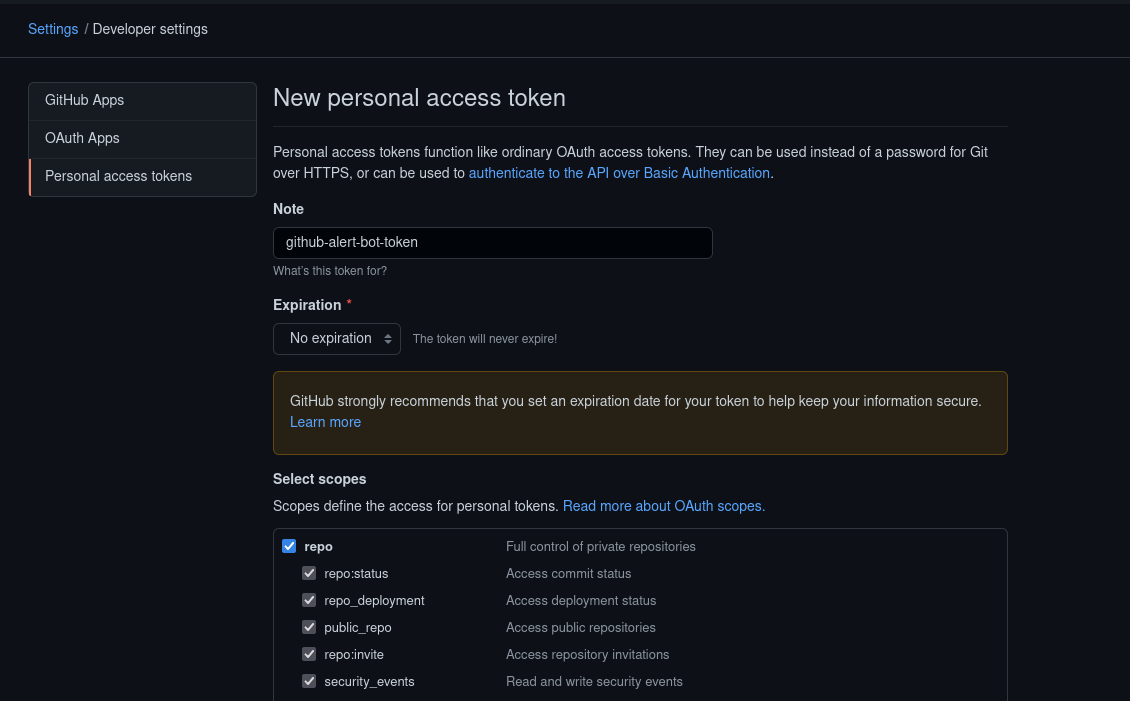
Save the access token after creating it.

Create a workflow in Slack

The workflow is the point used to send the notifications and here there are a tutorial to create one.

The only var required in the text is prs_list.

You can customize the message of your workflow as you wish:

example of workflow

After create, save the workflow webhook.

Deploy the bot

First, create your fork of this project to can perform the deploy.

The our bot is configured to deploy in Heroku. Heroku is a cloud platform to deploy your simple projects, they have a free plan that will be enough for us. You can also choose another cloud platform to do this.

Create a new app > Select the deploy on GitHub > Choose your fork of this project

Greate! If everything is ok, you can see this message:
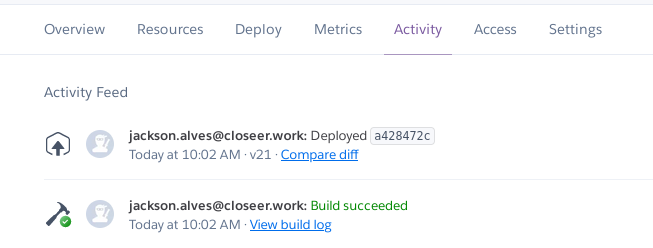
success deploy

Install Redis

Redis is used to check if one message is send in the past day with the same pull requests.

In the dashboard of your project in Heroku, go to Resources > Find more add-ons

Select Redis Enterprise Cloud. It will probably ask you to set up the credit card on your account, but don't worry, the free plan is enough to our bot. After set up your credit card, select the free plan and the project of bot to install the Redis.

It is listed in your add-ons if everything is ok:

redis add-on

Access the add-on and complete the Redis url with the datas: http://rediscloud:[email protected]:port

Like this: http://rediscloud:cofe6kWpNnsdlfkçlç[email protected]:1234

This will be used to connect our bot with the Redis.

Create GitHub webhook

Your repository to track > Settings > Webhooks > add webhook

In the Payload URL, past the URL of your Heroku project and the endpoint check_conflicts. Like this: https://my-heroku-app.herokuapp.com/check_conflicts

The Content type is application/json.

I recommend using a UUID in the Secret. This will ensure the security of the requests. Save this secret to use in virtual environments of the project

In the events, select Let me select individual events. and select Pull requests in the list of events.

Now just save.

Setting envs

Finally, the last step is set the virtual environments in the Heroku project.

Heroku project > Settings > Reveal Config vars.

Now set this envs:

  • SECRET_ACCESS: secret used in GitHub webhook
  • ACCESS_TOKEN: your access token of GitHub
  • PROJECT_TO_TRACK: project of the GitHub webhook. Example: jackson541/github-alerts-slack-bot
  • BRANCH_TO_TRACK: the branch of the project that you want to track. Example: master
  • SLACK_WEBHOOK_LINK: the URL of the workflow created in Slack
  • REDIS_URL: the URL created with the datas of Redis. example: http://rediscloud:cofe6kWpNnsdlfkçlç[email protected]:1234

You can stop and have your coffee, everything is set up!


Contribute

Contribute is always well received! Feel free to open Pull Requests or Issues. 😄

Owner
Jackson Alves
Formação de Técnico em informática pelo IFRN e atualmente cursando Ciência e Tecnologia na UFRN.
Jackson Alves
Grape - A webbrowser with its own Search Engine

Grape 🔎 A Web Browser made entirely in python. Search Engine 🔎 Installation: F

Grape 2 Sep 06, 2022
Program that uses Python to monitor grade updates in the Genesis Platform

Genesis-Grade-Monitor Program that uses Python to monitor grade updates in the Genesis Platform Guide: Install by either cloning the repo or downloadi

Steven Gatanas 1 Feb 12, 2022
Automatically mass follows tons of NameMC profiles.

Automatically mass follows tons of NameMC profiles. (Creates REAL traffic to your profile)

Jam 3 Jun 29, 2022
:globe_with_meridians: A Python wrapper for the Geocodio geolocation service API

Py-Geocodio Python wrapper for Geocodio geocoding API. Full documentation on Read the Docs. If you are upgrading from a version prior to 0.2.0 please

Ben Lopatin 84 Aug 02, 2022
List of twitch bots n bigots

This is a collection of bot account names NamelistMASTER contains all the names we reccomend you ban in your channel Sometimes people get on that list

62 Sep 05, 2021
An implementation of webhook used to notify GitHub repository events to DingTalk.

GitHub to DingTask An implementation of webhook used to notify GitHub repository events to DingTalk.

Prodesire 5 Oct 02, 2022
Zalo AI challenge 2021 5K-Compliance

Zalo AI challenge 2021 5K-Compliance Prepare data: Dữ liệu của ban tổ chức cung

Nguyễn nhật hoàng 32 Nov 21, 2022
A Telegram bot to all media and documents files to web link .

FileStreamBot A Telegram bot to all media and documents files to web link . Report a Bug | Request Feature 🍁 About This Bot : This bot will give you

Code X Mania 129 Jan 03, 2023
Bot to notify when vaccine appointments are available

Vaccine Watch Bot to notify when vaccine appointments are available. Supports checking Hy-Vee, Walgreens, CVS, Walmart, Cosentino's stores (KC), and B

Peter Carnesciali 37 Aug 13, 2022
This repository contains code written in the AWS Cloud Development Kit (CDK)

This repository contains code written in the AWS Cloud Development Kit (CDK) which launches infrastructure across two different regions to demonstrate using AWS AppSync in a multi-region setup.

AWS Samples 5 Jun 03, 2022
A python crypto trading bot on Binance using RSI in 25 Lines 🚀

RSI Crypto Trading Bot - Binance A Crypto Trading Bot on Binance trading BTCUSDT and ETHUSDT using RSI in 25 Lines of Code Getting Started Note Python

Blankly Finance 10 Dec 26, 2022
GitHub Usage Report

github-analytics from github_analytics import analyze pr_analysis = analyze.PRAnalyzer( "organization/repo", "organization", "team-name",

Shrivu Shankar 1 Oct 26, 2021
A Telegram bot for personal utilities

Aqua Aqua is a Telegram bot for personal utilities. Installation Prerequisites: Install Poetry for managing dependencies and fork/clone the repository

Guilherme Vasconcelos 2 Mar 30, 2022
A file-based quote bot written in Python

Let's Write a Python Quote Bot! This repository will get you started with building a quote bot in Python. It's meant to be used along with the Learnin

Florent 1 Dec 17, 2021
Using Streamlit to build a simple UI on top of the OpenSea API

OpenSea API Explorer Using Streamlit to build a simple UI on top of the OpenSea API. 🤝 Contributing Contributions, issues and feature requests are we

Gavin Capriola 1 Jan 04, 2022
Community-based extensions for the python-telegram-bot library.

Community-based extensions for the python-telegram-bot library. Table of contents Introduction Installing Getting help Contributing License Introducti

74 Dec 24, 2022
TikTok channel bulk ripper based on TikTok-Api and Youtube-dl. Some assembly may be required.

RipTok Script provided as is. Absolutely no guarantee. A TikTok ripper based on TikTokApi and YouTube-dl. Some assembly may be required. positional ar

32 Dec 24, 2022
Send song lyrics to iMessage users using the Genius lyrics API

pyMessage Send song lyrics to iMessage users using the Genius lyrics API. Setup 1.) Open the main.py file, and add your API key on line 7. 2.) Install

therealkingnull 1 Jan 23, 2022
Search stock images (e.g. via Unsplash) and save them to your Wagtail image library.

Wagtail Stock Images Search stock images (e.g. via Unsplash) and save them to your Wagtail image library. Requirements Python 3 Django = 2 Wagtail =

Vicktor 12 Oct 12, 2022
A cross-platform script to book first available time for getting a passport in Sweden - Ett skript som automatiskt bokar pass hos polisen

Automatic passport booker - Boka pass automatiskt hos Svenska polisen A cross-platform script to book first available time for getting a passport in S

Elias Floreteng 14 Oct 17, 2022