Raspberry Pi Pico as a Rubber Ducky

Overview

Raspberry-Pi-Pico-as-a-Rubber-Ducky

2022-02-09-16-58-32_Trim

Kurulum

  1. Raspberry Pi Pico cihazınız için CircuitPython'u indirin.
  2. Boot düğmesine basılı tutarken cihazı bir USB bağlantı noktasına takın ve cihazı taktıktan sonra boot tuşundan elinizi çekin. Bunun sonucunda "RPI-RP2" adlı çıkarılabilir bir medya aygıtı karşınıza çıkacaktır.
  3. İndirdiğiniz .uf2 dosyasını Pico'nun (RPI-RP2) ana dizinine kopyalayın. Bir süre sonra cihaz yeniden başlayacak ve 1-2 saniye sonra CIRCUITPY adında çıkarılabilir bir medya aygıtı olarak karşınıza çıkacaktır.
  4. Ardından adafruit-circuitpython-bundle-7.x-mpy-YYYYMMDD.zip dosyasını indirin ve cihazın dışına çıkarın.
  5. adafruit-circuitpython-bundle-7.x-mpy-YYYYMMDD klasörü altındaki "lib" klasörüne gidin ve "adafruit_hid'i" Raspberry Pi Pico'nuzdaki lib klasörüne kopyalayın.
  6. Buradaki sayfaya giderek CTRL + S tuşlarına basın ve dosyayı Pico'nun içerisinde bulunan code.py dosyasının üzerine yazarak Raspberry Pi Pico'nun ana dizinine "code.py" olarak kaydedin.
  7. Buradaki linkten bir script bulun veya kendi Rubber Ducky scriptinizi oluşturun ve "payload.dd" olarak kaydedin.
  8. Dikkat edin, son işlemden sonra cihaz yeniden başlatılacak ve yarım saniye sonra komut dosyası (payload.dd) çalışacaktır.

USB Etkinleştirme/Devre Dışı Bırakma

Pico'nun gizlilik amacıyla bir USB depolama aygıtı gibi görünmemesine istiyorsanız;

  1. Cihazı USB bağlantı noktasına takın.
  2. "boot.py" dosyasını Pico'nun (RPI-RP2) ana dizinine kopyalayın.
  3. payload.dd dosyanızı da Pico'ya (RPI-RP2) kopyalayın.
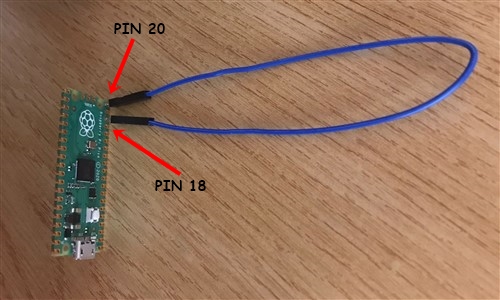
  4. Pico'yu bilgisayarınızdan çıkarın. Pin 18 ve pin 20 arasına bir jumper kablosu bağlayın. Bu durum Pico üzerinde bir kısa devre yaratacaktır ve hedef bilgisayara takıldığında Pico'nun bir USB sürücüsü olarak görünmesini engelleyecek.
  5. Tekrar programlamak için (Payload'ınızı güncellemek için) jumper kabloyu çıkarın ve PC'nize yeniden bağlayın. Varsayılan modda, USB depolama aygıtı aktif durumda olacaktır.
1

Klavye Düzenlerini Değiştirme

Varsayılan modda klavye düzeni İngilizce'dir. Bunu değiştirmek isterseniz;

  1. https://kbdlayout.info/ sayfasından istediğiniz klavye düzenini bularak üzerine tıklayın ve linki kopyalayıp https://www.neradoc.me/layouts/ sayfasındaki kutucuğa yapıştırın. Ardından "Make Zip Bundle Links" butonuna tıklayın.
  2. Ardından "Download the zip file (.py)" butonuna tıklayın.
  3. İndirilen dosyanın içerisinden kendize uygun olan klavye düzeninin dosyalarını Pico'nuzun içerisindeki lib klasörü altına kopyalayın (ben Türkçe Q klavye düzenini tercih ediyorum);
  • keyboard_layout.mpy
  • keyboard_layout_win_tuq.mpy
  • keycode_win_tuq.mpy

2

Dil Dosyanızı Kullanmak için Pico Kodunuzu Değiştirin

Pico içerisindeki "code.py" dosyasını açın ve içerisindeki şu kodu;

from adafruit_hid.keyboard_layout_us import KeyboardLayoutUS as KeyboardLayout
from adafruit_hid.keycode import Keycode

aşağıdaki kod ile değiştirin;

from keyboard_layout_win_tuq import KeyboardLayout
from keycode_win_tuq import Keycode
Owner
Furkan Enes POLATOĞLU
Cyber Security Researcher, SOC Analyst, CENG, YnVsbGV0cHJvb2Y=
Furkan Enes POLATOĞLU
Event-based hardware simulation framework

An event-based multi-device simulation framework providing configuration and orchestration of complex multi-device simulations.

Diamond Light Source Controls Group 3 Feb 01, 2022
This repo uses a stereo camera and gray-code-based structured light to realize dense 3D reconstruction.

Structured-light-stereo This repo uses a stereo camera and gray-code-based structured light to realize dense 3D reconstruction. . How to use: STEP 1:

FEI 20 Dec 31, 2022
Simple Weather Check base on Hefeng api, Work on raspberry Pi

Simple Weather Check base on Hefeng api, Work on raspberry Pi

Retr0mous 28 Sep 17, 2022
Raspberry Pi Power Button - Wake/Power Off/Restart(Double Press)

Control Raspberry pi with physically attached button. Wake, Power Off, and Restart (Double Press) . Python3 script runs as a service with easy installation.

Stas Yakobov 16 Oct 22, 2022
A rubiks cube timer using a distance sensor and a raspberry pi 4, and possibly the pi pico to reduce size and cost.

distance sensor cube timer A rubiks cube timer using a distance sensor and a raspberry pi 4, and possibly the pi pico to reduce size and cost. How to

3 Feb 21, 2022
This is a collection of python modules that interact with the Ryze Tello drone.

This is a collection of python modules that interact with the Ryze Tello drone.

DJI-SDK 1.2k Jan 03, 2023
Home-Assistant MQTT bridge for Panasonic Comfort Cloud

Panasonic Comfort Cloud MQTT Bridge Home-Assistant MQTT bridge for Panasonic Comfort Cloud. Note: Currently this brige is a one evening prototype proj

Santtu Järvi 2 Jan 04, 2023
LT-OCF: Learnable-Time ODE-based Collaborative Filtering, CIKM'21

LT-OCF: Learnable-Time ODE-based Collaborative Filtering Our proposed LT-OCF Our proposed dual co-evolving ODE Setup Python environment for LT-OCF Ins

Jeongwhan Choi 15 Dec 28, 2022
A DUCO (Duino-Coin) miner for GigaDevice ARM boards.

GD32 Duino-Coin Miner Description Contains the firmware and miner software for mining DUCO (Duino-Coin) on GigaDevice GD32 chips. Supported boards GD3

Maximilian Gerhardt 2 Feb 20, 2022
Python apps to assist with Gas Blending

Welcome to DiveTools Gas Blending This tool is for testing and educational use. It is not intended to confirm the mix of breathing gases. If this tool

Tucker 7 Sep 18, 2022
Hardware: CTWingSKIT_BC28 Development Toolkit

IoT Portal Monitor Tools hardware: CTWingSKIT_BC28 Development Toolkit serial port driver: ST-LINK hardware development environment: Keli 5 MDK IoT pl

Fengming Zhang 1 Nov 07, 2021
Volkswagen ID component for Home Assistant

Volkswagen ID component for Home Assistant This folder contains both a generic Python 3 library for the Volkswagen ID API and a component for Home Ass

55 Jan 07, 2023
Home Assistant custom components MPK-Lodz

MPK Łódź sensor This sensor uses unofficial API provided by MPK Łódź. Configuration options Key Type Required Default Description name string False MP

Piotr Machowski 3 Nov 01, 2022
Adafruit IO connected smart thermostat based on CircuitPython.

Adafruit IO Thermostat Adafruit IO connected smart thermostat based on CircuitPython. Background and Motivation I have a 24 V Heat-only system with a

Shubham Chaudhary 1 Jan 18, 2022
A custom mechanical keyboard inspired by the CFTKB Mysterium

Env-KB A custom mechanical keyboard inspired by the CFTKB Mysterium Build Guide and Parts List What is to do? Right now for the first 5 PCBs I have, i

EnviousData 203 Jan 04, 2023
A Home Assistant integration for Solaredge inverters

A Home Assistant integration for Solaredge inverters. Supports multiple inverters chained through RS485.

Seth 50 Dec 23, 2022
Play music on Raspberry Pi Pico Without CPU involvement

MicroPython_PIO_Music_DMA Play music on Raspberry Pi Pico Without CPU involvement This is based on PIOBeep (https://github.com/benevpi/pico_pio_buzz)

3 Nov 27, 2022
Testing out some (stolen) DMA code for RP2040 Micropython

RP2040_micropython_dma testing out some (stolen) DMA code for RP2040 Micropython. Heavy inspiration and some code from https://iosoft.blog/2021/10/26/

2 Dec 29, 2022
A simple Python script for toggling Philips Hue Lights by clapping

LightsClap A simple Python script for toggling Philips Hue Lights by clapping Usage pip3 install -r requirements.txt python3 main.py and press the Ent

Flux Industries 2 Nov 16, 2021
Simples Keylogger para Windows com um autoboot implementado no sistema

MKW Keylogger Keylogger simples para Windos com um autoboot implementado no sistema, o malware irá capturar pressionamentos de tecla e armazená-lo em

3 Jul 03, 2021