Rembg Video Virtual Green Screen Edition

Overview

Rembg Virtual Greenscreen Edition (Dr. Tim Scarfe)

Rembg Virtual Greenscreen Edition is a tool to create a green screen matte for videos

Video Virtual Green Screen Edition

15th Jan 2021 -- made a new YouTube explainer

  • Take any video file and convert it to an alpha matte to apply for a virtual green screen
  • It runs end-to-end non-interactively
  • You need ffmpeg installed and on your path
  • There is also a powershell script ./remove-bg.ps1 which will do the job in a manual way i.e. first create frames, then run the rembg -p ... command and then run ffmpeg to create the matte movie. This was my first approach to solve this problem but then I migrated onto just making a new version of rembg.

If you have any ideas for speeding this up further, please let us know. We have tried quite a few things at this stage and are a bit stuck on how to proceed from here. See some of the "evolution" in the Whimsical notes.

Usage;

pip install rembg-greenscreen

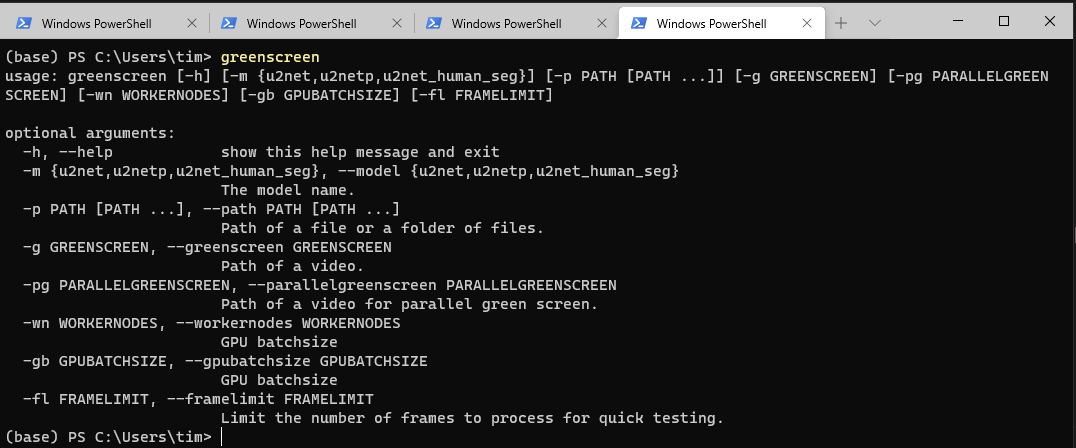
greenscreen -g "path/video.mp4"

Experimental parallel green screen version;

greenscreen --parallelgreenscreen "path/video.mp4" --workernodes 3 --gpubatchsize 5

The command above will produce a video.matte.mp4 in the same folder, also works with mov and avi extensions. Uses ffmpeg under the hood to stream and re-encode the frames into a grayscale matte video.

Be careful with the default parameters, my 11GB GPU is already pretty much maxed with 3 instances of the NN with 5 image gpu batches in forward pass.

You can see how much free GPU ram you have with

nvidia-smi

CLI interface
Important notes

  • Don't use VBR videos, it will run forever -- use Handbrake to convert them to CFR

References

License

  • Copyright (c) 2020-present Daniel Gatis
  • Copyright (c) 2020-present Dr. Tim Scarfe
  • Copyright (c) 2020-present Lucas Nestler (Making it go faster and more stuff running on the GPU, thanks Lucas!)

Licensed under MIT License

Owner
Tim Scarfe
Principal Software Engineer @Microsoft. Ph.D in Machine Learning.
Tim Scarfe
Source files for the data lake demo video using the AWS TICKIT database

Data Lake Demo Source code for video demonstration detailed in the post, Building a Simple Data Lake on AWS . Build a simple data lake on AWS using a

Gary A. Stafford 97 Dec 23, 2022
Telegram Music/ Video Streaming Bot Using Pytgcalls

Video Player 🔥 ᴢᴀɪᴅ ᴠᴄ ᴘʟᴀyᴇʀ ɪꜱ ᴀ ᴛᴇʟᴇɢʀᴀᴍ ᴘʀᴏᴊᴇᴄᴛ ʙᴀꜱᴇᴅ ᴏɴ ᴘʏʀᴏɢʀᴀᴍ ꜰᴏʀ ᴘʟᴀʏ ᴍᴜꜱɪᴄꜱ ɪɴ ᴠᴄ ᴄʜᴀᴛꜱ... 🅡🅔🅟🅞 🅢🅣🅐🅣🅢 ʀᴇQᴜɪʀᴇᴍᴇɴᴛꜱ 📝 FFmpeg NodeJ

16 Nov 30, 2022
Video processing routines for SciPy

scikit-video Video Processing SciKit BETA Video processing algorithms, including I/O, quality metrics, temporal filtering, motion/object detection, mo

Alex Izvorski 119 Dec 27, 2022
Automatic video generator for local news

Automatic video generator for local news

Gabriel Monteiro 2 Jan 11, 2022
Simple nightcore song+video maker

nighty nighty is a simple nightcore song maker (+ video) Installation clone the repo wherever you want git clone https://www.github.com/DanyB0/nighty

DanyB0 2 Oct 02, 2022
I have baked a custom integration to control Eufy Security Cameras and access RTSP and P2P stream if possible.

I have baked a custom integration to control Eufy Security Cameras and access RTSP (real time streaming protocol) and P2P (peer to peer) stream if pos

Fuat Akgün 422 Jan 01, 2023
Text2Video's purpose is to help people create videos quickly and easily by simply typing out the video’s script and a description of images to include in the video.

Text2Video Text2Video's purpose is to help people create videos quickly and easily by simply typing out the video’s script and a description of images

Josh Chen 19 Nov 22, 2022
Adblocker for movie subtitles.

SubAdBlock Adblocker for movie subtitles. Usage Place "main.py" and "config.conf" in directory with subtitles and run "main.py". It will automatically

Marko Živić 1 Jan 09, 2022
A script to disable steam servers regionwise. [Works on Windows only]

Csgo-server-blocker A script to disable steam servers regionwise. [Works on Windows only] Dependencies python3.x Usage: pip install requirements.txt I

Aditya Bennur 2 Jun 10, 2022
Code for the manim-generated scenes used in 3blue1brown videos

Code for the manim-generated scenes used in 3blue1brown videos

Grant Sanderson 4.1k Jan 09, 2023
Image and video quality assessment

CenseoQoE: 视觉感知画质评价框架 项目介绍 图像/视频在编解码、传输和显示等过程中难免引入不同类型/程度的失真导致图像质量下降。图像/视频质量评价(IVQA)的研究目标是希望模仿人类视觉感知系统, 通过算法评估图片/视频在终端用户的眼中画质主观体验的好坏,目前在视频编解码、画质增强、画质监。

Tencent 133 Dec 20, 2022
Become a virtual character with just your webcam!

Become a virtual character with just your webcam!

Rich 300 Jan 03, 2023
A Telegram bot to convert videos into x265/x264 format via ffmpeg.

Video Encoder Bot A Telegram bot to convert videos into x265/x264 format via ffmpeg. Configuration Add values in environment variables or add them in

Adnan Ahmad 82 Jan 03, 2023
Rembg Video Virtual Green Screen Edition

Rembg Virtual Greenscreen Edition is a tool to create a green screen matte for videos

Tim Scarfe 217 Jan 06, 2023
Video Translation Into Text

2021/12/9 The project has been updated Added a home screen Just drag it onto the screen The final results \ 2021/12/9 项目已更新 添加了主界面 拖到即可 最后结果 \ Using t

10 Mar 12, 2022
VIT - VideoInTerminal. A quick piece of code to play videos in your terminal using python

VIT VIT - VideoInTerminal. A quick piece of code to play videos in your terminal using python.

ShellTear 3 Mar 03, 2022
Automatically logs into VTOP and can perform certain tasks

VTOP_Login Automatically logs into VTOP and can perform certain tasks To run the

Jatin 1 Jan 30, 2022
获取斗鱼&虎牙&哔哩哔哩&抖音&快手等 48 个直播平台的真实流媒体地址(直播源)和弹幕,直播源可在 PotPlayer、flv.js 等播放器中播放。

获取斗鱼&虎牙&哔哩哔哩&抖音&快手等 48 个直播平台的真实流媒体地址(直播源)和弹幕,直播源可在 PotPlayer、flv.js 等播放器中播放。

乌帮图 5.6k Jan 06, 2023
A self-hosted streaming platform with Discord authentication, auto-recording and more!

A self-hosted streaming platform with Discord authentication, auto-recording and more!

John Patrick Glattetre 331 Dec 27, 2022
KonomiTV: Kind and Optimized Next brOadcast watching systeM Infrastructure for TV

備考・注意事項 現在 α 版で、まだ実験的なプロダクトです。通常利用には耐えないでしょうし、サポートもできません。 安定しているとは到底言いがたい品質ですが、それでも構わない方のみ導入してください。 使い方などの説明も用意できていないため、自力でトラブルに対処できるエンジニアの方以外には現状おすすめ

tsukumi 244 Dec 31, 2022