An easy-to-bundle GTK terminal emulator.

Overview

EasyTerm

An easy-to-bundle GTK terminal emulator.

This is a WIP (Work In Progress) project.

This project is meant to be used as a dependency for other projects that need an easy-to-bundle and lightweight terminal emulator, but also works as a standalone terminal emulator.

Dependencies

  • GTK 3
  • Handy
  • Vte

GTK4 & libadwaita

Port to GTK4 is almost simple, but is stalled because of the lack of Vte for GTK4. This mean that also libhandy cannot be moved to libadwaita because this last one need GTK4.

Bottles purposes

EasyTerm should be provided as the default terminal in the Bottles project when Vte will be ported to GTK4.

Installation

git clone https://github.com/bottlesdevs/EasyTerm.git
cd EasyTerm
python3 setup.py install

Usage

As a library, you can use the EasyTerm class as follows:

from easyterm import easyterm
easyterm.EasyTerm(
    cwd='/path',
    command='/bin/bash',
    env=[],
    actions=[
        {
            "name": "Hello",
            "icon": "emblem-favorite",
            "tooltip": "Say hello to the world",
            "command": "echo Hello World"
        }
    ]
)
You might also like...
Open a file in your locally running Visual Studio Code instance from arbitrary terminal connections.

code-connect Open a file in your locally running Visual Studio Code instance from arbitrary terminal connections. Motivation VS Code supports opening

Darkdump - Search The Deep Web Straight From Your Terminal

Darkdump - Search The Deep Web Straight From Your Terminal About Darkdump Darkdump is a simple script written in Python3.9 in which it allows users to

Random scripts and other bits for interacting with the SpaceX Starlink user terminal hardware

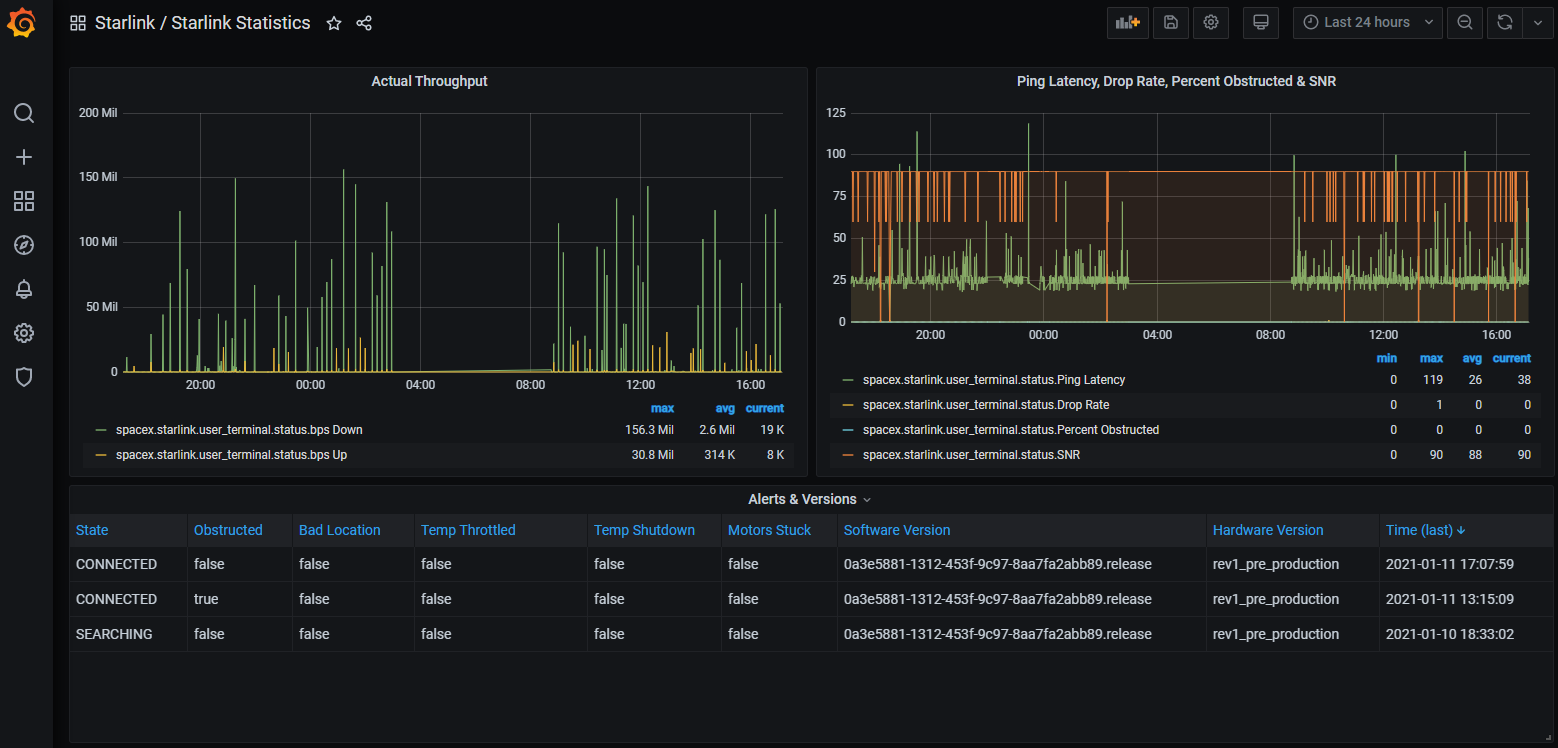
starlink-grpc-tools This repository has a handful of tools for interacting with the gRPC service implemented on the Starlink user terminal (AKA "the d

asciinema - Terminal session recorder 📹

asciinema - Terminal session recorder 📹

Rich is a Python library for rich text and beautiful formatting in the terminal.

The Rich API makes it easy to add color and style to terminal output. Rich can also render pretty tables, progress bars, markdown, syntax highlighted source code, tracebacks, and more — out of the box.

Lets you view, edit and execute Jupyter Notebooks in the terminal.

Lets you view, edit and execute Jupyter Notebooks in the terminal.

The project help you to quickly build layouts in terminal,cross-platform

The project help you to quickly build layouts in terminal,cross-platform

 GanTTY - Project planning from the terminal
GanTTY - Project planning from the terminal

GanTTY - Project planning from the terminal

Module for converting 2D Python lists to fancy ASCII tables. Table2Ascii lets you display pretty tables in the terminal and on Discord.

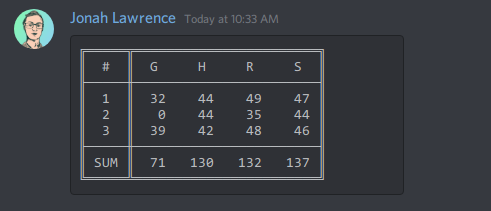
table2ascii Module for converting 2D Python lists to a fancy ASCII/Unicode tables table2ascii 📥 Installation 🧑‍💻 Usage Convert lists to ASCII table

Comments
  • [Request]: Tab completion in terminal

    [Request]: Tab completion in terminal

    Tell us the problem or your need

    Browsing the filesystem in terminal is difficult due to a lack of tab completion. Especially because many windows directories include spaces and other funky characters that might be difficult to type.

    Describe the solution you'd like

    Having support for tab completion to browse directories would be great.

    Other solutions?

    No response

    Additional context and references

    No response

    Feature request 
    opened by felinira 1
  • [Bug]: Terminal window freezes with copy / paste from keyboard

    [Bug]: Terminal window freezes with copy / paste from keyboard

    Describe the bug

    Trying to copy / paste with keyboard shortcuts from terminal causes it to freeze the input and it can not be used anymore (I have not yet found a way to unbreak this apart from restarting the terminal, is there a way?)

    To Reproduce

    1. Open terminal window
    2. Select text
    3. Try to copy with the terminal default shortcut Ctrl+Shift+C
    4. Terminal input freezes and can not be used anymore

    Package

    Flatpak from Flathub

    Distribution

    Debian testing

    Troubleshooting Logs

    Version: 2022.7.28-brescia-2
    Display:
        X.org: true
        X.org (port): :99.0
        Wayland: true
    Graphics:
        vendors:
            amd:
                vendor: amd
                envs:
                    DRI_PRIME: '1'
                icd: /usr/lib/x86_64-linux-gnu/GL/vulkan/icd.d/radeon_icd.x86_64.json:/usr/lib/i386-linux-gnu/GL/vulkan/icd.d/radeon_icd.i686.json
        prime:
            integrated: null
            discrete: null
    Kernel:
        Type: Linux
        Version: 5.18.0-2-amd64
    Distro:
        Name: GNOME
        Version: '"42 (Flatpak runtime)"'
    Disk:
        Total: 16806891520
        Free: 16806748160
    RAM:
        MemTotal: 31.3GiB
        MemAvailable: 6.4GiB
    Bottles_envs: null
    

    Display Protocol

    Wayland

    Display Backend used by Bottles

    Wayland

    Additional context

    No response

    opened by felinira 0
  • [Bug]: Closing the Command line window of a bottle results in 'python3.9 killed by SIGSEGV'

    [Bug]: Closing the Command line window of a bottle results in 'python3.9 killed by SIGSEGV'

    Describe the bug

    Closing the built-in Command line terminal window (the easyterm window) by clicking on the (x) with the mouse leads to a python39 crash.

    To Reproduce

    1. Create a bottle
    2. Open Command line
    3. Close the terminal window by clicking on the (x)
    4. The crash reporter notification comes up saying that python39 has crashed

    This always happens for me. Interestingly though, the python39 crash does not happen when typing exit in the terminal before closing the window.

    Package

    Flatpak from Flathub

    Distribution

    Fedora 36 / flatpak

    Health Check

    Display:
        X.org: true
        X.org (port): :99.0
        Wayland: false
    Graphics:
        vendors:
            nvidia:
                vendor: nvidia
                envs:
                    __NV_PRIME_RENDER_OFFLOAD: '1'
                    __GLX_VENDOR_LIBRARY_NAME: nvidia
                    __VK_LAYER_NV_optimus: NVIDIA_only
                icd: /usr/lib/x86_64-linux-gnu/GL/vulkan/icd.d/nvidia_icd.json:/usr/lib/i386-linux-gnu/GL/vulkan/icd.d/nvidia_icd.json
        prime:
            integrated: null
            discrete: null
    Kernel:
        Type: Linux
        Version: 5.17.7-300.fc36.x86_64
    Distro:
        Name: GNOME
        Version: '"42 (Flatpak runtime)"'
    Disk:
        Total: 33646157824
        Free: 33646002176
    RAM:
        MemTotal: 62.7GiB
        MemAvailable: 59.6GiB
    Tools:
        cabextract: true
        p7zip: true
        patool: true
        glibc_min: '2.33'
    Bottles_envs: null
    

    Display Protocol

    X11

    Display Backend used by Bottles

    X11

    Additional context

    These are the interesting bits from the crash reporter:

    reason: python3.9 killed by SIGSEGV
    cmdline: /usr/bin/python3 /app/bin/easyterm.py -d -p $'#00ffff #2b2d2e' -c bash -c $'/home/user/.var/app/com.usebottles.bottles/data/bottles/runners/caffe-7.4/bin/wine64 cmd'
    
    bug 
    opened by jp7677 1
  • (WIP) migrate EasyTerm to gtk4 and libadwaita

    (WIP) migrate EasyTerm to gtk4 and libadwaita

    Hit: https://github.com/bottlesdevs/Bottles/issues/610

    • [x] move to Gtk 4.0 namespace
    • [x] move from Handy to Adw
    • [ ] re-implement right menu

    Bugs

    • [ ] vte doesn't fill the window
    opened by mirkobrombin 0
Releases(0.2.0)
Owner
Bottles
Official GitHub organization for Bottles Developers
Bottles
Generate your name in Ascii modular type art through the terminal

ASCII Name Generator Designed and developed by Eduardo Aire The ASCII Art Name Generator is a simple program that helps you to have a practical Shell/

Eduardo Aire 1 Nov 17, 2021
Regis-ltmpt-auto - Program register ltmpt 2022 automatis

LTMPT Register Otomatis 2022 Program register ltmpt 2022 automatis dibuat untuk

1 Jan 13, 2022
A terminal utility to sort image files based on their characteristics.

About A terminal utility to sort image files based on their characteristics. Motivation This program was developed after I've realized that I had too

José Ferreira 1 Dec 10, 2022
iTerm2 Shell integration for Xonsh shell.

iTerm2 Shell Integration iTerm2 Shell integration for Xonsh shell. Installation To install use pip: xpip install xontrib-iterm2 # or: xpip install -U

Noorhteen Raja NJ 6 Dec 29, 2022
Albert launcher extension for converting units of length, mass, speed, temperature, time, current, luminosity, printing measurements, molecular substance, and more

unit-converter-albert-ext Extension for converting units of length, mass, speed, temperature, time, current, luminosity, printing measurements, molecu

Jonah Lawrence 2 Jan 13, 2022
Python-Stock-Info-CLI: Get stock info through CLI by passing stock ticker.

Python-Stock-Info-CLI Get stock info through CLI by passing stock ticker. Installation Use the following command to install the required modules at on

Ayush Soni 1 Nov 05, 2021
xonsh is a Python-powered, cross-platform, Unix-gazing shell

xonsh is a Python-powered, cross-platform, Unix-gazing shell language and command prompt.

xonsh 6.7k Dec 31, 2022
A command line interface to buy things in stregsystemet

Stregsystemet-CLI This repository is the Stregsystemet CLI, to buy things in Stregsystemet, at AAU. Use of this cli-tool is at your own risk and there

F-klubben 14 Oct 18, 2022
A very simple python script to encode and decode PowerShell one-liners.

PowerShell Encoder A very simple python script to encode and decode PowerShell one-liners. I used Raikia's PowerShell encoder ALOT, but one day it wen

John Tear 5 Jul 29, 2022
A dashboard for your Terminal written in the Python 3 language,

termDash is a handy little program, written in the Python 3 language, and is a small little dashboard for your terminal, designed to be a utility to help people, as well as helping new users get used

Rebecca White 2 Dec 03, 2021
Tablicate - Python library for easy table creation and output to terminal

Tablicate Tablicate - Python library for easy table creation and output to terminal Features Column-wise justification alignment (left, right, center)

3 Dec 14, 2022
Display Images in your terminal with python

Term-Img Display Images in your terminal with python NOTE: This project is a work in progress and not everything on here has actually been implemented

My avatar ;D 118 Jan 05, 2023
A Yahtzee-solving python package and command line tool.

yahtzee A Yahtzee-solving python package and command line tool. The algorithm is mathematically guaranteed to have the best strategy. That is, it maxi

David Merrell 0 Aug 19, 2022
Colab-xterm allows you to open a terminal in a cell

colab-xterm Colab-xterm allows you to open a terminal in a cell. Usage Install package and load the extension !pip install git+https://github.com/popc

InfuseAI 194 Dec 29, 2022
Ros command - Unifying the ROS command line tools

Unifying the ROS command line tools One impairment to ROS 2 adoption is that all

37 Dec 15, 2022
Lets you view, edit and execute Jupyter Notebooks in the terminal.

Lets you view, edit and execute Jupyter Notebooks in the terminal.

David Brochart 684 Dec 28, 2022
Un module simple pour demander l'accord de l'utilisateur dans une CLI.

Demande de confirmation utilisateur pour CLI Présentation ask_lib est un module pour le langage Python proposant une seule fonction; ask(). Le but pri

CallMePixelMan 7 May 09, 2022
Just a shell writed on Python

HIGHSHELL (also hSH or HS) Just a shell writed on Python Send bug report • How to use the shell • Broked features • Licenses How to use the shell Inst

0LungSkill0 2 Jan 04, 2022
Chat with Rem in Terminal!

Chat with Rem in Terminal!

bariscodefx 1 Dec 19, 2021
Module for converting 2D Python lists to fancy ASCII tables. Table2Ascii lets you display pretty tables in the terminal and on Discord.

table2ascii Module for converting 2D Python lists to a fancy ASCII/Unicode tables table2ascii 📥 Installation 🧑‍💻 Usage Convert lists to ASCII table

Jonah Lawrence 40 Jan 03, 2023