

阴阳师后台全平台(使用网易 MuMu 模拟器)辅助。支持御魂,觉醒,御灵,结界突破,秘闻副本,地域鬼王。

Overview

阴阳师后台全平台辅助

screen

  • Python 版本:Python 3.8.3
  • 模拟器:网易 MuMu雷电模拟器
  • 模拟器分辨率:1024*576
  • 显卡渲染模式:兼容(OpenGL)
  • 兼容 Windows 系统和 MacOS 系统

思路:

利用 adb 截图后,使用 opencv 找图找色,模拟点击。使用 adb 操作模拟器,相当于后台操作。

我主要为了刷勾玉,所以此工具更侧重地域鬼王,结界突破和秘闻副本,御魂是用来刷突破券的。

为了防止收到鬼使黑的来信,所以增加随机等待的时间比较多,每次随机等待 2-3 秒,导致整体运行速度稍微慢了一些。

此工具适合放在后台干其他工作的同学使用。也比较符合我个人的使用。


地域鬼王需要先把姑获鸟,以津真天和山童收藏。
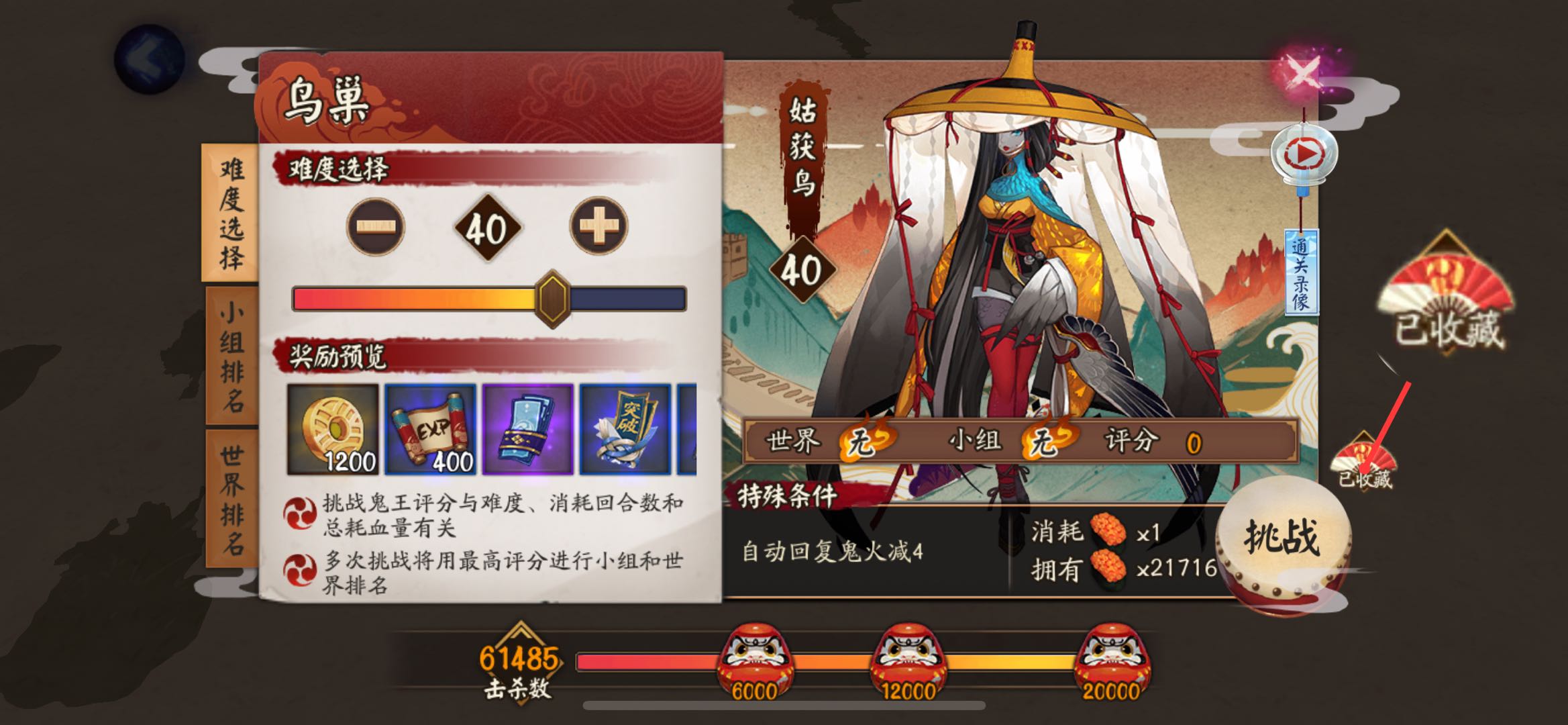
收藏

结界突破主要是把九宫格的坐标保存到列表,使用 shuffle 方法随机打乱,然后循环执行。

第一次进入突破会主动失败一次,失败的话难度不会增加,方便刷排名和勾玉使用。

每突破三次会领取一次奖励,等待九次全部完成后,会把右上角突破剩余数量截图上传到腾讯 OCR 识别接口,如果剩余次数大于等于九次,递归执行,否则停止执行。

腾讯 OCR 每月有一千次免费次数。如果只是识别结界券使用,应该是够用了,如果不够用可以按需付费或者自建字典识别。

突破剩余数量

这一步需要申请 腾讯云文字识别 OCR 的 secretId 和 secretKey。

然后新建文件 tencentcloudKeys.py,写入:

secretId = "AKI***********************aYHDtmaOw"
secretKey = "Sg**************************QdZ7X"

模拟器版

部分操作参考 网易 MuMu 开发者必备说明书【雷神命令】常用adb命令整理贴

建议直接看雷神模拟器社区的命令整理,比较详细。

运行阴阳师

如果不清楚应用的启动命令,可以先手动运行该程序,然后使用命令:

adb shell dumpsys window | findstr mCurrentFocus

查找正在运行的应用。

启动阴阳师的命令为:

adb shell am start -n com.netease.onmyoji.netease_simulator/com.netease.onmyoji.Client

因为我是 iOS,只能扫码登录,所以启动命令对我来说并不实用。

模拟点击

例如我们需要点击 500, 266 这个坐标:

adb shell input tap 500 266

模拟滑动

0, 0 滑动到 200, 200,耗时 0.5 秒:

adb shell input swipe 0 0 200 200 500

截图

需要先运行此命令:

adb shell screencap /data/screen.png

再将截图推送到电脑:

adb pull /data/screen.png .

注意:示例中的命令将图片保存到当前路径下。

找图

这里借助 opencv 库实现。

import cv2

def p():
    capture_img = ""  # 程序运行时的截图
    temp_img = ""  # 已经保存好的图片
    
    img1 = cv2.imread(capture_img)
    img2 = cv2.imread(temp_img)
    result = cv2.matchTemplate(img1, img2, cv2.TM_CCOEFF_NORMED)
    
    if result.max() > 0.9:
        return True

找色

如何在截图中获取某坐标的像素值?

import cv2

def p(x, y):
    capture_img = ""
    _img = cv2.imread(capture_img)
    img = cv2.cvtColor(_img, cv2.COLOR_BGR2RGB)
    r, g, b = img[y, x]  # 注意这里的坐标是相反的
    return r, g, b

裁剪图片

我们截图完成以后,如何从截图中获取剩余结界突破数量?

import cv2

capture_img = ""
img = cv2.imread(capture_img)
cv2.imwrite("new.png", img[12:30, 705:750])  # 裁剪坐标为 [y0:y1, x0:x1]

需要注意的是坐标都是 y, x。

双开应用切换

由于多开改版后(2.2.2x86/x64 版本之后)所有的多开应用和原应用都是同一个包名,所以需要通过 UserId 来控制多开的应用。

这里以网易云游戏为例,多开后分别获取包名,使用命令:

adb shell dumpsys window | findstr mCurrentFocus

全部都是 com.netease.android.cloudgame/com.netease.android.cloudgame.MainActivity

所以需要通过切换 UserId 来切换应用。

通过包名来获取对应 UserId:

adb shell ps|findstr com.netease.android.cloudgame

返回如下内容:

对应用户ID

可以看到原端应用的进程 id 是 u0_a36 ,看 _ 前面的 u0 就行,即 UserId=0; 在 MuMu 上一般原端的 UserId=0,多开端 #N1 的 UserId=10,如此类推 #N2 的 UserId=11,#N3 的 UserId=12,#N4 的 UserId=13

所以多开操作分为两步:

  1. 切换 UserId
  2. 打开应用

根据上边的截图,UserId 分别是 0 和 10,如果要在两个应用之间切换可以使用:

# 切换原应用
adb shell am start-user 0
adb shell am start --user 0 com.netease.android.cloudgame/com.netease.android.cloudgame.MainActivity

# 切换多开应用
adb shell am start-user 10
adb shell am start --user 10 com.netease.android.cloudgame/com.netease.android.cloudgame.MainActivity

切换之后就可以继续操作了。

赞赏

Owner
简讯
简讯
The windML framework provides an easy-to-use access to wind data sources within the Python world, building upon numpy, scipy, sklearn, and matplotlib. Renewable Wind Energy, Forecasting, Prediction

windml Build status : The importance of wind in smart grids with a large number of renewable energy resources is increasing. With the growing infrastr

Computational Intelligence Group 125 Dec 24, 2022
Splore - a simple graphical interface for scrolling through and exploring data sets of molecules

Scroll through and exPLORE molecule sets The splore framework aims to offer a si

3 Jun 18, 2022
A package for plotting maps in R with ggplot2

Attention! Google has recently changed its API requirements, and ggmap users are now required to register with Google. From a user’s perspective, ther

David Kahle 719 Jan 04, 2023
a python function to plot a geopandas dataframe

Pretty GeoDataFrame A minimum python function (~60 lines) to draw pretty geodataframe. Based on matplotlib, shapely, descartes. Installation just use

haoming 27 Dec 05, 2022
Displaying plot of death rates from past years in Poland. Data source from these years is in readme

Average-Death-Rate Displaying plot of death rates from past years in Poland The goal collect the data from a CSV file count the ADR (Average Death Rat

Oliwier Szymański 0 Sep 12, 2021
An XLSX spreadsheet renderer for Django REST Framework.

drf-renderer-xlsx provides an XLSX renderer for Django REST Framework. It uses OpenPyXL to create the spreadsheet and returns the data.

The Wharton School 166 Dec 01, 2022
Set of matplotlib operations that are not trivial

Matplotlib Snippets This repository contains a set of matplotlib operations that are not trivial. Histograms Histogram with bins adapted to log scale

Raphael Meudec 1 Nov 15, 2021
Runtime analysis of code with plotting

Runtime analysis of code with plotting A quick comparison among Python, Cython, and the C languages A Programming Assignment regarding the Programming

Cena Ashoori 2 Dec 24, 2021
Generating interfaces(CLI, Qt GUI, Dash web app) from a Python function.

oneFace is a Python library for automatically generating multiple interfaces(CLI, GUI, WebGUI) from a callable Python object. oneFace is an easy way t

NaNg 31 Oct 21, 2022
A GUI for Pandas DataFrames

About Demo Installation Usage Features More Info About PandasGUI is a GUI for viewing, plotting and analyzing Pandas DataFrames. Demo Installation Ins

Adam Rose 2.8k Dec 24, 2022
Simple and fast histogramming in Python accelerated with OpenMP.

pygram11 Simple and fast histogramming in Python accelerated with OpenMP with help from pybind11. pygram11 provides functions for very fast histogram

Doug Davis 28 Dec 14, 2022
Attractors is a package for simulation and visualization of strange attractors.

attractors Attractors is a package for simulation and visualization of strange attractors. Installation The simplest way to install the module is via

Vignesh M 45 Jul 31, 2022
Here are my graphs for hw_02

Let's Have A Look At Some Graphs! Graph 1: State Mentions in Congressperson's Tweets on 10/01/2017 The graph below uses this data set to demonstrate h

7 Sep 02, 2022
Simple Inkscape Scripting

Simple Inkscape Scripting Description In the Inkscape vector-drawing program, how would you go about drawing 100 diamonds, each with a random color an

Scott Pakin 140 Dec 27, 2022
Cryptocurrency Centralized Exchange Visualization

This is a simple one that uses Grafina to visualize cryptocurrency from the Bitkub exchange. This service will make a request to the Bitkub API from your wallet and save the response to Postgresql. G

Popboon Mahachanawong 1 Nov 24, 2021
Simulation du problème de Monty Hall avec Python et matplotlib

Le problème de Monty Hall C'est un jeu télévisé où il y a trois portes sur le plateau de jeu. Seule une de ces portes cache un trésor. Il n'y a rien d

ETCHART YANG 1 Jan 06, 2022
An intuitive library to add plotting functionality to scikit-learn objects.

Welcome to Scikit-plot Single line functions for detailed visualizations The quickest and easiest way to go from analysis... ...to this. Scikit-plot i

Reiichiro Nakano 2.3k Dec 31, 2022
Define fortify and autoplot functions to allow ggplot2 to handle some popular R packages.

ggfortify This package offers fortify and autoplot functions to allow automatic ggplot2 to visualize statistical result of popular R packages. Check o

Sinhrks 504 Dec 23, 2022
Create animated and pretty Pandas Dataframe or Pandas Series

Rich DataFrame Create animated and pretty Pandas Dataframe or Pandas Series, as shown below: Installation pip install rich-dataframe Usage Minimal exa

Khuyen Tran 92 Dec 26, 2022
:small_red_triangle: Ternary plotting library for python with matplotlib

python-ternary This is a plotting library for use with matplotlib to make ternary plots plots in the two dimensional simplex projected onto a two dime

Marc 611 Dec 29, 2022