The official Python library for Shodan

Overview

shodan: The official Python library and CLI for Shodan

Shodan is a search engine for Internet-connected devices. Google lets you search for websites, Shodan lets you search for devices. This library provides developers easy access to all of the data stored in Shodan in order to automate tasks and integrate into existing tools.

Features

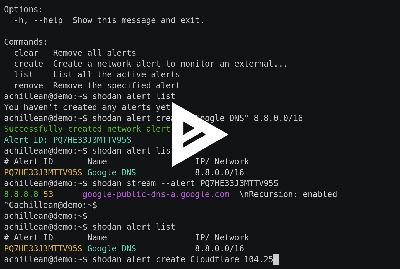
https://cli.shodan.io/img/shodan-cli-preview.png

Quick Start

from shodan import Shodan

api = Shodan('MY API KEY')

# Lookup an IP
ipinfo = api.host('8.8.8.8')
print(ipinfo)

# Search for websites that have been "hacked"
for banner in api.search_cursor('http.title:"hacked by"'):
    print(banner)

# Get the total number of industrial control systems services on the Internet
ics_services = api.count('tag:ics')
print('Industrial Control Systems: {}'.format(ics_services['total']))

Grab your API key from https://account.shodan.io

Installation

To install the Shodan library, simply:

$ pip install shodan

Or if you don't have pip installed (which you should seriously install):

$ easy_install shodan

Documentation

Documentation is available at https://shodan.readthedocs.org/ and https://help.shodan.io

Comments
  • move config dir to ~/.config

    move config dir to ~/.config

    In reference to #135 I hope this fix is ok with you guys. I notice you didn't have any logic code in settings.py, but I feel as though this is the easiest way to implement this. This method allows users who create the ~/.config/shodan directory to utilise it, while still providing support for the users who do not care to move the folder.

    I also ran tox and got

    python: commands succeeded
      congratulations :)
    

    Not sure if that's how to run the tests

    opened by Soneji 11
  • Unable to connect to shodan

    Unable to connect to shodan

    Me and at least one other person are having trouble using this api recently. I use it in a tool here: https://github.com/DanMcInerney/device-pharmer

    I am getting shodan results exactly as the docs for this API suggest to do it, namely:

    api = shodan.Shodan(API_KEY)
    results = api.search(search, page=1)
    

    Yet even when I use my own paid-for API key, I'm getting "Unable to connect to Shodan" errors. Any idea what's going wrong?

    opened by DanMcInerney 8
  • Error: Unable to parse JSON response

    Error: Unable to parse JSON response

    Hi, there. I run the sample code in your python docs pages. However, it returned an error.

    Error: Unable to parse JSON response
    

    Most of time the api will return errors although sometimes it can successfully execute. And I really don't know why. My os is Win10 and I also tried it at Win7. Doesn't work too.

    opened by ghost 7
  • Blank page when using Search option in CLI

    Blank page when using Search option in CLI

    Using the Host option works as expected. However, when I try to use Search to narrow down on a specific set of fields, all I get is an empty (blank) page with no data. At the bottom left corner, the page shows "lines 1-1/1 (END)".

    opened by razermouse 6
  • module has no object Shodan

    module has no object Shodan

    In the implementation of the basic search example, using shodan.Shodan(SHODAN_API_KEY) throws an error. I think it should be shodan.WebAPI(SHODAN_API_KEY)

    opened by wandeg 6
  • Unicode Error

    Unicode Error

    Hey there, i hope that this is the right repo for my issue. I´m using the Shodan CLI and installed it with "pip install shodan". Im using the following command for requesting hosts:

    shodan host <ip address>
    

    However, when there is an umlaut character in the city name (in this case 'Düsseldorf'), the output is broken and the following error message is shown:

    shodan host REDACTED
    REDACTED
    Hostnames:               REDACTED.com
    Traceback (most recent call last):
      File "/usr/local/bin/shodan", line 11, in <module>
        sys.exit(main())
      File "/usr/lib/python2.7/dist-packages/click/core.py", line 722, in __call__
        return self.main(*args, **kwargs)
      File "/usr/lib/python2.7/dist-packages/click/core.py", line 697, in main
        rv = self.invoke(ctx)
      File "/usr/lib/python2.7/dist-packages/click/core.py", line 1066, in invoke
        return _process_result(sub_ctx.command.invoke(sub_ctx))
      File "/usr/lib/python2.7/dist-packages/click/core.py", line 895, in invoke
        return ctx.invoke(self.callback, **ctx.params)
      File "/usr/lib/python2.7/dist-packages/click/core.py", line 535, in invoke
        return callback(*args, **kwargs)
      File "/usr/local/lib/python2.7/dist-packages/shodan/__main__.py", line 479, in host
        click.echo('{:25s}{}'.format('City:', host['city']))
    UnicodeEncodeError: 'ascii' codec can't encode character u'\xfc' in position 1: ordinal not in range(128)
    
    bug 
    opened by whoot 5
  • API Error only when using Radar

    API Error only when using Radar

    I receive the following success message after performing shodan init {MY_API_KEY}:

    Successfully initialized
    

    And can run all commands I've tested without issue, save for shodan radar, which returns the following error:

    Traceback (most recent call last):
      File "/usr/local/lib/python3.7/site-packages/shodan/cli/worldmap.py", line 205, in fetch_data
        for banner in self.api.stream.banners():
      File "/usr/local/lib/python3.7/site-packages/shodan/stream.py", line 99, in banners
        stream = self._create_stream('/shodan/banners', timeout=timeout)
      File "/usr/local/lib/python3.7/site-packages/shodan/stream.py", line 50, in _create_stream
        raise APIError(data['error'])
    shodan.exception.APIError: Access denied
    
    During handling of the above exception, another exception occurred:
    
    Traceback (most recent call last):
      File "/usr/local/bin/shodan", line 11, in <module>
        load_entry_point('shodan==1.8.1', 'console_scripts', 'shodan')()
      File "/usr/local/lib/python3.7/site-packages/click/core.py", line 722, in __call__
        return self.main(*args, **kwargs)
      File "/usr/local/lib/python3.7/site-packages/click/core.py", line 697, in main
        rv = self.invoke(ctx)
      File "/usr/local/lib/python3.7/site-packages/click/core.py", line 1066, in invoke
        return _process_result(sub_ctx.command.invoke(sub_ctx))
      File "/usr/local/lib/python3.7/site-packages/click/core.py", line 895, in invoke
        return ctx.invoke(self.callback, **ctx.params)
      File "/usr/local/lib/python3.7/site-packages/click/core.py", line 535, in invoke
        return callback(*args, **kwargs)
      File "/usr/local/lib/python3.7/site-packages/shodan/__main__.py", line 1331, in radar
        launch_map(api)
      File "/usr/local/lib/python3.7/site-packages/shodan/cli/worldmap.py", line 242, in launch_map
        return curses.wrapper(app.run)
      File "/usr/local/Cellar/python/3.7.0/Frameworks/Python.framework/Versions/3.7/lib/python3.7/curses/__init__.py", line 94, in wrapper
        return func(stdscr, *args, **kwds)
      File "/usr/local/lib/python3.7/site-packages/shodan/cli/worldmap.py", line 222, in run
        refresh = self.fetch_data(now)
      File "/usr/local/lib/python3.7/site-packages/shodan/cli/worldmap.py", line 212, in fetch_data
        except StandardError:
    NameError: name 'StandardError' is not defined
    

    I'm running macOS 10.13.6 and Python 3.7.

    Also tried to install with Python 2.7 on a raspberry pi with a fully updated Raspbian release, and received this error:

    Traceback (most recent call last):
      File "/usr/local/bin/shodan", line 11, in <module>
        load_entry_point('shodan==1.8.1', 'console_scripts', 'shodan')()
      File "/usr/lib/python2.7/dist-packages/click/core.py", line 716, in __call__
        return self.main(*args, **kwargs)
      File "/usr/lib/python2.7/dist-packages/click/core.py", line 696, in main
        rv = self.invoke(ctx)
      File "/usr/lib/python2.7/dist-packages/click/core.py", line 1060, in invoke
        return _process_result(sub_ctx.command.invoke(sub_ctx))
      File "/usr/lib/python2.7/dist-packages/click/core.py", line 889, in invoke
        return ctx.invoke(self.callback, **ctx.params)
      File "/usr/lib/python2.7/dist-packages/click/core.py", line 534, in invoke
        return callback(*args, **kwargs)
      File "build/bdist.linux-armv7l/egg/shodan/__main__.py", line 1331, in radar
      File "build/bdist.linux-armv7l/egg/shodan/cli/worldmap.py", line 242, in launch_map
      File "/usr/lib/python2.7/curses/wrapper.py", line 43, in wrapper
        return func(stdscr, *args, **kwds)
      File "build/bdist.linux-armv7l/egg/shodan/cli/worldmap.py", line 222, in run
      File "build/bdist.linux-armv7l/egg/shodan/cli/worldmap.py", line 205, in fetch_data
      File "build/bdist.linux-armv7l/egg/shodan/stream.py", line 99, in banners
      File "build/bdist.linux-armv7l/egg/shodan/stream.py", line 50, in _create_stream
    shodan.exception.APIError: Access denied
    

    Regenerating my API key did not help, nor did running the init command with sudo.

    opened by seajaysec 5
  • .json() doesn't work in some cases

    .json() doesn't work in some cases

    The .json() is in some cases not callable, when removing the () it will work..

    See: http://love-python.blogspot.nl/2013/03/dict-object-is-not-callable-on-json.html

    opened by Wouter0100 5
  • ImportError: cannot import name 'Shodan' from 'shodan'

    ImportError: cannot import name 'Shodan' from 'shodan'

    When the following code is executed in visual studio code

    from shodan import Shodan api = Shodan('my-api-key') ipinfo = api.host('8.8.8.8') print(ipinfo)

    it throws the following error ImportError: cannot import name 'Shodan' from 'shodan'

    Please help

    PIP LIST Package Version


    aniso8601 9.0.1 certifi 2021.5.30 charset-normalizer 2.0.4 click 8.0.1 click-plugins 1.1.1 colorama 0.4.4 Flask 2.0.1 Flask-RESTful 0.3.9 idna 3.2 itsdangerous 2.0.1 Jinja2 3.0.1 MarkupSafe 2.0.1 pip 21.2.3 pytz 2021.1 requests 2.26.0 setuptools 41.2.0 shodan 1.25.0 six 1.16.0 urllib3 1.26.6 Werkzeug 2.0.1 XlsxWriter 2.0.0

    opened by omega71044 4
  • Add

    Add "net:ip/mask" filter for shodan parse

    A simple implementation of the net:filter used in web GUI.

    It uses python3's builtin ipaddress lib and only imports those libs if the net:filter is used.

    Example:

    $ shodan download example 'country:fi cyber'
    
    $ shodan parse example.json.gz  | cut -c1-100
    95.216.39.52	53	srv01.cyber-cortex.net	PowerDNS Authoritative Server 4.1.1\nResolver ID: srv01.cyber
    95.216.52.222	2083	static.222.52.216.95.clients.your-server.de	HTTP/1.1 200 OK\r\nDate: Sun, 15 Sep 
    
    $ shodan parse -f net:95.216.39.0/24 example.json.gz  | cut -c1-100
    95.216.39.52	53	srv01.cyber-cortex.net	PowerDNS Authoritative Server 4.1.1\nResolver ID: srv01.cyber
    
    $ shodan parse -f net:95.216.0.0/16 example.json.gz  | cut -c1-100
    95.216.39.52	53	srv01.cyber-cortex.net	PowerDNS Authoritative Server 4.1.1\nResolver ID: srv01.cyber
    95.216.52.222	2083	static.222.52.216.95.clients.your-server.de	HTTP/1.1 200 OK\r\nDate: Sun, 15 Sep 
    
    opened by unfo 4
  • ValueError: invalid literal for int() with base 16: b'' when testing the 'private firehose' demo

    ValueError: invalid literal for int() with base 16: b'' when testing the 'private firehose' demo

    Hi,

    I was testing the Network alerts functionality when I ran across an error.

    I've now had the same error twice so it looks like it is repeatable:

    Traceback (most recent call last): File "/root/shodan/venv/lib/python3.5/site-packages/urllib3/response.py", line 572, in _update_chunk_length self.chunk_left = int(line, 16) ValueError: invalid literal for int() with base 16: b''

    During handling of the above exception, another exception occurred:

    Traceback (most recent call last): File "/root/shodan/venv/lib/python3.5/site-packages/urllib3/response.py", line 331, in _error_catcher yield File "/root/shodan/venv/lib/python3.5/site-packages/urllib3/response.py", line 637, in read_chunked self._update_chunk_length() File "/root/shodan/venv/lib/python3.5/site-packages/urllib3/response.py", line 576, in _update_chunk_length raise httplib.IncompleteRead(line) http.client.IncompleteRead: IncompleteRead(0 bytes read)

    During handling of the above exception, another exception occurred:

    Traceback (most recent call last): File "/root/shodan/venv/lib/python3.5/site-packages/requests/models.py", line 749, in generate for chunk in self.raw.stream(chunk_size, decode_content=True): File "/root/shodan/venv/lib/python3.5/site-packages/urllib3/response.py", line 461, in stream for line in self.read_chunked(amt, decode_content=decode_content): File "/root/shodan/venv/lib/python3.5/site-packages/urllib3/response.py", line 665, in read_chunked self._original_response.close() File "/usr/lib/python3.5/contextlib.py", line 77, in exit self.gen.throw(type, value, traceback) File "/root/shodan/venv/lib/python3.5/site-packages/urllib3/response.py", line 349, in _error_catcher raise ProtocolError('Connection broken: %r' % e, e) urllib3.exceptions.ProtocolError: ('Connection broken: IncompleteRead(0 bytes read)', IncompleteRead(0 bytes read))

    During handling of the above exception, another exception occurred:

    Traceback (most recent call last): File "monitornetwork_ports.py", line 17, in for banner in api.stream.alert(): File "/root/shodan/venv/lib/python3.5/site-packages/shodan/stream.py", line 79, in alert for line in self._iter_stream(stream, raw): File "/root/shodan/venv/lib/python3.5/site-packages/shodan/stream.py", line 63, in _iter_stream for line in stream.iter_lines(decode_unicode=True): File "/root/shodan/venv/lib/python3.5/site-packages/requests/models.py", line 793, in iter_lines for chunk in self.iter_content(chunk_size=chunk_size, decode_unicode=decode_unicode): File "/root/shodan/venv/lib/python3.5/site-packages/requests/utils.py", line 503, in stream_decode_response_unicode for chunk in iterator: File "/root/shodan/venv/lib/python3.5/site-packages/requests/models.py", line 752, in generate raise ChunkedEncodingError(e) requests.exceptions.ChunkedEncodingError: ('Connection broken: IncompleteRead(0 bytes read)', IncompleteRead(0 bytes read))

    opened by swedishmike 4
  • Error: Unable to connect to Shodan

    Error: Unable to connect to Shodan

    on trying shodan init <api_key> on my Kali Linux machine, I am getting error Error: Unable to connect to Shodan. -> updated the requests library, still the issue persists. shodan_error

    opened by harshinsecurity 1
  • Allow users to specify certificate bundles or ssl verification = False

    Allow users to specify certificate bundles or ssl verification = False

    In requests, users can specify on requests the "verify" variable as either a path to a certificate bundle, or the boolean value False for actually verify certificates.

    Allowing the user to specify this upon connection would be very useful for those who may use a corporate proxy and need to run a separate cert bundle or are lazy and just set it to False. By instantiating the requests inside the client Class, it hides that option for the user. Maybe even just providing an option kwargs would be sufficient. (incase you want to use any other options of requests).

    I looked at the code, and was considering offering a pull request, but I see requests being used in many of the various python files here. Sometime it's used by instantiating a requests.Session (which you can specify the verify value on so all subsequent requests use that) or you can just pass it to the .request (or the .get, or .post etc) methods for those modules that don't use the requests.Session. Since the usage is different through out the repo, I thought I'd raise an issue and request (no pun intended) someone more knowledgeable of the package itself update it.

    opened by JohnOmernik 0
  • Distribution error on Mac

    Distribution error on Mac

    easy_install shodan

      File "/usr/bin/easy_install", line 13, in <module>
        load_entry_point('setuptools==41.0.1', 'console_scripts', 'easy_install')()
      File "/System/Library/Frameworks/Python.framework/Versions/2.7/Extras/lib/python/setuptools/command/easy_install.py", line 2316, in main
        **kw
      File "/System/Library/Frameworks/Python.framework/Versions/2.7/Extras/lib/python/setuptools/__init__.py", line 145, in setup
        return distutils.core.setup(**attrs)
      File "/System/Library/Frameworks/Python.framework/Versions/2.7/lib/python2.7/distutils/core.py", line 124, in setup
        dist.parse_config_files()
      File "/System/Library/Frameworks/Python.framework/Versions/2.7/Extras/lib/python/setuptools/dist.py", line 698, in parse_config_files
        ignore_option_errors=ignore_option_errors)
      File "/System/Library/Frameworks/Python.framework/Versions/2.7/Extras/lib/python/setuptools/config.py", line 115, in parse_configuration
        options.parse()
      File "/System/Library/Frameworks/Python.framework/Versions/2.7/Extras/lib/python/setuptools/config.py", line 425, in parse
        section_parser_method(section_options)
      File "/System/Library/Frameworks/Python.framework/Versions/2.7/Extras/lib/python/setuptools/config.py", line 398, in parse_section
        self[name] = value
      File "/System/Library/Frameworks/Python.framework/Versions/2.7/Extras/lib/python/setuptools/config.py", line 183, in __setitem__
        value = parser(value)
      File "/System/Library/Frameworks/Python.framework/Versions/2.7/Extras/lib/python/setuptools/config.py", line 574, in _parse_packages
        'find_namespace: directive is unsupported on Python < 3.3')
    distutils.errors.DistutilsOptionError: find_namespace: directive is unsupported on Python < 3.3```


    Dependency distribution error 
    

    easy_install xlsxwriter Traceback (most recent call last): File "/usr/bin/easy_install", line 13, in load_entry_point('setuptools==41.0.1', 'console_scripts', 'easy_install')() File "/System/Library/Frameworks/Python.framework/Versions/2.7/Extras/lib/python/setuptools/command/easy_install.py", line 2316, in main **kw File "/System/Library/Frameworks/Python.framework/Versions/2.7/Extras/lib/python/setuptools/init.py", line 145, in setup return distutils.core.setup(**attrs) File "/System/Library/Frameworks/Python.framework/Versions/2.7/lib/python2.7/distutils/core.py", line 124, in setup dist.parse_config_files() File "/System/Library/Frameworks/Python.framework/Versions/2.7/Extras/lib/python/setuptools/dist.py", line 698, in parse_config_files ignore_option_errors=ignore_option_errors) File "/System/Library/Frameworks/Python.framework/Versions/2.7/Extras/lib/python/setuptools/config.py", line 115, in parse_configuration options.parse() File "/System/Library/Frameworks/Python.framework/Versions/2.7/Extras/lib/python/setuptools/config.py", line 425, in parse section_parser_method(section_options) File "/System/Library/Frameworks/Python.framework/Versions/2.7/Extras/lib/python/setuptools/config.py", line 398, in parse_section self[name] = value File "/System/Library/Frameworks/Python.framework/Versions/2.7/Extras/lib/python/setuptools/config.py", line 183, in setitem value = parser(value) File "/System/Library/Frameworks/Python.framework/Versions/2.7/Extras/lib/python/setuptools/config.py", line 574, in _parse_packages 'find_namespace: directive is unsupported on Python < 3.3') distutils.errors.DistutilsOptionError: find_namespace: directive is unsupported on Python < 3.3

    opened by sherlocksecurity 1
  • JSON output to console

    JSON output to console

    I considered doing this as a PR but I'm not sure whether:

    1. It would be accepted
    2. How best to do this while retaining the colouring // style of other output types

    Essentially for both the search and host command I think it would be useful to be able to just immediately print the JSON to the console so that it could be read // manipulated via jq, e.g.

    shodan host 1.2.3.4 --format json | jq <some jq syntax>
    

    Would something like this be acceptable?

    def host_print_json(host, history=False):
        click.echo(json.dumps(host['data'], sort_keys=True, indent=4))
    
    opened by tlansec 0
  • Keep specific hostname when adding domain-based network alert

    Keep specific hostname when adding domain-based network alert

    If a user runs a command such as:

    shodan alert domain www.shodan.io
    

    Then the CLI will create a domain-based network alert for shodan.io. However, it should create a network alert for just www.shodan.io which is how the Shodan Monitor website operates.

    opened by achillean 0
Releases(1.28.0)
Sniper for Anigame and Izzi discord bots!

Anigame Sniper Gen-3 Features Inbuilt Spammer Responds to your messages in discord (on/off) Snipes only where you want it to Set latency so that the b

22 Nov 13, 2022
🕵️‍♂️ Investigate Google Accounts with emails.

Description GHunt is an OSINT tool to extract information from any Google Account using an email. It can currently extract: Owner's name Last time the

mxrch 13.1k Jan 01, 2023
Create custom Vanity URLs for Discord without 30 boosts

CustomVanity - Made by udp#6666 aka Apolo - OpenSource Custom Discord Vanity Creator How To Use Open CustomVanity.py Write your server invite code Wri

apolo 17 Aug 23, 2022
Console BeautifulDiscord theme manager

BeautifulDiscord theme manager Console script for downloading & managing Discord .css themes via BeautifulDiscord. Setup Simply run # Linux/MacOS pip3

1 Dec 15, 2022
Instagram boosting

instagram boosting bot This bot can boost your instagram account! Rules and Instruction Use git clone to download this repository Open cmd/terminal an

Eskimo 4 Oct 20, 2022
Telegram Vc Video Player Bot

Telegram Video Player Bot Telegram bot project for streaming video on telegram video chat, powered by tgcalls and pyrogram Deploy to Heroku 👨‍🔧 The

Dihan Official 11 Dec 25, 2022
Ethone-Selfbot - Open Source Discord Self-Bot, written in discord.py

Ethone SB Table of contents Newest open-source Discord SelfBot with useful commands and easy documentation on how to add your own and change the exist

Ethone 3 Jan 08, 2022
A discord bot providing notifications of player activity on a minecraft server.

tos-alert A discord bot providing notifications of player activity on a minecraft server. Setup By default the app does not launch and will crash with

1 Jul 22, 2022
EZXT - A ccxt wrapped client for binance & ftx

EZXT Open source & beginner-friendly ccxt wrapped client for binance & ftx Want

Shaft 10 Oct 25, 2022
Terminal-Trade(Panel API) For Binance

Binance-Trade-Project Binance Futures Terminal-Trade(API) & Binance This Project Worth Around 500 Bucks. **I Did This Project For SomeOne And He

Cyber 9 Dec 30, 2021
Easily report Instagram pages and close the page

Program Features - 📌 Delete target post on Instagram. - 📌 Delete Media Target post on Instagram - 📌 Complete deletion of the target account on Inst

hack4lx 11 Nov 25, 2022
a public repository helping ML/DL engineers and DS to beautify the notebook with minimal coding.

ml-helper-functions a public repository helping ML/DL engineers and DS to beautify the notebook with minimal coding.

Jesal Patel 4 Jun 24, 2021
A Bot to Track Kernel Upstreams from kernel.org and Post it on Telegram Channel

Channel Kernel Tracker is the channel where the bot will be sending the updates in. Introduction This is a Telegram Bot to Track Kernel Upstreams kern

Kartikeya Hegde 3 Oct 05, 2021
A Telegram bot to send messages in Telegram groups or Channels using bots anonymously.

Group-chatting-bot A bot to send messeges to group using bot telegram bot ❤️ Support Made with Python3

Pyrogramers 16 Nov 06, 2022
This is a script to forward forward large number of documents to another telegram channel.

ChannelForward 😇 This is a Script to Forward Large Number of Documents to Another Telegram Channel. If You Try to Forward Very Large Number of Files

Anjana Madushanka 10 Jun 08, 2021
A basic implementation of the Battlesnake API in Python

Getting started with Battlesnake and Python This is a basic implementation of the Battlesnake API in Python. It's a great starting point for anyone wa

Gaurav Batra 2 Dec 08, 2021
PyMusic Player is a music player written in python3.

PyMusic Player is a music player written in python3. It harvests r

PythonSerious 2 Jan 30, 2022
Automatically scrape all of your artifacts in Genshin Impact.

Genshin Artifact Scraper Automatically scrape all of your artifacts in Genshin Impact. Features: Simple recalibration (2 steps). GUI to select OCR reg

21 Dec 17, 2022
A small script to migrate or synchronize users & groups from Okta to AWS SSO

aws-sso-sync-okta A small script to migrate or synchronize users & groups from Okta to AWS SSO Changelog Version Remove hardcoded values on variables

Paul 4 Feb 11, 2022