
A Python interface between Earth Engine and xarray for processing weather and climate data

Overview

wxee

PyPI conda-forge Read the Docs Open in Colab Black code style GLP3 License

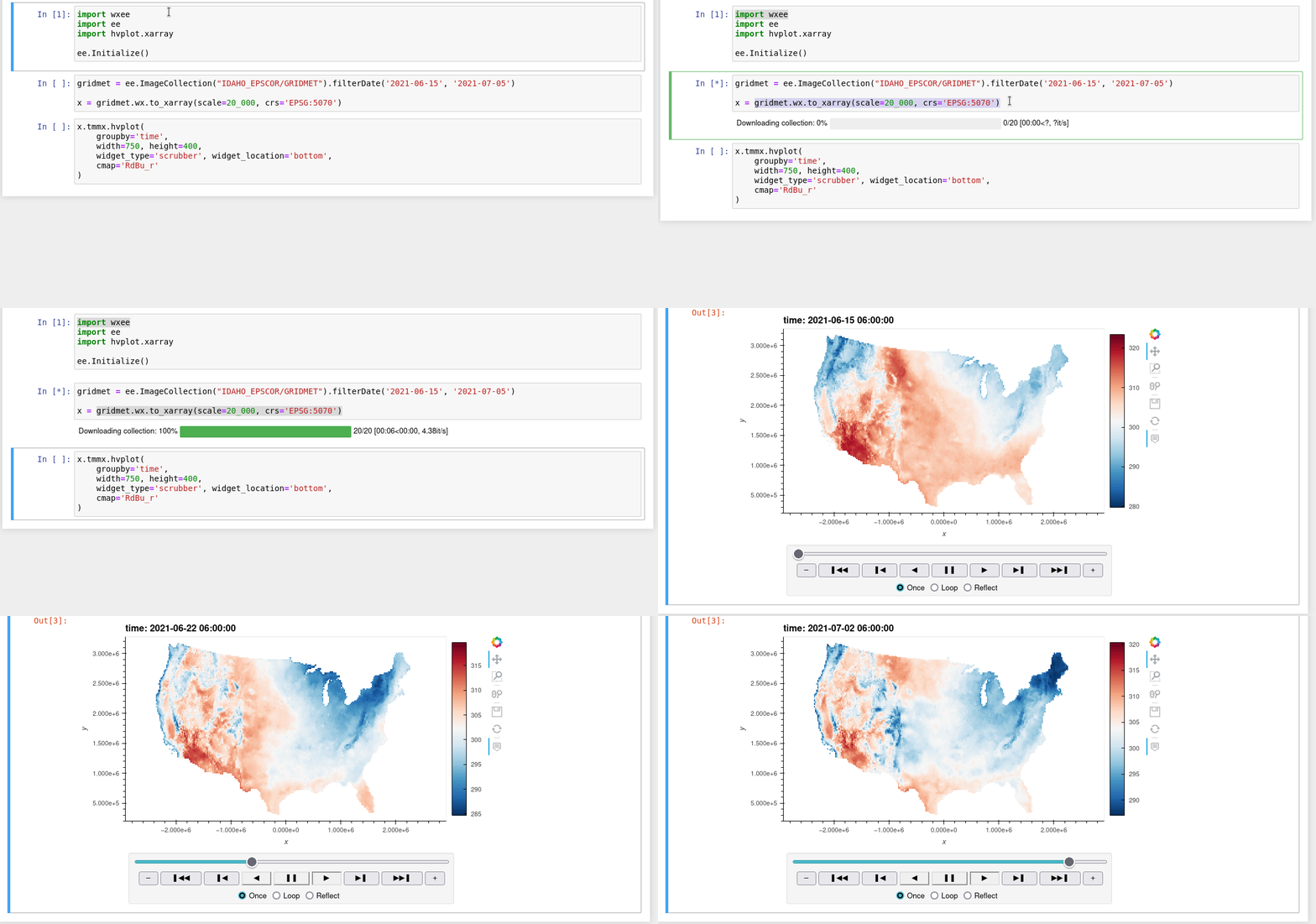
Demo downloading weather data to xarray using wxee.

What is wxee?

wxee was built to make processing gridded, mesoscale time series weather and climate data quick and easy by integrating the data catalog and processing power of Google Earth Engine with the flexibility of xarray, with no complicated setup required. To accomplish this, wxee implements convenient methods for data processing, aggregation, downloading, and ingestion.

Features

  • Time series image collections to xarray, NetCDF, or GeoTIFF in one line of code
  • Climatological means and temporal aggregation
  • Parallel processing for fast downloads

Install

Pip

pip install wxee

Conda

conda install -c conda-forge wxee

From Source

git clone https://github.com/aazuspan/wxee
cd wxee
make install

Quickstart

Setup

Once you have access to Google Earth Engine, just import and initialize ee and wxee.

import ee
import wxee

ee.Initialize()

Download Images

Download and conversion methods are extended to ee.Image and ee.ImageCollection using the wx accessor. Just import wxee and use the wx accessor.

xarray

ee.ImageCollection("IDAHO_EPSCOR/GRIDMET").wx.to_xarray()

NetCDF

ee.ImageCollection("IDAHO_EPSCOR/GRIDMET").wx.to_xarray(path="data/gridmet.nc")

GeoTIFF

ee.ImageCollection("IDAHO_EPSCOR/GRIDMET").wx.to_tif()

Create a Time Series

Additional methods for processing image collections in the time dimension are available through the TimeSeries subclass. A TimeSeries can be created from an existing ee.ImageCollection...

col = ee.ImageCollection("IDAHO_EPSCOR/GRIDMET")
ts = col.wx.to_time_series()

Or instantiated directly just like you would an ee.ImageCollection!

ts = wxee.TimeSeries("IDAHO_EPSCOR/GRIDMET")

Aggregate Daily Data

Many weather datasets are in daily or hourly resolution. These can be aggregated to coarser resolutions using the aggregate_time method of the TimeSeries class.

ts = wxee.TimeSeries("IDAHO_EPSCOR/GRIDMET")
monthly_max = ts.aggregate_time(frequency="month", reducer=ee.Reducer.max())

Calculate Climatological Means

Long-term climatological means can be calculated using the climatology_mean method of the TimeSeries class.

ts = wxee.TimeSeries("IDAHO_EPSCOR/GRIDMET")
mean_clim = ts.climatology_mean(frequency="month")

Contribute

Bugs or feature requests are always appreciated! They can be submitted here.

Code contributions are also welcome! Please open an issue to discuss implementation, then follow the steps below. Developer setup instructions can be found in the docs.

Comments
  • Converting Half/3-hourly to daily and monthly

    Converting Half/3-hourly to daily and monthly

    Hi, I am wondering if wxee could convert half-hourly / 3-hourly data to daily/ monthly data for the following data sets:

    1. ee.ImageCollection("TRMM/3B42") (3-hourly precipitation)
    2. ee.ImageCollection("NASA/GPM_L3/IMERG_V06") (half-hourly)

    Thanking you.

    opened by surajitdb 5
  • `MergeError` when translating to `xarray`

    `MergeError` when translating to `xarray`

    Hi, @aazuspan!

    Just wanted to say that I love wxee! I'm using it to combine products from Earth Engine and Planetary Computer and that's amazing! I'm using it almost every day, but sometimes this error happens:

    ---------------------------------------------------------------------------
    MergeError                                Traceback (most recent call last)
    /tmp/ipykernel_1042/4012842980.py in <module>
          1 CLOUD_MASK = PCL_s2cloudless(S2_ee).map(PSL).map(PCSL).map(matchShadows).select("CLOUD_MASK")
    ----> 2 CLOUD_MASK_xarray = CLOUD_MASK.wx.to_xarray(scale = 20,crs = "EPSG:" + str(S2.epsg.data),region = ee_aoi)
    
    /srv/conda/envs/notebook/lib/python3.8/site-packages/wxee/collection.py in to_xarray(self, path, region, scale, crs, masked, nodata, num_cores, progress, max_attempts)
        135             )
        136 
    --> 137             ds = _dataset_from_files(files)
        138 
        139         # Mask the nodata values. This will convert int datasets to float.
    
    /srv/conda/envs/notebook/lib/python3.8/site-packages/wxee/utils.py in _dataset_from_files(files)
        120     das = [_dataarray_from_file(file) for file in files]
        121 
    --> 122     return xr.merge(das)
        123 
        124 
    
    /srv/conda/envs/notebook/lib/python3.8/site-packages/xarray/core/merge.py in merge(objects, compat, join, fill_value, combine_attrs)
        898         dict_like_objects.append(obj)
        899 
    --> 900     merge_result = merge_core(
        901         dict_like_objects,
        902         compat,
    
    /srv/conda/envs/notebook/lib/python3.8/site-packages/xarray/core/merge.py in merge_core(objects, compat, join, combine_attrs, priority_arg, explicit_coords, indexes, fill_value)
        633 
        634     prioritized = _get_priority_vars_and_indexes(aligned, priority_arg, compat=compat)
    --> 635     variables, out_indexes = merge_collected(
        636         collected, prioritized, compat=compat, combine_attrs=combine_attrs
        637     )
    
    /srv/conda/envs/notebook/lib/python3.8/site-packages/xarray/core/merge.py in merge_collected(grouped, prioritized, compat, combine_attrs)
        238                 variables = [variable for variable, _ in elements_list]
        239                 try:
    --> 240                     merged_vars[name] = unique_variable(name, variables, compat)
        241                 except MergeError:
        242                     if compat != "minimal":
    
    /srv/conda/envs/notebook/lib/python3.8/site-packages/xarray/core/merge.py in unique_variable(name, variables, compat, equals)
        147 
        148     if not equals:
    --> 149         raise MergeError(
        150             f"conflicting values for variable {name!r} on objects to be combined. "
        151             "You can skip this check by specifying compat='override'."
    
    MergeError: conflicting values for variable 'CLOUD_MASK' on objects to be combined. You can skip this check by specifying compat='override'.
    

    It is weird because it is not something that happens all the time, and most of the times I just have to re-run the code and it works. So, I don't know exactly what the problem is xD

    Anyway, here I let you the error I got. I was trying to get a cloud mask in GEE and download it as a xarray. I aleady tried it again and now it works, but, as I said, I don't know why. It also happens with other datasets. I was downloading some Sentinel-2 data (just as it is, without any processing steps) and sometimes work, but sometimes it doesn't and I can't reproduce the error because when I re-run it, most of the times it works xD

    Ok, that was it!

    Thank you!

    bug 
    opened by davemlz 4
  • How to call a country using ee.Geometry.Polygon?

    How to call a country using ee.Geometry.Polygon?

    Hi Aaron, I am wondering how to call a country using ee.Geometry.Polygon in wxee or is there any other way? Since Google Fusion Tables is not supported any more on Earth Engine, is there a way out to call a country polygon?

    Thank you.

    opened by surajitdb 4
  • wxee crash in windows WSL linux system

    wxee crash in windows WSL linux system

    I have a code file to use wxee to convert ee image to xarray array data, and it ran successfully on Windows. But when I ran the same piece of code on Windows Subsystem for Linux (WSL) Ubuntu, it crashes.

    Example:

    import ee ee.Initialize() import wxee wxee.Initialize() myregion=ee.Geometry.LineString([[-84, 30], [-70, 45], [-70, 45], [-84, 30]]) cfsr=[] dem=ee.ImageCollection('NOAA/CFSV2/FOR6H').filter(ee.Filter.date('1996-02-14', '1996-02-19')).select(['u component_of_wind_height_above_ground'])

    etc=dem.wx.to_xarray(region=myregion,scale=2000)

    print(etc)

    The error was

    Requesting data: 0%| | 0/20 [00:00<?, ?it/s]malloc(): unsorted double linked list corrupted Aborted

    again, it ran successfully on Windows, but not on WSL.

    opened by fanqi203 3
  • EEException: Date: Parameter 'value' is required.

    EEException: Date: Parameter 'value' is required.

    I was trying to download a median image to xarray and encountered this error below. I understand that we need time series image collections, but wonder if there is a workaround for ee.Image? Thanks, Daniel

    EEException: Date: Parameter 'value' is required.
    
    stale 
    opened by Daniel-Trung-Nguyen 3
  • Specific points to xarray

    Specific points to xarray

    Dear Aaron Zuzpan

    Thank you very much for this wonderful package. I have in my assets a shp with 64 points, also locally as geojson. I tried following your instruction here , https://github.com/aazuspan/wxee/issues/28, to download sentinel-2 bands to xarray of those specifics 64 points. But, the total points depends of scale and region, being differents in number and localization of those 64. There is any way to download those specific points to xarray?.

    Thank in advance.

    Walter Pereira

    opened by wep69 3
  • NaN values in Sentinel 1 GRD scenes

    NaN values in Sentinel 1 GRD scenes

    i did the same with Sentinel 1 GRD scenes, the issue is some values are just converted as NaN, why such issue ??? So i am getting a major backscatter values as Nan, why such issue ?

    Originally posted by @ashishgitbisht in https://github.com/aazuspan/wxee/issues/46#issuecomment-1066781564

    question 
    opened by aazuspan 3
  • All parallel downloads fail with conda-forge installation

    All parallel downloads fail with conda-forge installation

    Issue

    Any parallel operations (specifically wxee.TimeSeries.wx.to_xarray()) will fail and may crash Python in a fresh install. On Linux the issue causes an immediate crash and "segmentation fault" message. On Windows it throws an SSL error, usually after downloading several images, or Python crashes silently. This happens on a clean install of wxee from conda-forge but has not happened in my development environment, so it is probably a package version or missing dependency issue.

    Temporary Workaround

    Setting num_cores to 1 (which disables multiprocessing) seems to resolve the issue but slows down downloads.

    bug 
    opened by aazuspan 3
  • Pickling fails with local functions (e.g. ee.Image.expression())

    Pickling fails with local functions (e.g. ee.Image.expression())

    Hi, @aazuspan!

    First of all, WOW! Your work with eexarray is amazing, keep it going! :rocket:

    I was using your dev repo to try to convert a S2 collection to xarray, and it works, but, when I compute a spectral index using eemont (that uses ee.Image.expression) it doesn't work:

    This works!

    import ee, eemont, eexarray
    
    ee.Initialize()
    
    tw = ee.Geometry.Point([10.4522,51.0792])
    bf = tw.buffer(500)
    xt = bf.bounds()
    
    S2 = ee.ImageCollection("COPERNICUS/S2_SR") \
        .filterBounds(xt) \
        .preprocess() \
        .map(lambda x: x.addBands(x.normalizedDifference(["B8","B4"]).rename("NDVI"))) \
        .limit(10) \
        .map(lambda x: x.clip(xt)) \
        .eex.resample_daily(reducer = ee.Reducer.median())
    
    S2eex = S2.eex.to_xarray(scale=10) 
    

    This doesn't work (using eemont)

    import ee, eemont, eexarray
    
    ee.Initialize()
    
    tw = ee.Geometry.Point([10.4522,51.0792])
    bf = tw.buffer(500)
    xt = bf.bounds()
    
    S2 = ee.ImageCollection("COPERNICUS/S2_SR") \
        .filterBounds(xt) \
        .preprocess() \
        .spectralIndices("NDVI") \
        .limit(10) \
        .map(lambda x: x.clip(xt)) \
        .eex.resample_daily(reducer = ee.Reducer.median())
    
    S2eex = S2.eex.to_xarray(scale=10) 
    

    This doesn't work (not using eemont)

    import ee, eemont, eexarray
    
    ee.Initialize()
    
    tw = ee.Geometry.Point([10.4522,51.0792])
    bf = tw.buffer(500)
    xt = bf.bounds()
    
    def addExpressionNDVI(x):
        params = {"N": x.select("B8"),"R": x.select("B4")}
        NDVI = x.expression("(N-R)/(N+R)",params).rename("NDVI")
        return x.addBands(NDVI)
    
    S2 = ee.ImageCollection("COPERNICUS/S2_SR") \
        .filterBounds(xt) \
        .preprocess() \
        .map(addExpressionNDVI) \
        .limit(10) \
        .map(lambda x: x.clip(xt)) \
        .eex.resample_daily(reducer = ee.Reducer.median())
    
    S2eex = S2.eex.to_xarray(scale=10) 
    

    Error

    AttributeError: Can't pickle local object 'Image.expression.<locals>.ReinterpretedFunction'
    ---------------------------------------------------------------------------
    AttributeError                            Traceback (most recent call last)
    <ipython-input-37-94ef9caa673d> in <module>
    ----> 1 S2eex = S2.eex.to_xarray(scale=10)
    
    ~/anaconda3/envs/gee/lib/python3.9/site-packages/eexarray/ImageCollection.py in to_xarray(self, path, region, scale, crs, masked, nodata, num_cores, progress, max_attempts)
         90             collection = self._rename_by_time()
         91 
    ---> 92             files = collection.eex.to_tif(
         93                 out_dir=tmp,
         94                 region=region,
    
    ~/anaconda3/envs/gee/lib/python3.9/site-packages/eexarray/ImageCollection.py in to_tif(self, out_dir, prefix, region, scale, crs, file_per_band, masked, nodata, num_cores, progress, max_attempts)
        198                 max_attempts=max_attempts,
        199             )
    --> 200             tifs = list(
        201                 tqdm(
        202                     p.imap(params, imgs),
    
    ~/anaconda3/envs/gee/lib/python3.9/site-packages/tqdm/std.py in __iter__(self)
       1183 
       1184         try:
    -> 1185             for obj in iterable:
       1186                 yield obj
       1187                 # Update and possibly print the progressbar.
    
    ~/anaconda3/envs/gee/lib/python3.9/multiprocessing/pool.py in next(self, timeout)
        868         if success:
        869             return value
    --> 870         raise value
        871 
        872     __next__ = next                    # XXX
    
    ~/anaconda3/envs/gee/lib/python3.9/multiprocessing/pool.py in _handle_tasks(taskqueue, put, outqueue, pool, cache)
        535                         break
        536                     try:
    --> 537                         put(task)
        538                     except Exception as e:
        539                         job, idx = task[:2]
    
    ~/anaconda3/envs/gee/lib/python3.9/multiprocessing/connection.py in send(self, obj)
        209         self._check_closed()
        210         self._check_writable()
    --> 211         self._send_bytes(_ForkingPickler.dumps(obj))
        212 
        213     def recv_bytes(self, maxlength=None):
    
    ~/anaconda3/envs/gee/lib/python3.9/multiprocessing/reduction.py in dumps(cls, obj, protocol)
         49     def dumps(cls, obj, protocol=None):
         50         buf = io.BytesIO()
    ---> 51         cls(buf, protocol).dump(obj)
         52         return buf.getbuffer()
         53 
    
    AttributeError: Can't pickle local object 'Image.expression.<locals>.ReinterpretedFunction'
    

    Versions

    • xarray 0.19.0
    • earthengine-api 0.1.277
    • eemont 0.2.5
    • python 3.9

    It seems to be something related specifically to that earthengine-api method, but if you can find a workaround, that would be amazing! :rocket:

    And again, thank you very much for eexarray!

    bug 
    opened by davemlz 3
  • Set default col and groupby kwargs (#57)

    Set default col and groupby kwargs (#57)

    Closes #57 by allowing user to the override default col="time" arg for static rgb plots. Also specifies a default groupby="time" kwarg for interactive plots.

    enhancement 
    opened by aazuspan 2
  • define scale in wx.to_xarray()

    define scale in wx.to_xarray()

    Hi, I have a Landsat time-series in epsg:4326 downloaded from the google earth engine that I am trying to convert to xarray. The area covers the entire Las Vegas. Using ds = landsat_ts.wx.to_xarray() resulted in a ds with coarse scale of 1 decimal degree. My question is how to define scale and crs parameters in the wx.to_xarray() function to get the raw Landsat's resolution of 30m? Thanks, Daniel

    Attributes: transform : (1.0, 0.0, -116.0, 0.0, -1.0, 37.0) crs : +init=epsg:4326 res : (1.0, 1.0) is_tiled : 1 nodatavals : (-32768.0,) scales : (1.0,) offsets : (0.0,) AREA_OR_POINT : Area TIFFTAG_RESOLUTIONUNIT : 1 (unitless) TIFFTAG_XRESOLUTION : 1 TIFFTAG_YRESOLUTION : 1

    opened by Daniel-Trung-Nguyen 2
  • Figure out feasibility of using `geedim` for downloading backend

    Figure out feasibility of using `geedim` for downloading backend

    geedim is a Python package that supports downloading EE images with automatic tiling to bypass file size limits. I've been wanting to improve the download system in wxee for a while (see #19), and using geedim might be a good way to do that with the added bonus of removing most of the low-level thread and tempfile management that causes a lot of headaches. Ideally, I would replace the entire image downloading system with geedim, both for to_tif and for to_xarray.

    It will be quite a bit of work just to figure out how feasible this is, so I'm going to start keeping track of and checking off potential incompatibilities below as I figure them out.

    Possible Issues

    • [ ] Parallelizing - geedim uses threads to download tiles of large images whereas wxee uses threads to download images within collections. I'll need to figure out the feasibility of parallelizing on both dimensions or else download speed would tank on large collections of small images, which is the primary focus of wxee.
    • [ ] Download progress - geedim tracks progress of image tiles whereas I need to track progress of images in collections (or both would be fine). I give separate progress bars for retrieving data (requesting the download URLs) and the download itself because the URL request can take a lot of time, and I don't think this will be possible with geedim.
    • [ ] Tempfiles - I don't believe geedim supports tempfile outputs, but that's typically what you want when converting to xarray. I don't want to have to manage files manually, so I'll need to think more about how this will work. Maybe just create temp directories and download into them?
    • [ ] File-per-band - geedim automatically sets filePerBand=False for all downloads. I'll need to do some rewriting to load xarray objects from multi-band images, but that may improve performance on the IO side by reading/writing fewer files.
    • [ ] Masking - wxee takes a nodata argument and replaces masked values with that. After downloading, it sets that value in the image metadata or xarray.Dataset. geedim takes a different approach of adding a "FILL_MASK" band to the image before downloading. The advantage of the geedim approach is that you don't need to choose between exporting everything as a float or risking assigning nodata to real values, but it does require downloading more data from EE, and once you actually get the image into xarray and mask it there's no advantage since xarray will promote everything to float64 anyways to accommodate NaN values. I'll probably live with the geedim approach by applying and removing the mask band after downloading, but I should do some experiments to see how that affects performance (and to make sure I'm fully understanding the geedim approach).

    Solved Issues

    • [x] Setting filenames - The geedim.MaskedImage class exposes and caches EE properties, so building filenames from metadata is straightforward. The only consideration is that we need to persist that MaskedImage instance throughout the download process to avoid having to retrieve properties multiple times.
    enhancement question 
    opened by aazuspan 1
  • Time series smoothing filter

    Time series smoothing filter

    Add a wxee.TimeSeries.smooth_time method that applies pixel-wise temporal smoothing to a time series.

    enhancement 
    opened by aazuspan 0
  • Add Drive export and import method

    Add Drive export and import method

    This would add two methods allowing ee.ImageCollection and its subclass objects to be exported to a Drive and then imported into an xarray.Dataset. Dimension and coordinates would be stored in filenames and parsed on import. This feature would allow users to handle time series data when file size or grid size is too large or computations time out.

    Planned usage reference:

    ts = wxee.TimeSeries("IDAHO_EPSCOR/GRIDMET").filterDate("2020", "2021")
    task = ts.wx.to_drive(crs="EPSG:5070", scale=4_000)
    
    # Once files are exported, user manually downloads them to a local folder
    data_dir = "data"
    
    ds = wxee.load_dataset(data_dir)
    

    Drive exporting will be very similar to the wxee.image._get_url method but will instead run and return a batch export task. All of the importing functionality is already implemented in the private wxee.utils._dataset_from_files, so that portion should be simple.

    enhancement 
    opened by aazuspan 3
  • Improve download stability

    Improve download stability

    The current download system is pretty solid with automated retrying, but the cdsapi package has a more extensive system that should improve download stability. See their implementation for reference.

    enhancement 
    opened by aazuspan 0
  • More example notebooks

    More example notebooks

    opened by aazuspan 2
  • Decide how to handle leap days in climatology

    Decide how to handle leap days in climatology

    Currently, running climatology_dayofyear groups days by Julian date. In a leap year, all days after February 29 will be pushed back one Julian day, so the climatological day-of-year 365 would represent December 31 in non-leap years and December 30 in leap years, for example. Day 366 would always represent December 31, but would be aggregated from 1/4 as many days as other days of the year.

    Tools like Ferret handle this by re-gridding all years into 365 steps regardless of leap days (Reference 1, Reference 2).

    Regridding may not be a practical solution in GEE, but it should be considered. If the current solution is kept, the docs should be updated to make that distinction clear.

    enhancement 
    opened by aazuspan 1
Releases(v0.3.3)
Owner
Aaron Zuspan
Geospatial analyst and software developer
Aaron Zuspan
Telegram Url Upload Bot With Same more Features ✨

Telegram Url Upload Bot With Same more Features ✨

Group Dc Bots 4 Feb 12, 2022
A collection of scripts to steal BTC from Lightning Network enabled custodial services. Only for educational purpose! Share your findings only when design flaws are fixed.

Lightning Network Fee Siphoning Attack LN-fee-siphoning is a collection of scripts to subtract BTC from Lightning Network enabled custodial services b

Reckless_Satoshi 14 Oct 15, 2022
Python Business Transactions Library - ContractsPY

Python Business Transactions Library - ContractsPY Declare and define business transactions in Python. Use the contracts library to validate business

Arzu Huseynov 7 Jun 21, 2022
BSDotPy, A module to get a bombsquad player's account data.

BSDotPy BSDotPy, A module to get a bombsquad player's account data from bombsquad's servers. Badges Provided By: shields.io Acknowledgements Issues Pu

Rudransh Joshi 3 Feb 17, 2022
A python to scratch API connector. Can fetch data from the API and send it back in cloud variables.

Scratch2py Scratch2py or S2py is a easy to use, versatile tool to communicate with the Scratch API Based of scratchclient by Raihan142857 Installation

20 Jun 18, 2022
🤖 A discord bot for Dota2 community

BOTA BOT-A is a free Discord Dota 2 bot which provides comprehensive Information of every Dota 2 characters and exciting features for the community. P

Bendang 23 Jun 29, 2022
Who are we? We are the Hunters of all Torrent in this world.🗡️.Fork from SlamDevs

MIRROR HUNTER This Mirror Bot is a multipurpose Telegram Bot writen in Python for mirroring files on the Internet to our beloved Google Drive. Repo la

Anime Republic 130 May 28, 2022
A simple discord bot that generates facts!

fact-bot A simple discord bot that generates facts! How to make a bot Go to https://discord.com/developers/applications Then click on 'New Application

1 Jan 05, 2022
Python script to replace BTC adresses in the clipboard with similar looking ones, whose private key can be retrieved by a netcat listener or similar.

BTCStealer Python script to replace BTC adresses in the clipboard with similar looking ones, whose private key can be retrieved by a netcat listener o

Some Person 6 Jun 07, 2022
A Python Client for News API

newsapi-python A Python client for the News API. License Provided under MIT License by Matt Lisivick. THE SOFTWARE IS PROVIDED "AS IS", WITHOUT WARRAN

Matt Lisivick 281 Dec 29, 2022
A python API for BSCScan (Binance Smart Chain Explorer), available on PyPI.

bscscan-python A complete Python API for BscScan.com, available on PyPI. Powered by BscScan.com APIs. This is a gently modified fork of the etherscan-

Panagiotis Kotsias 246 Dec 31, 2022
cipher bot telegram

cipher-bot-telegram cipher bot telegram Telegram bot that encode/decode your messages To work correctly, you must install the latest version of python

anonim 1 Oct 10, 2021
Script to get a notification when a product, on Amazon Warehouse, is available within a target price

Amazon_Warehouse_Scraping This script aims to scrape Amazon Warehouse and send an email back if there are products whose price matches with the target

2 Oct 25, 2021
Surfline Forecast Bot For Python

Surfline Forecast Bot A telegram bot created using Telethon that allows users to

1 May 08, 2022
Creates Spotify playlists from Spinitron playlists.

spin2spot Creates Spotify playlists from Spinitron playlists. Quick Start You can use spin2spot as a command-line tool: Erik Didriksen 1 Aug 28, 2021

This tool is created by Shahzain and is one of the best self bots out there!

Shahzain SelfBot This tool is created by Shahzain and is one of the best self bots out there! Features Token Destroyer! Server Nuker(50-100 Bans Per S

Shahzain 6 Apr 02, 2022
Simple PoC script that allows you to exploit telegram's "send with timer" feature by saving any media sent with this functionality.

Simple PoC script that allows you to exploit telegram's "send with timer" feature by saving any media sent with this functionality.

Matteo 52 Nov 29, 2022
An unofficial Python wrapper for the 'Binance exchange REST API'

Welcome to binex_f v0.1.0 many interfaces are heavily used by myself in product environment, the websocket is reliable (re)connected. Latest version:

DeepLn 2 Jan 05, 2022
BLYRIC is a Twitter bot that tweets a song lyric every night.

BLYRIC BLYRIC, a bot that tweets a song lyric every night. Follow on Twitter: @blyric_ Overview BLYRIC is a Twitter bot that tweets a song quote every

Bruno Kenzo Hyodo 6 Oct 05, 2022
A discord tool to use bugs and exploits

DiscordTool A discord tool to use bugs and exploits Features: send a buggy messa

6 Aug 19, 2022