πŸͺ„ Auto-generate Streamlit UI from Pydantic Models and Dataclasses.

Overview

Streamlit Pydantic

Auto-generate Streamlit UI elements from Pydantic models.

Getting Started β€’ Documentation β€’ Support β€’ Report a Bug β€’ Contribution β€’ Changelog

Streamlit-pydantic makes it easy to auto-generate UI elements from Pydantic models. Just define your data model and turn it into a full-fledged UI form. It supports data validation, nested models, and field limitations. Streamlit-pydantic can be easily integrated into any Streamlit app.

Beta Version: Only suggested for experimental usage.
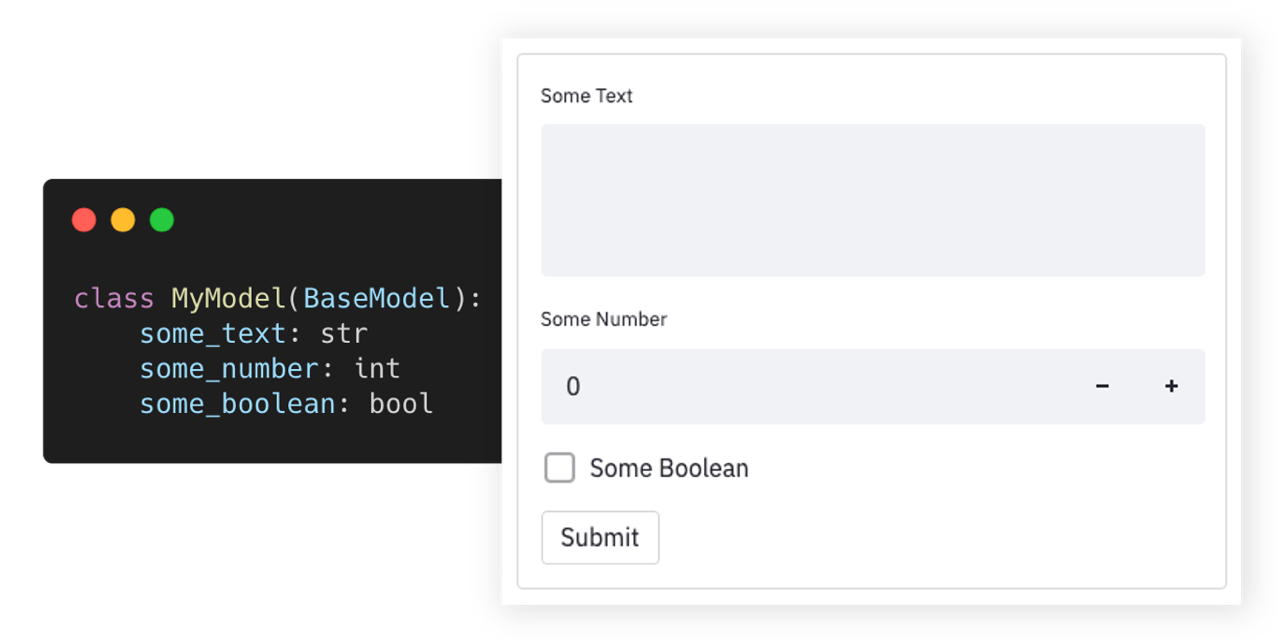

Try out and explore various examples in our playground here.


Highlights

  • πŸͺ„  Auto-generated UI elements from Pydantic models.
  • πŸ“‡   Out-of-the-box data validation.
  • πŸ“‘   Supports nested Pydantic models.
  • πŸ“   Supports field limits and customizations.
  • 🎈   Easy to integrate into any Streamlit app.

Getting Started

Installation

Requirements: Python 3.6+.

pip install streamlit-pydantic

Usage

  1. Create a script (my_script.py) with a Pydantic model and render it via pydantic_form:

    import streamlit as st
    from pydantic import BaseModel
    import streamlit_pydantic as sp
    
    class ExampleModel(BaseModel):
        some_text: str
        some_number: int
        some_boolean: bool
    
    data = sp.pydantic_form(key="my_form", input_class=ExampleModel)
    if data:
        st.json(data.json())
  2. Run the streamlit server on the python script: streamlit run my_script.py

  3. You can find additional examples in the examples section below.

Examples


πŸ‘‰   Try out and explore these examples in our playground here


The following collection of examples demonstrate how Streamlit Pydantic can be applied in more advanced scenarios. You can find additional - even more advanced - examples in the examples folder or in the playground.

Simple Form

import streamlit as st
from pydantic import BaseModel

import streamlit_pydantic as sp


class ExampleModel(BaseModel):
    some_text: str
    some_number: int
    some_boolean: bool

data = sp.pydantic_form(key="my_form", input_class=ExampleModel)
if data:
    st.json(data.json())

Date Validation

import streamlit as st
from pydantic import BaseModel, Field, HttpUrl
from pydantic.color import Color

import streamlit_pydantic as sp


class ExampleModel(BaseModel):
    url: HttpUrl
    color: Color
    email: str = Field(..., max_length=100, regex=r"^\S+@\S+$")


data = sp.pydantic_form(key="my_form", input_class=ExampleModel)
if data:
    st.json(data.json())

Complex Nested Model

from enum import Enum
from typing import Set

import streamlit as st
from pydantic import BaseModel, Field, ValidationError, parse_obj_as

import streamlit_pydantic as sp


class OtherData(BaseModel):
    text: str
    integer: int


class SelectionValue(str, Enum):
    FOO = "foo"
    BAR = "bar"


class ExampleModel(BaseModel):
    long_text: str = Field(..., description="Unlimited text property")
    integer_in_range: int = Field(
        20,
        ge=10,
        lt=30,
        multiple_of=2,
        description="Number property with a limited range.",
    )
    single_selection: SelectionValue = Field(
        ..., description="Only select a single item from a set."
    )
    multi_selection: Set[SelectionValue] = Field(
        ..., description="Allows multiple items from a set."
    )
    single_object: OtherData = Field(
        ...,
        description="Another object embedded into this model.",
    )


data = sp.pydantic_form(key="my_form", input_class=ExampleModel)
if data:
    st.json(data.json())

Render Input

from pydantic import BaseModel

import streamlit_pydantic as sp


class ExampleModel(BaseModel):
    some_text: str
    some_number: int = 10  # Optional
    some_boolean: bool = True  # Option


input_data = sp.pydantic_input("model_input", ExampleModel, use_sidebar=True)

Render Output

import datetime

from pydantic import BaseModel, Field

import streamlit_pydantic as sp


class ExampleModel(BaseModel):
    text: str = Field(..., description="A text property")
    integer: int = Field(..., description="An integer property.")
    date: datetime.date = Field(..., description="A date.")


instance = ExampleModel(text="Some text", integer=40, date=datetime.date.today())
sp.pydantic_output(instance)

Custom Form

import streamlit as st
from pydantic import BaseModel

import streamlit_pydantic as sp


class ExampleModel(BaseModel):
    some_text: str
    some_number: int = 10
    some_boolean: bool = True


with st.form(key="pydantic_form"):
    sp.pydantic_input(key="my_input_model", input_class=ExampleModel)
    submit_button = st.form_submit_button(label="Submit")

Support & Feedback

Type Channel
🚨   Bug Reports
🎁   Feature Requests
πŸ‘©β€πŸ’»   Usage Questions
πŸ“’   Announcements

Documentation

The API documentation can be found here. To generate UI elements, you can use the high-level pydantic_form method. Or the more flexible lower-level pydantic_input and pydantic_output methods. See the examples section on how to use those methods.

Limitations

TBD

Contribution

Development

To build the project and run the style/linter checks, execute:

pip install universal-build
python build.py --make --check

Refer to our contribution guides for more detailed information on our build scripts and development process.


Licensed MIT. Created and maintained with ❀️   by developers from Berlin.

Comments
  • Handle Collection Type fields

    Handle Collection Type fields

    Feature description: Correctly handle fields such as List[str]

    Curently when a field is of a collection type such as dict, list, Mapping, Sequence etc. the behaviour is broken. For the model

    class ExampleModel(BaseModel):
            text: str
            many_texts: Sequence[str]
    

    the output is broken image and pressing the submit button results in the following error Whoops! There were some problems with your input: many_texts: field required

    Problem and motivation:

    I have forms where some of the inputs are an arbitrary number of strings. Up until now I have solved this with a text_area widget, and prompt the user to separate their inputs with commas. Then with a custom validator the strings can be put back into a list. While this kinda works, it is a very hacky solution, it prevents me from using this package without breaking up my model

    Is this something you're interested in working on?

    Currently I don't have the capacity but it is something that am willing to look into in the near future (in a couple of months)

    Stale 
    opened by papalotis 8
  • Populate generated form values from a pydantic model instance

    Populate generated form values from a pydantic model instance

    What kind of change does this PR introduce?

    • [ ] Bugfix
    • [x] New Feature
    • [ ] Feature Improvement
    • [ ] Refactoring
    • [ ] Documentation
    • [ ] Other, please describe:

    Description:

    This PR adds the capability to provide a pydantic model instance to sp.pydantic_input() and have the generated pydantic widgets be pre-populated with the instance property values.

    This allows for full CRUD operations to be performed on pydantic data using streamlit.

    I've been tinkering with this and some other changes in my fork and have made good use of it in a couple of projects now and it would be nice to get it merged upstream.

    To demonstrate the functionality I've added two additional examples to the playground:

    • complex_instance_model.py: A full demo that shows all of the major widget types and the difference in behaviour between an empty pydantic schema vs a fully populated instance
    • union_field_instance.py: An example to demonstrate a union field using an instance with Discriminated Unions

    Checklist:

    • [x] I have read the CONTRIBUTING document.
    • [x] My changes don't require a change to the documentation, or if they do, I've added all required information.
    opened by HIL340 7
  • Add full support for readOnly, max_items, min_items and other schema properties within rendered collections

    Add full support for readOnly, max_items, min_items and other schema properties within rendered collections

    What kind of change does this PR introduce?

    • [ ] Bugfix
    • [ ] New Feature
    • [x] Feature Improvement
    • [x] Refactoring
    • [ ] Documentation
    • [ ] Other, please describe:

    Description:

    Hello again πŸ˜„

    From a user/dev perspective the changes introduced by this PR are:

    1. Support the readOnly pydantic field property in all pydantic widgets by making use of streamlits disabled widget property (fully introduced in streamlit 1.5.0 and pinned to this version in setup.py)
    2. Enhance the new list add/remove/clear buttons to respect max_items and min_items pydantic field properties that might be present in the model.
    3. Add support for all existing widget types (eg. date, time, boolean etc..) to be rendered in lists and dicts with full validation and formatting options. This is a result of some refactoring to improve code re-use. eg. There is now only one function that rendered a number field, regardless of whether that field is a standalone property or contained within in a list, dict or complex object.

    A new showcase example complex_disabled_showcase.py has been added to test/demonstrate all of the major widgets in thier disabled form. complex_instance_model.py has also been updated to demonstrate some of the now supported collection properties and data types.

    Checklist:

    • [x] I have read the CONTRIBUTING document.
    • [x] My changes don't require a change to the documentation, or if they do, I've added all required information.
    Stale 
    opened by HIL340 6
  • Return pydantic object from function

    Return pydantic object from function

    Thanks for making this repo @LukasMasuch! Excited to start playing with it. Would you be open to a PR to modify the API so that sd.pydantic_input() returns the instantiated pydantic object, or None if the inputs are invalid? If so I can play around with that

    opened by benlindsay 3
  • Lists(except files list) do not work in sidebar forms

    Lists(except files list) do not work in sidebar forms

    Description:

    lists of integers or strings (or in my assumption any other primitive type) as datatype does not work when using in sidebar form. The above does not occur and we get the clear and add item buttons but they disappear when used insidebar forms

    Expected Behaviour:

    this should be consistent across all forms (for my use-case at least sidebar-form)

    Steps to reproduce:

    class IDsModel(BaseModel):
        ids: List[str] =  Field( [], max_items=8, description="Enter ids")
    
    with st.sidebar.form(key="dummy_form"):
        dummy_session_data = sp.pydantic_input(key="dummy_model", model=IDsModel)
    

    P.S. love the pydantic <-> streamlit integration <3

    bug Stale 
    opened by sidphbot 2
  • Double ended slider

    Double ended slider

    Feature description: Generate a double ended slider when providing a maximum and minimum argument to Field.

    Streamlit provides a double ended slider when setting value to a list of integers that specify the range in st.slider(). In _render_single_number_input you only check for min_value and set value accordingly. By replacing L610 with

    if "min_value" in streamlit_kwargs and "max_value" in streamlit_kwargs:
        streamlit_kwargs["value"] = [
               streamlit_kwargs["min_value"],
               streamlit_kwargs["max_value"],
        ]
    elif "min_value" in streamlit_kwargs:
    

    you would get a double ended slider. I can create a PR if you like, but I am struggling with building the project see #12.

    Problem and motivation:

    It is a feature of streamlit and in my work we often need to specify ranges. I think this is very common in a lot of fields.

    Is this something you're interested in working on? Yes, I already did.

    Stale 
    opened by Bartcardi 1
  • Building the project after clean fork fails with mypy error

    Building the project after clean fork fails with mypy error

    Describe the bug: When I try to build the project using the instructions under the section Development in README.md, one of the code checks fails.

    I forked your latest main branch and tried to run the instructions for development. After running PIPENV_IGNORE_VIRTUALENVS=1 python build.py --make --check mypy reports an error.

    src/streamlit_pydantic/ui_renderer.py:1070: error: Argument 1 to "join" of "str" has incompatible type "Tuple[Union[int, str], ...]"; expected "Iterable[str]"
    

    Expected behaviour:

    I would have expected all checks to pass on the master branch.

    Steps to reproduce the issue: Clone the repo and checkout master (1afd4e3)

    pip install universal-build
    python build.py --make --check
    

    In my case I used PIPENV_IGNORE_VIRTUALENVS=1 to ignore my current virtual environment.

    Technical details:

    • Host Machine Mac OS
    • Python 3.9.5

    Possible Fix:

    Have a look at the specified line in the mypy output.

    Additional context: When running pip install universal-build python build.py --make --check for the first time it complained about missing wheel and twine.

    bug Stale 
    opened by Bartcardi 1
  • Support for Union class.

    Support for Union class.

    Cool project @LukasMasuch, thank you!

    Feature description:

    I'm missing support for Unions. Ver simple example can be:

    class PostalAddress(BaseClass):
        street: str
        city: str
        house: int
        
    class EmailAddress(BaseClass):
        email: str
        send_news: bool
        
    class ContactMethod(BaseClass):
        contact: Union[PostalAddress, EmailAddress]
        ... other fields
        
        
    # rendring form for ClassMethod


    So far I'm doing it with radio button, depending on its output the right option is rendered.

    I'm not sure if there is more elegant solution, but let me know if you have ideas so I could help with implementing

    opened by arogozhnikov 1
  • Using non-beta streamlit functions now

    Using non-beta streamlit functions now

    What kind of change does this PR introduce?

    • [ ] Bugfix
    • [ ] New Feature
    • [ ] Feature Improvement
    • [x] Refactoring
    • [ ] Documentation
    • [ ] Other, please describe:

    Description:

    Changed all streamlit beta functions to their non-beta version. On 2021-11-02, the beta-versions will be removed anyway.

    Checklist:

    • [x] I have read the CONTRIBUTING document.
    • [x] My changes don't require a change to the documentation, or if they do, I've added all required information.
    opened by BenediktPrusas 1
  • Fix Union Discriminator functioanlity with Pydantic 1.10+

    Fix Union Discriminator functioanlity with Pydantic 1.10+

    What kind of change does this PR introduce?

    • [x] Bugfix
    • [ ] New Feature
    • [ ] Feature Improvement
    • [ ] Refactoring
    • [ ] Documentation
    • [ ] Other, please describe:

    Description:

    Pydantic's 1.10 release introduced a change to its union discriminator property from "anyOf" to "oneOf" (see https://github.com/pydantic/pydantic/pull/4335).

    This property is used by streamlit-pydantic to support the optional rendering of discriminated unions in forms and this is no longer working with pydantic 1.10+

    This PR adds support for the pydantic 1.10 "oneOf" property name and maintains backwards compatibility with"anyOf" (and therefore with pydantic < 1.10)

    Also included are some minor formatting updates to the Union playground example pages by making use of streamlit tabs for the different model/instance init styles.

    Checklist:

    • [x] I have read the CONTRIBUTING document.
    • [x] My changes don't require a change to the documentation, or if they do, I've added all required information.
    opened by HIL340 1
  • Add Streamlit Color Widget

    Add Streamlit Color Widget

    What kind of change does this PR introduce?

    • [ ] Bugfix
    • [x] New Feature
    • [ ] Feature Improvement
    • [ ] Refactoring
    • [x] Documentation
    • [ ] Other, please describe:

    Description:

    Add the streamlit colour widget as a valid representation and selector of a pydantic colour field type.

    I've added the widget in the "Complex Instance Model" and "Complex Disabled Showcase" playground pages and in the process did some tidy up of these two pages:

    • Complex Instance Model: Updated to make use of st.tabs to separate the two init styles.
    • Complex Disabled Showcase: Fixed inconsistencies between the model and instance fields (some were in the wrong order or missing entirely)

    Checklist:

    • [x] I have read the CONTRIBUTING document.
    • [x] My changes don't require a change to the documentation, or if they do, I've added all required information.
    opened by HIL340 0
  • How to populate a form with a model instance?

    How to populate a form with a model instance?

    Describe the issue: How can I populate a form with an instance of a model that e.g. is loaded from a database? I was hoping for sth. like this to work:

    model = ExampleModel(long_text="This is a long text property.", integer_in_range=24)
    
    data = sp.pydantic_form(key="my_form", model=model)
    

    Brilliant project though, exactly what I was looking for!

    enhancement 
    opened by TomTom101 4
  • Displaying Input Sections in Columns

    Displaying Input Sections in Columns

    Feature description: As far as I understand at the moment User Input will all be displayed in one colum. As seen here grafik But instead i would like to display the interactive fields in multile colums, As seen here: grafik

    Maybe one could specify the number of input columns as name-value pair:

    input_data = sp.pydantic_input(
        "model_input", model=ExampleModel, width=2
    )
    

    Additionaly if the width value equals None, the Number of Collums could be automaticly determined to approximate for e.g. a 3 by 4 aspect ratio. If the window size is to narrow streamlit rearranges the elements anyway.

    Problem and motivation: The motivation is clearly to make apps with a lot of user input more organised and utilize more of wide screen displays. This is espacially sensible, since streamlit-pydantic is a usefull tool espacially in applications with a lot of user input, to make code more organised and modular.

    Is this something you're interested in working on? Yes, although I am totally inexperienced

    opened by BenediktPrusas 6
Releases(v0.5.0)
  • v0.5.0(Nov 17, 2021)

    PyPi Release

    🎁 Features & Improvements

    • Add support for union class (see example)
    • Add support for overwriting streamlit args (see example)
    • Add support for read only string fields.
    • Using non-beta streamlit functions now (#8) by @BenediktPrusas

    πŸ‘₯ Contributors

    Thanks to @BenediktPrusas, @LukasMasuch for the contributions.

    Source code(tar.gz)
    Source code(zip)
  • v0.4.0(Jul 19, 2021)

    PyPi Release

    🎁 Features & Improvements

    • Add support for dataclasses
    • Introduce multi-line format option for text area
    • Add option to ignore_empty_values (applied on "" string or 0 int value)
    • Change input_class parameter to model

    πŸ‘₯ Contributors

    Thanks to @LukasMasuch for the contributions.

    Source code(tar.gz)
    Source code(zip)
  • v0.3.0(Jul 17, 2021)

    PyPi Release

    🎁 Features & Improvements

    • Add support for literal expression for enums.
    • Support default values for enum sets (multiselect).

    πŸ‘₯ Contributors

    Thanks to @LukasMasuch for the contributions.

    Source code(tar.gz)
    Source code(zip)
  • v0.2.0(Jul 11, 2021)

    PyPi Release

    🎁 Features & Improvements

    • Add support for pydantic_form method as proposed by @benlindsay here.
    • Allow creating multiple forms within the same Streamlit application.
    • Implement playground application to showcase examples.

    πŸ“ Documentation

    • Update documentation with lots of examples.
    • Improve API documentation.

    πŸ‘₯ Contributors

    Thanks to @LukasMasuch and @benlindsay for the contributions.

    Source code(tar.gz)
    Source code(zip)
  • v0.1.0(Jul 11, 2021)

    🎁 Features & Improvements

    • Extract UI-generation logic from opyrator
    • Create initial API for usage within Streamlit App.

    πŸ‘₯ Contributors

    Thanks to @LukasMasuch for the contributions.

    Source code(tar.gz)
    Source code(zip)
Pyrmanent - Make all your classes permanent in a flash πŸ’Ύ

Pyrmanent A base class to make your Python classes permanent in a flash. Features Easy to use. Great compatibility. No database needed. Ask for new fe

Sergio Abad 4 Jan 07, 2022
Unfinished Python library based on ndspy, for Zelda: Phantom Hourglass and Spirit Tracks.

zed An unfinished library and toolset by me, for viewing and editing files from The Legend of Zelda: Phantom Hourglass and The Legend of Zelda: Spirit

4 Oct 13, 2022
Code and data for learning to search in local branching

Code and data for learning to search in local branching

Defeng Liu 7 Dec 06, 2022
Vaksina - Vaksina COVID QR Validation Checker With Python

Vaksina COVID QR Validation Checker Vaksina is a general purpose library intende

Michael Casadevall 33 Aug 20, 2022
A free website that keeps the people informed about housing and evictions.

Eviction Tracker Currently helping verify detainer warrant data for middle Tennessee - via Middle TN DSA - Red Door Collective Features Presents data

Red Door Collective 7 Dec 14, 2022
the classic version Of torrentleechx #Unmaintained #Archived

TorrentleechX-Classic Old Modified Version Repo #Unmaintained #Archived for support join here working example group Leech Here For Any Issues/Imroveme

XcodersHub 18 Jan 30, 2022
List of all D&D 5e monsters: WotC + popular third-party sourcebooks

Xio's Guide to Monsters If you're a DM like me, and you have multiple sources of D&D 5e monsters that include WotC as well as third-party suppliers, y

20 Jan 06, 2023
Simple script with AminoLab to send ghost messages

Simple script with AminoLab to send ghost messages

Moleey 1 Nov 22, 2021
Proyecto - AnΓ‘lisis de texto de eventos histΓ³ricos

Acceder al cΓ³digo desde Google Colab para poder ver de manera adecuada todas las visualizaciones y poder interactuar con ellas. Link de acceso: https:

1 Jan 31, 2022
Mini-calculadora escrita como exemplo para uma palestra relΓ’mpago sobre `git bisect`

Calculadora Mini-calculadora criada para uma palestra relΓ’mpado sobre git bisect. Tem atΓ© uma colinha! Exemplo de uso Modo interativo $ python -m calc

Eduardo Cuducos 3 Dec 14, 2021
The Python agent for Apache SkyWalking

SkyWalking Python Agent SkyWalking-Python: The Python Agent for Apache SkyWalking, which provides the native tracing abilities for Python project. Sky

The Apache Software Foundation 149 Dec 12, 2022
Render reMarkable documents to PDF

rmrl: reMarkable Rendering Library rmrl is a Python library for rendering reMarkable documents to PDF files. It takes the original PDF document and th

Robert Schroll 95 Dec 25, 2022
Compiler Final Project - Lisp Interpreter

Compiler Final Project - Lisp Interpreter

2 Jan 23, 2022
Collection of tools to be more productive in your work environment and to avoid certain repetitive tasks. πŸ’›πŸ’™πŸ’š

Collection of tools to be more productive in your work environment and to avoid certain repetitive tasks. πŸ’›πŸ’™πŸ’š

Raja Rakotonirina 2 Jan 10, 2022
Show my read on kindle this year

Show my kindle status on GitHub

yihong 26 Jun 20, 2022
Old versions of Deadcord that are problematic or used as reference.

⚠️ Unmaintained and broken. We have decided to release the old version of Deadcord before our v1.0 rewrite. (which will be equiped with much more feat

Galaxzy 1 Feb 10, 2022
Statistics Calculator module for all types of Stats calculations.

Statistics-Calculator This Calculator user the formulas and methods to find the statistical values listed. Statistics Calculator module for all types

2 May 29, 2022
An implementation to rank your favourite songs from World of Walker

World-Of-Walker-Elo An implementation to rank your favourite songs from Alan Walker's 2021 album World of Walker. Uses the Elo rating system, which is

1 Nov 26, 2021
System Information Utility With Python

System-Information-Utility This is a simple utility, for the terminal, which allows you to find out information about your PC. It's very easy to run t

2 Apr 15, 2022
Airplane reservation system python 2

airplane-reservation-system-python-2 Announcement πŸ”Š : πŸ”΄ IMPORTANT πŸ”΄ : Few new things have been added into the code [16/05/2021] different names is

voyager2005 1 Dec 06, 2021


