EDF R&D implementation of ISO 15118-20 FDIS.

Related tags

MiscellaneousEDF
Overview

EDF R&D implementation of ISO 15118-20 FDIS

============

This project implements the ISO 15118-20 using Python.

Supported features:

  • DC Bidirectional Power Transfer BPT with dynamic control mode.
  • TLS 1.3 with mutual authentication.
  • Set departure time from SECC side.

Project setup

Installation and setup for Ubuntu

Update your system using the command below:

sudo apt-get update

1. Install MiniConda

Visit the conda installation website link to install MiniConda according to your operating system.

If your operating system is Ubuntu, you can visit this link and follow instructions.

Next, to activate the command conda, execute the line below:

export PATH="[YOUR PATH OF INSTALLED MINICONDA]/bin":$PATH

Example path: /home/trang/miniconda3/bin/

To install conda's shell functions for easier access, once conda command is activated, then:

conda init bash

2. Install PyCharm

Install by Terminal:

sudo snap install pycharm-community --classic

Or you can download the installer via the following link: Download PyCharm Community for Ubuntu

Extract the downloaded file in [YOUR EXTRACTED DIRECTORY OF PYCHARM]. Then, to open PyCharm, run in Terminal :

cd [YOUR EXTRACTED DIRECTORY OF PYCHARM]
./pycharm-community-2021.3.1/bin/pycharm.sh

3. Install Java

This proyect uses OpenEXI for decode/encode xml to EXI. This is a java library, which has been coupled to python using jPype. Since the project imports java libraries, it is required to install JDK. For installing JDK follow the instructions here

For Ubuntu/Debian, you can follow instructions here

4. Create virtual environment and install dependencies

First of all, it is necessary to download the project Raiden V2X from github.

In Terminal:

cd [YOUR DOWNLOADED DIRECTORY OF PROJECT]
conda env create -f environment.yml

Normally, all of project's dependencies are installed automatically when setting virtual environment.

5. Setup virtual environment

From command line

To activate your new virtual environment in Terminal,run the command below:

conda activate edf15118-20

From PyCharm

Step 1:
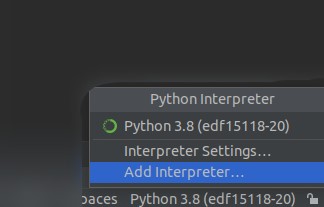
Add your new virtual environment and interpreter in PyCharm:

In Python Interpreter on bottom right corner of windows, choose Add Interpreter... like the screen shot below

Step 2:

In the popup window, choose your Python interpreter of edf15118-20 environment.

The environment is located in [YOUR PATH OF INSTALLED MINICONDA]/envs/

Then choose the package python of edf15118-20 virtual environment.

For example, the complete Python Interpreter path is:

/home/trang/miniconda3/envs/edf15118-20/bin/python
Installation and setup for Raspberry Pi

1. Install VSCode:

Install with the command line below:

sudo apt-get update
sudo apt install code

2. Install dependencies:

First, install PyQt5 independently with the following command :

sudo apt-get install python3-pyqt5

Next, install all remaining dependencies as below:

pip install -r requirement_rasp.txt

3. Install missing packages

Some packages are not installed automatically via requirement_rasp.txt. To execute the project, it is required to install these librairies manually via the command below:

sudo apt-get install libatlas-base-dev libhdf5-dev libhdf5-serial-dev libatlas-base-dev libjasper-dev

4. Setup Python for VSCode:

In VSCode, press Ctrl+Shift+X to install Python extension then select Python interpreter

5. Install Java

Follow the same steps of Linux PC.

Execute EVCC and SECC

1. Setup configuration files config.ini:

From the terminal, check for network interfaces by using the following command:

ifconfig

For example, the result returned by ifconfig:

enp0s3: flags=4163<UP,BROADCAST,RUNNING,MULTICAST>  mtu 1500
        inet 10.0.2.15  netmask 255.255.255.0  broadcast 10.0.2.255
        inet6 fe80::1c00:5e0f:2cb2:e69f  prefixlen 64  scopeid 0x20<link>
        ether 08:00:27:e4:6d:1b  txqueuelen 1000  (Ethernet)
        RX packets 277  bytes 39834 (39.8 KB)
        RX errors 0  dropped 0  overruns 0  frame 0
        TX packets 1110  bytes 92105 (92.1 KB)
        TX errors 0  dropped 0 overruns 0  carrier 0  collisions 0

lo: flags=73<UP,LOOPBACK,RUNNING>  mtu 65536
        inet 127.0.0.1  netmask 255.0.0.0
        inet6 ::1  prefixlen 128  scopeid 0x10<host>
        loop  txqueuelen 1000  (Local Loopback)
        RX packets 475  bytes 42714 (42.7 KB)
        RX errors 0  dropped 0  overruns 0  frame 0
        TX packets 475  bytes 42714 (42.7 KB)
        TX errors 0  dropped 0 overruns 0  carrier 0  collisions 0

Setup the configuration file an interface which has ipv6 address. In this case, we will use enp0s3 interface.

EVSE :

In file evse_config.ini, setup the parameters as shown below:

[NETWORK]
    interface = enp0s3
    tcp_port = 49152
    # See table 10, must range from 49152 to 65535

[SETTINGS]
    virtual_mode = true

The parameter virtual_mode in [SETTINGS], allows to set and verify the 61851-1 states from a communication card.To simulate the communication card the virtual_mode parmeter can be set to true.

If it is required to verify or set 61851-1 states, some adaptations of the provided interfaces are needed to read and set the states from the communication card.

EVCC :

Setup configuration file ev_config.ini, as follows:

[NETWORK]
    interface = enp0s3
    udp_port = 49153
    # See table 18, must range from 49152 to 65535
    tcp_port = 49154
    # See table 10, must range from 49152 to 65535

[SETTINGS]
    virtual_mode = true

Like EVSE, you set virtual_mode = true/false based on your own situation.

2. Install certificates for mutual authentication

Before running ISO 15118-20, you need to install the certificates for TLS with mutual authentication by running the command below in the terminal:

cd /shared/certificates/

and then run :

sh generateCertificates.sh

3. Run ISO 15118-20

To run a communication session, the server which corresponds to the SECC needs to be running first:

  • If you run using the GUI, go to directory /secc run python3 evse_gui.py
    • In GUI, click Set to define a departure time and target state of charge SoC from the charging station side and then click Start

Start Window SECC

  • If you run without GUI, run start_evse.py

Then, you can run electric vehicle communication controller EVCC:

  • If you execute with GUI, go to directory /evcc and execute python3 ev_gui.py
  • In GUI, click Set to define a departure time and target state of charge SoC from the EV and then click Start

Start Window EVCC

  • To execute without GUI, run start_ev.py

The session sequence can be seen in the terminal by the printed logs or in the GUI, in the information tab.

Information tab EVCC

Once the session is in the charging loop you can control dinamically the power transfer by moving the control bar at the left side of the SECC control window:

Control Window SECC

To stop the charging session, click on stop button of the EVCC start window.

Note: If you have the error message below when runing the project:

qt.qpa.plugin: Could not load the Qt platform plugin "xcb" in "" even though it was found.
This application failed to start because no Qt platform plugin could be initialized. Reinstalling the application may fix this problem.

Available platform plugins are: eglfs, linuxfb, minimal, minimalegl, offscreen, vnc, xcb.

Aborted (core dumped)

This error comes from the library libxcb which is used in package Qt for GUI. To fix it, you need to re-install this library with the command below:

sudo apt-get install libxcb-randr0-dev libxcb-xtest0-dev libxcb-xinerama0-dev libxcb-shape0-dev libxcb-xkb-dev

Generate documentation


In order to generate the documentation, one has to use the sphinx module from the docs directory:

    make html
Comments
  • Stop button from EVCC side is not working systematically.

    Stop button from EVCC side is not working systematically.

    Stop from the EVCC side without GUI works fine. Hint: The problem seems to be related to accelerated message exchange, the GUI seems to need more time to process the stop request.

    opened by OSkrdgz 4
  • Fix: comply with schemas from e58323a

    Fix: comply with schemas from e58323a

    When verifying my decoder, I ran in the issue that ScheduleExchangeReq message couldn't be decoded. After some research I found a mismatch in schema updates but not in the code see: e58323a 2048 -> 1024

    Ps, thanks for open-sourcing this project

    opened by jessekerkhoven 4
  • This piece of code takes too much time to be executed

    This piece of code takes too much time to be executed

    https://github.com/EDF-Lab/eVDriveFlow/blob/23766073bad54cb7366ab41d90acc6b1e505b5a9/evcc/tcp_client.py#L119

    https://github.com/EDF-Lab/eVDriveFlow/blob/23766073bad54cb7366ab41d90acc6b1e505b5a9/secc/tcp_server.py#L98

    xml_object = self.message_handler.unmarshall(xml) request_type = type(xml_object).name logger.info("Received %s.", request_type) # TODO: This method takes too long

    opened by OSkrdgz 1
  • Support fragment encoding for signing data

    Support fragment encoding for signing data

    According to the standard; For PnC support certain fields need to be encoded as an EXI fragment by the EVCC or SECC (for verification or to add in the message):

    • [x] PnC_AReqIdentificationMode
    • [ ] SignedInstallationData
    • [ ] Fields of MeteringConfirmationReq
    • [ ] ChargeParameterDiscoveryRes
    • [x] SignatureInfo (with the xmldsig schema)

    This commit simply adds the support to encode the marked types, but doesn't use any yet.

    opened by SirTates 0
  • Update certificate configuration files to fill required elements:

    Update certificate configuration files to fill required elements:

    In order to generate the certifcates compliant with the standard the .cnf files corresponding to each certificatemust contain the required and critical extensions as specified in the Certificate profiles in Annex B of 15118-20.

    | x | Required: issuing CA must make sure that this extension is present certificate validating entity must ensure that this extension is present | |-----|---------------------------------------------------------------------------------------------------------------------------------------------------------------------------------------------------------------------------------------------------------------------------------------------------------------| | (x) | Optional it is upto the discretion of the issuing CA and/or certificate requester to either include or omit this extension certificate validating entity must ignore the absence of this extension | | - | Must not be present issuing CA must make sure that this extension is not present certificate validating entity must ensure that this extension is not present | | c | This extension is critical, see IETF RFC 5280 if this extension is present, the certificate validating entity must process it. If an implementation recognizes that a “critical” extension is present, but the implementation cannot interpret the extension, the implementation has to reject the certificate. Quote from IETF RFC 5280: “A certificate-using system MUST reject the certificate if it encounters a critical extension it does not recognize or a critical extension that contains information that it cannot process." NOTE: IETF RFC 5280 has been updated by IETF RFC 6818, IETF RFC 8398 and IETF RFC 8399. These updates are considered to be included for this version of ISO 15118-20 standard. | | nc | This extension is non-critical, see IETF RFC 5280 if this extension is present, the certificate validating entity may ignore it if either the entity is unable to process the extension or if the requirements allow the entity to ignore the extension. If an implementation recognizes that a “non-critical” extension is present, but the implementation cannot interpret the extension, the extension can be ignored. Quote from IETF RFC 5280: “A non-critical extension MAY be ignored if it is not recognized, but MUST be processed if it is recognized." NOTE: IETF RFC 5280 has been updated by IETF RFC 6818, IETF RFC 8398 and IETF RFC 8399. These updates are considered to be included for this version of ISO 15118-20 standard. ||

    opened by OSkrdgz 0
Releases(v0.1.1)
Owner
GitHub organization of EDF Research & Development
This repo created to complete the task HACKTOBER 2021, contribute now and get your special T-Shirt & Sticker. TO SUPPORT OWNER PLEASE PRESS STAR BUTTON

❤ THIS REPO WILL CLOSED IN 31 OCT 00:00 ❤ This repository will automatically assign the hacktoberfest and hacktoberfest-accepted labels to all submitt

Rajendra Rakha 307 Dec 27, 2022
Programmatic interface to Synapse services for Python

A Python client for Sage Bionetworks' Synapse, a collaborative, open-source research platform that allows teams to share data, track analyses, and collaborate

Sage Bionetworks 54 Dec 23, 2022
RecurrentArchitectures - See the accompanying blog post

Why this? What is the goal? The goal of this repository is to write all the recurrent architectures from scratch in tensorflow for learning purposes.

Debajyoti Datta 9 Feb 06, 2022
[arXiv 2020] Video Representation Learning with Visual Tempo Consistency

Video Representation Learning with Visual Tempo Consistency [Paper] [Project Page] News Full codebae is coming soon Pretained Models For now, we provi

DeciForce: Crossroads of Machine Perception and Autonomy 24 Nov 23, 2022
A collection of examples of using cocotb for functional verification of VHDL designs with GHDL.

At the moment, this repo is in an early state and serves as a learning tool for me. So it contains a a lot of quirks and code which can be done much better by cocotb-professionals.

T. Meissner 7 Mar 10, 2022
Lock a program and kills it indefinitely if it is started.

Kill By Lock Lock a program and kills it indefinitely if it is started. How start it? It' simple, you just have to double-click on the python file (.p

1 Jan 12, 2022
A python package for bitclout.

BitClout.py A python package for bitclout. Developed by ItsAditya Run pip install bitclout to install the module! Examples of How To Use BitClout.py G

ItsAditya 9 Dec 31, 2021
Shows a pixel art of any Pokémon in your terminal!

pokemon-icat This script is inspired by this project, but since the output heavily depends on the font of your terminal, i decided to make a script th

ph04 52 Dec 22, 2022
Awesome open-source alternatives to SaaS

Awesome-oss-alternatives - Awesome list of open-source startup alternatives to well-known SaaS products

Runa Capital 12.7k Jan 03, 2023
A simple streamlit webapp with multiple functionality

A simple streamlit webapp with multiple functionality

Omkar Pramod Hankare 2 Nov 24, 2021
UniPD exam dates finder

UniPD exam dates finder Find dates for exams at UniPD Usage ./finder.py courses.csv It's suggested to save output to a file: ./finder.py courses.csv

Davide Peressoni 1 Jan 25, 2022
"Hacking" the (Telekom) Zyxel GPON SFP module (PMG3000-D20B)

"Hacking" the (Telekom) Zyxel GPON SFP module (PMG3000-D20B) The SFP can be sour

Matthias Riegler 52 Jan 03, 2023
Learn Python tips, tools, and techniques in around 5 minutes each.

Python shorts Learn Python tips, tools, and techniques in around 5 minutes each. Watch on YouTube Subscribe on YouTube to keep up with all the videos.

Michael Kennedy 28 Jan 01, 2023
Process RunGap output file of a workout and load data into Apple Numbers Spreadsheet and my website with API calls

BSD 3-Clause License Copyright (c) 2020, Mike Bromberek All rights reserved. ProcessWorkout Exercise data is exported in JSON format to iCloud using

Mike Bromberek 1 Jan 03, 2022
Python module used to generate random facts

Randfacts is a python library that generates random facts. You can use randfacts.get_fact() to return a random fun fact. Disclaimer: Facts are not gua

Tabulate 14 Dec 14, 2022
because rico hates uuid's

terrible-uuid-lambda because rico hates uuid's sub 200ms response times! Try it out here: https://api.mathisvaneetvelde.com/uuid https://api.mathisvan

Mathis Van Eetvelde 2 Feb 15, 2022
Vaccine for STOP/DJVU ransomware, prevents encryption

STOP/DJVU Ransomware Vaccine Prevents STOP/DJVU Ransomware from encrypting your files. This tool does not prevent the infection itself. STOP ransomwar

Karsten Hahn 16 May 31, 2022
Moleey Panel with python 3

Painel-Moleey pkg upgrade && pkg update pkg install python3 pip install pyfiglet pip install colored pip install requests pip install phonenumbers pkg

Moleey. 1 Oct 17, 2021
Oppia is an online learning tool that enables anyone to easily create and share interactive activities

Oppia is an online learning tool that enables anyone to easily create and share interactive activities (called 'explorations'). These activities simulate a one-on-one conversation with a tutor, makin

Oppia 4.7k Dec 29, 2022
3x - This Is 3x Friendlist Cloner Tools

3X FRIENDLIST CLONER TOOLS COMMAND $ apt update $ apt upgrade $ apt install pyth

MAHADI HASAN AFRIDI 2 Jan 17, 2022