GUI app to read settings and stats from Cloudflare WARP CLI for Linux, and change some settings

Overview

warp-cli-gui

GUI app to read settings and stats from Cloudflare WARP CLI for Linux, and change some settings.
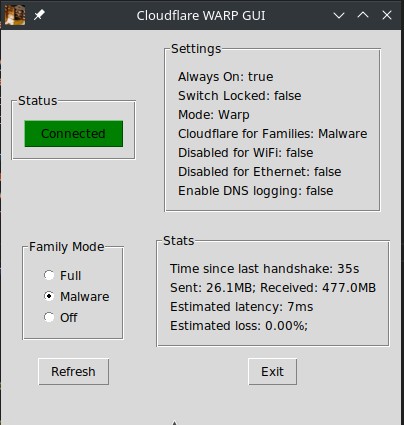
Screenshot_20211229_164126

Description

Python program that will interact with Linux CLI to check status, and change basic settings, for Cloudflare WARP CLI.

Requirements and Execution

  • Linux OS (tested on Manjaro Linux)
  • Python 3 with pillow library
  • warp-svc running as daemon (should be installed with warp-cli)
  • warp-cli for Linux installed (instructions at https://developers.cloudflare.com/warp-client/get-started/linux)
  • Copy these source files into a single folder, and execute with 'python warp-cli-gui.py'

License

This software is available under the GPL-3.0. You should have received a copy of the GNU General Public License along with this program. If not, see http://www.gnu.org/licenses/ for more info.

Todo's on the Road Map

  • Connect/Disconnect button action
  • Pull though current Family Mode status to radio buttons
  • Fix spacings and layout
  • "Always stay connected" option setting
  • Option to switch WARP modes
  • Consider auto-refresh with optional refresh in seconds
  • Maybe graphs where relevant eg. latency
  • Can it show connect status on panel when minimized?

Video

See my video about the initial creation of this app at https://youtu.be/hhPhiV0o5us

Versions

V0.1 - Initial release on 29 Dec 2021. Basically functional but needs connect button to be activated.

You might also like...
Desktop application for Windows/macOS users to rotate through custom, preset, and searched-for collections of backgrounds with scheduling and additional settings

Background Revolution (In Development, Alpha Release) What? This will be an application for users to customize their windows backgrounds by uploading

Simple GUI python app to show a stocks graph performance. Made with Matplotlib and Tiingo.

stock-graph-python Simple GUI python app to show a stocks graph performance. Made with Matplotlib and Tiingo. Tiingo API Key You will need to add your

A simple quiz app using API and GUI

GUI-Quiz-APP It's a simple quiz app using API and GUI.

Learn to build a Python Desktop GUI app using pywebview, Python, JavaScript, HTML, & CSS.

Python Desktop App Learn how to make a desktop GUI application using Python, JavaScript, HTML, & CSS all thanks to pywebview. pywebview is essentially

GUI based app made in python using tkinter

Virtual Keyboard A GUI application made in python using tkinter This is my first ever proper GUI based application project after learning tkinter rece

EZ Presence - A GUI-Python app which makes it easy to set a custom Discord Rich Presence. (BETA)

EZ Presence EZ Presence is a GUI-Python app which makes it easy to set any custom Discord Rich Presence. Using the App How to Run Since the app is in

Open source UI framework written in Python, running on Windows, Linux, macOS, Android and iOS

Kivy Innovative user interfaces made easy. Kivy is an open source, cross-platform Python framework for the development of applications that make use o

A simple Python Module for sending cross-platform desktop notifications on Windows, macOS and Linux

notify.py Cross platform desktop notifications for Python scripts and applications. Docs You can read the docs on this Git's Wiki, or here Supported P

Build GUI for your Python program with JavaScript, HTML, and CSS

https://pywebview.flowrl.com pywebview is a lightweight cross-platform wrapper around a webview component that allows to display HTML content in its o

Comments
  • Malware status greyed out on start

    Malware status greyed out on start

    Issue has been created by an update in the Cloudflare WARP driver for Linux in January 2022. This has changed the output in the CLI, which throws off what is being read and interpreted by this app.

    It has not completely broken the app, but has affected some status settings and UI. I'm looking for a more reliable way to read (scan to correct starting line) the correct settings, that may also prevent this happening in future. I may issue a quick fix as an interim measure if I find that both Arch and Ubuntu are the same.

    bug 
    opened by Danie10 1
  • NameError: name 'always_connected' is not defined

    NameError: name 'always_connected' is not defined

    Discovered a variable declaration issue that only appeared with the binary on a new installation, giving error:

    Traceback (most recent call last):
      File "warp-cli-gui.py", line 298, in <module>
      File "warp-cli-gui.py", line 259, in display_aon
    NameError: name 'always_connected' is not defined. Did you mean: 'always_conn_btn'?
    [6587] Failed to execute script 'warp-cli-gui' due to unhandled exception!


    Am working on diagnosing the global variable declaration which is causing this.

    bug 
    opened by Danie10 1
Releases(v1.5)
  • v1.5(Feb 19, 2022)

    The prerequisites to have Cloudflare WARP installed, the warp-svc daemon running, and first have warp-cli installed and registered still apply.

    But no Python needs to be installed to run this warp-cli-gui application.

    Big change from v1.3 is you should only need to download the binary file now. Ensure the warp-cli-gui file has execute permissions, then execute with ./warp-cli-gui from that directory.

    v1.5 Corrects the formatting changes due to latest WARP Linux driver update.

    Source code(tar.gz)
    Source code(zip)
    warp-cli-gui(305.01 MB)
  • v1.4(Feb 18, 2022)

    The prerequisites to have Cloudflare WARP installed, the warp-svc daemon running, and first have warp-cli installed and registered still apply.

    But no Python needs to be installed to run this warp-cli-gui application.

    Big change from v1.3 is you should only need to download the binary file now. Ensure the warp-cli-gui file has execute permissions, then execute with ./warp-cli-gui from that directory.

    Source code(tar.gz)
    Source code(zip)
    warp-cli-gui(305.01 MB)
  • v1.3(Jan 3, 2022)

    The prerequisites to have Cloudflare WARP installed, the warp-svc daemon running, and first have warp-cli installed and registered still apply.

    But no Python needs to be installed to run this warp-cli-gui application.

    Big change from v1.3 is you should only need to download the binary file now. Ensure the warp-cli-gui file has execute permissions, then execute with ./warp-cli-gui from that directory.

    Source code(tar.gz)
    Source code(zip)
    warp-cli-gui(416.47 MB)
  • v1.2(Jan 2, 2022)

    The prerequisites to have Cloudflare WARP installed, the warp-svc daemon running, and first have warp-cli installed and registered still apply.

    But no Python needs to be installed to run this warp-cli-gui application.

    Copy these 4 files into any directory location on your computer, ensure the warp-cli-gui file has execute permissions, then execute with ./warp-cli-gui from that directory.

    Source code(tar.gz)
    Source code(zip)
    off.png(9.15 KB)
    on.png(9.69 KB)
    warp-cli-gui(416.33 MB)
    warp_logo.png(86.50 KB)
  • v1.1(Jan 1, 2022)

    The prerequisites to have Cloudflare WARP installed, the warp-svc daemon running, and first have warp-cli installed and registered still apply. But no Python needs to be installed to run this warp-cli-gui application.

    Copy these files into any directory location on your computer, ensure the warp-cli-gui file has execute permissions, then execute with './warp-cli-gui' from that directory.

    Source code(tar.gz)
    Source code(zip)
    off.png(9.15 KB)
    on.png(9.69 KB)
    warp-cli-gui(416.31 MB)
    warp_logo.png(86.50 KB)
  • v1.0(Dec 31, 2021)

    The prerequisites to have Cloudflare WARP installed, the daemon running, and first have warp-cli registered still apply. But no Python needs to be installed to run the warp-cli-gui application.

    Copy these files into any directory location on your computer, ensure the warp-cli-gui file has execute permissions, then execute with './warp-cli-gui' from that directory.

    Source code(tar.gz)
    Source code(zip)
    warp-cli-gui(416.41 MB)
    warp_logo.png(86.50 KB)
Owner
Danie
Danie
A GUI panel to manage multi monitor on i3wm.

Monitor manager Only for I3wm (Just for now) It's about two years that I'm using i3 as my window manager and in my experience this window manager allo

Wire.Nemo 3 Nov 06, 2021
Make desktop applications using HTML and CSS with python

Neutron Make desktop applications using HTML and CSS with python What is Neutron Neutron will allow developers to design modern applications in python

Ian Baldelli 284 Dec 29, 2022
Firefox 96 Webapps for Gnome 3

mozapp Do you prefer Firefox to Chrome? Me too! But ever since Firefox dropped support for standalone web applications, I've resorted to using Chrome

Marten de Vries 8 Oct 31, 2022
A simple quiz app using API and GUI

GUI-Quiz-APP It's a simple quiz app using API and GUI.

KALPAK KUMAR DAS 1 Feb 03, 2022
Desktop application for Windows/macOS users to rotate through custom, preset, and searched-for collections of backgrounds with scheduling and additional settings

Background Revolution (In Development, Alpha Release) What? This will be an application for users to customize their windows backgrounds by uploading

Daniel Agapov 1 Nov 02, 2021
GUI for Volatility forensics tool written in PyQT5

Volatility GUI This is a GUI for Volatility forensics tool written in PyQT5 Prerequisites: 1- Installed version of Volatility. 2- Install PyQT5. sudo

Hamza Megahed 52 Jun 18, 2022
HDLG is a modern cross-platform GUI for hdl-dump with Batch installation capabilities.

HDLG is a modern cross-platform GUI for hdl-dump with Batch installation capabilities. Looking for Artwork This project is looking for an Icon an

8 Dec 03, 2022
UI for converting various point cloud file formats

Point cloud format converter This coverter based on open3d. If you're using old ROS1 i suggest to use conda python3 evn to install requirements. Todo

Haegu Lee 1 Oct 29, 2021
Python code examples on how to create several applications using Dear PyGui.

Python code examples on how to create several applications using Dear PyGui. Includes building and editing a table, as well as visualizing sorting algorithms in a plot.

Alexander H. 7 Sep 15, 2022
Key Cast - Cast your key presses and mouse clicks on the screen, while casting your favorite application on the screen. Better than the rest.

Key Cast Screen cast your keyboard and mouse clicks in style Project Homepage » View Demo · Report Bug · Request Feature Table of Contents Introductio

Mehul Singh Teya 13 Dec 23, 2022
Example GUI for Command line capable machine learning programs

Example GUI for Command line capable machine learning programs This is an example GUI made in PysimpleGUI and Tkinter, mainly for machine learning pro

Kim Yongwook 4 May 31, 2022
`rosbag filter` with Gooey-based GUI

rosbag_filter_gui rosbag filter with Gooey-based GUI Test-passed Ubuntu 20.04 ROS Noetic Python 3.8 Installation

Yujie He 2 Dec 07, 2021
A simple, yet powerful web GUI to manage your Wireguard server, powered by Flask.

Linguard Linguard aims to provide a clean, simple yet powerful web GUI to manage your WireGuard server, and it's powered by Flask. Read the docs for f

Jose Antonio Mazón San Bartolomé 111 Jan 07, 2023
Bank-Project - A bank ATM simulator recreated in python

Bank-Project A bank ATM simulator recreated in python. NOTE: this repo is a translation of Rasphy2009/Proyecto-Banco Requirements (.py only) 🐍 Python

Rasphy 2 Jan 02, 2022
A keyboard-driven, vim-like browser based on PyQt5.

qutebrowser is a keyboard-focused browser with a minimal GUI. It’s based on Python and PyQt5 and free software, licensed under the GPL.

qutebrowser 8.4k Jan 01, 2023
A simple todo GUI applicaiton

simple_todo_gui A simple todo GUI applicaiton To create an .exe file, run 'Python setup.py build' after installing PyQt5 and cx_Freeze with pip. Then

Dhammike Piyumal 2 Nov 11, 2021
A simple fusee-launcher frontend for macOS

A simple fusee-launcher frontend for macOS (Universal). Supports macOS = 10.9. It has libusb statically linked, so you don't need to install anything

rob 25 Dec 19, 2022
Easily display all of your creative avatars to keep them consistent across websites.

PyAvatar Easily display all of your creative avatars to keep them consistent across websites. Key Features • Download • How To Use • Support • Contrib

William 2 Oct 02, 2022
Transparent & click through tkinter window. WINDOWS ONLY

REQUIREMENTS: WINDOWS ONLY pip install pywin32 NOTES: Will not work on top of a fullscreen application, if you are using this to draw on top of a gam

francis 2 Nov 04, 2022
Neukivy is a collection of neumorphic widgets built with Kivy.

Neukivy is a collection of neumorphic widgets built with Kivy. The library is currently in its initial development so there isn't much yet. But hopefully it will grow into a library you can use to ea

Guhan Sensam 29 Dec 13, 2022