Motion detector, Full body detection, Upper body detection, Cat face detection, Smile detection, Face detection (haar cascade), Silverware detection, Face detection (lbp), and Sending email notifications

Overview

Raspberry Pi Smart Security Camera

Security camera running OpenCV for object and motion detection. The camera will send email with image of any objects it detects. It also runs a server that provides web interface with live stream video.

Informations about:

  • Setup
  • Installing Dependencies
  • Saving email addresses
  • Running the Program

are available under the Functionality section.

Functionality

Email notifications

You can specify receiver's and sender's email address though web interface:
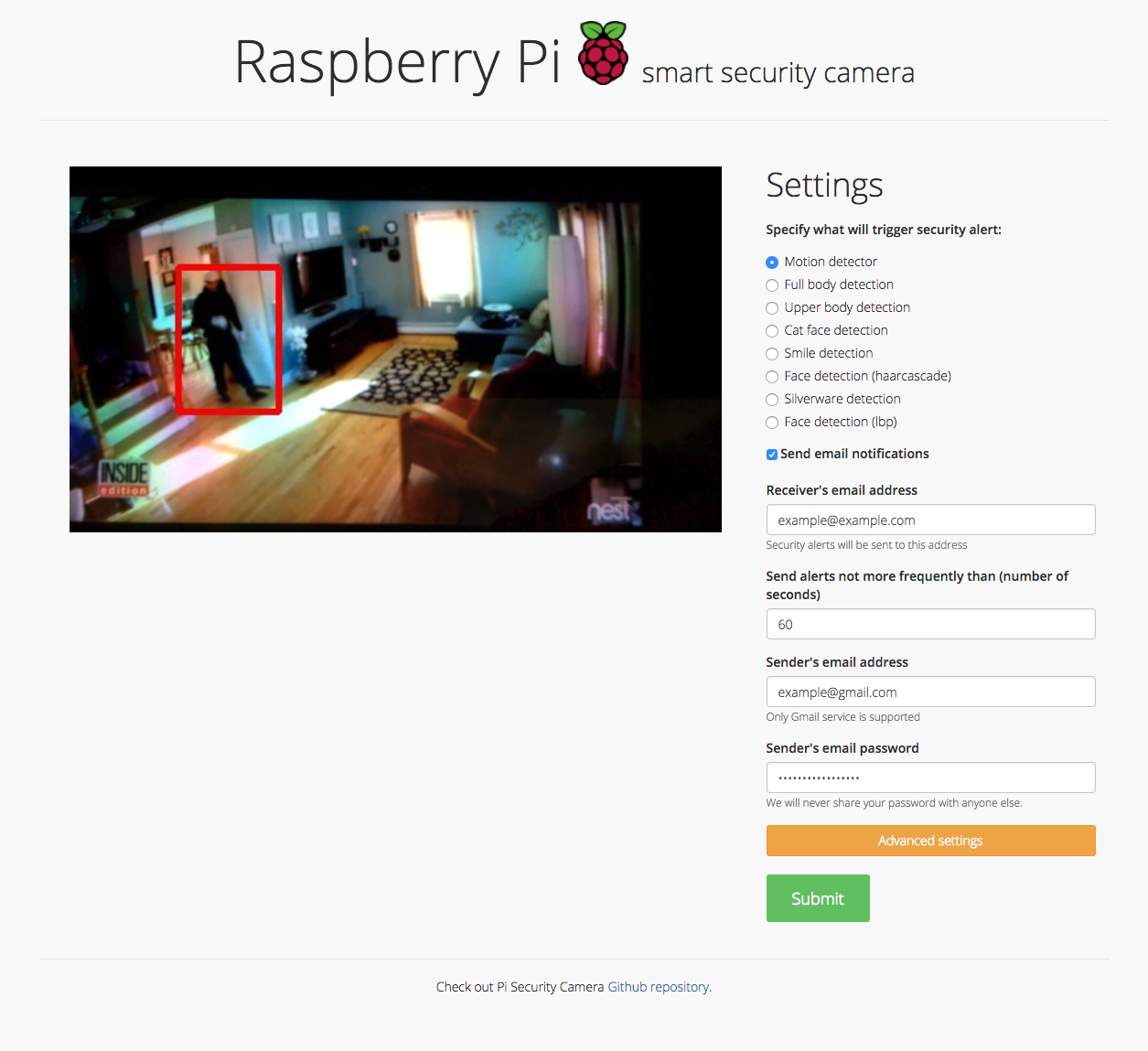
emailNotifications

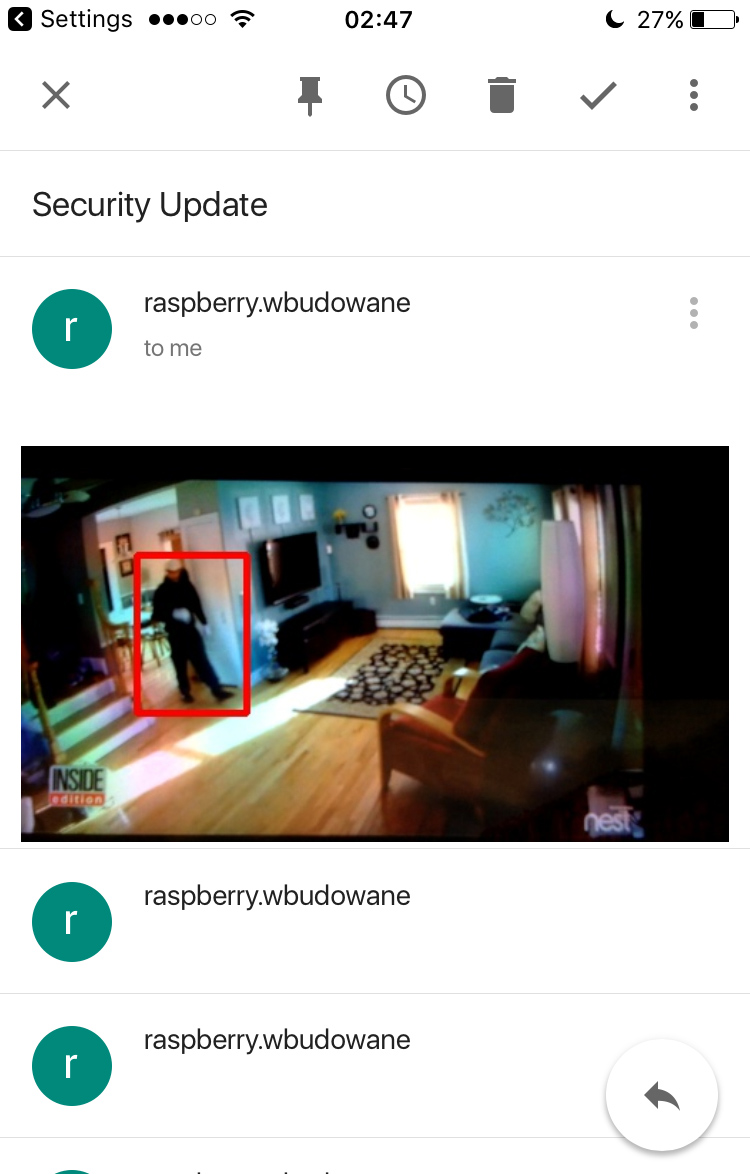
After detecting an object the camera will send an email with image preview.

Email notification Email with image preview
MotionDetection MotionDetection

Object detection

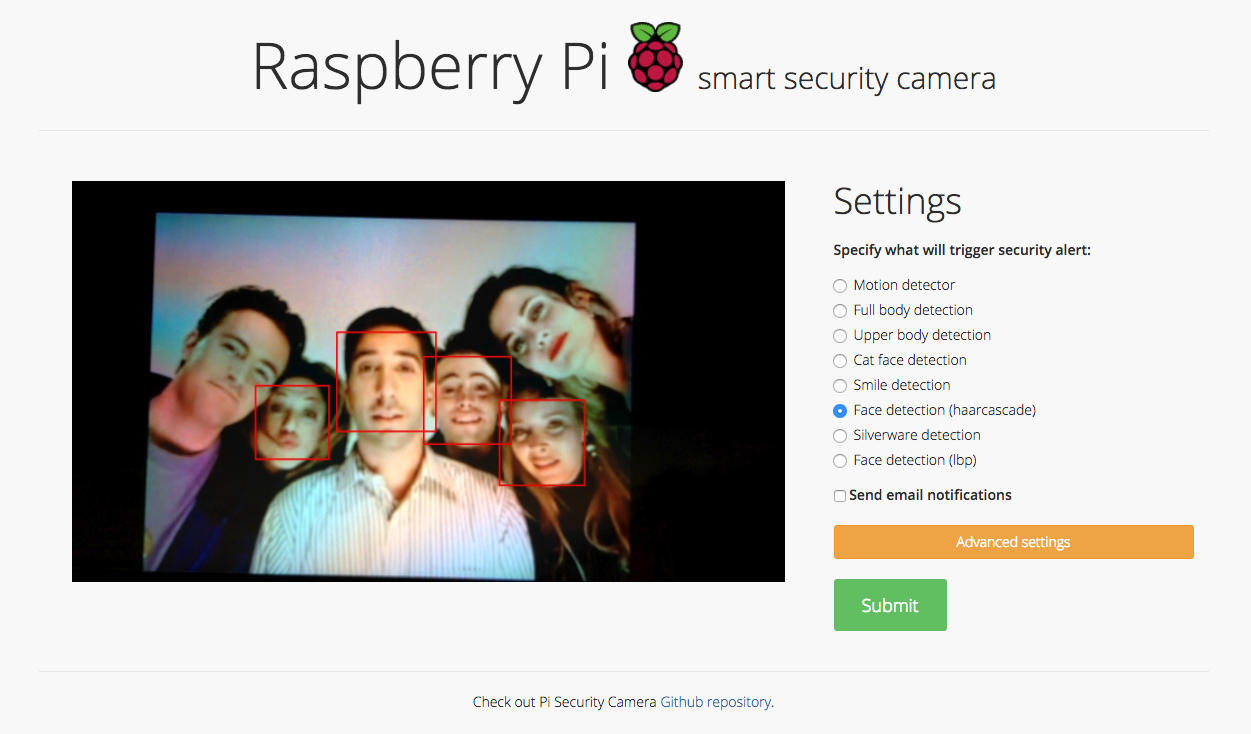
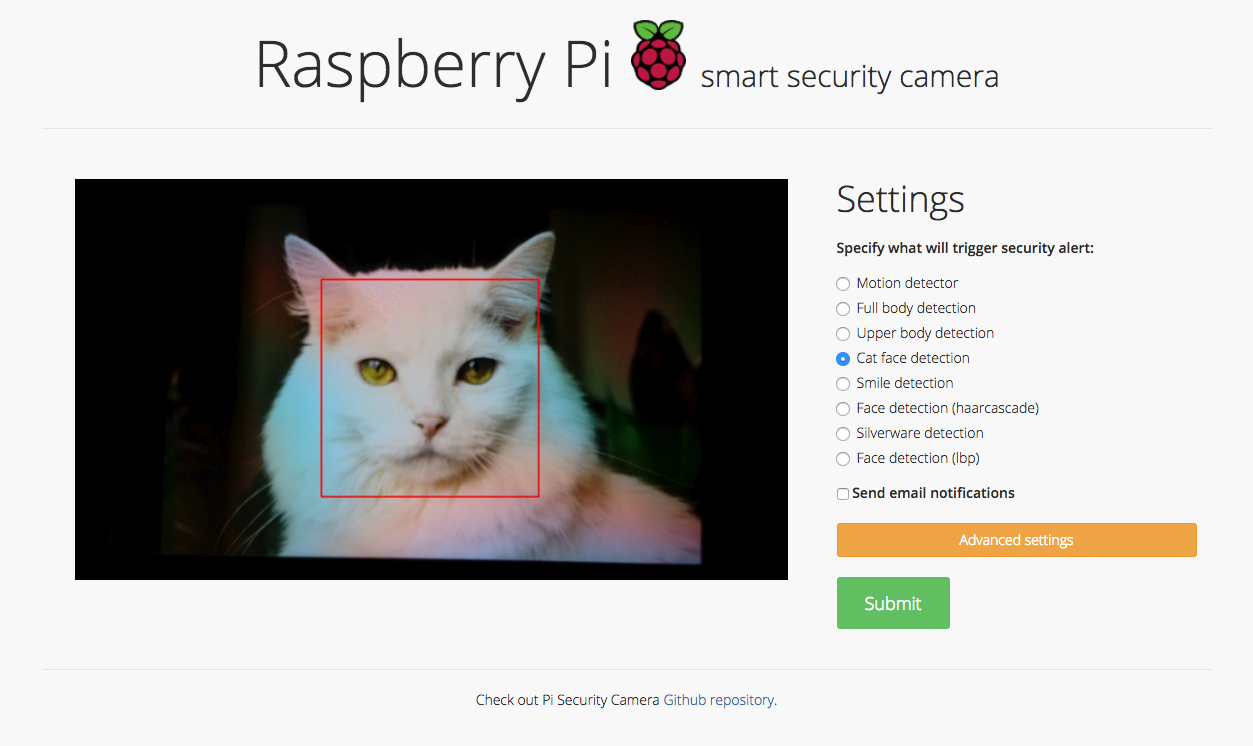
You can also specify what will trigger the security alert. Here are some examples:

Motion detection
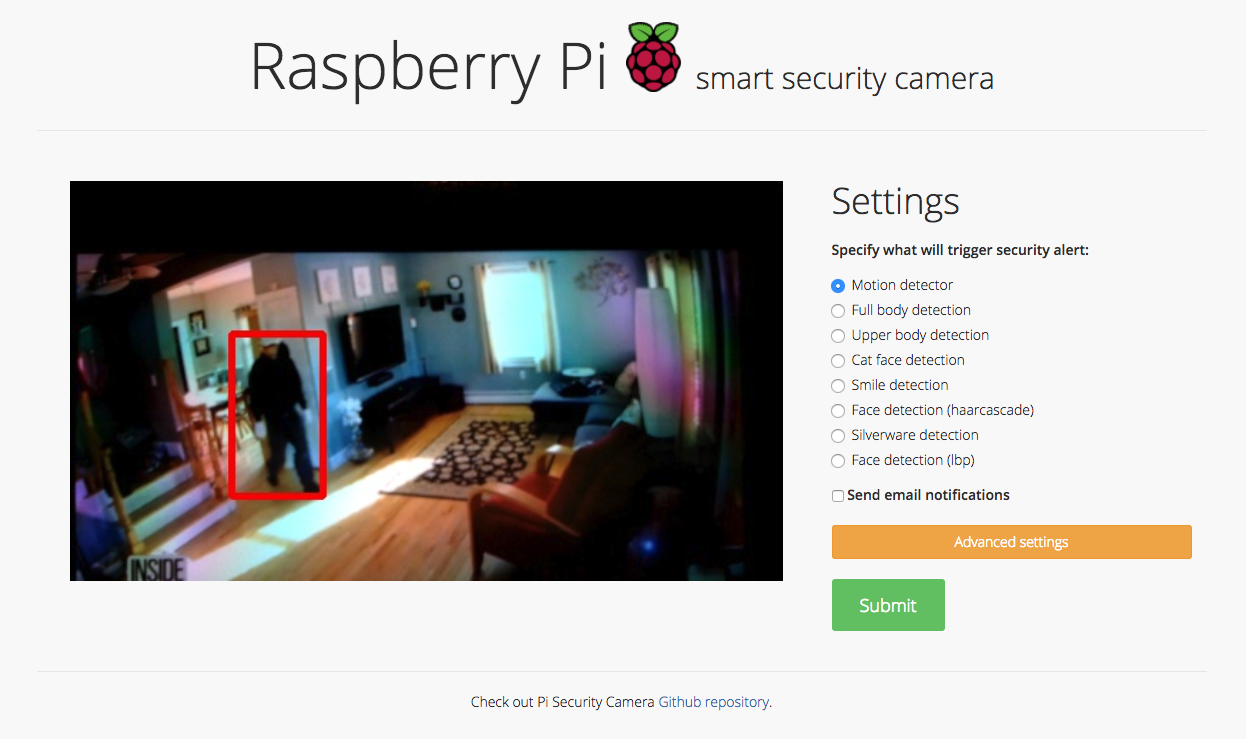
MotionDetection

Face detection

FaceDetection

Cat face detection

CatFaceDetection

Note that some of the available detectors are experimental and their accuracy leaves a space for a future improvement. Particularly:

  • Upper body detection
  • Smile detection
  • Silverware detection

Setup

This project uses a USB Camera to stream video. Before running the code, make sure you have connected a USB Camera to your device.

Installing Dependencies

This project uses openCV to detect objects in the video feed. You can install openCV by using the following tutorial. In this project Python 2.7 version was used.

The installation took about 1-2 hours on Raspberry Pi 3 Model B, but it would be considerably slower on a less powerful board like the Raspberry Pi Zero (it may even take about 8 hours).

The tutorial will prompt you to create a virtual environment. Make sure you are using the virtual environment by typing the following commands

source ~/.profile
workon cv

Next, navigate to the repository directory

cd pi-security-camera

and install the dependencies for the project

pip install -r requirements.txt

Note: If you're running python3, you'll have to change the import statements at the top of the mail_config.py file

from email.mime.multipart import MIMEMultipart
from email.mime.text import MIMEText
from email.mime.image import MIMEImage

Saving email addresses

If you don't wand to specify email addresses each time you run the app you can save them in secret.py file.

# Email you want to send the update from (only works with gmail)
from_email = ''           # '[email protected]' - must be a gmail account!
from_email_password = ''  # 'password'

# Email you want to send the update to:
to_email = ''             # '[email protected]'

Replace empty strings - '' with with your own email/credentials. Application logs into a gmail SMTP server and sends an email with an image of the object detected by the security camera..

Running the Program

Run the program

source ~/.profile
workon cv
python application.py

You can view a live stream by visiting the ip address of your Raspberry Pi in a browser on the same network. You can find the ip address of your Raspberry Pi by typing ifconfig in the terminal and looking for the inet or wlan address.

Visit :5000 in your browser to view the stream.

Note: To view the live stream on a different network than your Raspberry Pi, you can use ngrok to expose a local tunnel. Once downloaded, run ngrok with ./ngrok http 5000 and visit one of the generated links in your browser.

Owner
Peace
👨‍🏫I'm an Open source enthusiast ⚡ and 💻 passionate about AI👨‍💻. I understand you have to work hard📚 to achieve ✨ what you want in life.
Peace
The open source extract transaction infomation by using OCR.

Transaction OCR Mã nguồn trích xuất thông tin transaction từ file scaned pdf, ở đây tôi lựa chọn tài liệu sao kê công khai của Thuy Tien. Mã nguồn có

Nguyen Xuan Hung 18 Jun 02, 2022
7th place solution

SIIM-FISABIO-RSNA-COVID-19-Detection 7th place solution Validation: We used iterative-stratification with 5 folds (https://github.com/trent-b/iterativ

11 Jul 17, 2022
Hand gesture detection project with aweome UI implementation.

an awesome hand gesture detection project for you to be creative! Imagination is the limit to do with this project.

AR Ashraf 39 Sep 26, 2022
A curated list of resources for text detection/recognition (optical character recognition ) with deep learning methods.

awesome-deep-text-detection-recognition A curated list of awesome deep learning based papers on text detection and recognition. Text Detection Papers

2.4k Jan 08, 2023
第一届西安交通大学人工智能实践大赛(2018AI实践大赛--图片文字识别)第一名;仅采用densenet识别图中文字

OCR 第一届西安交通大学人工智能实践大赛(2018AI实践大赛--图片文字识别)冠军 模型结果 该比赛计算每一个条目的f1score,取所有条目的平均,具体计算方式在这里。这里的计算方式不对一句话里的相同文字重复计算,故f1score比提交的最终结果低: - train val f1score 0

尹畅 441 Dec 22, 2022
Some Boring Research About Products Recognition 、Duplicate Img Detection、Img Stitch、OCR

Products Recognition 介绍 商品识别,围绕在复杂的商场零售场景中,识别出货架图像中的商品信息。主要组成部分: 重复图像检测。【更新进度 4/10】 图像拼接。【更新进度 0/10】 目标检测。【更新进度 0/10】 商品识别。【更新进度 1/10】 OCR。【更新进度 1/10】

zhenjieWang 18 Jan 27, 2022
Ocular is a state-of-the-art historical OCR system.

Ocular Ocular is a state-of-the-art historical OCR system. Its primary features are: Unsupervised learning of unknown fonts: requires only document im

228 Dec 30, 2022
A curated list of awesome synthetic data for text location and recognition

awesome-SynthText A curated list of awesome synthetic data for text location and recognition and OCR datasets. Text location SynthText SynthText_Chine

Tianzhong 283 Jan 05, 2023
Python package for handwriting and sketching in Jupyter cells

ipysketch A Python package for handwriting and sketching in Jupyter notebooks. Usage A movie is worth a thousand pictures is worth a million words...

Matthias Baer 16 Jan 05, 2023
Discord QR Scam Code Generator + Token grab mobile device.

A Python script that automatically generates a Nitro scam QR code and grabs the Discord token when scanned.

Visual 9 Nov 22, 2022
An easy to use an (hopefully useful) captcha solution for pyTelegramBotAPI

pyTelegramBotCAPTCHA An easy to use and (hopefully useful) image CAPTCHA soltion for pyTelegramBotAPI. Installation: pip install pyTelegramBotCAPTCHA

29 Dec 26, 2022
This is a GUI for scrapping PDFs with the help of optical character recognition making easier than ever to scrape PDFs.

pdf-scraper-with-ocr With this tool I am aiming to facilitate the work of those who need to scrape PDFs either by hand or using tools that doesn't imp

Jacobo José Guijarro Villalba 75 Oct 21, 2022
Sort By Face

Sort-By-Face This is an application with which you can either sort all the pictures by faces from a corpus of photos or retrieve all your photos from

0 Nov 29, 2021
基于openpose和图像分类的手语识别项目

手语识别 0、使用到的模型 (1). openpose,作者:CMU-Perceptual-Computing-Lab https://github.com/CMU-Perceptual-Computing-Lab/openpose (2). 图像分类classification,作者:Bubbl

20 Dec 15, 2022
This repo contains several opencv projects done while learning opencv in python.

opencv-projects-python This repo contains both several opencv projects done while learning opencv by python and opencv learning resources [Basic conce

Fatin Shadab 2 Nov 03, 2022
This project is basically to draw lines with your hand, using python, opencv, mediapipe.

Paint Opencv 📷 This project is basically to draw lines with your hand, using python, opencv, mediapipe. Screenshoots 📱 Tools ⚙️ Python Opencv Mediap

Williams Ismael Bobadilla Torres 3 Nov 17, 2021
CNN+LSTM+CTC based OCR implemented using tensorflow.

CNN_LSTM_CTC_Tensorflow CNN+LSTM+CTC based OCR(Optical Character Recognition) implemented using tensorflow. Note: there is No restriction on the numbe

Watson Yang 356 Dec 08, 2022
This is a pytorch re-implementation of EAST: An Efficient and Accurate Scene Text Detector.

EAST: An Efficient and Accurate Scene Text Detector Description: This version will be updated soon, please pay attention to this work. The motivation

Dejia Song 544 Dec 20, 2022
This is used to convert a string to an Image with Handwritten Characters.

Text-to-Handwriting-using-python This is used to convert a string to an Image with Handwritten Characters. text_to_handwriting(string: str, save_to: s

Akashdeep Mahata 3 Aug 15, 2022